
1. Introduction
This manual provides detailed instructions for the safe and effective use of your KAIWEETS HT206B Clamp Meter and KAIWEETS KM100 Digital Multimeter. Please read this manual thoroughly before operation and retain it for future reference.
2. Safety Information
WARNING: Always observe safety precautions when working with electrical circuits to prevent personal injury or damage to the meter.
- The HT206B meets safety standard IEC 61010-1, CAT III 600V. The KM100 has passed CE and RoHS certifications and is IEC rated CAT III 600V.
- Both devices feature anti-burn protection with double fuses and overload protection on all ranges (KM100).
- Ensure the rotary switch is set to the correct test range before making measurements.
- Do not attempt to measure voltages or currents exceeding the specified maximum limits.
- Inspect test leads for damage before each use. Do not use if insulation is compromised.
- When measuring current with the clamp meter, only clamp the live wire, not the entire power cord.
3. Product Overview
3.1 KAIWEETS HT206B Clamp Meter
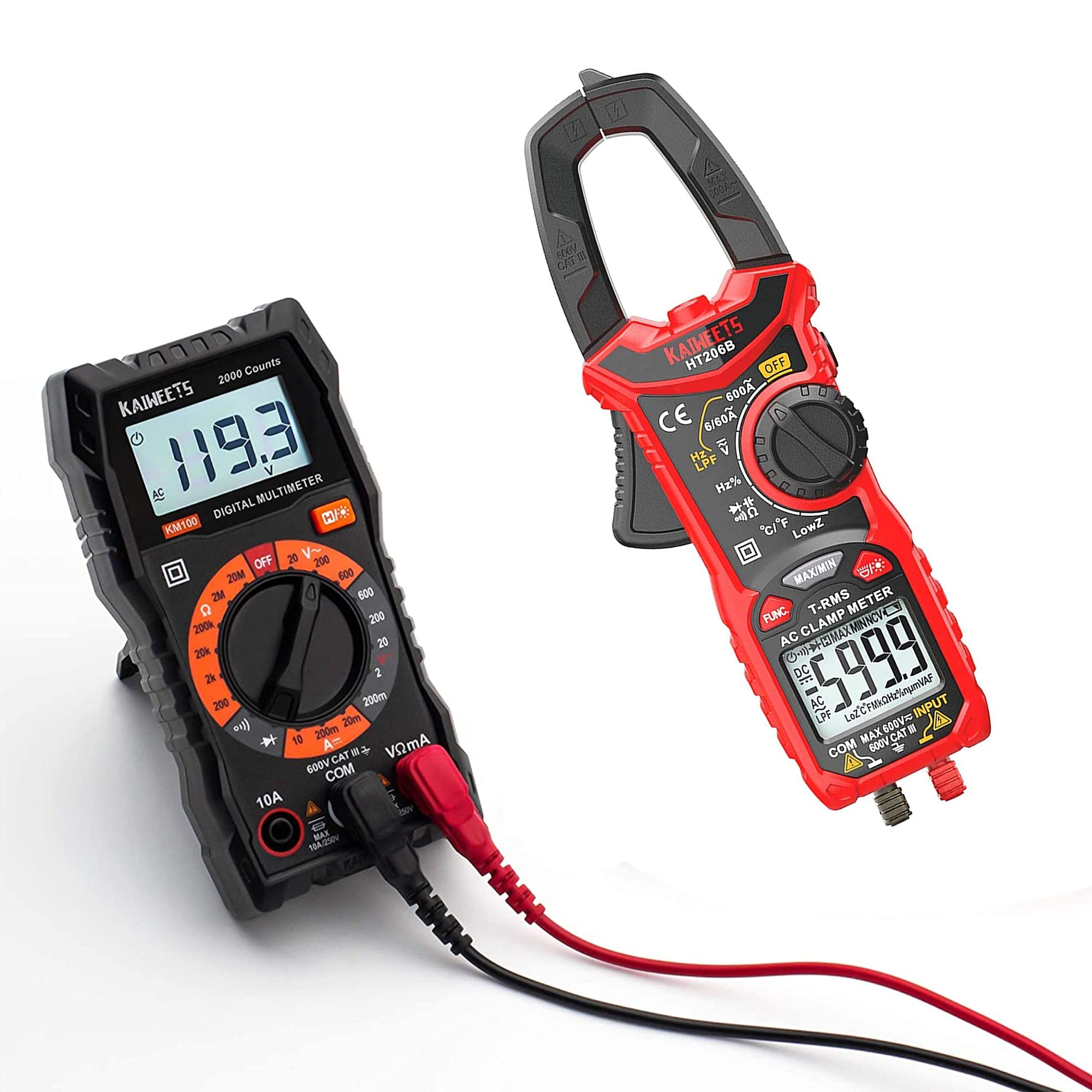
Figure 1: KAIWEETS HT206B Clamp Meter and included accessories.
The KAIWEETS HT206B is a True-RMS clamp meter designed for accurate measurements on non-linear loads. It is suitable for various applications in labs, factories, and households.
Key Features:
- Measurement Capabilities: AC Current, AC/DC Voltage, Frequency, Duty Cycle, Resistance, Capacitance, Diode, Continuity, and Temperature.
- Two-color Backlit LCD Display: The screen turns red to warn of high voltage (>80V) or high current (>3A).
- LED Flashlight: For illumination in dimly lit areas.
- Non-Contact Voltage (NCV) Detection: For detecting live wires without direct contact.
- Automatic Shutdown: Powers off after 15 minutes of inactivity to conserve battery.
- Low Battery Indication: Alerts when batteries need replacement.

Figure 2: HT206B Clamp Meter feature highlights.

Figure 3: NCV and Hold functions on the HT206B.
3.2 KAIWEETS KM100 Digital Multimeter

Figure 4: KAIWEETS KM100 Digital Multimeter and included accessories.
The KAIWEETS KM100 is a multi-function digital multimeter designed for safety and accuracy in various electrical tests, including household, automotive, and industrial applications.
Key Features:
- Measurement Capabilities: AC/DC Voltage, DC Current, Resistance, Continuity, and Diode Measurement. Note: This model cannot test AC current.
- Backlight Function: Improves visibility in dark conditions.
- Hold Function: Locks the displayed measurement value for easy recording.
- Support Stand: Flexible and stable, adjustable up to 90°.
- Safety: CAT III 600V, CE and RoHS certified, with anti-burn double fuses and overload protection.
4. Setup
4.1 Battery Installation
Both the HT206B and KM100 require AAA batteries for operation.
- Locate the battery compartment cover on the back of the device.
- Use a screwdriver (if necessary) to open the cover.
- Insert 2 AAA batteries, observing the correct polarity (+/-) as indicated inside the compartment. (For KM100, batteries are typically pre-installed).
- Replace the battery compartment cover and secure it.
4.2 Connecting Test Leads and Thermocouple
For most measurements, test leads are required. For temperature measurements with the HT206B, the K-Type thermocouple is used.
- Insert the red test lead into the "VΩmA" or "+" input jack.
- Insert the black test lead into the "COM" or "-" input jack.
- For HT206B temperature measurement, connect the K-Type thermocouple to the designated temperature input ports, observing polarity.
5. Operating Instructions
5.1 General Operation
- Turn the rotary switch to the desired measurement function.
- Connect the test leads or clamp the conductor as appropriate for the measurement.
- Read the measurement value on the LCD display.
- To turn off the device, rotate the switch to the "OFF" position. The HT206B also features automatic shutdown after 15 minutes of inactivity.
5.2 KAIWEETS HT206B Specific Operations
- AC Current Measurement: Rotate the switch to the AC Current range (e.g., 6/60A or 600A). Open the clamp jaw and enclose only the live wire of the circuit. Ensure the jaw is fully closed.
- FUNC. Button: Press the "FUNC." button to switch between secondary functions within a range, such as AC and DC voltage, or different frequency/duty cycle modes.
- NCV (Non-Contact Voltage) Detection: Rotate the switch to the NCV position. Bring the top of the clamp meter near the conductor. The meter will beep and the NCV indicator will light up if AC voltage is detected.
- HOLD Function: Press the "MAX/MIN" button briefly to activate the data hold function, freezing the current reading on the display. Press again to release.
- Temperature Measurement: Connect the K-Type thermocouple. Rotate the switch to the temperature function (°C/°F). Insert the thermocouple probe into the substance or area to be measured.

Figure 5: HT206B temperature measurement applications.
5.3 KAIWEETS KM100 Specific Operations
- Voltage Measurement (AC/DC): Rotate the switch to the desired AC V or DC V range. Connect test leads in parallel to the circuit.
- DC Current Measurement: Rotate the switch to the DC A range. Connect test leads in series with the circuit. Caution: Do not attempt to measure AC current with the KM100.
- Resistance Measurement: Rotate the switch to the Ω range. Connect test leads across the component to be measured. Ensure the circuit is de-energized.
- Continuity Test: Rotate the switch to the continuity/diode position. Connect test leads across the circuit or component. A continuous beep indicates continuity.
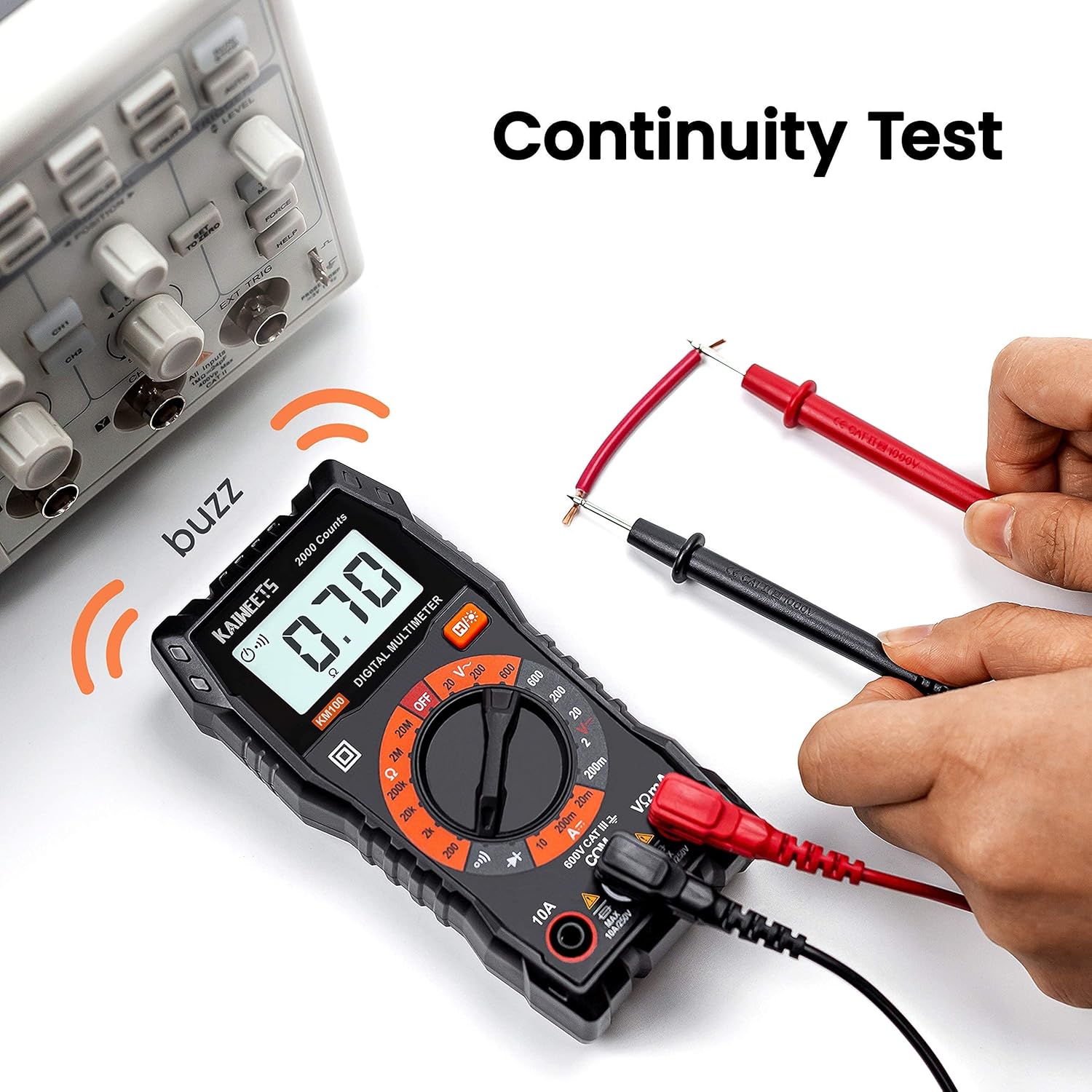
Figure 6: KM100 Continuity Test.

Figure 7: KM100 DC Voltage Measurement.
6. Maintenance
6.1 Cleaning
Wipe the meter casing with a damp cloth and mild detergent. Do not use abrasives or solvents. Ensure the meter is dry before use.
6.2 Battery Replacement
When the low battery indicator appears on the display, replace the batteries promptly to ensure accurate readings. Refer to Section 4.1 for battery installation instructions.
6.3 Storage
When not in use for extended periods, remove the batteries to prevent leakage. Store the meters and accessories in their carrying cases in a cool, dry place, away from direct sunlight and extreme temperatures.

Figure 8: KM100 stored in its carrying case.
7. Troubleshooting
- No Display/Faint Display: Check battery levels and replace if necessary. Ensure batteries are inserted with correct polarity.
- Incorrect Readings:
- Ensure the rotary switch is set to the correct measurement function and range.
- Verify test leads are properly connected and not damaged.
- For clamp meter, ensure the jaw is fully closed around a single conductor for current measurement.
- For resistance or continuity, ensure the circuit is de-energized.
- Meter Does Not Respond: Turn the meter off and then on again. If the issue persists, replace batteries.
8. Specifications
8.1 KAIWEETS HT206B Clamp Meter
| Measurement | Range | Accuracy |
|---|---|---|
| AC Current | 6A/60A/600A | ±(2.5%+5) |
| AC Voltage | 6V/60V/600V | ±(1.0%+5) |
| DC Voltage | 600mV/6V/60V/600V | ±(0.5%+5) |
| Resistance | 600Ω/6kΩ/60kΩ/600kΩ/6MΩ/60MΩ | ±(1.0%+5) |
| Capacitance | 10nF/100nF/1μF/10μF/100μF/1mF/10mF/100mF | ±(4.0%+5) |
| Frequency/Duty Cycle | 10Hz to 10MHz | ±(1.0%+3) |
| Temperature | -4°F to 1832°F (-20°C to 1000°C) | ±(2.5%+5) |
| Display Counts | 6000 Counts | |
| Safety Rating | CAT III 600V, CE, RoHS, IEC 61010-1 | |
| Power Source | 2 x AAA Batteries | |
8.2 KAIWEETS KM100 Digital Multimeter
| Measurement | Range | Accuracy |
|---|---|---|
| AC Voltage | 20V/200V/600V | ±(1.0%+5) |
| DC Voltage | 200mV/2V/20V/200V/600V | ±(1.0%+5) |
| DC Current | 20mA/200mA/10A | ±(1.5%+5) |
| Resistance | 200Ω/2kΩ/20kΩ/200kΩ/2MΩ/20MΩ | ±(1.2%+5) |
| Safety Rating | CAT III 600V, CE, RoHS | |
| Power Source | 2 x AAA Batteries (pre-installed) | |
9. Warranty and Support
KAIWEETS products are designed and manufactured to high-quality standards. Both the HT206B and KM100 are CE and RoHS certified, indicating compliance with European safety, health, and environmental protection requirements.
For specific warranty information or technical support, please refer to the warranty card included with your product or contact KAIWEETS customer service directly through their official channels.


