
SOFTSEA Full(desk) Black
SOFTSEA Full Metal Loft Bed with Desk and Shelves Instruction Manual
Model: Full(desk) Black
Brand: SOFTSEA
Introduction
Thank you for choosing the SOFTSEA Full Metal Loft Bed with Desk and Shelves. This product is designed to maximize your living space by combining a comfortable sleeping area with a functional workspace and storage. Constructed from a strong metal frame, it includes full-length guardrails, an integrated ladder, and secured metal slats for stability and safety. This manual provides detailed instructions for assembly, safe operation, and proper maintenance to ensure long-lasting use and enjoyment of your new loft bed.

Image: The SOFTSEA Full Metal Loft Bed in a room setting, featuring the bed platform above, a spacious desk area below with a gaming chair and computer setup, and integrated shelves.
Safety Information
Your safety is paramount. Please read and adhere to all safety warnings and instructions before assembly and use.
- Always use the integrated ladder to access the loft bed. Do not attempt to climb the bed from any other side.
- Do not exceed the maximum weight capacity of 250 pounds for the loft bed.
- Be cautious of sharp edges and pinch points during assembly and use.
- Ensure all connections are securely tightened after assembly and periodically check for looseness.
- It is highly recommended to secure the bed frame to a wall to prevent any potential wobbling or movement, especially if the bed feels unstable.
- Only use a mattress with a maximum height of 6 inches to ensure proper guardrail height and user safety.
Setup and Assembly
The SOFTSEA Full Metal Loft Bed is designed for straightforward assembly. Each part is numbered, and a clear manual is included. All necessary tools are provided. While assembly can be done by one person, it is highly recommended to have two people for easier and safer installation.
Assembly Tips:
- Before starting, lay out all parts and hardware and compare them against the parts list in the included manual to ensure nothing is missing.
- Do not fully tighten any bolts until all components are loosely assembled and aligned. This allows for flexibility to fit parts together correctly. Once all parts are in place, then proceed to fully tighten all connections.
- Pay close attention to the orientation of parts, especially those with pre-drilled holes, to avoid reassembly.
- For the mattress support slats, ensure they are properly seated and secured to the frame.

Image: A side view of the loft bed frame, highlighting the integrated ladder and the support structure for the desk and shelves.
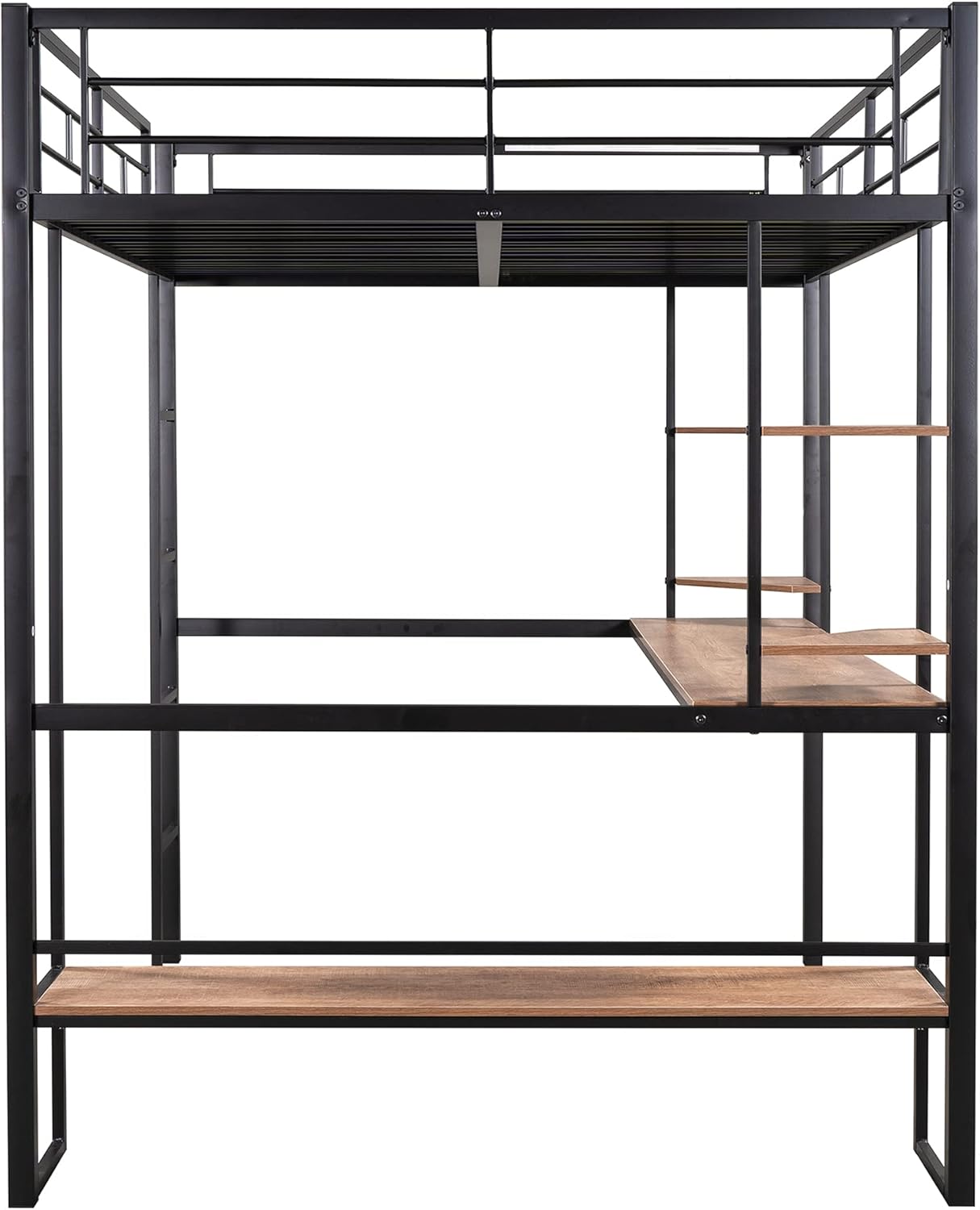
Image: A front view of the loft bed frame, clearly showing the desk surface and the two corner shelves on the side.
Operating Instructions
The SOFTSEA Full Metal Loft Bed is designed for daily use, providing a versatile solution for sleeping, studying, and storage.
Using the Bed:
- Access the bed using the built-in ladder. Ensure a firm grip on the ladder rungs.
- Place a standard full-size mattress on the metal slats. The mattress should not exceed 6 inches in height to maintain the effectiveness of the guardrails.
- The bed is designed to support a maximum weight of 250 pounds.
Using the Desk and Shelves:
- The integrated desk surface provides ample space for a computer, books, or other study/work materials.
- The two corner shelves are suitable for lightweight items such as books, decorative items, or small electronics. Avoid placing heavy objects on these shelves, as they are not designed for excessive weight.

Image: The loft bed in use, showcasing the desk area with a computer and gaming chair, and the side shelves holding various items, demonstrating its functional design.
Maintenance
Regular maintenance will help preserve the condition and extend the lifespan of your loft bed.
- Cleaning: Wipe down the metal frame and wooden surfaces with a soft, damp cloth. Avoid using harsh chemicals or abrasive cleaners, as they may damage the finish.
- Hardware Check: Periodically inspect all bolts and screws to ensure they remain tight. Re-tighten any loose connections to maintain structural integrity and prevent wobbling.
- Wall Anchoring: For enhanced stability, especially if the bed feels wobbly, consider anchoring the frame to a wall using appropriate hardware (not included).
Troubleshooting
If you encounter any issues with your loft bed, refer to the following common problems and solutions:
| Problem | Possible Cause | Solution |
|---|---|---|
| Bed feels wobbly or unstable. | Loose bolts or uneven floor. | Ensure all bolts are fully tightened. If the floor is uneven, use shims under the bed legs. Consider anchoring the bed to a wall for added stability. |
| Difficulty during assembly. | Parts not aligned correctly; bolts tightened too early. | Loosen all bolts, realign parts, and then gradually tighten them once all components are in place. Refer to the numbered parts and illustrations in the manual carefully. |
| Shelves do not hold much weight. | Shelves are designed for light items. | The shelves are intended for lighter objects. Avoid placing heavy books or electronics that exceed their capacity. |
Specifications
- Product Dimensions: 78"L x 56.3"W x 71.6"H
- Desk Dimensions: Approximately 15''D x 75.6''L
- Shelf Dimensions: Approximately 13.2'' x 13.5'' (each corner shelf)
- Color: Black
- Finish Type: Powder Coated
- Included Components: Slat system, integrated ladder, desk surface, two corner shelves
- Compatible Mattress Size: Full (maximum height of 6 inches)
- Weight Capacity (Loft Bed): 250 lbs
- Assembly Required: Yes
- Country of Origin: Vietnam

Image: A detailed diagram illustrating the overall dimensions of the loft bed, including length, width, height, and specific measurements for the desk and shelves in inches.
Warranty and Support
For any questions, concerns, or assistance with your SOFTSEA Full Metal Loft Bed, please contact our customer support. While specific warranty details are not provided in this manual, please refer to your purchase documentation or contact the retailer/manufacturer directly for warranty information and claims.
We are committed to providing high-quality products and support to ensure your satisfaction.
Ask a question about this manual
Ask about setup, troubleshooting, compatibility, parts, safety, or missing instructions. Manuals+ will review the question and use this page’s manual context to help answer it.