
1. Introduction
This user manual provides detailed instructions for the installation, operation, and maintenance of your Ctronics 5MP PTZ Security Camera. This advanced outdoor surveillance camera features 5-megapixel resolution, 4X optical zoom, 355° pan and 90° tilt capabilities, human detection, auto-tracking, color night vision, two-way audio, and an IP66 waterproof rating, ensuring comprehensive security for your property.
2. Product Features
- 5MP Super HD Resolution: Captures clear and detailed video footage.
- 4X Optical Zoom: Allows for close-up viewing of distant objects without compromising image quality.
- Pan & Tilt Functionality: Offers a wide surveillance area with 355° horizontal pan and 90° vertical tilt.
- Human Detection & Auto-Tracking: Intelligently identifies human figures and automatically tracks their movement within the camera's field of view.
- Color Night Vision: Provides full-color video even in low-light conditions up to 165 feet (50 meters).
- Two-Way Audio: Built-in microphone and speaker enable real-time communication.
- IP66 Waterproof: Designed to withstand harsh outdoor weather conditions.
- Wi-Fi Connectivity: Easy wireless connection to your home network.
3. Package Contents
Please check the package for the following items:
- Ctronics 5MP PTZ Security Camera Unit
- Power Adapter
- Mounting Screws and Wall Plugs
- Waterproof Kit for Network Cable (if applicable)
- User Manual
4. Setup
4.1 Physical Installation
Select a suitable outdoor location for mounting the camera, ensuring a clear view of the area you wish to monitor. The camera is designed for wall mounting.

Image: Ctronics PTZ Security Camera mounted on an outdoor wall.
Securely mount the camera using the provided screws and wall plugs. Ensure the mounting surface is stable and can support the camera's weight. Connect the camera to a power source using the provided power adapter.

Image: Ctronics PTZ Security Camera connected to a power outlet.
4.2 Initial Configuration (Wi-Fi Connection)
To connect your camera to your Wi-Fi network and access its features, follow these steps:
- Download the Ctronics app from your device's app store.
- Connect the camera to the power supply.
- Press and hold the reset button for approximately 10 seconds until you hear a prompt sound, indicating a successful reset.
- Open your phone's Wi-Fi settings and find the camera's hotspot (named IPCAM-XXXXXX). Connect to it using the default password "01234567".
- Open the Ctronics app, click to add a camera, and select "Search Camera from LAN".
- Once the camera is added, go to Wi-Fi settings within the app and select your home Wi-Fi network. Enter the password to connect the camera to your home network.
For a visual guide on connecting the camera to your Wi-Fi network, please refer to the video below:
Video: Wifi Connection Video for 5MP PTZ Security Camera. This video demonstrates the step-by-step process of connecting the camera to your Wi-Fi network using the Ctronics app.
For instructions on adding the camera to the HiP2P client end software, please watch the following video:
Video: Add camera to the HiP2P client end. This video provides a guide on how to integrate your camera with the HiP2P client software for monitoring.
5. Operating Instructions
5.1 Pan, Tilt, and Zoom (PTZ) Control
Control the camera's viewing angle remotely through the Ctronics app. The camera supports 355° horizontal pan and 90° vertical tilt, allowing you to cover a wide area. Use the digital controls in the app to adjust the camera's position and utilize the 4X optical zoom for detailed viewing.
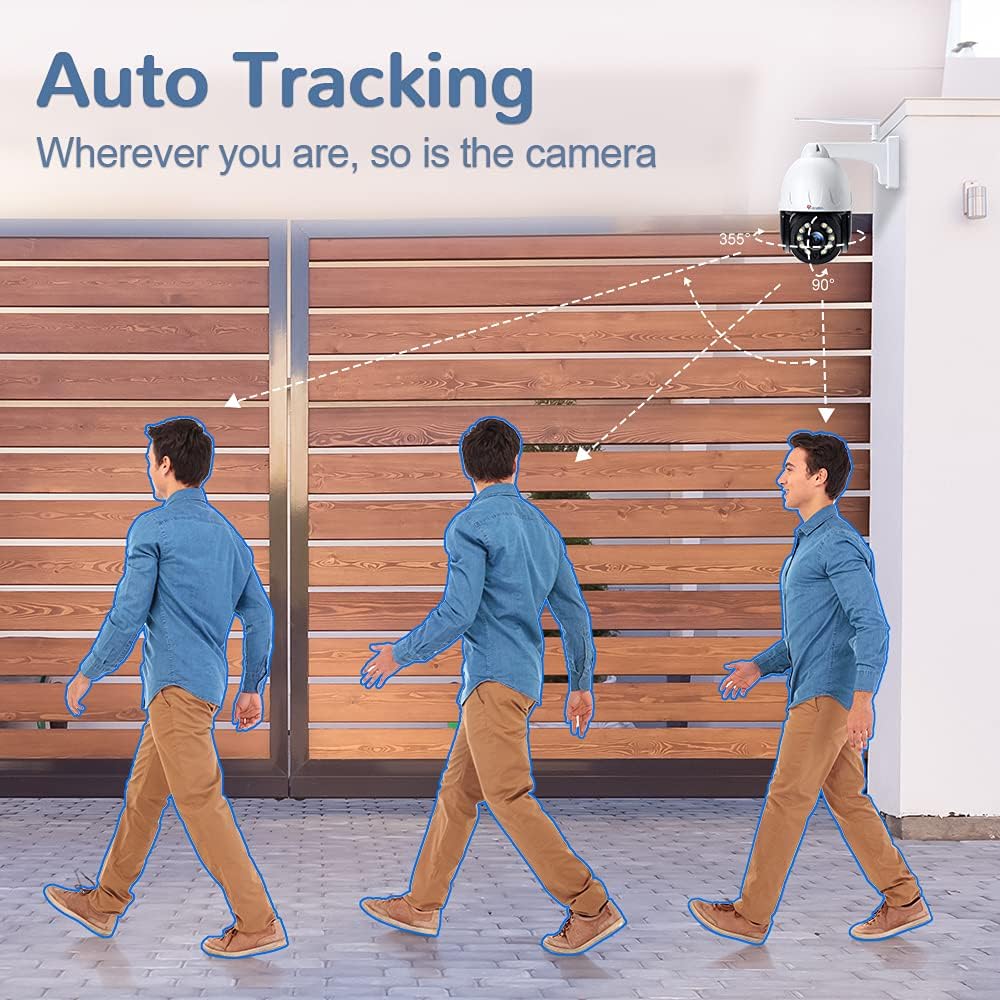
Image: Intelligent 355° Pan and 90° Tilt functionality.

Image: Preset & Cruise feature, allowing up to 16 presets per patrol.
5.2 Night Vision
The camera is equipped with both infrared (IR) and color night vision capabilities, providing clear surveillance even in complete darkness. The color night vision extends up to 165 feet (50 meters).

Image: Spotlight Color Night Vision, effective up to 165FT/50M.
5.3 Human Detection and Auto-Tracking
The camera can intelligently detect human shapes, reducing false alarms from animals or other moving objects. Once a human is detected, the auto-tracking feature will automatically follow their movement, keeping them in the frame.
See the camera's 5X Optical Zoom and Auto-Tracking in action:
Video: 5X Optical Zoom PTZ Security Camera Outdoor. This video demonstrates the camera's optical zoom and auto-tracking capabilities as it follows movement.
5.4 Two-Way Audio
Utilize the built-in microphone and speaker for two-way communication. This allows you to speak to visitors or deter intruders directly through the camera via the app.

Image: Two-Way Audio communication feature.
6. Maintenance
- Cleaning: Regularly clean the camera lens with a soft, dry cloth to ensure clear image quality. Avoid abrasive cleaners.
- Firmware Updates: Check the Ctronics app periodically for firmware updates to ensure optimal performance and access to new features.
- Connection Check: Periodically verify that all cables and connections are secure and free from damage, especially for outdoor installations.
- Weather Protection: While IP66 rated, ensure the camera is installed in a location that minimizes direct exposure to extreme weather conditions for prolonged durability.
7. Troubleshooting
| Problem | Possible Cause | Solution |
|---|---|---|
| Camera not connecting to Wi-Fi | Incorrect Wi-Fi password, weak signal, camera not reset. | Ensure correct password. Move camera closer to router. Perform a factory reset (refer to Section 4.2). |
| Poor image quality | Dirty lens, low bandwidth, incorrect resolution settings. | Clean the lens. Check network speed. Adjust video resolution in app settings. |
| No two-way audio | Microphone/speaker disabled, app permissions, network issues. | Check audio settings in the app. Ensure app has microphone permissions. Verify stable network connection. |
| Auto-tracking not working | Detection zone not set, sensitivity too low, obstructions. | Configure detection zones and sensitivity in the app. Ensure clear line of sight. |
If you encounter issues not listed here or if the solutions do not resolve your problem, please contact Ctronics customer support.
8. Specifications
| Feature | Detail |
|---|---|
| Model Number | CT-CTIPC-500C-CA |
| Effective Still Resolution | 5 MP |
| Video Capture Resolution | 1080p |
| Pan/Tilt Range | 355° Pan, 90° Tilt |
| Zoom Type | Optical Zoom (4X) |
| Night Vision | Color Night Vision (up to 165FT/50M) |
| Audio | 2-Way Audio |
| Weatherproof Rating | IP66 |
| Dimensions (L x W x H) | 8.94 x 8.39 x 5.08 inches |
| Item Weight | 4.09 pounds |
| Material | Metal |
| Power Source | Battery Powered |
| Compatible Devices | iOS |
9. Warranty and Support
Ctronics products are designed for reliability and performance. For specific warranty information regarding your CT-CTIPC-500C-CA camera, please refer to the warranty card included in your product packaging or visit the official Ctronics website. For technical support, troubleshooting assistance, or any inquiries, please contact Ctronics customer service through their official channels. Keep your purchase receipt for warranty claims.


