
Introduction
Thank you for choosing the VGR V-276 Cordless Hair Clipper. This manual provides essential information for the safe and effective operation, maintenance, and care of your new grooming device. Please read these instructions thoroughly before first use and retain them for future reference.
Safety Instructions
- This appliance is not intended for use by persons (including children) with reduced physical, sensory or mental capabilities, or lack of experience and knowledge, unless they have been given supervision or instruction concerning use of the appliance by a person responsible for their safety.
- Children should be supervised to ensure that they do not play with the appliance.
- Do not immerse the clipper in water or use it near water.
- Keep the appliance dry.
- Always check the blades for damage before use. Do not use if blades are damaged, as injury may occur.
- Use only the charger supplied with the appliance.
- Do not open the appliance casing. For repairs, contact authorized service personnel.
- Unplug the appliance before cleaning.
Package Contents
Verify that all items are present in your package:
- VGR V-276 Hair Clipper
- USB Charging Cable
- Guide Combs (various sizes)
- Cleaning Brush
- Lubricating Oil
- User Manual

Image: The VGR V-276 hair clipper kit, displaying the clipper, various guide combs, USB charging cable, cleaning brush, and oil bottle.
Product Overview
Familiarize yourself with the components of your VGR V-276 hair clipper:

Image: Detailed view of the VGR V-276 hair clipper highlighting its key features: Taper Lever, Professional Blades, ON/OFF switch, LED Display, Hang Loop, and USB Charger port.
- Professional Blades: High-quality stainless steel blades for precise cutting.
- Taper Lever: Adjustable lever for varying cutting lengths without changing guide combs.
- ON/OFF Switch: Power control for the clipper.
- LED Display: Shows battery charge percentage and charging status.
- Hang Loop: For convenient storage.
- USB Charger Port: For charging the internal battery.
Setup
Charging the Clipper
Before first use, fully charge the clipper. The LED display will show the battery percentage.
- Ensure the clipper is switched off.
- Connect the USB charging cable to the clipper's charging port.
- Plug the other end of the USB cable into a compatible USB power source (e.g., computer, laptop, power bank, or USB wall adapter).
- The LED display will indicate charging progress. A full charge takes approximately 3 hours and provides up to 250 minutes of runtime.
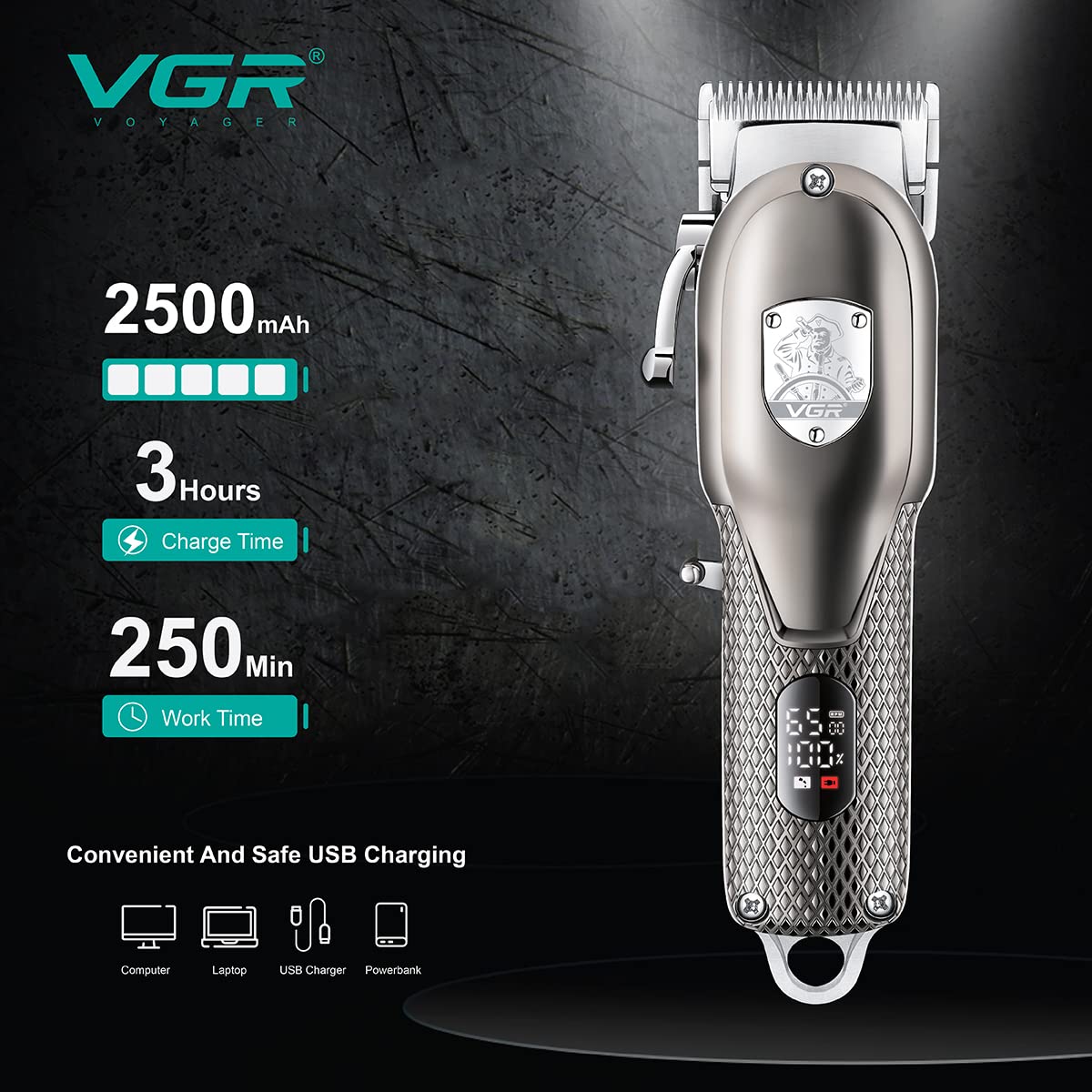
Image: The VGR V-276 hair clipper with an overlay showing battery capacity (2500mAh), charge time (3 hours), and work time (250 minutes). It also illustrates various USB charging options like computer, laptop, USB charger, and power bank.
Attaching Guide Combs
Select the desired guide comb for your preferred hair length.
- Align the guide comb with the clipper blade.
- Push the comb firmly until it clicks into place.
- To remove, gently pull the comb away from the blade.
Operating Instructions
Basic Operation
- Ensure the clipper is fully charged.
- Attach the appropriate guide comb if desired.
- Press the ON/OFF switch to turn on the clipper. The LED display will illuminate.
- Hold the clipper with the blades facing away from you.
- Begin cutting hair, moving the clipper against the direction of hair growth.
- Use the taper lever to adjust the cutting length between 0.8mm and 12mm without changing guide combs, allowing for blending and precise detailing.
- After use, press the ON/OFF switch to turn off the clipper.

Image: Close-up of the VGR V-276 clipper showing the adjustable taper lever. Arrows indicate the range of adjustment from 0.8mm for the closest cut to 12mm for a longer cut, emphasizing R-angle processing for skin protection.

Image: A person holding the VGR V-276 hair clipper to their head, demonstrating its ergonomic design and ease of use for personal grooming.
Maintenance
Cleaning the Blades
Regular cleaning ensures optimal performance and hygiene.
- Turn off the clipper and disconnect it from the power source.
- Remove any attached guide combs.
- Use the provided cleaning brush to remove loose hairs from the blades.
- For a more thorough clean, the blades can be carefully detached (refer to specific blade removal instructions if available in a physical manual, otherwise proceed with caution).
- Wipe the clipper body with a dry cloth. Do not use abrasive cleaners or immerse the clipper in water.
Oiling the Blades
To maintain blade sharpness and smooth operation, oil the blades after every few uses or when performance decreases.
- After cleaning, apply 1-2 drops of the provided lubricating oil onto the blades.
- Turn on the clipper for a few seconds to distribute the oil evenly.
- Turn off the clipper and wipe off any excess oil with a soft cloth.
Troubleshooting
| Problem | Possible Cause | Solution |
|---|---|---|
| Clipper does not turn on. | Battery is depleted. | Charge the clipper fully. |
| Clipper runs slowly or pulls hair. | Blades are dirty or not oiled. Battery is low. | Clean and oil the blades. Recharge the clipper. |
| Clipper gets hot during use. | Extended continuous use. Blades need lubrication. | Allow the clipper to cool down. Ensure blades are properly oiled. Avoid prolonged continuous operation. |
| LED display not working. | Internal malfunction. | Contact customer support for assistance. |
Specifications
| Feature | Detail |
|---|---|
| Model Number | V-276 |
| Battery Type | Lithium Ion |
| Battery Capacity | 2500mAh |
| Charging Time | Approx. 3 hours |
| Runtime | Up to 250 minutes |
| Blade Material | Stainless Steel |
| Power Source | Corded Electric (for charging) |
| Product Dimensions | 7.2 x 13.8 x 23.7 cm |
| Item Weight | 830 g (0.83 Kilograms) |
| Special Feature | Rechargeable, LED Digital Display |
Warranty and Support
Warranty Information
The VGR V-276 Hair Clipper comes with a 1-year warranty against defects in materials and workmanship from the date of original purchase. This warranty is valid only if purchased from the seller "VGR INDIA" and does not cover intentional or unintentional damage by the user.
To initiate a warranty claim, contact VGR INDIA at WARRANTY@VGRINDIA.CO.IN. Please provide a clear description of the problem, associated pictures, and a copy of your original invoice. Upon verification, the company will, at its discretion, repair or exchange the product. Customers are responsible for the cost of transporting the product to VGR INDIA for warranty service.
Importer Contact
VGR INDIA MUMBAI - 401104 INDIA