
1. Introduction
The Alonefire SV38 is a powerful 5W 365nm UV LED flashlight designed for various professional and household applications. Its 365nm wavelength, combined with a black filter lens, ensures a pure ultraviolet output, making it effective for tasks such as detecting counterfeit documents, verifying currency, identifying pet urine stains, curing UV resin, and examining fluorescent minerals. This manual provides essential information for the safe and efficient use of your SV38 flashlight.

Figure 1: Alonefire SV38 UV LED Flashlight and USB-C charging cable.
2. Safety Information
WARNING: Ultraviolet (UV) light can be harmful to eyes and skin. Please read and follow all safety precautions.
- Eye Protection: Always wear UV protective eyewear when operating the flashlight to prevent eye damage. Do not look directly into the UV light source.
- Skin Exposure: Avoid prolonged exposure of skin to UV light.
- Children and Pets: Keep the flashlight out of reach of children and pets. Do not shine the light into their eyes.
- Heat: The flashlight may generate heat during extended use. Handle with care.
- Battery Safety: Use only the specified battery type. Do not attempt to disassemble, short-circuit, or expose the battery to high temperatures.

Figure 2: Components of the SV38 flashlight, including the anodized aluminum alloy shell, power switch/charging indicator, spring contact, and back clip.
3. Setup
3.1 Battery Installation
- Unscrew the tail cap of the flashlight.
- Insert the provided 2000mAh Lithium-ion battery with the positive (+) end facing towards the flashlight head (LED).
- Screw the tail cap back on securely.
3.2 Initial Charging
Before first use, fully charge the flashlight.
- Locate the USB Type-C charging port on the side of the flashlight.
- Connect the provided USB Type-C cable to the flashlight and the other end to a compatible USB power source (e.g., computer, power bank, wall adapter).
- The charging indicator light will illuminate red during charging. It will turn green when fully charged.

Figure 3: Charging indicator status. Red indicates charging or low battery, green indicates fully charged.
4. Operation
4.1 Power On/Off
- Press the power button located on the side of the flashlight to turn the UV light ON.
- Press the power button again to turn the UV light OFF.
4.2 Black UV Filter Lens
The SV38 is equipped with a hardened black optical filter lens. This lens is designed to filter out ambient visible light, ensuring that the emitted ultraviolet light is purer and more effective for detection tasks.

Figure 4: The black UV filter lens blocks undesired ambient light, making the UV output purer.
4.3 Applications
The Alonefire SV38 UV flashlight can be used for various purposes:
- Counterfeit Detection: Verify currency, passports, and other official documents with UV security features.
- Pet Stain Detection: Locate invisible pet urine stains on carpets, rugs, and furniture.
- Mineral and Gemstone Inspection: Identify fluorescent minerals and authenticate amber.
- Resin Curing: Accelerate the curing process of UV-sensitive resins.
- Leak Detection: Detect leaks in HVAC systems, automotive, and industrial machinery when used with UV dye.
- Scorpion Spotting: Scorpions fluoresce under UV light, making them visible in dark environments.
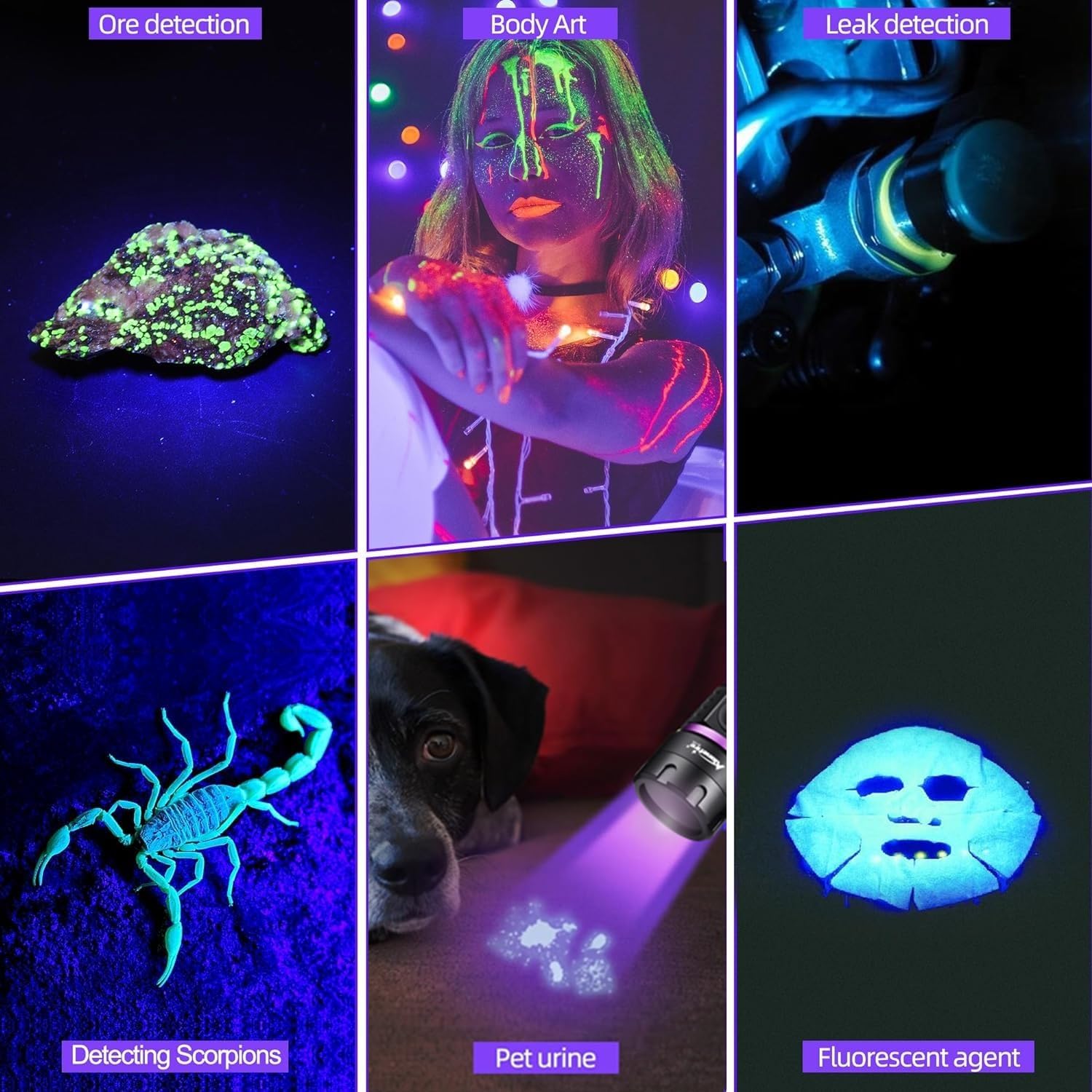
Figure 5: Examples of SV38 UV flashlight applications.

Figure 6: Detecting pet urine stains with the UV flashlight.
5. Maintenance
- Cleaning: Wipe the flashlight body with a soft, damp cloth. Do not use abrasive cleaners or solvents.
- Lens Care: Gently clean the lens with a lens cleaning cloth to maintain optimal UV output.
- Battery Care: If the flashlight will not be used for an extended period, remove the battery to prevent leakage. Recharge the battery every 3-6 months to maintain its lifespan.
- Storage: Store the flashlight in a cool, dry place away from direct sunlight and extreme temperatures.
6. Troubleshooting
| Problem | Possible Cause | Solution |
|---|---|---|
| Flashlight does not turn on. | Low battery or battery incorrectly installed. | Charge the battery or ensure it is installed with the correct polarity. |
| UV light appears dim. | Low battery or dirty lens. | Recharge the battery. Clean the lens with a soft cloth. |
| Charging indicator not working. | Faulty USB cable or power source. | Try a different USB cable or power source. Ensure the cable is fully inserted. |
| Flashlight gets hot during use. | Normal operation for high-power LED. | This is normal. If it becomes excessively hot, turn it off and allow it to cool. Avoid prolonged continuous use. |
7. Specifications
| Feature | Detail |
|---|---|
| Brand | ALONEFIRE |
| Model Number | SV38 |
| Light Source Type | UV LED (365nm) |
| Power Consumption | 5W |
| Material | Aluminum Alloy |
| Color | Black |
| Battery Type | 1 x 2000mAh Lithium-ion (included) |
| Charging Port | USB Type-C |
| Special Features | Durable, Lightweight, Rechargeable, Black Filter Lens |
| Product Dimensions | Approximately 14.5 x 7.3 x 3.3 cm |
| Item Weight | Approximately 105 g |
8. Warranty and Support
Alonefire products are manufactured to high-quality standards. For warranty information or technical support, please refer to the seller's return policy or contact Alonefire customer service through their official channels. Spare parts availability is guaranteed for 5 years.


