Introduction

This image displays the 24HOCL Piano Keyboard, highlighting its red color, lighted keys, and the included accessories such as the music sheet stand, microphone, and power adapter.
This manual provides essential information for the proper setup, operation, and maintenance of your 24HOCL 61-Key Piano Keyboard. Please read this manual thoroughly before using the product to ensure optimal performance and longevity.
The 24HOCL 61-Key Keyboard Piano is designed for beginners, featuring lighted keys, various tones and rhythms, and teaching modes to facilitate learning. It includes a microphone, music sheet stand, audio line, and power supply for a complete musical experience.
Package Contents
Upon opening the package, verify that all the following items are included:
- 1 x Electronic Keyboard Piano
- 1 x Microphone
- 1 x Music sheet stand
- 1 x Instruction in English (this manual)
- 1 x Charging Cable
- 1 x UL Adapter
- 1 x Audio Line
- Keynote Stickers (for learning)

This image illustrates the 24HOCL Piano Keyboard along with its complete set of accessories, including the music sheet stand, instruction manual, keynote stickers, power adapter and USB cable, audio line, and microphone, as packaged for delivery.
Setup
Unpacking:
Carefully remove all components from the packaging. Retain the packaging for future storage or transport.
Power Connection:
Connect the provided UL Adapter to the keyboard's power input jack. Plug the adapter into a standard electrical outlet. Alternatively, the keyboard can be powered by 4 AA batteries (not included) for portable use. Ensure batteries are inserted with correct polarity.

This image displays the various connection ports located on the 24HOCL Piano Keyboard, specifically highlighting the Power Supply input, MP3 Input, Headphone Input, and Microphone Input for external device connectivity.
Music Sheet Stand Installation:
Insert the music sheet stand into the designated slot on the top panel of the keyboard.
Microphone Connection:
Plug the microphone into the microphone input jack on the keyboard.
Headphone/Audio Device Connection (Optional):
For private practice, connect headphones to the 3.5mm headphone jack. To use the keyboard as a stereo speaker for external audio, connect an MP3 player or other audio device to the MP3 input using the provided audio line.
Keynote Sticker Application (Optional):
If desired, apply the provided keynote stickers to the keys to assist with learning note identification.
Operating Instructions
Familiarize yourself with the control panel and its functions for effective use of the keyboard.

This image provides a detailed overview of the 24HOCL Piano Keyboard's control panel, clearly labeling each button and its corresponding function, such as Power, Start/Stop, Record, Play, Demo Song, various musical controls, and LED On/Off.
Basic Functions:
- Power: Press to turn the keyboard ON or OFF.
- Volume +/-: Adjust the overall sound volume.
- Tempo +/-: Adjust the speed of rhythms and demo songs.
- Select +/-: Navigate through different Timbres (tones), Rhythms, and Demo Songs.
- LED On/Off: Toggle the lighted key feature.
Musical Features:
- Timbres (Tones): The keyboard offers 200 different tones, including piano, organ, violin, trumpet, mandolin, and guitar. Use the "Select +/-" buttons to choose a timbre.
- Rhythms: Access 200 rhythms such as slow rock, disco, march, waltz, and samba. Use "Select +/-" to choose a rhythm and "Start/Stop" to play/pause.
- Percussion: The keyboard includes 5 kinds of percussion sounds (bass drum, snare drum, hi-hat, cymbal). These are typically assigned to specific keys.
- Demo Songs: Play through 70 pre-recorded demonstration songs. Use "Select +/-" to choose a song and "Demo Song" button to play.
- Sustain: Press the Sustain button to add a lingering effect to notes played.
- Chord: Engage chord functions for automatic accompaniment.
- Dual Keyboard: This mode may split the keyboard into two sections, allowing two players or different instrument sounds on each half.
Learning Modes:
The keyboard features three teaching modes to assist beginners:
- One-Key Mode: Allows you to play along with a demo song by pressing any key. The correct note will sound regardless of which key is pressed.
- Follow Mode: The keyboard waits for you to play the correct note indicated by the lighted keys before proceeding to the next note in the demo song.
- Ensemble Mode: You play the melody while the keyboard provides the accompaniment.
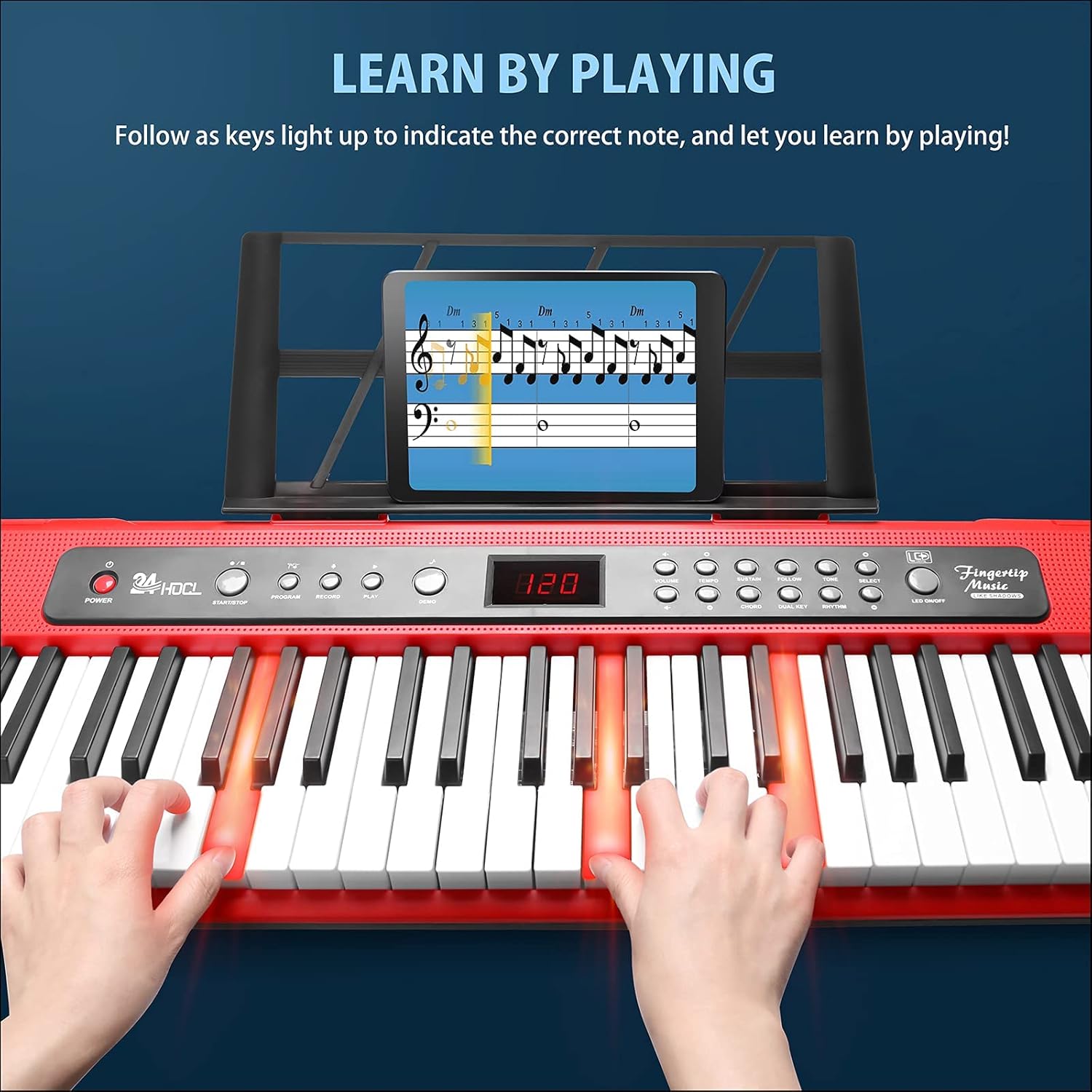
This image illustrates the interactive learning feature of the 24HOCL Piano Keyboard, where specific keys illuminate to guide the user in playing the correct notes, facilitating a 'Learn by Playing' experience.
Recording and Playback:
- Record: Press the Record button to begin recording your performance.
- Play: Press the Play button to listen to your recorded performance.
- Program: This function allows you to program a sequence of notes or rhythms. Refer to the detailed instruction manual included in the package for specific programming steps.
Maintenance
- Cleaning: Use a soft, dry cloth to clean the surface of the keyboard. Do not use abrasive cleaners, solvents, or waxes, as these can damage the finish.
- Storage: When not in use for extended periods, store the keyboard in a cool, dry place, away from direct sunlight and extreme temperatures. If using batteries, remove them before long-term storage to prevent leakage.
- Handling: Avoid dropping the keyboard or subjecting it to strong impacts. Do not place heavy objects on top of the keyboard.
- Liquid Exposure: Keep the keyboard away from water and other liquids. If liquid spills on the keyboard, immediately disconnect power and allow it to dry completely before attempting to use it again.
Troubleshooting
| Problem | Possible Cause | Solution |
|---|---|---|
| No power |
|
|
| No sound |
|
|
| Keys not responding |
|
|
| Lighted keys not working |
|
|
Specifications
| Feature | Detail |
|---|---|
| Model Number | BD-681 |
| Number of Keys | 61 |
| Key Type | 22mm Standard Piano Keys (unweighted mini keys) |
| Timbres (Tones) | 200 |
| Rhythms | 200 |
| Demo Songs | 70 |
| Percussion Sounds | 5 types (Bass Drum, Snare Drum, Hi-Hat, Cymbal) |
| Teaching Modes | One-Key, Follow, Ensemble |
| Display | 3-digit Digital LCD Display |
| Connectivity | MIDI USB, USB, 3.5mm Headphone Jack, MP3 Input, Microphone Input |
| Power Source | Corded Electric (UL Adapter included), 4 x AA Batteries (not included) |
| Speakers | 2 (Stereo Sound) |
| Material | Environmental Protection ABS Plastic |
| Product Dimensions | 92.46 x 25.4 x 7.11 cm (36.4 x 10 x 2.8 inches) |
| Item Weight | 2.8 kg (6.17 lbs) |
| Skill Level | Beginner |
| Special Features | Digital Display, Lighted Keys, Portable, Record/Playback |

This image provides a detailed view of the 24HOCL Piano Keyboard's keys, emphasizing their standard 22mm width and 25mm height, and includes a visual comparison to illustrate the difference from smaller mini piano keys.
Warranty and Support
Information regarding product warranty and customer support was not provided in the available product data. For any inquiries or assistance, please refer to the contact information provided with your product packaging or on the manufacturer's official website.
Manufacturer: 24HOCL
Place of Business: exsauro_us@outlook.com


