
1. Introduction
Thank you for choosing the Briloner Leuchten 7082-016 LED Panel Ceiling Light. This modern, ultra-flat LED panel offers versatile lighting solutions for your home or office. Featuring dimmable functionality, adjustable color temperature (from warm white to cool white), and a unique backlight effect, this light can create various atmospheres. The included remote control provides convenient operation. Please read this manual carefully before installation and use to ensure safe and optimal performance.
2. Safety Instructions
- Electrical Safety: Always disconnect the main power supply before installing, cleaning, or performing any maintenance on the light fixture. Installation should be performed by a qualified electrician in accordance with local electrical codes.
- Indoor Use Only: This product has an IP20 protection rating, meaning it is protected against solid objects larger than 12.5mm but has no protection against water. Do not use in bathrooms or other areas where it may be exposed to moisture or water splashes.
- Mounting Surface: Ensure the mounting surface is structurally sound and can support the weight of the fixture.
- Heat: Do not cover the light fixture with any materials that could impede heat dissipation.
- Cleaning: Use only a dry, soft cloth for cleaning. Do not use abrasive cleaners or solvents.
3. Package Contents
Verify that all components are present and undamaged before proceeding with installation.
- 1x Briloner Leuchten 7082-016 LED Panel Ceiling Light
- 1x Remote Control
- Mounting Hardware (screws, wall plugs)
- User Manual
4. Setup and Installation
Important: Ensure the power supply is disconnected at the main circuit breaker before starting installation.
- Preparation: Choose a suitable location on the ceiling. The light fixture measures 420 x 420 x 29 mm (L x W x H).
- Marking: Use the mounting bracket (if separate) or the fixture itself as a template to mark the drilling points on the ceiling.
- Drilling: Drill holes at the marked points and insert the appropriate wall plugs.
- Wiring: Connect the electrical wires from the ceiling to the terminal block of the light fixture. Ensure correct polarity (Live, Neutral, Earth).
- Mounting: Secure the light fixture to the ceiling using the provided screws. Ensure it is firmly attached.
- Power On: Restore power at the main circuit breaker.
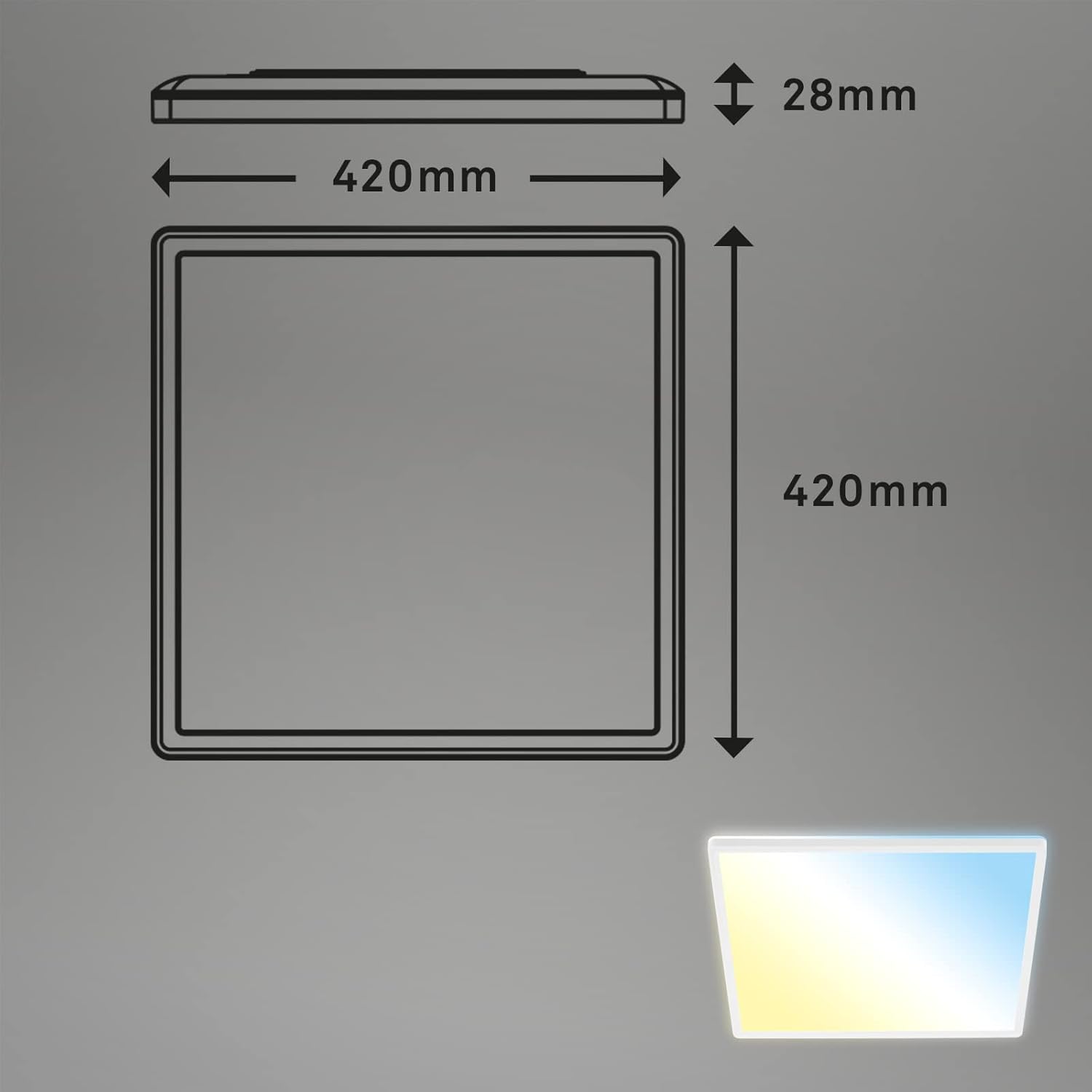
Image: Product dimensions (420mm x 420mm x 28mm).
5. Operating Instructions
The Briloner Leuchten 7082-016 LED Panel is operated using the included remote control.

Image: Remote control functions.
- ON/OFF Button: Press to turn the light on or off.
- Dim Up/Down: Use the brightness control buttons to increase or decrease the light intensity.
- Dim Levels (10%, 50%, 100%): Quickly set the brightness to predefined levels.
- Light Color Change: Adjust the color temperature from warm white (2700K) to cool white (6500K) using the dedicated buttons or slider on the remote.
- Warm White / Cool White Buttons: Directly switch to warm white or cool white color temperatures.
- Backlight Effect: Activate the subtle backlight feature for an enhanced ambient glow.
- Nightlight Function: Activates a very low brightness, warm light setting suitable for night use.
- User Memory (D1, D2): Save your preferred light settings (brightness and color temperature) to these memory buttons for quick recall.
Note on Memory Function: When the light is switched off via the wall switch, it may not retain the last used settings. To ensure settings are saved, always use the remote control to turn the light off.
6. Maintenance
The Briloner Leuchten 7082-016 LED Panel requires minimal maintenance.
- Cleaning: Ensure the light is switched off and cooled down before cleaning. Wipe the surface with a soft, dry, lint-free cloth. Do not use liquid cleaners, sprays, or abrasive materials, as these can damage the finish or electrical components.
- No User-Serviceable Parts: The integrated LED board is designed for a long lifespan (approximately 25,000 hours). Do not attempt to open or repair the fixture yourself. Contact qualified personnel for any issues beyond basic cleaning.
7. Troubleshooting
If you encounter problems with your LED panel, refer to the following common issues and solutions:
| Problem | Possible Cause | Solution |
|---|---|---|
| Light does not turn on. | No power supply; loose wiring; remote control battery depleted. | Check circuit breaker. Ensure wiring connections are secure (consult an electrician). Replace remote control batteries. |
| Remote control not working. | Batteries depleted; remote out of range; obstruction. | Replace remote control batteries. Ensure you are within range and there are no obstructions between the remote and the light. |
| Light loses memory of settings when turned off by wall switch. | This is expected behavior for some models when power is completely cut. | Always use the remote control to turn the light off to retain the last settings. If using a wall switch, the light may revert to a default setting upon next power-on. |
| Light flickers or has uneven illumination. | Faulty wiring; internal component issue. | Disconnect power immediately. Consult a qualified electrician or contact customer support. |
If the problem persists after trying these solutions, please contact Briloner customer support.
8. Specifications
- Model Number: 7082-016
- Dimensions (L x W x H): 420 x 420 x 29 mm
- Weight: 1.5 kg
- Power Consumption: 22 Watt
- Luminous Flux: 3000 Lumen
- Color Temperature: 2700K (Warm White) to 6500K (Cool White)
- Material: Plastic
- Color: White
- Protection Rating: IP20
- Average Lifespan: Approximately 25,000 hours
- Power Supply: AC (Alternating Current)
9. Warranty and Support
Briloner products are manufactured with high-quality standards. For information regarding warranty terms and conditions, please refer to the warranty card included with your purchase or visit the official Briloner website.
For technical support, spare parts, or any questions not covered in this manual, please contact Briloner customer service through their official channels. When contacting support, please have your model number (7082-016) and purchase details ready.
Online Resources: You may find additional information and support on the Briloner Store on Amazon.