Introduction
Thank you for choosing the BELIFE BN59-01358B Replacement Remote Control. This remote is designed to provide full functionality for specified Samsung TV models, offering a seamless replacement experience. Please read this manual carefully to ensure proper setup and operation.
Package Contents
- 1 x BELIFE BN59-01358B Replacement Remote Control
- (Batteries are not included)
Setup: Battery Installation
To begin using your BELIFE remote control, you must first install the batteries. This remote requires two AAA batteries (not included).
- Locate the Battery Compartment: Turn the remote control over to its back. The battery compartment cover is located at the bottom section.
- Open the Cover: Gently slide the battery compartment cover downwards or press the release tab (if present) and lift the cover off.
- Insert Batteries: Insert two AAA batteries, ensuring that the positive (+) and negative (-) terminals align correctly with the markings inside the compartment. Incorrect insertion can prevent the remote from functioning.
- Close the Cover: Replace the battery compartment cover by sliding it back into place until it clicks securely.
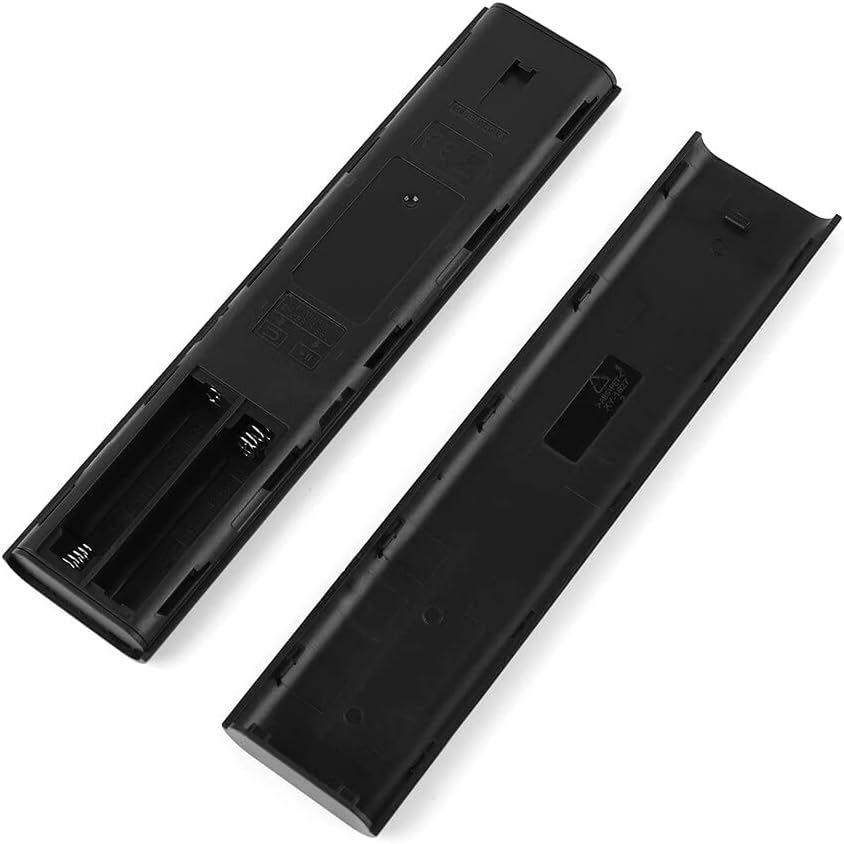
Image: Rear view of the BELIFE remote control with the battery cover removed, revealing the two AAA battery slots. This illustrates where to insert the batteries.
Your remote control is now ready for use. No programming is typically required for this replacement remote.
Operating Instructions
The BELIFE BN59-01358B remote control is designed to function immediately with compatible Samsung TV models. Point the remote directly at your television's infrared receiver for optimal performance.

Image: Front view of the BELIFE remote control, displaying its layout and all functional buttons. This image helps users identify specific controls.
Key Functions:
- Power Button (⏻): Turns the TV on or off.
- Number Pad (123): Accesses the on-screen number pad for direct channel input.
- Navigation Pad (Circular): Used to navigate menus and select options. The central button acts as 'Enter' or 'OK'.
- Back Button (↶): Returns to the previous screen or menu.
- Home Button (⌂): Accesses the TV's Smart Hub or home screen.
- Play/Pause/Skip Buttons: Controls media playback.
- Volume Up/Down (+/-): Adjusts the television volume.
- Channel Up/Down (⌃/⌄): Changes television channels.
- Streaming Service Buttons (NETFLIX, Prime Video, Samsung TV Plus): Provides direct access to these applications.
For specific advanced functions or TV settings, refer to your Samsung television's original user manual.
Compatibility
This BELIFE remote control (model BN59-01358B) is specifically designed as a replacement for certain Samsung TV models. It is crucial to verify that your television model is listed as compatible before use.
Important Note:
- ✅ This remote is suitable ONLY for the indicated Samsung TV models.
- ❌ It is NOT compatible with other Samsung models not explicitly specified.
If you are unsure about compatibility, please consult your television's original documentation or contact BELIFE customer support.
Troubleshooting
| Problem | Possible Cause | Solution |
|---|---|---|
| Remote is not responding. |
|
|
| Buttons are unresponsive or delayed. |
|
|
| Specific functions are not working. |
|
|
If problems persist after attempting these solutions, please contact BELIFE customer support.
Specifications
- Brand: BELIFE
- Model Number: BN59-01358B
- Connectivity Technology: Infrared (IR)
- Compatible Devices: Specific Samsung Televisions
- Color: Black
- Power Source: 2 x AAA Batteries (not included)
- Maximum Range: Approximately 10 meters (33 feet)
- Special Features: Full functionality for compatible models, direct streaming service buttons.
Warranty and Support
For warranty information or technical assistance, please refer to the retailer where you purchased this product or visit the official BELIFE website. Keep your proof of purchase for warranty claims.
For general inquiries or further support, please contact BELIFE customer service through their official channels.


