
Sejoy DBP-2261
Sejoy DBP-2261 Wrist Blood Pressure Monitor User Manual
Model: DBP-2261
1. Introduction
The Sejoy DBP-2261 Wrist Blood Pressure Monitor is an automatic device designed for convenient and accurate blood pressure measurement at home. It features a large LCD display, irregular heartbeat detection, and memory storage for two users. Regular monitoring of blood pressure can provide valuable health insights.

Image: Sejoy DBP-2261 Wrist Blood Pressure Monitor with large display and cuff.
2. Product Features
- Wrist Cuff Design: Suitable for wrist circumferences from 5.3'' to 8.5''.
- Dual-User Mode: Stores up to 120 readings (60 per user) with date and time stamps.
- Large LCD Display: Clear, easy-to-read numbers for systolic, diastolic, and pulse readings.
- Fast Reading: Automatic inflation and deflation provide results in under 1 minute.
- Irregular Heartbeat Detection: Alerts users to potential irregular heartbeats.
- Compact and Portable: Includes a carrying case for easy transport.

Image: Visual representation of the monitor's key features including memory, auto-off, battery power, large display, and irregular heartbeat detection.
3. Setup and Battery Installation
3.1 Unboxing
Carefully remove all components from the packaging. Ensure you have the wrist blood pressure monitor, 2 AAA batteries, and the storage case.

Image: Contents of the box, including the monitor, AAA batteries, and storage case.
3.2 Installing Batteries
- Locate the battery compartment on the back of the monitor.
- Open the battery cover.
- Insert the 2 AAA batteries, ensuring the correct polarity (+/-) as indicated inside the compartment.
- Close the battery cover securely.
4. Operating Instructions
4.1 Proper Cuff Placement
Accurate readings depend on correct cuff placement and body position. The cuff should be placed directly on your wrist, approximately 1 cm above your wrist joint, with the display facing upwards.

Image: A person demonstrating the one-button operation and adjustable wrist cuff placement.
4.2 Taking a Measurement
- Prepare for Measurement: Sit comfortably on a chair with your back straight and supported. Keep your feet flat on the floor. Rest for 5-10 minutes before taking a measurement. Avoid speaking or moving during the measurement.
- Position Your Arm: Place the cuff on your wrist with your palm facing up. Ensure the monitor is at the same level as your heart. You can rest your elbow on a table to achieve this.
- Start Measurement: Press the power button (usually marked with a power symbol). The cuff will automatically inflate and then slowly deflate.
- Read Results: Once the measurement is complete, the monitor will beep, and your systolic pressure (SYS), diastolic pressure (DIA), and pulse rate (PUL) will be displayed on the screen.

Image: Diagram illustrating correct body posture and arm positioning for accurate blood pressure readings.
5. Understanding Your Results
The monitor displays three key values: Systolic (top number), Diastolic (bottom number), and Pulse (heart rate). It also features a color-coded indicator on the side to help you understand your blood pressure classification according to AHA guidelines.
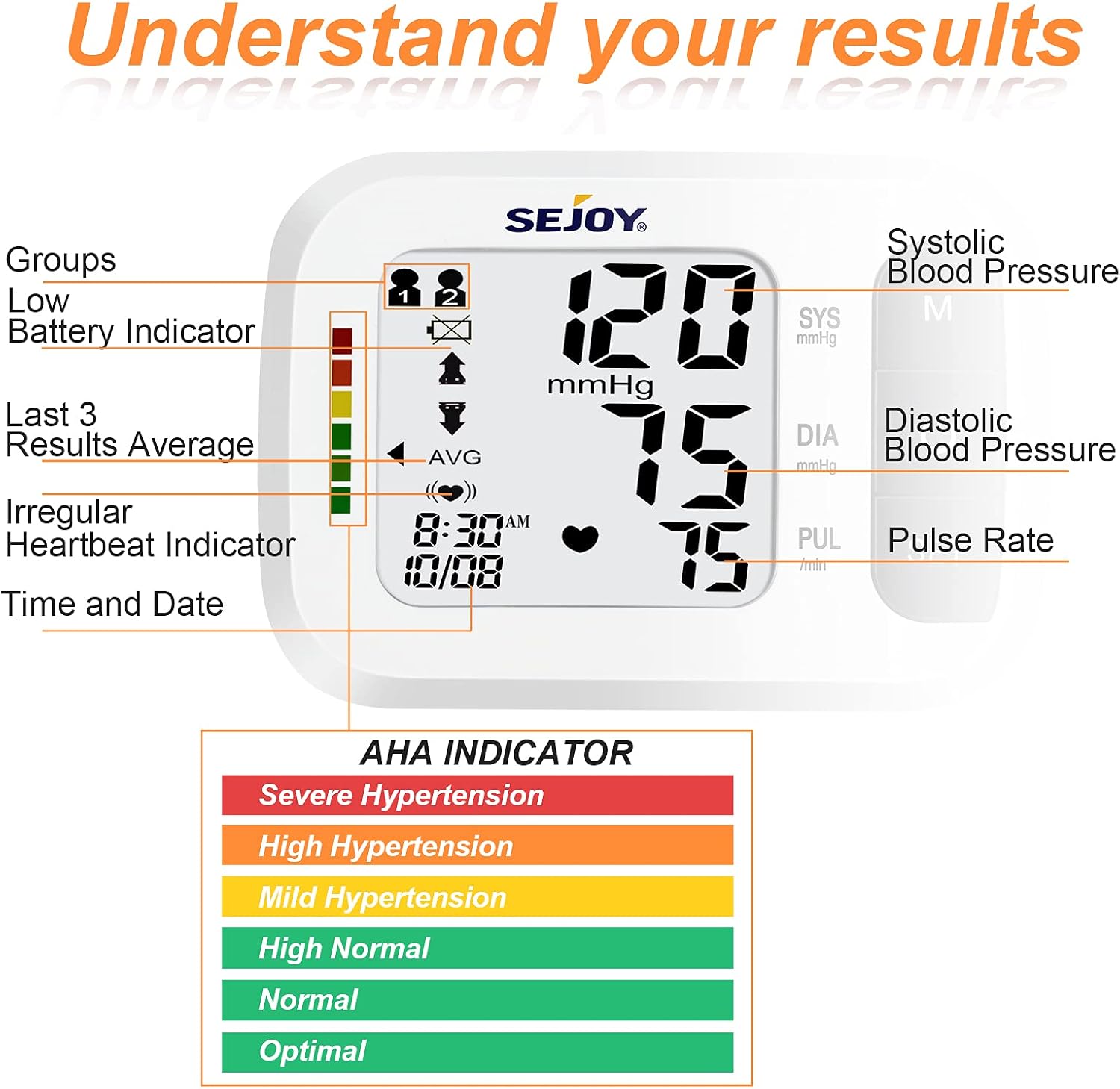
Image: Close-up of the monitor's display showing readings and indicators for groups, low battery, last 3 results average, irregular heartbeat, time, and date.
5.1 Blood Pressure Classification
| Blood Pressure Classification | Systolic mmHg (top number) | Diastolic mmHg (bottom number) | |
|---|---|---|---|
| Optimal | <120 | and | <80 |
| Normal | 120-129 | and | 80-85 |
| High Normal | 130-139 | or | 85-90 |
| Mild Hypertension (Hypertension Stage 1) | 140-159 | or | 90-100 |
| Moderate Hypertension (Hypertension Stage 2) | 160-179 | or | 100-110 |
| Severe Hypertension (Hypertension Stage 3) | ≥180 | and/or | ≥110 |
Table: Blood Pressure Classification based on Systolic and Diastolic readings.
5.2 Irregular Heartbeat Detection
If the monitor detects an irregular heartbeat during the measurement, a specific symbol (often a heart icon with waves) will appear on the display. This indicates that an irregular heartbeat was detected. If this symbol appears frequently, consult your physician.
6. Memory Function
The DBP-2261 monitor supports two users and can store up to 60 readings for each user, totaling 120 memories. This allows individuals or couples to track their blood pressure trends over time.
6.1 Accessing Memory
- Ensure the monitor is off.
- Press the 'M' (Memory) button. The display will show the average of the last three readings.
- Press the 'M' button repeatedly to scroll through individual past readings for the current user.
- To switch between User 1 and User 2, press the 'SET' button while in memory mode.

Image: The monitor illustrating its capability to store separate record histories for two users.
7. Troubleshooting
If you encounter issues with your blood pressure monitor, please refer to the following common troubleshooting tips. For more detailed information, consult the full owner's manual provided with your device.
- Inaccurate Readings: Ensure correct cuff placement, proper arm positioning at heart level, and that you are relaxed and not talking during measurement. Avoid caffeine, exercise, and smoking for at least 30 minutes prior.
- No Display/Power Issues: Check if batteries are inserted correctly and are not depleted. Replace batteries if necessary.
- Error Codes: Specific error codes may appear on the display. Refer to the owner's manual for a complete list of error codes and their corresponding solutions.
- Cuff Not Inflating/Deflating: Ensure the cuff is securely attached and there are no kinks in the air tube (if applicable, though this is a wrist unit).
8. Specifications
| Feature | Detail |
|---|---|
| Product Dimensions | 2.55 x 2.55 x 1.57 inches |
| Item Model Number | DBP-2261 |
| Batteries | 2 AAA batteries required (included) |
| Item Weight | 4 Ounces |
| Manufacturer | JOYTECH Healthcare Co., Ltd. |
| Included Components | Case |
| Power Source | Battery Powered |
| Use for | Wrist |
| Display Type | LCD |
| Age Range (Description) | Adult |
| Band Size | 5.3-8.5 inches |
9. Maintenance and Care
- Cleaning: Wipe the monitor and cuff with a soft, dry cloth. Do not use abrasive cleaners or immerse the unit in water.
- Storage: Store the monitor in its provided carrying case in a cool, dry place, away from direct sunlight and extreme temperatures.
- Battery Replacement: Replace batteries when the low battery indicator appears on the display to ensure accurate readings.
10. Warranty and Support
For information regarding warranty coverage, technical support, or service, please refer to the official documentation included with your product or contact Sejoy customer service directly. Contact details can typically be found in the owner's manual or on the manufacturer's website.
Related documentsDBP-2261

Ask a question about this manual
Ask about setup, troubleshooting, compatibility, parts, safety, or missing instructions. Manuals+ will review the question and use this page’s manual context to help answer it.