
roborock S7+
Roborock S7+ Robot Vacuum and Sonic Mop User Manual
Your guide to effortless home cleaning.
Product Overview
The Roborock S7+ is an advanced robot vacuum and sonic mop designed to provide comprehensive floor cleaning. It features powerful 2500Pa suction for effective vacuuming and sonic mopping technology that scrubs at up to 3000 cycles per minute for deep cleaning. The integrated Auto-Empty Dock allows the robot to automatically empty its dustbin, providing up to 60 days of hands-free dust disposal. Ultrasonic carpet detection enables intelligent mop lifting, ensuring seamless transitions between hard floors and carpets without wetting the latter. With LiDAR navigation and smart mapping, the S7+ efficiently maps your home and allows for customized cleaning routines via the mobile app.
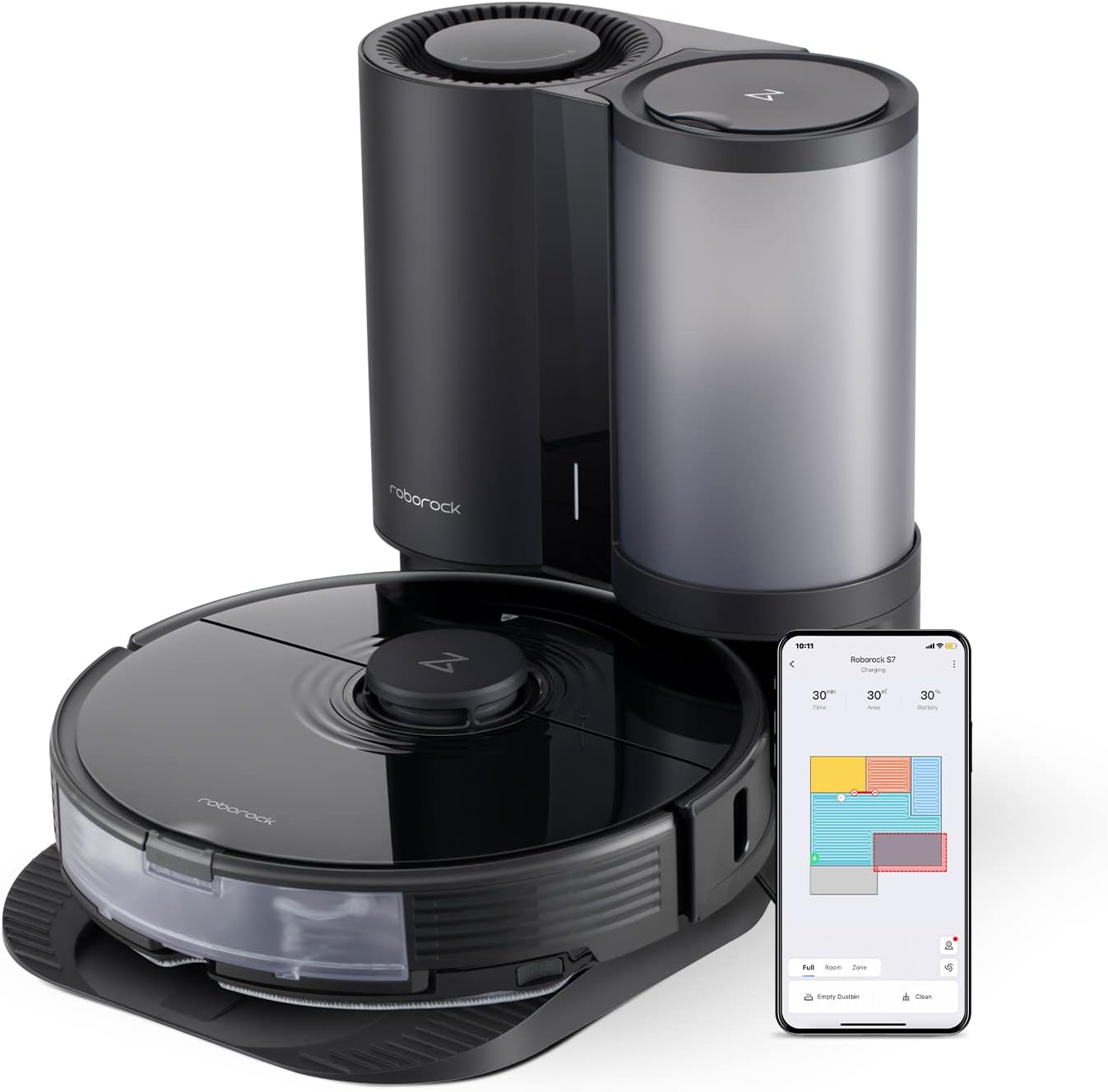
The Roborock S7+ Robot Vacuum and Sonic Mop with its accompanying Auto-Empty Dock.
Key Features:
- Self-Empty Dock Support: Automatically empties the robot's dustbin for up to 60 days.
- Sonic Mopping: Scrubs at up to 3000 cycles per minute for effective dry stain removal.
- Intelligent Mop Lifting: Automatically lifts the mop on carpets to prevent wetting.
- Ultrasonic Carpet Detection: Quickly and accurately recognizes carpets for intelligent cleaning.
- 2500Pa HyperForce Suction: Provides powerful vacuuming for deep cleaning.
- Multi-Layer Air Filtration: Keeps fine dust locked away inside the dock.
- LiDAR Navigation & Smart Mapping: Creates accurate maps for efficient navigation and customizable cleaning.
- Comprehensive App Control: Manage cleaning schedules, intensity, no-go zones, and more.
Product Introduction Video:
An official introduction to the Roborock S7+ Robot Vacuum and Sonic Mop.
Setup Guide
1. Unboxing and Assembly:
Carefully remove all components from the packaging. The Roborock S7+ and its Auto-Empty Dock may require minor assembly. Ensure all protective films and packaging materials are removed from the robot and the dock.
2. Dock Placement:
Place the Auto-Empty Dock on a hard, level surface against a wall. Ensure there is adequate clear space around the dock (at least 0.5 meters on either side and 1.5 meters in front) for the robot to easily dock and undock. Plug the dock into a power outlet.

Ensure adequate space around the Auto-Empty Dock for optimal robot navigation.
3. Initial Charging:
Place the Roborock S7+ onto the charging contacts of the Auto-Empty Dock. The robot will automatically begin charging. For first-time use, it is recommended to fully charge the robot before its initial cleaning cycle.
4. App Connection:
Download the Roborock app from your smartphone's app store. Follow the in-app instructions to connect your Roborock S7+ to your home Wi-Fi network. This will enable remote control, scheduling, and access to advanced features.

The Roborock app provides comprehensive control over your S7+ robot vacuum.
5. Water Tank and Dustbin Preparation:
Fill the water tank with clean water for mopping. Ensure the robot's internal dustbin is properly installed. The Auto-Empty Dock will handle emptying the robot's dustbin automatically after cleaning tasks.

The Auto-Empty Dock simplifies dust disposal, allowing for extended periods without manual emptying.
Operating Instructions
1. Initial Mapping:
For the first cleaning cycle, allow the robot to fully map your home. This creates an accurate floor plan within the app, enabling efficient navigation and customized cleaning zones.

The robot uses advanced sensors to create a detailed map of your home.
2. Cleaning Modes:
- Vacuuming: The robot uses its powerful 2500Pa suction to pick up dirt and debris from various floor types.
- Mopping: The sonic mopping system vibrates to scrub away dried-on stains. Ensure the water tank is filled.
- Vacuum & Mop: The robot can perform both tasks simultaneously. The intelligent mop lifting feature will raise the mop when carpets are detected.

The sonic mopping system effectively cleans hard floors.

Powerful 2500Pa suction ensures thorough vacuuming on various surfaces.
3. App Control and Customization:
Use the Roborock app to:
- Schedule Cleanings: Set specific times for the robot to clean automatically.
- Zone Cleaning: Define specific areas for the robot to clean.
- No-Go Zones & Invisible Walls: Create virtual barriers to restrict the robot from certain areas.
- Customizable Cleaning: Adjust suction power and scrubbing intensity for different rooms or areas.
- Multi-Level Mapping: The robot can recognize and store maps for up to 4 different levels of your home.

The mobile app offers extensive control and customization options for your cleaning needs.

Set virtual boundaries to protect fragile items or restrict access to certain areas.
Operating Videos:
Demonstration of the S7+'s powerful 2500Pa suction.
Visualizing the mop lifting feature of the Roborock S7+.
A comprehensive overview of the Roborock S7+ Robot Vacuum and Sonic Mop with Auto-Empty Dock in action.
Maintenance
1. Auto-Empty Dock Dust Bag Replacement:
The Auto-Empty Dock stores up to 60 days of dust. When the dust bag is full, replace it according to the dock's instructions. This ensures continuous hands-free dust disposal.

The Auto-Empty Dock automatically collects dust from the robot's bin.
2. Robot Dustbin and Filter Cleaning:
Although the dock empties the robot, it is recommended to periodically check and clean the robot's internal dustbin and filter to ensure optimal performance. The filter is washable.

The multi-layer air filtration system keeps dust contained.
3. Water Tank Maintenance:
Empty and refill the water tank with clean water after each mopping session to prevent residue buildup and ensure fresh water for subsequent cleanings.
4. Main Brush and Side Brush Cleaning:
Regularly remove and clean the main brush and side brush to remove tangled hair and debris. This maintains effective vacuuming performance.

The main brush is designed for effective debris collection.
5. Sensor Cleaning:
Wipe the robot's sensors (cliff sensors, wall sensors, etc.) with a soft, dry cloth to ensure accurate navigation and obstacle avoidance.
Troubleshooting
Robot Not Charging:
- Ensure the charging contacts on both the robot and the dock are clean and free of dust or debris.
- Verify the power cable is securely plugged into the dock and the wall outlet.
- Check if the power outlet is functioning correctly.
Robot Gets Stuck Frequently:
- Clear any loose cables, small objects, or thick rugs that might obstruct the robot's path.
- Use the app to set up No-Go Zones or Invisible Walls around problematic areas.
- Clean the cliff sensors and obstacle avoidance sensors on the robot.
Poor Cleaning Performance:
- Empty the robot's dustbin and clean the filter.
- Clean the main brush and side brush, removing any tangled hair.
- Ensure the water tank is filled and the mop pad is clean for mopping tasks.
- Adjust the suction power or scrubbing intensity settings in the app.
Auto-Empty Dock Not Functioning:
- Check if the dust bag in the dock is full and replace it if necessary.
- Ensure the robot's internal dustbin is properly installed and its air inlet is clear.
- Verify there are no obstructions in the dock's dust collection port.
Specifications
| Feature | Detail |
|---|---|
| Brand | roborock |
| Model Name | S7+ |
| Product Dimensions | 14"L x 18"W x 15"H |
| Item Weight | 28 pounds |
| Battery Life | 180 minutes |
| Suction Power | 2500Pa |
| Control Method | App |
| Compatible Devices | Smartphones, Amazon Echo, Google Home |
| Filter Type | Washable |
Warranty and Support
For detailed warranty information and specific support inquiries, please refer to the official Roborock website or the user manual PDF provided with your product. You can also find additional resources and FAQs on the Roborock support page.
Official User Manual (PDF): Download Here
Visit the Roborock Store for more information: Roborock Store
Related documentsS7+


Ask a question about this manual
Ask about setup, troubleshooting, compatibility, parts, safety, or missing instructions. Manuals+ will review the question and use this page’s manual context to help answer it.