1. Introduction
The XDUOO MT-604 is a high-performance balanced tube pre-amplifier and Class-A hybrid amplifier designed to enhance your audio experience. It combines the warm, rich sound characteristics of tube amplification with the powerful, dynamic output of a transistor-based Class-A buffer. This manual provides essential information for the proper setup, operation, and maintenance of your MT-604 amplifier.
2. Important Safety Instructions
- Read all instructions carefully before operating the device.
- Keep this manual for future reference.
- Do not expose the device to rain, moisture, or extreme temperatures.
- Ensure proper ventilation around the unit to prevent overheating.
- Use only the specified power adapter (DC12V/2A).
- Do not attempt to open or service the unit yourself. Refer all servicing to qualified personnel.
- Avoid placing the unit near heat sources or in direct sunlight.
- Disconnect the power supply during lightning storms or when unused for long periods.
3. Key Features
- Tube + Transistor Hybrid Design: Combines a tube pre-amplifier with a transistor Class-A buffer for optimal sound quality.
- 6J1 Tube Pre-amplification: Utilizes four 6J1 tubes for a sweet and exquisite vocal presentation.
- Class-A Transistor Buffer: Delivers up to 2000mW output power, capable of driving a wide range of headphones.
- Balanced Connectivity: Features XLR and 4.4mm balanced input and output options for versatile connections.
- Built-in Mute Circuit: Incorporates a relay-controlled mute circuit to prevent "POP" noise during power-on and ensure tube stability.
4. Product Overview
4.1 Front Panel
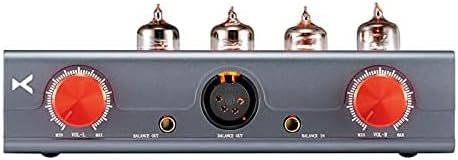
Figure 1: Front view of the XDUOO MT-604 amplifier, showing the dual volume controls, 4.4mm and XLR balanced inputs, and 4.4mm and 4-pin XLR balanced outputs.
- Left Volume Control: Adjusts the volume for the left channel.
- 4.4mm Balanced Input: Connect a 4.4mm balanced audio source.
- XLR Balanced Input: Connect an XLR balanced audio source.
- 4.4mm Balanced Output: Connect headphones with a 4.4mm balanced plug.
- Right Volume Control: Adjusts the volume for the right channel.
- XLR Balanced Output: Connect headphones with a 4-pin XLR balanced plug.
4.2 Rear Panel

Figure 2: Rear view of the XDUOO MT-604 amplifier, showing the balanced XLR inputs, power switch, and DC power input.
- Balanced Input (Left/Right XLR): Connect balanced audio sources using XLR cables.
- Power Switch: Toggles the amplifier power ON/OFF.
- DC 12V Power Input: Connect the provided DC 12V power adapter.
5. Setup Instructions
Follow these steps to set up your XDUOO MT-604 amplifier:
- Tube Installation: The 6J1 tubes are typically pre-installed. If not, carefully insert each tube into its corresponding socket on the top panel, ensuring the pins align correctly. Do not force them.
- Connect Audio Source:
- For XLR balanced input: Connect your audio source (e.g., DAC, pre-amp) to the "BALANCE IN" XLR ports on the rear panel using XLR cables.
- For 4.4mm balanced input: Connect your audio source to the 4.4mm balanced input port on the front panel.
- Connect Headphones:
- For 4-pin XLR balanced output: Connect your balanced headphones to the 4-pin XLR output port on the front panel.
- For 4.4mm balanced output: Connect your balanced headphones to the 4.4mm output port on the front panel.
- Connect Power: Connect the provided DC 12V power adapter to the "DC 12V" input port on the rear panel, then plug the adapter into a wall outlet.
- Initial Volume Setting: Before powering on, ensure both left and right volume controls on the front panel are set to their minimum (counter-clockwise) position.
6. Operating Instructions
- Power On: Flip the "POWER" switch on the rear panel to the "ON" position. The tubes will begin to glow, indicating the unit is powering on.
- Tube Warm-up: Allow approximately 30-60 seconds for the tubes to warm up and stabilize. During this time, the built-in mute circuit will prevent any audio output.
- Adjust Volume: Slowly turn the left and right volume controls clockwise to your desired listening level. It is recommended to adjust both knobs equally to maintain channel balance. Some users prefer to set both amplifier volume knobs to maximum and control the overall volume from their source device (DAC/pre-amp).
- Power Off: When finished listening, turn both volume controls to minimum, then flip the "POWER" switch to the "OFF" position.
Note: The MT-604 features a dual-mono volume control design. For optimal stereo imaging and channel balance, ensure both left and right volume knobs are set to the same level. You may need to visually align the markings or use a reference point.
7. Maintenance
- Cleaning: Use a soft, dry cloth to clean the exterior of the amplifier. Do not use liquid cleaners or solvents.
- Tube Replacement: The 6J1 tubes have a finite lifespan. If you notice a degradation in sound quality or tube failure, replacement tubes can be purchased. Ensure the amplifier is powered off and unplugged before attempting to replace tubes. Carefully pull the old tubes straight out and insert new ones, aligning the pins correctly.
- Ventilation: Ensure the ventilation holes on the unit are not obstructed to prevent overheating.
8. Troubleshooting
| Problem | Possible Cause | Solution |
|---|---|---|
| No power | Power adapter not connected; Power switch OFF; Outlet malfunction. | Ensure power adapter is securely connected and plugged into a working outlet. Flip power switch to ON. |
| No sound | Incorrect audio connections; Volume too low; Tubes not warmed up; Source device issue. | Check all audio cables. Increase volume. Wait for tubes to warm up (approx. 30-60 seconds). Verify source device is playing audio. |
| Distorted sound | Volume too high; Faulty tubes; Incorrect impedance matching. | Reduce volume. Consider replacing tubes. Ensure headphone impedance is within 16Ω ~ 600Ω. |
| Imbalanced sound (one channel louder) | Volume knobs not matched; Faulty cable; Tube issue. | Carefully align both left and right volume knobs. Check balanced cables for damage. |
9. Specifications
| Parameter | Value |
|---|---|
| Power Supply | DC12V/2A |
| Gain | +15dB |
| Output Power | 2000mW (1KHz, 32Ω load) |
| Dynamic Range | 85dBA (32Ohm) |
| Frequency Response | 10Hz~60KHz (±0.5dB) |
| Signal-to-Noise Ratio (S/N) | 115dB |
| Suitable Headphone Impedance | 16Ω ~ 600Ω |
| Total Harmonic Distortion + Noise (THD+N) | ≤0.01% (1KHz, 32Ω load) |
| Dimensions | 17 x 10 x 6 cm (approx. 6.7 x 3.9 x 2.4 inches) |
| Weight | 0.55 kg (approx. 1.21 pounds) |
| Material | Metal |
| Color | Grey |
10. Warranty and Support
For warranty information, technical support, or service inquiries, please contact your authorized xDuoo dealer or visit the official xDuoo website. Please retain your proof of purchase for warranty claims.
Official Website: www.xduoo.com