
1. Introduction
Thank you for purchasing the WISCENT WTB-791 Portable CD Boombox. This device offers versatile audio playback options including CD, MP3, USB, FM radio, Bluetooth, and AUX input. Please read this manual carefully before use to ensure proper operation and to maximize your listening experience. Keep this manual for future reference.

Image 1.1: Front view of the WISCENT WTB-791 Portable CD Boombox, showing the display, speakers, and control buttons.
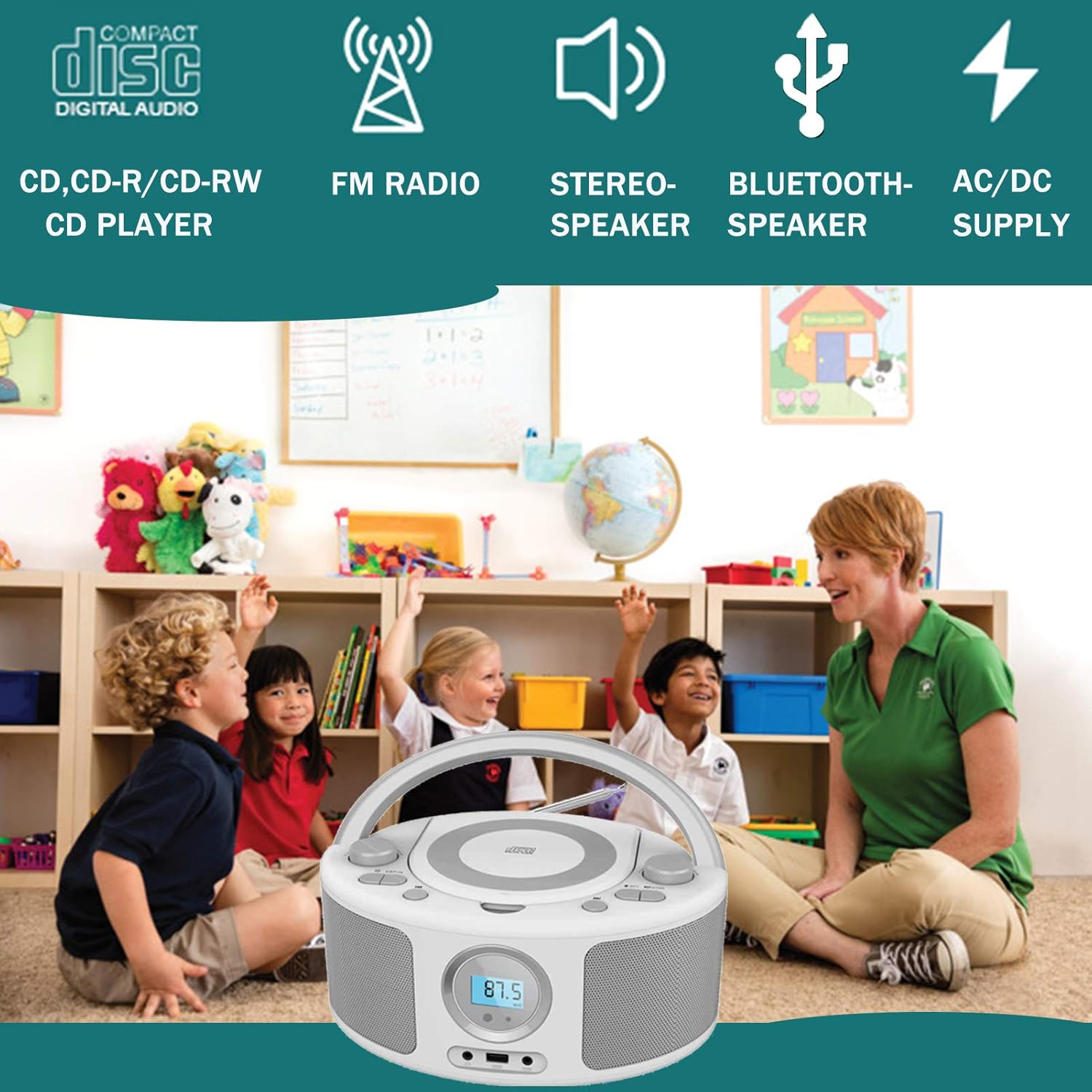
Image 1.2: Visual representation of the boombox's key features: CD playback, FM radio, stereo speakers, Bluetooth speaker functionality, and dual AC/DC power options.
2. Safety Instructions
To reduce the risk of electric shock, do not remove the cover (or back). Refer servicing to qualified service personnel. Do not expose this appliance to rain or moisture. Do not block any ventilation openings. Install in accordance with the manufacturer's instructions. Protect the power cord from being walked on or pinched. Only use attachments/accessories specified by the manufacturer.
3. Package Contents
Please check the package contents upon unboxing:
- 1 x WISCENT WTB-791 Portable CD Boombox
- 1 x AC Power Cable (5 ft)
- 1 x AUX Cable
- 1 x User Manual
Note: 4 x 'C' size batteries are required for DC operation and are not included in the package.
Image 3.1: Contents of the package, including the boombox unit, AC power cord, AUX cable, and the user manual.
4. Product Overview
4.1 Front Panel
- LCD Display: Shows current mode, track number, frequency, etc.
- Speakers: Integrated stereo speakers.
- Headphone Jack: For private listening.
- USB Port: For MP3 playback from USB flash drives.
- AUX Input: For connecting external audio devices.
4.2 Top Panel
- CD Compartment: Top-loading for CD, CD-R, CD-RW, MP3 CDs.
- Function/Mode Button: To switch between CD, FM, USB, Bluetooth, AUX modes.
- Play/Pause Button
- Stop Button
- Skip/Search Buttons: For navigating tracks or radio stations.
- Volume Control Knobs
- Program/Repeat Button
4.3 Rear Panel
- AC IN Jack: For connecting the AC power cable.
- Battery Compartment: For 'C' size batteries (not included).
- FM Antenna: Telescopic antenna for radio reception.

Image 4.1: Top view of the WISCENT WTB-791, illustrating the top-loading CD compartment with a disc inserted.

Image 4.2: Dimensions of the boombox (260mm x 200mm x 128mm) and a view of the rear panel, highlighting the AC power input and the battery compartment.
5. Setup
5.1 Power Supply
The boombox can be powered by AC electricity or batteries.
- AC Power: Connect the supplied AC power cable to the AC IN jack on the rear of the unit and then to a standard wall outlet (220V/50Hz or 110V/60Hz).
- DC Battery Power: Open the battery compartment on the rear. Insert 4 x 'C' size batteries (not included), ensuring correct polarity. Close the compartment securely.
5.2 FM Antenna
For optimal FM radio reception, fully extend the telescopic antenna located on the rear of the unit. Adjust its position for the best signal.
6. Operating Instructions
6.1 General Operation
- Press the Power button to turn the unit ON.
- Press the Function/Mode button repeatedly to select your desired mode (CD, FM, USB, Bluetooth, AUX).
- Adjust the Volume control knobs to your preferred listening level.
6.2 CD Playback
- Select CD mode using the Function/Mode button.
- Open the CD compartment lid and carefully place a CD (Audio CD, CD-R, CD-RW, or MP3 CD) onto the spindle, label side up.
- Close the CD compartment lid. The CD will begin playing automatically or display the track count.
- Use the Play/Pause, Stop, and Skip/Search buttons to control playback.
- The Repeat function allows you to repeat a single track, all tracks, or play in random order.

Image 6.1: The boombox in a home environment, demonstrating its use for CD playback.
6.3 FM Radio
- Select FM mode using the Function/Mode button.
- Extend the FM antenna for better reception.
- Press and hold the Skip/Search buttons to automatically scan for available stations. The unit can store up to 20 preset stations.
- Press the Skip/Search buttons briefly to manually tune or cycle through preset stations.
6.4 USB Playback
- Select USB mode using the Function/Mode button.
- Insert a USB flash drive containing MP3 files into the USB port.
- The unit will automatically detect and begin playing MP3 files.
- Use the Play/Pause, Stop, and Skip/Search buttons to control playback.
6.5 Bluetooth Connection
- Select Bluetooth mode using the Function/Mode button. The display will show "BT" or a similar indicator, and the unit will enter pairing mode.
- On your Bluetooth-enabled device (smartphone, tablet, etc.), enable Bluetooth and search for available devices.
- Select "WTB-791" (or similar name) from the list of devices to pair.
- Once paired, you can stream audio wirelessly from your device to the boombox.

Image 6.2: Visual guide for connecting a smartphone or other digital audio player to the boombox via Bluetooth.

Image 6.3: The boombox functioning as a Bluetooth speaker, seamlessly integrated into a modern living space.
6.6 AUX Input
- Select AUX mode using the Function/Mode button.
- Connect one end of the supplied AUX cable to the AUX IN jack on the boombox and the other end to the headphone jack or audio output of your external device (e.g., MP3 player, smartphone).
- Play audio from your external device. The sound will be output through the boombox speakers.

Image 6.4: A child using the boombox with headphones, demonstrating the AUX input and headphone jack functionality for personal listening.
7. Maintenance
- Cleaning: Use a soft, dry cloth to clean the exterior of the unit. Do not use abrasive cleaners or solvents.
- CD Lens Care: If CD playback issues occur, use a commercially available CD lens cleaner disc.
- Storage: When not in use for extended periods, remove batteries and store the unit in a cool, dry place.
8. Troubleshooting
| Problem | Possible Cause | Solution |
|---|---|---|
| No power | AC cable not connected; Batteries depleted or incorrectly inserted. | Ensure AC cable is securely connected. Replace batteries or check polarity. |
| CD not playing / Skipping | CD is dirty, scratched, or inserted incorrectly; CD lens is dirty. | Clean or replace CD. Reinsert CD correctly. Use a CD lens cleaner. |
| Poor FM reception | Antenna not extended or positioned correctly; Weak signal. | Fully extend and adjust the telescopic antenna. Try moving the unit to a different location. |
| Bluetooth not connecting | Boombox not in Bluetooth mode; Device too far; Device already paired with another unit. | Ensure boombox is in Bluetooth mode. Move device closer. Disconnect from other devices. |
| USB not playing | USB drive not inserted correctly; Files not in MP3 format; USB drive corrupted. | Reinsert USB drive. Ensure files are MP3. Try a different USB drive. |
9. Specifications
| Feature | Specification |
|---|---|
| Model Number | WTB-791 |
| Brand | WISCENT |
| Supported Media | Audio-CDs, CD-Rs, CD-RWs, MP3-CDs, USB (MP3) |
| Connectivity | Bluetooth, USB, AUX Input |
| Radio Tuner | FM Digital Radio (20 presets) |
| Output Power | 2 x 2W RMS (4 Watts total) |
| Power Source | AC (220V/50Hz, 110V/60Hz) or 4 x 'C' size batteries (DC) |
| Weight | 1.5 Kilograms |
| Compatible Devices | MP3 Player, Computer, Tablet, TV, Smartphone |
10. Warranty and Support
WISCENT is committed to providing quality products and customer satisfaction.
- Free Return & Replace: We offer free replacement for missing parts or broken products.
- Lifetime Support: Includes 18-month replacement warranty and lifetime technical support.
- Customer Service: For any inquiries or support, please contact WISCENT customer service via Amazon buyer-seller messaging (available 7/24).
Image 10.1: Overview of WISCENT's customer support, including free returns/replacements, lifetime technical support, and 24/7 messaging.


