
Introduction
Thank you for choosing the Lucky Doug Metal Building Construction Model Kit 9904. This kit provides an engaging and educational experience, allowing users to construct a detailed metal bulldozer model. Designed to enhance STEM skills, this kit includes 256 durable metal parts, along with necessary assembly tools. Upon completion, the model features a freely swinging arm and rollable wheels for interactive play.

Image: The Lucky Doug Metal Building Construction Model Kit 9904, showing the assembled yellow and black bulldozer, its packaging, and the included wrench and screwdriver.
Safety Information
- This product contains small parts and is recommended for ages 8 years and up. Adult supervision is advised, especially for younger users.
- Keep small parts away from children under 3 years old to prevent choking hazards.
- Ensure all nuts and bolts are securely fastened during assembly to prevent parts from detaching.
- Handle metal edges with care during assembly.
- Do not modify the product or use non-original parts, as this may compromise safety and functionality.
Package Contents
Before beginning assembly, please verify that all components are present and undamaged. The kit includes 256 parts, consisting of various metal plates, beams, wheels, nuts, bolts, and two essential tools: a wrench and a screwdriver.

Image: A comprehensive layout of all 256 metal and plastic components, including various plates, beams, wheels, nuts, bolts, and assembly tools, for the Model Kit 9904.
Refer to the included instruction booklet for a detailed parts list and identification guide. The box also features a screw length meter to help identify different screw sizes (e.g., C6, C8, C16, C20).

Image: A child measuring a screw against a length guide printed on the kit box, demonstrating how to identify screw sizes during assembly.
Setup and Assembly Instructions
Assembly of the Lucky Doug Metal Building Construction Model Kit 9904 requires careful attention to detail and patience. Follow the step-by-step instructions provided in the included manual. The process is designed to be straightforward, with each step clearly illustrated.
- Preparation: Lay out all parts on a clean, flat surface. Organize similar parts together to facilitate identification.
- Tool Usage: Use the provided wrench and screwdriver for fastening nuts and bolts. Ensure connections are snug but do not overtighten, which could damage parts.
- Follow Illustrations: Each step in the instruction booklet features detailed illustrations. Pay close attention to the orientation of parts and the specific holes indicated for connections.
- Screw Identification: Utilize the screw length meter on the packaging to correctly identify and select the appropriate screws for each step.
- Systematic Building: Build the model section by section, as outlined in the manual. This typically involves constructing the chassis, then the cabin, followed by the arm and bucket, and finally attaching the wheels.

Image: A child focused on assembling the metal bulldozer model, with various parts, tools, and the instruction manual spread on a table.
The assembly process is estimated to take approximately 4 hours, providing a comprehensive hands-on learning experience.
Operating Instructions
Once fully assembled, the Lucky Doug Metal Building Construction Model Kit 9904 offers interactive features:
- Rollable Wheels: The model is equipped with functional wheels, allowing it to be pushed and rolled across flat surfaces.
- Swing Arm: The excavator arm is designed to swing freely, enabling dynamic play and simulation of construction movements.
- Driver's Seat: The model includes a detailed driver's seat within the cabin, enhancing its realistic appearance.
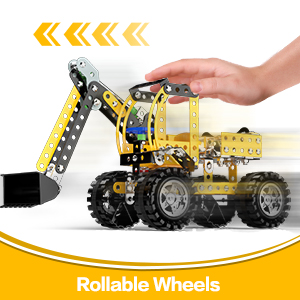
Image: The bulldozer model being pushed, highlighting its rollable wheels.
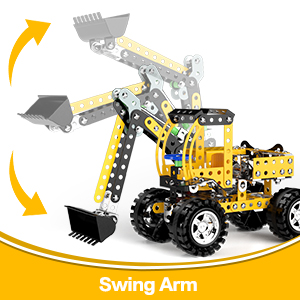
Image: The excavator arm of the model demonstrating its upward and downward swinging motion.
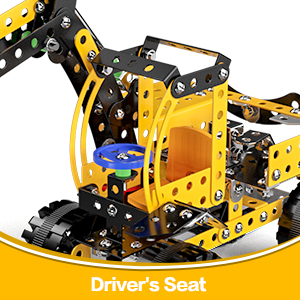
Image: A close-up view of the detailed driver's seat within the model's cabin.
Maintenance
To ensure the longevity and continued enjoyment of your Lucky Doug Metal Building Construction Model Kit 9904, follow these simple maintenance guidelines:
- Cleaning: Wipe the model with a soft, dry cloth to remove dust and debris. Avoid using harsh chemicals or abrasive cleaners.
- Storage: Store the model in a cool, dry place away from direct sunlight and extreme temperatures to prevent material degradation.
- Check Connections: Periodically inspect all nuts and bolts to ensure they remain tight. Retighten any loose connections using the provided tools.
- Avoid Water: The metal components are durable, but prolonged exposure to water or high humidity may lead to rust.
Troubleshooting
If you encounter any issues during assembly or operation, consider the following:
- Parts Not Fitting:
- Double-check the instruction manual to ensure you are using the correct parts for the current step.
- Verify the orientation of the parts. Some pieces may only fit in a specific direction.
- Ensure no excess material or burrs are obstructing the fit.
- Difficulty with Bolts and Nuts:
- Align the bolt and nut carefully before tightening.
- Use both the wrench and screwdriver simultaneously to secure the connection.
- If a bolt is difficult to thread, try backing it out and re-aligning.
- Model Instability:
- Review all connections to ensure they are securely tightened. Loose connections can lead to instability.
- Confirm that all structural components are assembled according to the instructions.
Specifications
| Brand | Lucky Doug |
| Model Number | 9904 (Item Model Number: 9902-4) |
| Product Dimensions | 6" H × 6.7" L × 4.3" W (Assembled) |
| Item Weight | 1.19 pounds |
| Number of Parts | 256 |
| Material | Metal |
| Recommended Age | 8 years and up |

Image: The assembled bulldozer model with its key dimensions (height, length, width) indicated.
Warranty and Support
Lucky Doug is committed to providing high-quality products. For any questions, concerns, or assistance with your Metal Building Construction Model Kit 9904, please contact Lucky Doug customer support through the retailer's platform where the product was purchased. Please retain your proof of purchase for any warranty claims.
While specific warranty details are not provided in this manual, general consumer rights apply. For further information, please visit the Lucky Doug Store on Amazon.