
1. Introduction
The Tascam Portacapture X8 is a high-resolution 32-bit 8-channel multitrack field recorder designed for professional audio capture in various environments. It features an intuitive Launcher system with a 3.5-inch color touch panel display, making it suitable for applications such as multi-track recording, podcasting, music production, voice recording, field recording, and ASMR. The device supports up to 192kHz/32-bit float point recording, ensuring high-fidelity audio quality.
2. Key Features
- Intuitive Launcher System: Navigate and control the device effortlessly using the 3.5-inch color touch panel display. The system offers dedicated applications for various recording scenarios.
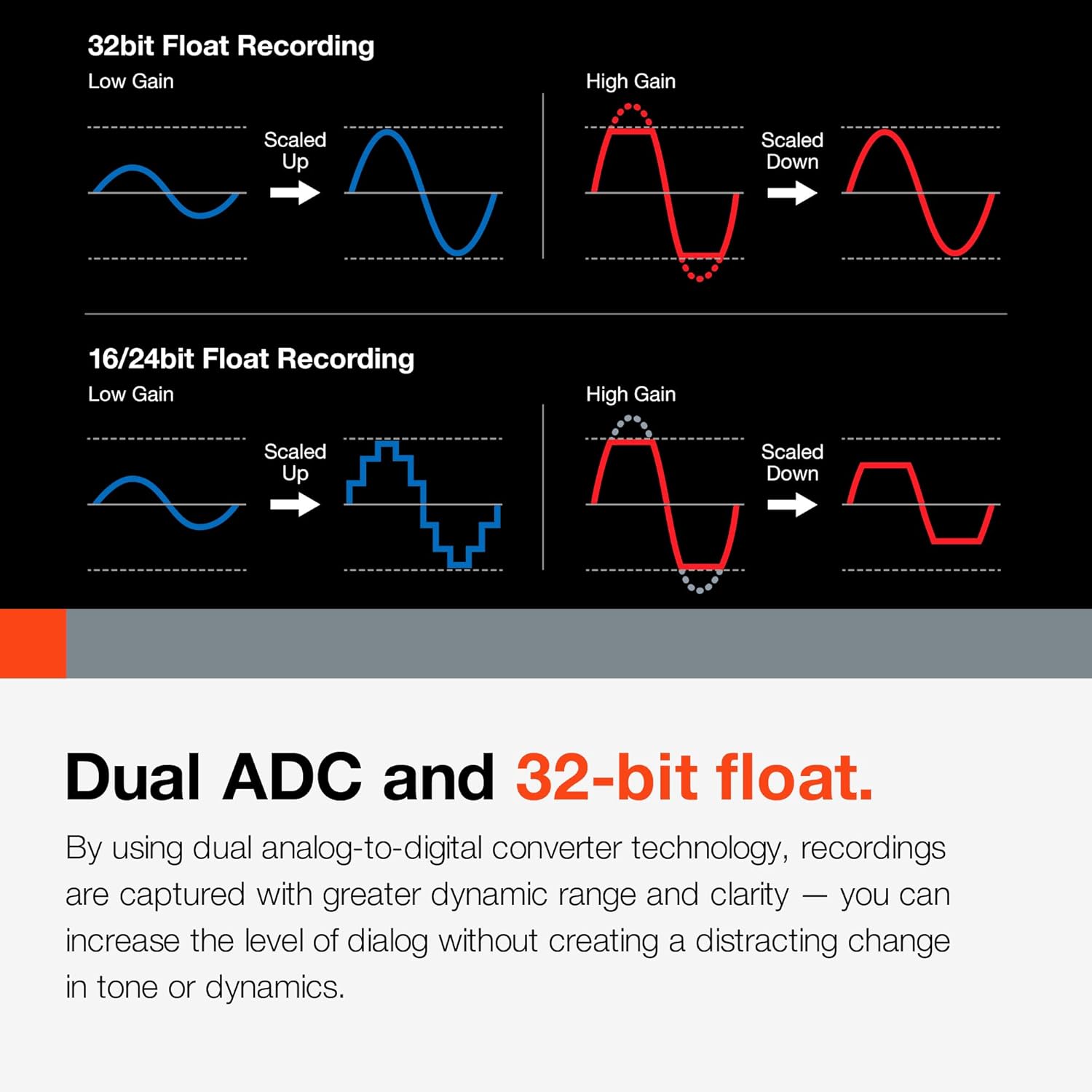
- High-Resolution 32-bit Float Recording: Supports recording up to 192kHz/32-bit float, providing an extended dynamic range and preventing clipping, even with unexpected volume spikes.
- Multiple Input Channels: Equipped with 4 XLR/TRS locking combo jack MIC/LINE inputs, each with individual phantom power supply (24V/48V), utilizing Tascam's HDDA (High Definition Discrete Architecture) mic preamps for clean audio.
- Detachable Condenser Microphones: Features two 14.6mm large-diaphragm condenser mics that can be configured for both A-B (wide stereo) and X-Y (focused stereo) positions.
- Versatile Recording Applications: Includes pre-set recording modes optimized for multi-track recording, podcasting, music, voice (interviews, vlogs), field recording, and ASMR.
- Remote Control Capability: Control the Portacapture X8 wirelessly from a smartphone or tablet using the optional AK-BT1 Bluetooth adapter.
3. Setup
- Power Supply: Insert 4 AA batteries (Lithium Metal batteries included) or connect the device via USB bus power. An optional PS-P520U AC adapter can also be used.
- SD Card Insertion: Open the SD card slot cover and insert a microSDXC card (up to 512GB, not included) for recording. Ensure the card is properly formatted before use.
- Microphone Attachment: The device comes with detachable 14.6mm large-diaphragm condenser mics. Attach them securely to the top of the unit. You can adjust their position for A-B or X-Y stereo configurations.
- External Microphone/Line Input: For external microphones or line-level sources, connect XLR or TRS cables to the 4 combo jacks on the sides of the unit. Activate phantom power (24V/48V) if required by your microphones.
- Bluetooth Adapter (Optional): If using remote control, insert the optional AK-BT1 Bluetooth adapter into its dedicated slot.
4. Operation
4.1. Launcher System and Recording Modes
The Portacapture X8 features an intuitive Launcher system accessible via its 3.5-inch color touch panel. This system provides quick access to various recording applications:
- Manual: For multi-track recording of up to six audio sources and a stereo mix (2-mix).
- Voice: Ideal for capturing interviews, dictation, and meetings.
- Podcast: Use this for podcast creation with up to four people.
- Music: Choose this app for capturing instrumental and vocal performances.
- Field: Ideal for recording nature sounds outdoors.
- Pocketstudio: Designed for musicians, it puts a Portastudio in your pocket. Record and mix down tracks—anywhere, anytime, with a set of features that made TASCAM Portastudios so legendary.
- ASMR: The screen visual effect changes in response to the input sound.
4.2. 32-bit Float Recording
The Portacapture X8 supports 32-bit float recording, which captures a wider dynamic range than standard 16/24-bit recording. This technology allows for significant post-production gain adjustments without introducing clipping or distortion, even if initial recording levels were too low or too high. This ensures that your audio remains usable and high-quality.
4.3. Remote Control
With the optional AK-BT1 Bluetooth adapter, you can remotely control the Portacapture X8 using a dedicated smartphone or tablet application. This is particularly useful for situations where the recorder needs to be placed in an optimal position for audio capture, but out of direct reach for manual operation.
4.4. Wireless Timecode Sync
The Portacapture X8 can wirelessly sync timecode with supported Atomos products (with optional AK-BT1). This feature is crucial for videographers using multi-camera setups, ensuring precise audio-video alignment and streamlining post-production workflows.
5. Connections
- XLR/TRS Combo Inputs: Four inputs for connecting professional microphones or line-level devices. Each input supports phantom power.
- MIC/EXT IN: A 3.5mm stereo mini-jack input for connecting external microphones or line-level sources.
- LINE OUT: A 3.5mm stereo mini-jack output for connecting to cameras, mixers, or other audio devices.
- Headphones Jack: A 3.5mm stereo mini-jack for monitoring audio with headphones.
- USB-C Port: For connecting to a computer for data transfer, USB bus power, or using the Portacapture X8 as a 6-in/2-out USB audio interface.
6. Media Integration
6.1. Product Images




6.2. Official Product Videos
7. Maintenance
- Cleaning: Use a soft, dry cloth to clean the exterior of the unit. Avoid using abrasive cleaners or solvents. For the touchscreen, use a microfiber cloth specifically designed for electronics.
- Battery Care: When not in use for extended periods, remove the Lithium Metal batteries to prevent leakage and damage. Ensure batteries are inserted correctly according to polarity markings.
- Storage: Store the Portacapture X8 in a cool, dry place away from direct sunlight, extreme temperatures, and high humidity.
- Microphone Care: Handle the detachable microphones with care. Avoid dropping the unit or subjecting the microphones to impact.
8. Troubleshooting
- Device Not Powering On: Check battery installation and charge level. If using USB power, ensure the cable and power source are functioning correctly.
- No Audio Recording: Verify that an SD card is inserted and properly formatted. Check input levels and ensure microphones are connected securely and phantom power is enabled if needed.
- Distorted Audio: While 32-bit float recording minimizes clipping, ensure input gain levels are set appropriately. Check for faulty cables or microphone issues.
- Touchscreen Unresponsive: Restart the device. If the issue persists, ensure the screen is clean and free from moisture.
- Bluetooth Connection Issues: Ensure the optional AK-BT1 adapter is correctly inserted. Check Bluetooth settings on both the Portacapture X8 and your smart device, and attempt re-pairing.
9. Specifications
| Feature | Detail |
|---|---|
| Product Dimensions | 9 x 7 x 3 inches |
| Item Weight | 1.61 pounds |
| Item Model Number | Portacapture X8 |
| Batteries | 1 Lithium Metal battery required (included) |
| Brand | Tascam |
| Hardware Interface | USB |
| Microphone Form Factor | Built-In |
| Format | WAV |
| Headphones Jack | XLR |
| Memory Storage Capacity | 512 GB |
| Screen Size | 3.5 Inches |
| Manufacturer | Tascam |
| Compatible Devices | Smartphone |
10. Warranty and Support
The Tascam Portacapture X8 comes with a standard manufacturer's warranty. For detailed warranty information, product registration, and technical support, please refer to the official Tascam website or contact their customer service. Keep your proof of purchase for warranty claims.


