Introduction
Product Overview
The Rayson TD1202R is a robust 3:1 pitch wire binding machine designed for efficient document finishing. It features a durable metal construction, ensuring longevity and reliable performance for both business and individual use. This manual provides detailed instructions for setup, operation, maintenance, and troubleshooting to help you achieve professional binding results.
Key Features
- Manual Punch and Bind Operation: Offers precise control with 32 round holes (4.5 mm diameter) for accurate document alignment.
- High Capacity: Capable of punching up to 12 sheets of 80 gsm paper and binding up to 120 sheets of 80 gsm paper.
- Adjustable Margin: Customize your binding with adjustable margin settings of 3 mm, 5 mm, or 7 mm.
- Letter Size Compatibility: Designed to accommodate standard letter-size sheets (21.6 x 28 cm).
- Versatile Binding: Compatible with various 3:1 pitch binding spirals, including wire, coil, and click spirals.
Setup
Unpacking and Initial Inspection
Carefully remove the binding machine from its packaging. Inspect the machine for any signs of damage that may have occurred during transit. Ensure all components are present according to the packing list.
Machine Components Overview

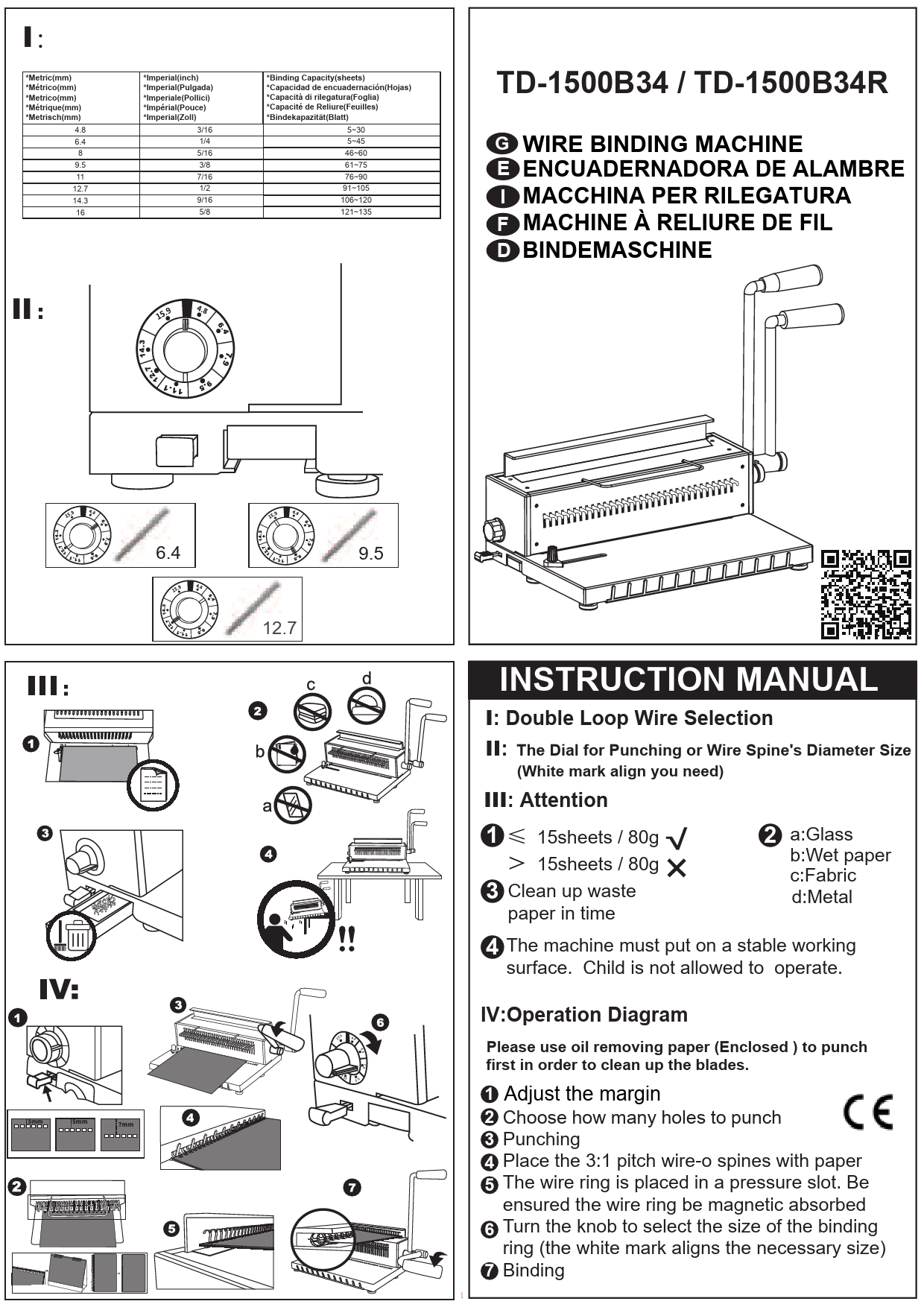
Familiarize yourself with the machine's parts, including the punching lever, margin depth adjuster, paper guides, and the wire closing mechanism. Refer to the diagram above for a visual guide.
Placement
Place the binding machine on a stable, flat surface. Ensure there is enough space around the machine for comfortable operation and to accommodate documents being punched and bound.
Operating Instructions
1. Adjusting the Margin Depth
The margin depth determines how far the holes are punched from the edge of your paper. Adjusting this is crucial for document durability and appearance.
- Locate the margin depth adjuster knob, typically on the side of the machine.
- Turn the knob to select your desired margin depth: 3 mm, 5 mm, or 7 mm. A deeper margin is recommended for thicker documents or larger binding spirals.

2. Punching Documents
Follow these steps to punch holes in your documents accurately.
- Ensure the margin depth is set correctly (see step 1).
- Align your paper against the paper guide. For letter-size documents, ensure they are flush with the guide.
- Insert a maximum of 12 sheets of 80 gsm paper into the punching slot. Do not exceed this capacity to prevent damage to the machine and ensure clean punches.
- Firmly press down the punching lever to punch the holes. Release the lever and remove the punched sheets.
- Repeat the process for all sheets in your document.

3. Binding Documents with Wire Spirals
After punching, assemble your document using wire binding spirals.
- Place the open wire binding spiral onto the wire holder on the machine, ensuring the open side faces upwards.
- Gather your punched documents and carefully thread the front cover, all internal pages, and the back cover onto the open wire spiral.
- Once all pages are on the wire, remove the document from the wire holder.
- Insert the document (with the wire) into the wire closing mechanism, ensuring the open ends of the wire are positioned correctly.
- Gently push the closing lever to close the wire spiral. Adjust the closing pressure if necessary to achieve a perfectly round bind.


4. Using Other Binding Spirals
The TD1202R is compatible with various 3:1 pitch binding spirals, including coil and click spirals. The general process for punching remains the same. For binding with coil or click spirals, follow the specific instructions provided with those binding supplies, as the closing mechanism may differ from wire spirals.

Official Product Videos
Burostyle TD-1200R Binding Machine: This video demonstrates the general operation and binding process for a machine similar to the TD1202R, providing a visual guide to punching and wire binding.
Rayson TD1202 Wire Binding - Usage Video: This video specifically shows the usage of a Rayson TD1202 model, which is very similar to the TD1202R, detailing the steps for wire binding documents.
Maintenance
Emptying the Waste Tray
Regularly empty the waste tray to prevent paper debris from accumulating and affecting the machine's performance.
- Locate the waste tray, usually at the bottom or side of the machine.
- Pull out the tray and dispose of the paper chads.
- Slide the tray back into place until it clicks securely.
General Cleaning
Keep the machine clean to ensure smooth operation.
- Wipe the exterior of the machine with a soft, dry cloth.
- Avoid using abrasive cleaners or solvents, as these can damage the finish.
- Periodically check the punching dies for any obstructions and remove them carefully if found.
Troubleshooting
Holes Not Cutting Completely
If you notice that some holes are not fully punched through, consider the following:
- Punching Knob Position: Ensure the punching knob is turned to the "PUNCHING" position. It should be turned clockwise.
- Overloading: Reduce the number of sheets being punched at once. Exceeding the 12-sheet capacity can lead to incomplete punches.
- Waste Tray: Check if the waste tray is full. An overflowing tray can impede the punching mechanism.
Machine Struggles to Punch
If the machine feels difficult to operate or struggles during punching:
- Reduce Sheet Count: Always adhere to the maximum punching capacity of 12 sheets (80 gsm). For heavier paper stock (e.g., 24# test paper), reduce the sheet count further (e.g., 4-6 sheets).
- Check for Obstructions: Inspect the punching slot for any foreign objects or jammed paper.
- Tighten Components: Ensure all adjustable knobs and levers are securely tightened before operation.
Specifications
| Manufacturer | RAYSON ELECTRICAL MFG. LTD. |
| Brand | Rayson |
| Model Number | TD1202R |
| Material Type | Metal |
| Punching Capacity | 12 sheets (80 gsm) |
| Binding Capacity | 120 sheets (80 gsm) |
| Hole Type | Round holes (4.5 mm diameter) |
| Number of Holes | 32 |
| Pitch | 3:1 |
| Adjustable Margin | 3 mm, 5 mm, 7 mm |
| Compatible Paper Size | Letter (21.6 x 28 cm) |
| Product Dimensions | 45.72 x 25.4 x 20.32 cm |
| Item Weight | 7.58 kg |
Warranty and Support
Warranty Information
This Rayson product is manufactured with high-quality materials and is designed for durability. For specific warranty details, please refer to the warranty card included with your purchase or contact Rayson customer support. Extended protection plans may also be available from third-party providers.
Customer Support
For technical assistance, spare parts, or any inquiries regarding your Rayson TD1202R binding machine, please contact Rayson customer support through their official website or the contact information provided in your product documentation. When contacting support, please have your model number (TD1202R) and purchase date available.