
Introduction
Welcome to your new Supersonic SC-1444BT Portable Bluetooth Speaker. This manual provides detailed instructions for the proper setup, operation, and maintenance of your device. Please read this manual thoroughly before use and retain it for future reference.
Package Contents
- Supersonic SC-1444BT Portable Bluetooth Speaker
- USB Charging Cable
- User Manual
Product Overview
Familiarize yourself with the speaker's components and controls.
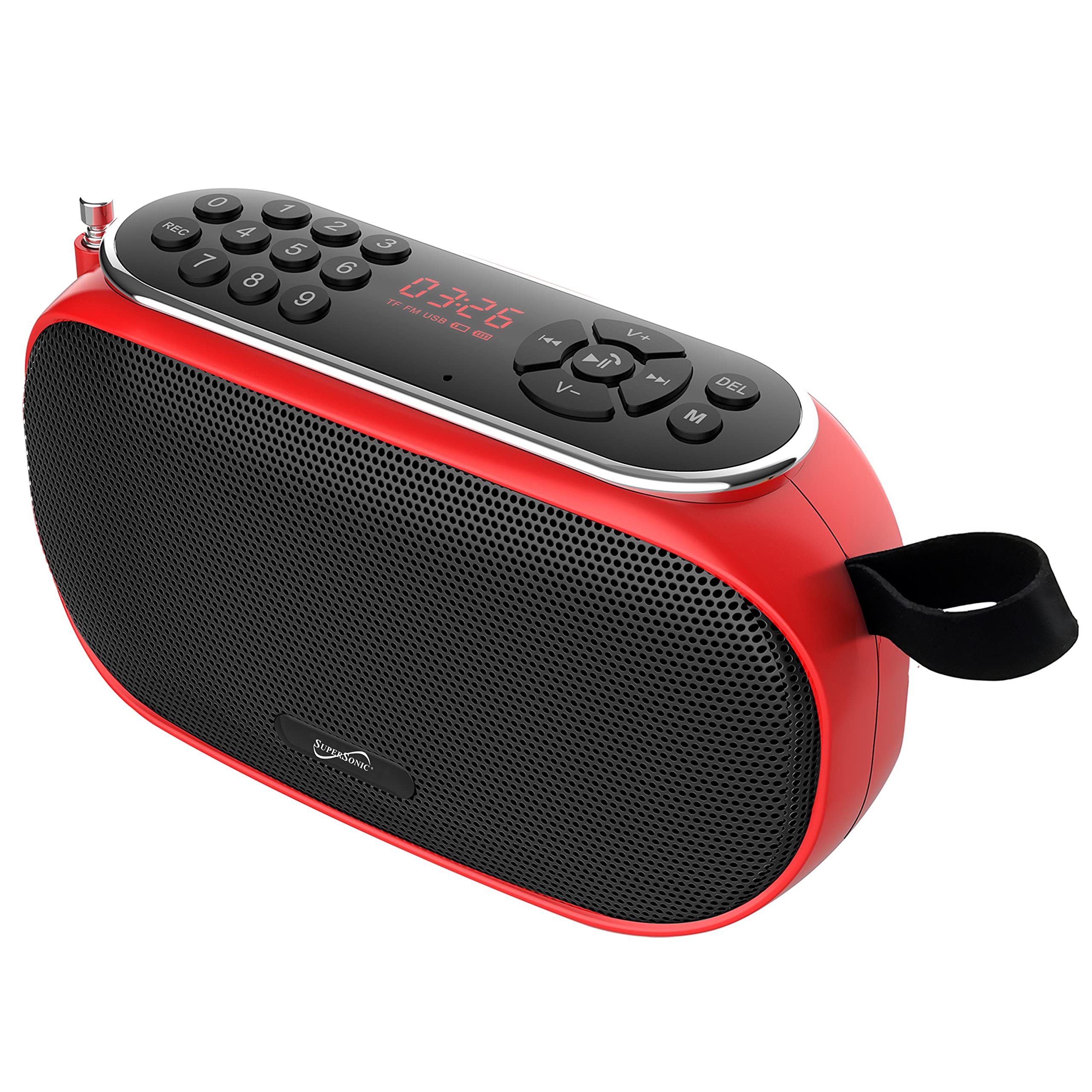
Image showing the front and top view of the Supersonic SC-1444BT Portable Bluetooth Speaker in red, highlighting the LED display and speaker grille.
Controls and Ports (Typical Layout)
- LED Display: Shows time, mode, and track information.
- Power Button: Press and hold to turn on/off.
- Mode Button: Cycles through Bluetooth, FM Radio, USB, Micro SD modes.
- Play/Pause Button: Controls playback, answers/ends calls, initiates auto-scan in FM mode.
- Volume Up / Next Track Button: Increases volume, skips to next track/station.
- Volume Down / Previous Track Button: Decreases volume, skips to previous track/station.
- USB Port: For USB flash drive playback.
- Micro SD Card Slot: For Micro SD card playback.
- Charging Port: Connects to USB charging cable.
- Telescopic Antenna: For improved FM radio reception.
Setup
1. Charging the Battery
- Connect the small end of the provided USB charging cable to the speaker's charging port.
- Connect the larger end of the USB cable to a USB power adapter (not included) or a computer's USB port.
- The LED indicator will illuminate to show charging status. Allow sufficient time for a full charge before first use.
2. Powering On/Off
- To power on, press and hold the Power Button until the LED display illuminates.
- To power off, press and hold the Power Button again until the LED display turns off.
Operating Instructions
1. Bluetooth Mode
- Power on the speaker. It will typically enter Bluetooth pairing mode automatically, indicated by a flashing Bluetooth icon on the LED display. If not, press the Mode Button to select Bluetooth mode.
- On your mobile device (smartphone, tablet, laptop), enable Bluetooth and search for available devices.
- Select "SC-1444BT" from the list of found devices to connect.
- Once connected, the speaker will emit a confirmation tone, and the Bluetooth icon on the display will stop flashing. You can now play audio from your device through the speaker.
- The effective Bluetooth range is approximately 33 feet (10 meters).
2. FM Radio Mode
- Extend the telescopic antenna fully for optimal reception.
- Press the Mode Button repeatedly until "FM" appears on the LED display.
- To auto-scan and save available stations, press the Play/Pause Button once. The speaker will scan and store stations automatically.
- Use the Volume Up / Next Track Button or Volume Down / Previous Track Button to navigate through the saved FM stations.
3. USB / Micro SD Playback
- Insert a USB flash drive or a Micro SD card (with audio files) into the corresponding port/slot on the speaker.
- The speaker will automatically detect the storage device and switch to USB or Micro SD mode, beginning playback of the audio files.
- Use the Play/Pause Button to pause or resume playback.
- Use the Volume Up / Next Track Button or Volume Down / Previous Track Button to skip tracks.
4. Hands-Free Calling
- When your speaker is connected to your smartphone via Bluetooth, incoming calls will be routed through the speaker.
- To answer an incoming call, press the Play/Pause Button once.
- To end an active call, press the Play/Pause Button once.
- To reject an incoming call, press and hold the Play/Pause Button.
5. Recording Function
The speaker supports audio recording. To use this feature:
- Ensure a USB flash drive or Micro SD card is inserted into the speaker to save recordings.
- Specific activation of the recording function may vary. Refer to the device's button labels or try pressing and holding the Mode Button or Play/Pause Button while in a playback mode to initiate recording.
- Press the same button again to stop recording.
6. Setting the Clock
The LED display features a clock. To set the time:
- With the speaker powered on, press and hold the Mode Button until the hour digits on the LED display begin to flash.
- Use the Volume Up / Next Track Button or Volume Down / Previous Track Button to adjust the hour.
- Press the Mode Button again to switch to minute adjustment. The minute digits will flash.
- Use the Volume Up / Next Track Button or Volume Down / Previous Track Button to adjust the minutes.
- Press the Mode Button one more time to confirm and save the time setting.
Maintenance
- Clean the speaker with a soft, dry cloth. Do not use abrasive cleaners or solvents.
- Avoid exposing the speaker to water, moisture, or extreme temperatures. This product is not water resistant.
- Store the speaker in a cool, dry place when not in use for extended periods.
- Do not attempt to disassemble or repair the speaker yourself. This will void the warranty.
Troubleshooting
| Problem | Possible Cause | Solution |
|---|---|---|
| Speaker does not power on. | Battery is depleted. | Charge the speaker using the provided USB cable. |
| Cannot connect via Bluetooth. | Speaker not in pairing mode; device Bluetooth off; out of range. | Ensure speaker is in Bluetooth mode and flashing; enable Bluetooth on your device; move device closer to speaker (within 33ft). |
| Poor FM radio reception. | Antenna not extended; weak signal area. | Fully extend the telescopic antenna; try moving the speaker to a different location. |
| No sound from USB/Micro SD. | Incorrect file format; card/drive not inserted correctly. | Ensure audio files are in a compatible format (e.g., MP3); reinsert the USB drive or Micro SD card firmly. |
Specifications
- Brand: Supersonic
- Model: SC-1444BT
- Bluetooth Version: 5.0
- Speaker Output Power: 5 Watts
- Battery: 1200mAh Rechargeable
- Bluetooth Range: 33 Feet (10 Meters)
- Speaker Size: 52 mm
- Dimensions (D x W x H): 5.5" x 2" x 3.25"
- Connectivity: Bluetooth, USB, Micro SD, FM Radio
- Additional Features: LED Clock Display, Hands-Free Calling, Recording, Repeat, Memory
- Water Resistance: Not Water Resistant
- Power Source: Battery Powered (1 CR5 battery required)
- Compatible Devices: Laptop, Smartphone, Tablet
Warranty and Support
Warranty Information
This Supersonic SC-1444BT Portable Bluetooth Speaker comes with a 90-day limited warranty from the date of purchase. This warranty covers manufacturing defects under normal use. It does not cover damage caused by misuse, accident, unauthorized modification, or external causes.
Customer Support
For technical assistance, warranty claims, or further information, please contact Supersonic customer support. Refer to the product packaging or the official Supersonic website for the most current contact details.


