
CANDY 31011162
User Manual
Candy CSTG272DVE/1-S Toploader Washing Machine
Model: 31011162
1. Introduction
Thank you for choosing the Candy CSTG272DVE/1-S Toploader Washing Machine. This manual provides essential information for the safe and efficient use of your appliance. Please read it carefully before installation and first use, and keep it for future reference.
This appliance is designed for domestic use only, specifically for washing machine-washable textiles in a household environment. Any other use is considered improper and potentially dangerous.
2. Safety Information
General Safety Warnings
- Always disconnect the appliance from the power supply before cleaning or performing maintenance.
- This appliance can be used by children aged from 8 years and above and persons with reduced physical, sensory or mental capabilities or lack of experience and knowledge if they have been given supervision or instruction concerning use of the appliance in a safe way and understand the hazards involved.
- Children should be supervised to ensure that they do not play with the appliance.
- Do not pull on the power cord to unplug the appliance. Always grasp the plug firmly and pull it out of the socket.
- Ensure the power cord is not trapped or damaged during installation.
- Do not install the appliance in a damp place or where it may be exposed to water splashes.
- Never open the door forcefully or use it as a step.
- Do not wash items that are soiled with flammable liquids.
- Keep pets away from the appliance.
Installation Safety
- The appliance must be installed by a qualified person in accordance with local regulations.
- Remove all transit bolts and packing materials before use. Failure to do so can cause significant damage.
- Ensure the appliance is level and stable to prevent excessive vibration and noise during operation.
- Connect the water inlet hose to a cold water tap. Do not use old hoses.
- The drain hose must be properly secured to prevent leaks.
3. Product Overview
Familiarize yourself with the main components of your washing machine.

Figure 3.1: Front view of the Candy CSTG272DVE/1-S Toploader Washing Machine. The image shows the white appliance with the top-loading lid closed, and the control panel visible at the top front.
Control Panel

Figure 3.2: Close-up view of the control panel. It features a central program selector knob, a digital display, and various touch buttons for options like temperature, spin speed, delay start, and Smart Touch connectivity.
The control panel allows you to select wash programs, adjust settings, and monitor the washing cycle.
- Program Selector Knob: Used to choose the desired wash program.
- Display: Shows remaining time, error codes, and selected options.
- Buttons:
- Temperature selection
- Spin speed selection
- Delay Start
- Options (e.g., pre-wash, extra rinse)
- Start/Pause
- Smart Touch (for app connectivity)
4. Setup and Installation
Unpacking
- Carefully remove the appliance from its packaging.
- Remove all transit bolts from the rear of the machine. These bolts secure the drum during transport and must be removed before operation. Keep them for future transport.
- Remove any polystyrene blocks or other packing materials from inside the drum.
Positioning
Place the washing machine on a firm, flat surface. Ensure there is adequate space around the appliance for ventilation and access.
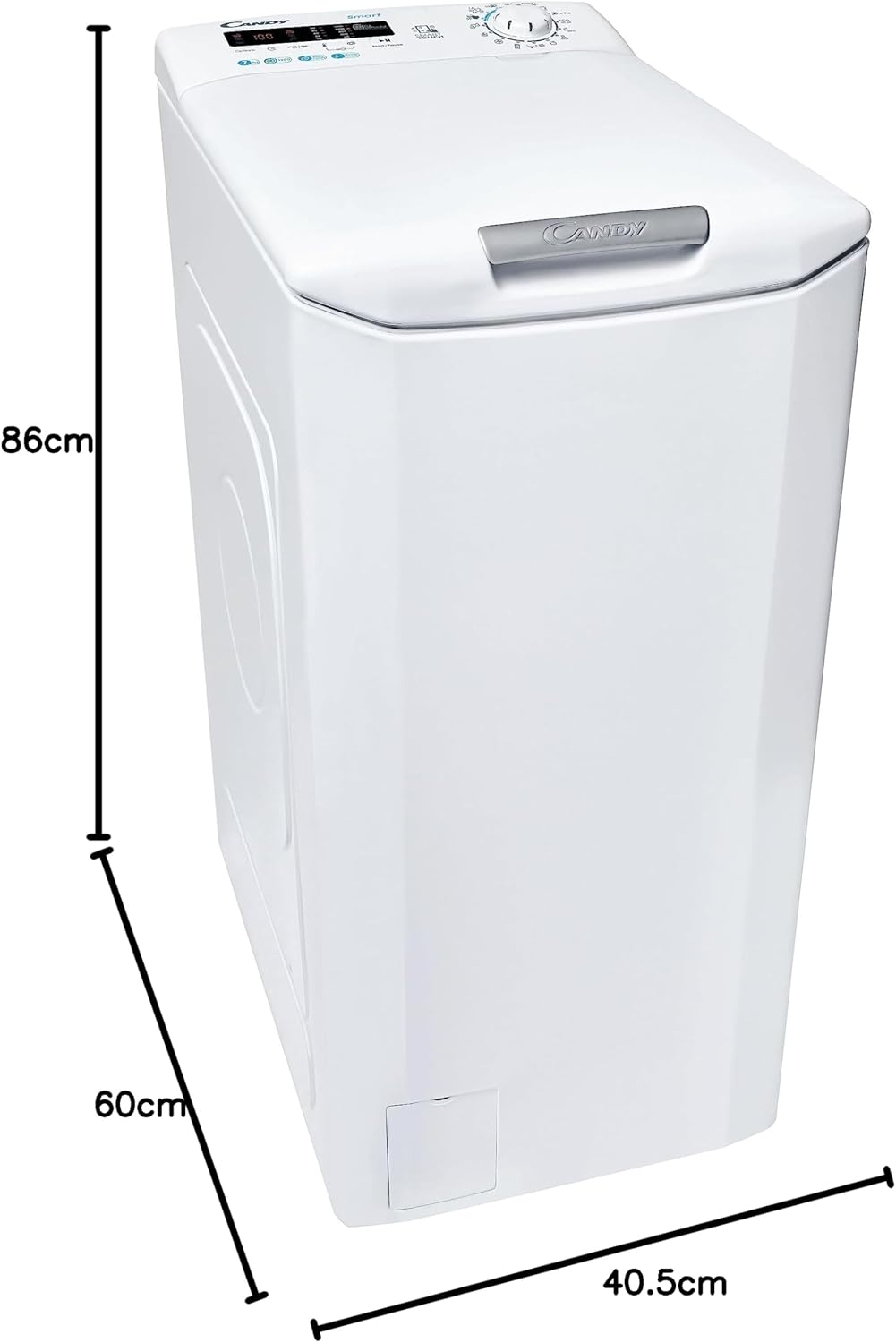
Figure 4.1: Diagram showing the dimensions of the washing machine: 86cm height, 60cm depth, and 40.5cm width. Ensure your installation space accommodates these measurements.
Levelling the Appliance
Use a spirit level to ensure the machine is perfectly level. Adjust the adjustable feet at the bottom of the machine until it is stable and does not rock.
Water Connection
- Connect the supplied water inlet hose to the cold water tap. Ensure the connection is tight to prevent leaks.
- Place the drain hose into a standpipe or over the edge of a sink, ensuring it is securely fixed to prevent it from falling out during draining. The height of the drain point should be between 60 cm and 100 cm from the floor.
Electrical Connection
- Plug the power cord into a grounded electrical outlet.
- Ensure the voltage and frequency of your power supply match the specifications on the appliance's rating plate.
- Do not use extension cords or multiple adapters.
5. Operating Instructions
Before First Use
Run a short wash cycle without laundry to clean the drum and remove any manufacturing residues. Use a small amount of detergent.
Loading Laundry
- Sort laundry by fabric type, color, and degree of soiling.
- Open the top lid and then the drum flaps.
- Load laundry loosely into the drum, ensuring not to overload. The maximum capacity is 7 kg.
- Close the drum flaps and then the top lid securely.
Adding Detergent and Additives
Open the detergent dispenser drawer, usually located on the top panel. Add detergent to the main wash compartment and fabric softener to the designated compartment. Refer to detergent packaging for recommended dosages.
Selecting a Wash Program
Turn the Program Selector Knob to choose the desired wash program. The display will show the default temperature and spin speed for that program.
The machine offers 17 standard cycles. Common programs include:
- Cotton
- Synthetics
- Delicates
- Wool/Hand Wash
- Quick Wash
- Rinse
- Spin
Adjusting Options
Use the touch buttons on the control panel to adjust the following:
- Temperature: Press the temperature button to cycle through available temperatures.
- Spin Speed: Press the spin speed button to select the desired RPM (up to 1200 rpm).
- Delay Start: Press this button to set a delay for the start of the wash cycle.
- Smart Touch: This feature allows you to control and monitor your washing machine via the Candy Simply-Fi app on your smartphone. Follow the app instructions for pairing.
Starting the Wash Cycle
Press the "Start/Pause" button to begin the selected wash program. The display will show the remaining time.
Pausing and Cancelling a Program
- To pause a program, press the "Start/Pause" button. Press it again to resume.
- To cancel a program, turn the Program Selector Knob to the "OFF" position, then select a new program or turn the machine off.
End of Cycle
At the end of the cycle, the display will show "End" or similar. The door will unlock after a short delay. Remove laundry promptly to prevent creasing.
6. Maintenance and Cleaning
Regular maintenance ensures optimal performance and extends the life of your appliance.
Cleaning the Exterior
Wipe the exterior surfaces with a soft, damp cloth. Do not use abrasive cleaners or solvents.
Cleaning the Detergent Dispenser
Periodically remove the detergent dispenser drawer and rinse it under running water to remove any detergent residue. Clean the housing with a brush.
Cleaning the Filter
The filter should be cleaned regularly to prevent blockages. Locate the filter cover at the bottom front of the machine. Place a shallow container underneath to catch any residual water. Unscrew the filter slowly to drain water, then remove and clean it under running water. Reinsert and tighten securely.
Drum Cleaning
Run a hot wash cycle (e.g., 60°C or 90°C Cotton program) with no laundry and a small amount of detergent or a specialized washing machine cleaner to prevent odors and build-up.
Winter Storage
If the machine is to be stored in an unheated area, drain all water from the hoses and pump to prevent freezing damage.
7. Troubleshooting
Before contacting service, check the following common issues and solutions.
| Problem | Possible Cause | Solution |
|---|---|---|
| Machine does not start | No power; Door not closed; Program not selected; Start/Pause not pressed. | Check power plug and fuse; Ensure door is firmly closed; Select a program; Press Start/Pause. |
| Water not filling | Water tap closed; Inlet hose kinked; Water pressure too low. | Open water tap; Straighten hose; Check household water pressure. |
| Machine not draining | Drain hose kinked/blocked; Filter blocked; Drain pump fault. | Check and clear drain hose; Clean pump filter; Contact service if issue persists. |
| Excessive vibration/noise | Transit bolts not removed; Machine not level; Uneven load. | Remove transit bolts; Adjust feet to level machine; Redistribute laundry evenly. |
| Detergent residue in dispenser | Insufficient water pressure; Detergent clumping; Dispenser dirty. | Check water pressure; Use less detergent or liquid detergent; Clean dispenser. |
For error codes displayed on the screen, refer to the Candy Simply-Fi app or the manufacturer's website for specific meanings and solutions.
8. Specifications
| Feature | Specification |
|---|---|
| Brand | CANDY |
| Model | CSTG272DVE/1-S (31011162) |
| Type | Toploader Washing Machine |
| Capacity | 7 Kilograms |
| Maximum Rotational Speed | 1200 RPM |
| Noise Level | 78 dB |
| Installation Type | Freestanding |
| Dimensions (H x W x D) | 86 cm x 40.5 cm x 60 cm |
| Weight | 56 kg |
| Voltage | 220 Volts |
| Control Console | Buttons |
| Number of Standard Cycles | 17 |
| Special Features | Smart Connectivity |
| Material | Steel Plastic |
9. Warranty and Support
Your Candy CSTG272DVE/1-S Washing Machine comes with a manufacturer's warranty. Please refer to the warranty card included with your appliance for specific terms and conditions, including warranty period and coverage details.
For technical assistance, spare parts, or to schedule a service appointment, please contact Candy customer support. Have your appliance's model number (31011162) and serial number ready when contacting support.
You may also find additional resources and FAQs on the official Candy website: www.candy-group.com
Related documents31011162


Ask a question about this manual
Ask about setup, troubleshooting, compatibility, parts, safety, or missing instructions. Manuals+ will review the question and use this page’s manual context to help answer it.