
EIGIIS K22
EIGIIS K22 Military Smart Watch User Manual
Model: K22 | Brand: EIGIIS
Introduction
This manual provides detailed instructions for the setup, operation, and maintenance of your EIGIIS K22 Military Smart Watch. Please read this guide thoroughly to ensure proper use and to maximize the functionality of your device.

Figure 1: EIGIIS K22 Military Smart Watch, showcasing its robust design and included additional strap.
What's in the Box
Upon opening the package, verify that all items are present:
- 1 x Smartwatch
- 1 x Charging Cable
- 1 x User Manual (this document)
Setup
1. Charging the Smart Watch
Before first use, fully charge the smartwatch. Connect the magnetic charging cable to the charging contacts on the back of the watch and plug the USB end into a compatible power adapter (not included). A full charge typically takes 1-2 hours and provides up to 30 days of standby time.

Figure 2: The smartwatch display indicating charging status and estimated charging time.
2. App Installation and Pairing
To unlock the full features of your K22 Smart Watch, download and install the "Da Fit" application on your smartphone. The app is available for both iPhone and Samsung (Android) devices.
- Scan the QR code provided in the watch's packaging or search for "Da Fit" in your phone's app store.
- Install the "Da Fit" app.
- Ensure Bluetooth is enabled on your smartphone.
- Open the "Da Fit" app and navigate to the device section. Tap "ADD A DEVICE".
- Select "K22" from the list of available devices to pair.
3. Enabling Bluetooth Dial Calls
For Bluetooth call functionality, an additional pairing step is required after the initial app connection:
- On your K22 Smart Watch, go to "Settings" and enable the "Phone: On" option.
- On your smartphone, go to your Bluetooth settings. Find the Bluetooth device named "K22_XXXX" (where XXXX corresponds to your watch's MAC address) and connect to it.
- Once connected, your K22 Smart Watch is ready for Bluetooth dial calls.

Figure 3: Visual guide for connecting the K22 Smart Watch to the "Da Fit" app and setting up Bluetooth call features.
Operating the Smart Watch
1. Bluetooth Dial Calls
With the Bluetooth call feature enabled, you can dial and answer calls directly from your smartwatch. The built-in speaker allows for convenient hands-free communication.

Figure 4: The smartwatch interface for making and receiving Bluetooth calls, alongside a smartphone displaying a call screen.
2. Health Tracking
The K22 Smart Watch provides comprehensive health monitoring features:
- Heart Rate Monitoring: Tracks your heart rate throughout the day.
- Blood Pressure Monitoring: Measures your blood pressure.
- Blood Oxygen (SpO2) Monitoring: Monitors your blood oxygen saturation levels.
- Sleep Monitoring: Analyzes your sleep patterns, including deep sleep, light sleep, and awake times.

Figure 5: The smartwatch screen showing real-time data for heart rate, blood pressure, and blood oxygen levels.
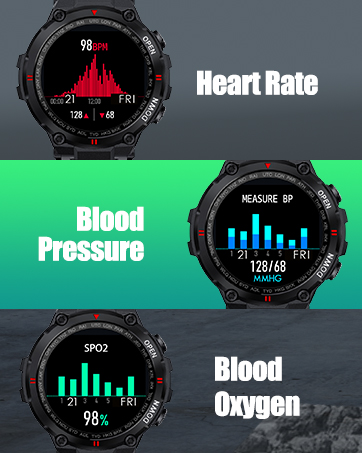
Figure 6: The smartwatch interface showing detailed sleep duration and quality analysis.
3. Multiple Sports Modes
The K22 Smart Watch supports various sports modes to accurately record your exercise data, including calories burned, distance covered, and heart rate during activity. Available modes include:
- Walking
- Running
- Cycling
- Skipping
- Badminton
- Basketball
- Football

Figure 7: The smartwatch showing an active training session with real-time data and icons representing different sports modes.
4. Bluetooth Music Control
Control your smartphone's music playback directly from your K22 Smart Watch. You can play, pause, skip tracks, and adjust volume without needing to access your phone.

Figure 8: The smartwatch screen showing music playback controls, allowing remote management of your phone's audio.
5. Notification Reminder
Receive call, SMS, and social media notifications directly on your smartwatch, ensuring you never miss important messages. The watch supports notifications from various applications.

Figure 9: The smartwatch and a smartphone showing incoming notifications from different messaging and social media applications.
6. APP Multiple Dial Options & Customization
Personalize your smartwatch with a wide array of watch faces available through the "Da Fit" app. You can choose from over 100 different styles or even customize your own dial to match your preferences.

Figure 10: The smartwatch showcasing different digital and analog watch face options available for customization.
7. Built-in Casual Games
The smartwatch includes built-in casual games for entertainment, allowing you to relax and pass the time directly from your wrist.

Figure 11: The smartwatch screen showing a simple game, indicating the presence of built-in entertainment features.
8. Weather Forecast
Access real-time weather forecasts directly on your smartwatch, providing current temperature and conditions to help you plan your day.
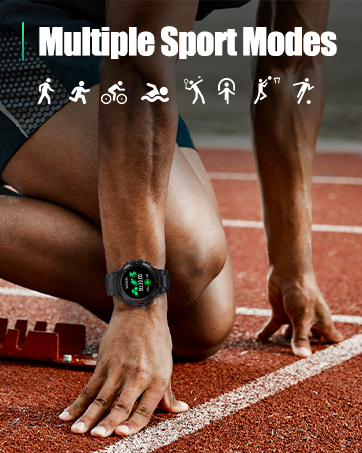
Figure 12: The smartwatch screen showing the current weather forecast, including temperature and sky conditions.
Maintenance
Water Resistance
The EIGIIS K22 Smart Watch is designed with a degree of water resistance. It is suitable for daily use such as hand washing and light rain exposure. However, it is not recommended for swimming, showering with hot water, or prolonged immersion in water. Exposure to hot water, steam, or high-pressure water jets can compromise the watch's seals and lead to damage. Damage caused by improper water exposure is not covered under warranty.
Cleaning
To clean your smartwatch, gently wipe the screen and body with a soft, dry, lint-free cloth. For stubborn smudges, a slightly damp cloth can be used, followed by immediate drying. Avoid using harsh chemicals, abrasive cleaners, or solvents, as these can damage the watch's finish and internal components.
Battery Care
To prolong battery life, avoid fully discharging the watch frequently. Charge the device when the battery level is low. Store the watch in a cool, dry place when not in use for extended periods.
Troubleshooting
- Watch not turning on: Ensure the watch is fully charged. Connect it to the charging cable and a power source for at least 30 minutes.
- Cannot pair with phone: Make sure Bluetooth is enabled on both the watch and your phone. Ensure the "Da Fit" app is installed and running. Try restarting both devices.
- Inaccurate health data: Ensure the watch is worn snugly on your wrist, not too tight or too loose. Clean the sensor on the back of the watch regularly. Note that health tracking features are for reference only and not for medical diagnosis.
- Notifications not appearing: Check app notification settings within the "Da Fit" app and your phone's system settings to ensure permissions are granted.
- Short battery life: Reduce screen brightness, disable unnecessary notifications, and limit continuous heart rate monitoring if not needed.
Specifications
| Feature | Detail |
|---|---|
| Model Name | Smart Watch |
| Brand | EIGIIS |
| Screen Size | 1.3 Inches |
| Shape | Round |
| GPS | True |
| Battery Cell Composition | Lithium Polymer |
| Connectivity Technology | Bluetooth |
| Memory Storage Capacity | 128 MB (Internal) |
| Item Weight | 5.6 ounces (160 Grams) |
| Product Dimensions | 1.2 x 4.3 x 6.5 inches |
| Date First Available | August 9, 2021 |
Warranty and Support
For detailed warranty information and further support, please refer to the official user guides provided by EIGIIS. You can access the PDF versions of the user guide and manual via the links below:
For additional assistance, please contact EIGIIS customer support through their official channels.
Related documentsK22


Ask a question about this manual
Ask about setup, troubleshooting, compatibility, parts, safety, or missing instructions. Manuals+ will review the question and use this page’s manual context to help answer it.