
Introduction
This manual provides essential instructions for the setup, operation, and maintenance of your Bestol replacement remote control. This remote is designed to be compatible with specific Furrion LCD LED TV models, including FEHD19A0A and FEFD22A0A, offering direct functionality without complex programming.
Product Overview
The Bestol remote control is a direct replacement unit, featuring a standard layout for easy navigation and control of your compatible Furrion television. It includes dedicated buttons for power, channel selection, volume adjustment, menu access, and various media playback functions.

Image 1: Front view of the Bestol remote control, showing all buttons including power, number pad, navigation, volume, channel, and media controls.

Image 2: Close-up view of the Bestol remote control buttons, highlighting the layout of the navigation cluster, menu, exit, and function keys.
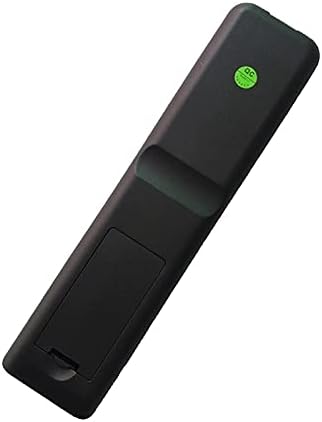
Image 3: Back view of the Bestol remote control, showing the battery compartment cover.
Setup
1. Battery Installation
- Locate the battery compartment on the back of the remote control (refer to Image 3).
- Slide the battery compartment cover downwards or outwards to open it.
- Insert two AAA batteries (not included), ensuring the positive (+) and negative (-) terminals align correctly with the markings inside the compartment.
- Replace the battery compartment cover by sliding it back into place until it clicks securely.
2. Initial Use
This Bestol remote control is designed as a direct replacement for compatible Furrion LCD LED TV models (FEHD19A0A, FEFD22A0A). No programming or pairing is typically required. Simply install the batteries and point the remote towards your television to begin operation.
Operating Instructions
Familiarize yourself with the button layout (refer to Image 1 and Image 2) to effectively control your Furrion TV.
- Power (ⓘ): Turns the TV on or off.
- Number Pad (0-9): Directly select channels.
- CH ▲/▼: Changes the channel up or down.
- VOL ▲/▼: Adjusts the volume up or down.
- Mute (🔇): Mutes or unmutes the TV audio.
- MENU: Accesses the TV's main menu.
- Navigation Arrows (◀ ▲ ▶ ▼): Navigates through menu options.
- ENTER: Confirms a selection in the menu.
- EXIT: Exits the current menu or on-screen display.
- SOURCE: Selects input sources (e.g., HDMI, AV).
- DISPLAY: Shows current channel information.
- EPG: Accesses the Electronic Program Guide (if supported by TV).
- SLEEP: Sets the TV sleep timer.
- FAV (Favorite List): Accesses favorite channels list.
- F.LIST / C.LIST: Function/Channel List access.
- MTS/AUDIO: Selects audio modes (e.g., Stereo, SAP).
- ASPECT: Changes the screen aspect ratio.
- PMODE (Picture Mode): Cycles through picture presets.
- SMODE (Sound Mode): Cycles through sound presets.
- Colored Buttons (Red, Green, Yellow, Blue): Functionality varies by TV model and context (e.g., teletext, interactive features).
- Media Playback Controls (GOTO, CC, SUBTITLE, INFO, REPEAT, A-B, TITLE, MENU PBC, Play, Pause, Stop, Rewind, Fast Forward, Previous, Next): Controls media playback on compatible devices or TV functions.
Maintenance
- Cleaning: Wipe the remote control with a soft, dry cloth. Do not use liquid cleaners or abrasive materials.
- Battery Replacement: Replace batteries when the remote's response becomes sluggish or stops working. Always replace both batteries at the same time with new ones of the same type (AAA).
- Storage: If the remote will not be used for an extended period, remove the batteries to prevent leakage and potential damage. Store in a cool, dry place.
- Avoid Exposure: Do not expose the remote to direct sunlight, extreme temperatures, high humidity, or liquids.
Troubleshooting
- Remote is not responding:
- Ensure fresh AAA batteries are correctly installed with the proper polarity.
- Check for any obstructions between the remote control and the TV's infrared sensor.
- Point the remote directly at the TV's sensor.
- Verify that the TV is powered on.
- Some buttons are not working:
- This remote is specifically designed for Furrion models FEHD19A0A and FEFD22A0A. Ensure your TV model is compatible.
- Clean the remote control, especially around the unresponsive buttons, to remove any dirt or debris.
- If only specific advanced functions are not working, your TV model might not support those particular features.
- Remote feels sluggish or has a short range:
- This usually indicates low battery power. Replace the batteries.
Specifications
| Brand | Bestol |
| Model Number | 8846985147994 |
| Compatible Devices | Furrion LCD LED Televisions (FEHD19A0A, FEFD22A0A) |
| Connectivity Technology | Infrared |
| Special Feature | Ergonomic design |
| Item Weight | 3.13 ounces (approx. 88.7 grams) |
| Package Dimensions | 8.39 x 2.36 x 0.87 inches (approx. 21.3 x 6.0 x 2.2 cm) |
| Batteries Required | Yes (2x AAA, not included) |
Warranty and Support
Specific warranty information for this Bestol remote control is not provided in the product details. For any warranty claims, technical support, or further assistance, please contact the seller or retailer from whom the product was purchased. Retain your proof of purchase for any inquiries.