
1. Introduction
This manual provides comprehensive instructions for the installation, operation, and maintenance of your AWESAFE 2DIN Car Radio, model Wince für Golf. Please read this manual thoroughly before using the device to ensure proper functionality and safety.
The AWESAFE car radio is designed for VW Golf 5 and Golf 6 models, featuring a 7-inch touchscreen, CD/DVD player, Mirrorlink, Bluetooth, USB, SD card support, and GPS navigation.
2. Setup and Installation
This section details the steps for installing your AWESAFE car radio. Professional installation is recommended.
2.1 Compatibility
This radio is specifically designed for the following Volkswagen models:
- VW Golf 5 (2003-2008)
- VW Golf 6 (2008-2013)
- VW Golf R32 (2003-2008)
- VW Golf GTI (2003-2008)
- VW Golf Plus (2005-2012)
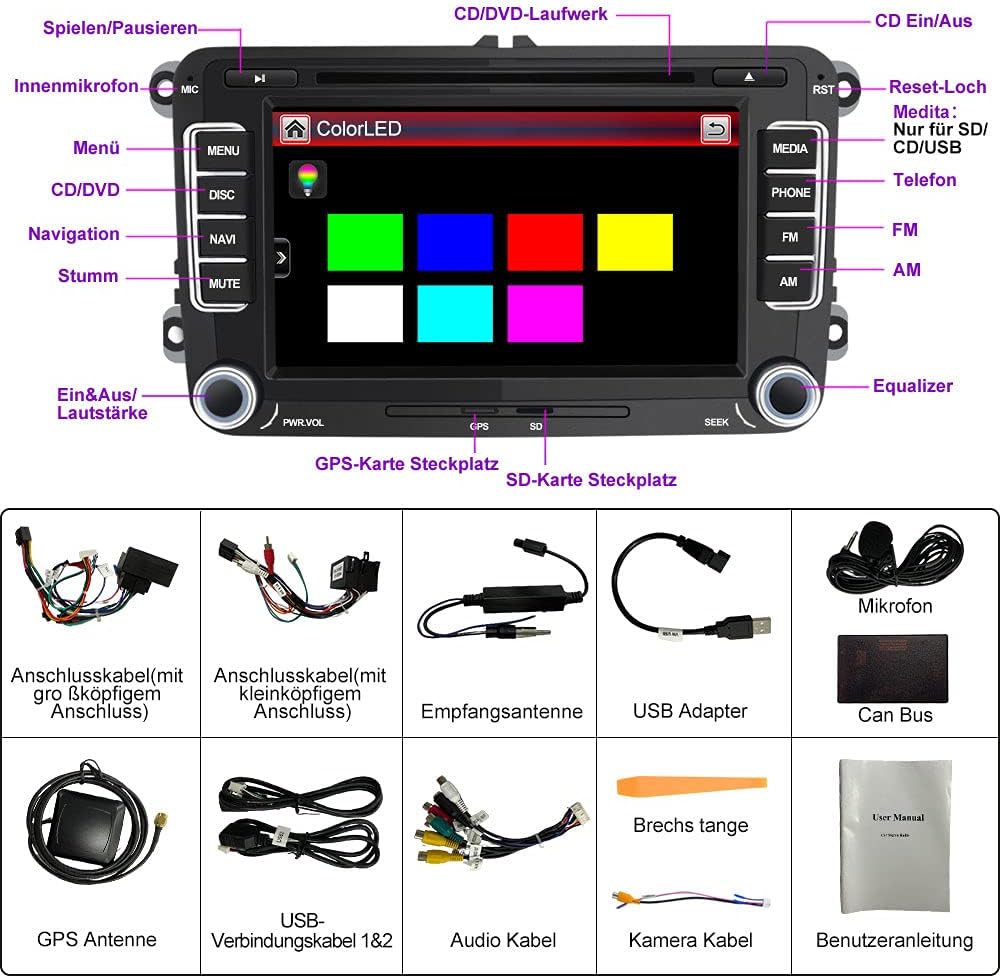
Image: AWESAFE car radio installed in a VW Golf dashboard, illustrating its compatibility with various Golf models.
2.2 Package Contents
Verify that all components are present in the package:

Image: A visual representation of all items included in the AWESAFE car radio package, such as the main unit, wiring harnesses, GPS antenna, USB cables, microphone, and the user manual.
- AWESAFE 2DIN Car Radio Unit
- Power Cable (large head connector)
- Power Cable (small head connector)
- Receiving Antenna
- USB Adapter
- Microphone
- Can Bus Decoder
- GPS Antenna
- USB Connection Cables (1 & 2)
- Audio Cable
- Camera Cable
- Pry Tool
- User Manual
2.3 Wiring and Connections
Proper wiring is crucial for the radio's functionality. Refer to the wiring diagram and specific instructions for your vehicle's CAN-BUS type.

Image: CAN-BUS wiring instructions for different vehicle types, showing connections for low and high CAN-BUS systems.
- For Low CAN-BUS Car Types (A): If there is NO "CAN" label on your original radio's wiring diagram, connect the CAN-BUS and the 8-pin connector, then remove the small black connection.
- For High CAN-BUS Car Types (B): If there IS a "CAN" label on your original radio's wiring diagram, connect the CAN-BUS to the 8-pin connector and remove the small black connection.

Image: Detailed wiring diagram for the car radio, illustrating connections for various peripherals and power.
Note: If your car supports steering wheel controls, you can configure them thanks to the included Canbus decoder.
2.4 CD/DVD Drive Preparation
Before using the CD/DVD drive, ensure to remove the two transport screws located on the top of the unit.

Image: Instructions for removing the transport screws from the CD/DVD drive.
2.5 DAB+ Installation (Optional)
If you have purchased a DAB+ module, follow these steps for installation:
- Connect the antenna and plug it into a USB port.
- Peel off the protective film from the copper strip and connect the copper strips of the antenna (adhesive strip) to the chassis (ground, -pole).
- Add the DAB app to the start page function in the factory settings.

Image: Visual guide for DAB+ antenna installation.
2.6 Rear View Camera Connection (Optional)
To connect a rear view camera (sold separately), follow the wiring diagram:

Image: Wiring diagram for connecting a rear view camera.
- Connect the RCA connector to the CAMERA input on the device.
- Connect the red wire to the positive electrode "+" of the reverse light.
- Connect the black wire to the negative electrode "-" of the reverse light.
3. Operating Instructions
This section covers the main functions and how to operate your AWESAFE car radio.
3.1 Basic Controls and Interface
The 7-inch touchscreen with 800 x 480 pixels resolution allows for intuitive operation using slide and scroll functions. The unit also features physical buttons for common functions.

Image: Overview of the car radio's main features and interface.
3.2 GPS Navigation
The device comes with offline maps and supports various languages including German, Dutch, English, and Turkish. The dual-zone function allows you to play music or radio while navigating.
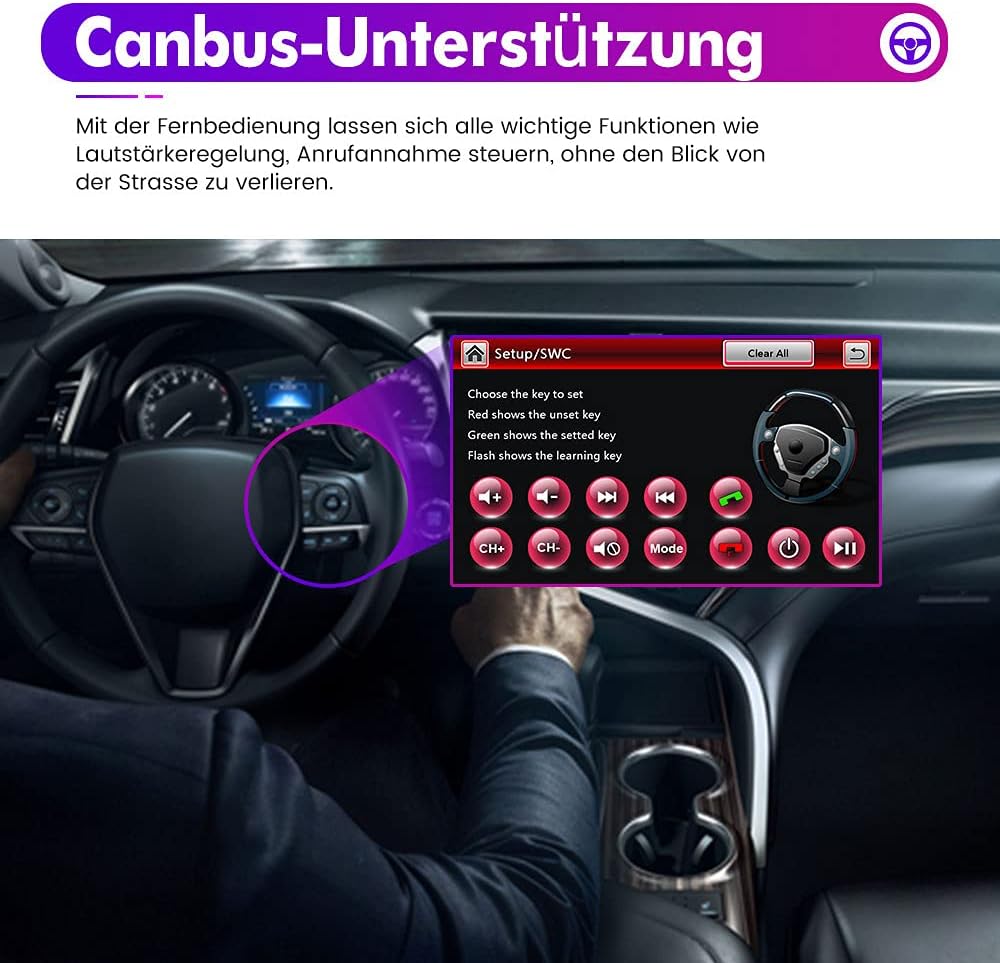
Image: GPS navigation screen displaying a map.
3.3 Bluetooth Connectivity
Connect your mobile phone via Bluetooth for hands-free calling and wireless music playback. The system supports Apple iOS and Android smartphones.
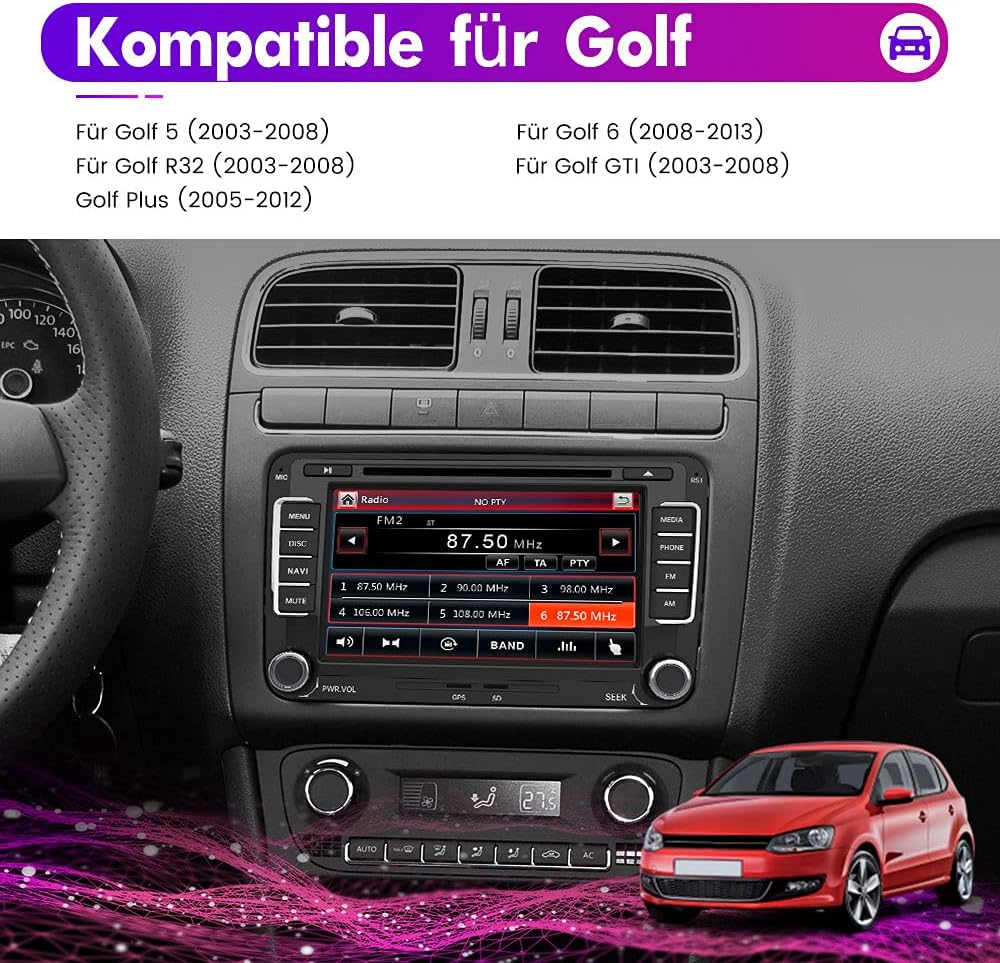
Image: Bluetooth connection interface.
3.4 Multimedia Playback
The car radio supports various media sources:
- CD/DVD Drive: Play audio CDs and video DVDs.
- USB/SD Card: View videos, photos, or listen to music from a USB stick or SD card.
- AUX Input: Connect external audio devices.
- AM/FM RDS Radio: Enjoy radio broadcasts with RDS information.
The unit also features a preset equalizer (Pop, Rock, Jazz, Classical, User-defined) for audio customization.
3.5 Mirrorlink Function
Mirror your Android smartphone screen onto the radio display. This allows you to control content from your phone directly on the car radio. Audio is transmitted via Bluetooth.

Image: Mirrorlink feature in action, displaying a smartphone screen on the car radio.
3.6 Steering Wheel Control
The device supports connection to your vehicle's steering wheel remote control, allowing you to manage important functions like volume control and call answering without taking your eyes off the road.

Image: Steering wheel control setup interface.
3.7 AV Output / Headrest Monitor Function
The AV output function allows for connecting headrest monitors, enabling passengers in the back to enjoy movies or videos.

Image: Headrest monitors connected via AV output.
3.8 Customizing Start Logo and Lighting
You can customize the start logo and choose from 7 adjustable lighting colors.
To customize the start logo:
- Copy the desired LOGO (image format 800 x 480 pixels) to an SD card.
- Insert the SD card into the GPS slot.
- From the main menu, navigate to "Settings" -> "Start Logo" -> Enter password (7749) -> Set the desired LOGO.

Image: Customizing the start logo.
4. Maintenance
To ensure the longevity and optimal performance of your AWESAFE car radio, follow these maintenance guidelines:
- Cleaning the Screen: Use a soft, lint-free cloth to gently wipe the touchscreen. Avoid abrasive cleaners or solvents that could damage the display.
- CD/DVD Drive: Keep the CD/DVD slot free from dust and debris. Avoid inserting damaged or dirty discs.
- Software Updates: While guaranteed software updates are unknown for this model, periodically check the manufacturer's website for any available firmware updates.
- General Care: Protect the unit from extreme temperatures, direct sunlight for prolonged periods, and excessive moisture.
5. Troubleshooting
This section addresses common issues you might encounter with your car radio.
5.1 Common Issues and Solutions
- No Power:
- Check all power connections and fuses.
- Ensure the car battery is adequately charged.
- No Sound:
- Verify speaker connections.
- Check volume settings and ensure the unit is not muted.
- Confirm audio source selection is correct.
- GPS Not Working / Inaccurate:
- Ensure the GPS antenna is properly connected and has a clear view of the sky.
- Verify map data is loaded correctly.
- Bluetooth Connection Issues:
- Ensure Bluetooth is enabled on both the radio and your mobile device.
- Delete previous pairings and try pairing again.
- Move your mobile device closer to the radio.
- CD/DVD Playback Errors:
- Ensure the transport screws have been removed (see Section 2.4).
- Use clean, unscratched discs.
- Steering Wheel Controls Not Responding:
- Verify CAN-BUS connection (see Section 2.3).
- Ensure controls are properly configured in the radio's settings.
If problems persist, please contact AWESAFE customer support.
6. Specifications
| Feature | Specification |
|---|---|
| Brand | AWESAFE |
| Model Name | Wince für Golf |
| Product Dimensions | 22 x 15 x 13 cm |
| Item Weight | 2.62 Kilograms |
| Display | 7-inch Touchscreen, 800 x 480 pixels |
| Operating System | Windows CE |
| Connectivity Technology | Bluetooth, USB |
| Connector Type | 3.5 mm jack, USB Type-A |
| Supported Audio Formats | MP3 |
| Supported Media Formats | Audio-CD |
| Compatible Devices | Mobile phone, MP3 player, USB device, microSD card |
| Number of Channels | 2 |
| Headphone Jack | None |
| Included Components | USB cable (among others, see package contents) |
| Guaranteed Software Updates Until | Unknown |
7. Warranty Information
The AWESAFE 2DIN Car Radio comes with a 1-year warranty from the date of purchase. This warranty covers manufacturing defects and malfunctions under normal use.
Please retain your proof of purchase for warranty claims. The warranty does not cover damage caused by improper installation, misuse, accidents, unauthorized repairs, or normal wear and tear.
8. Customer Support
For technical assistance, troubleshooting, or warranty inquiries, please contact AWESAFE customer support. Refer to the contact information provided with your product packaging or visit the official AWESAFE website.
When contacting support, please have your product model number (Wince für Golf) and ASIN (B092ZB3FQQ) ready.


