
1. Introduction
This manual provides comprehensive instructions for the installation, operation, and maintenance of the Blum T51.1901.PS Depth Adjustable Locking Device. This device is specifically designed for use with Blum B563 and B569 Series TANDEM drawer slides, offering precise depth adjustment for optimal drawer front alignment.
The T51.1901.PS features a captive right device and a self-aligning left device, along with self-adjusting drawer length tolerance, ensuring a secure and adaptable fit for your drawer systems.
2. Safety Information
Please read and understand all instructions before installation and use. Failure to follow these instructions may result in improper function or damage. Always use appropriate personal protective equipment (PPE) during installation, such as safety glasses.
- Ensure all components are securely fastened before operating the drawer.
- Do not attempt to modify the locking devices, as this may compromise their functionality and void any warranty.
- Keep small parts away from children to prevent choking hazards.
3. Package Contents
Verify that all components are present in your package:
- Two (2) Blum T51.1901.PS Depth Adjustable Locking Devices (Left)
- Two (2) Blum T51.1901.PS Depth Adjustable Locking Devices (Right)
Note: The locking devices are typically packaged by Dexter Group corp.
4. Setup and Installation
The Blum T51.1901.PS locking devices are designed for side-mount installation with Blum B563/B569 TANDEM plus slides. Follow these steps for proper installation:
4.1 Identifying Left and Right Devices

Figure 1: Front view of Blum T51.1901.PS locking devices. Note the orange release levers and white adjustment mechanisms.
The package includes both left and right locking devices. It is crucial to identify the correct device for each side of the drawer. The right device is captive, while the left device is self-aligning.
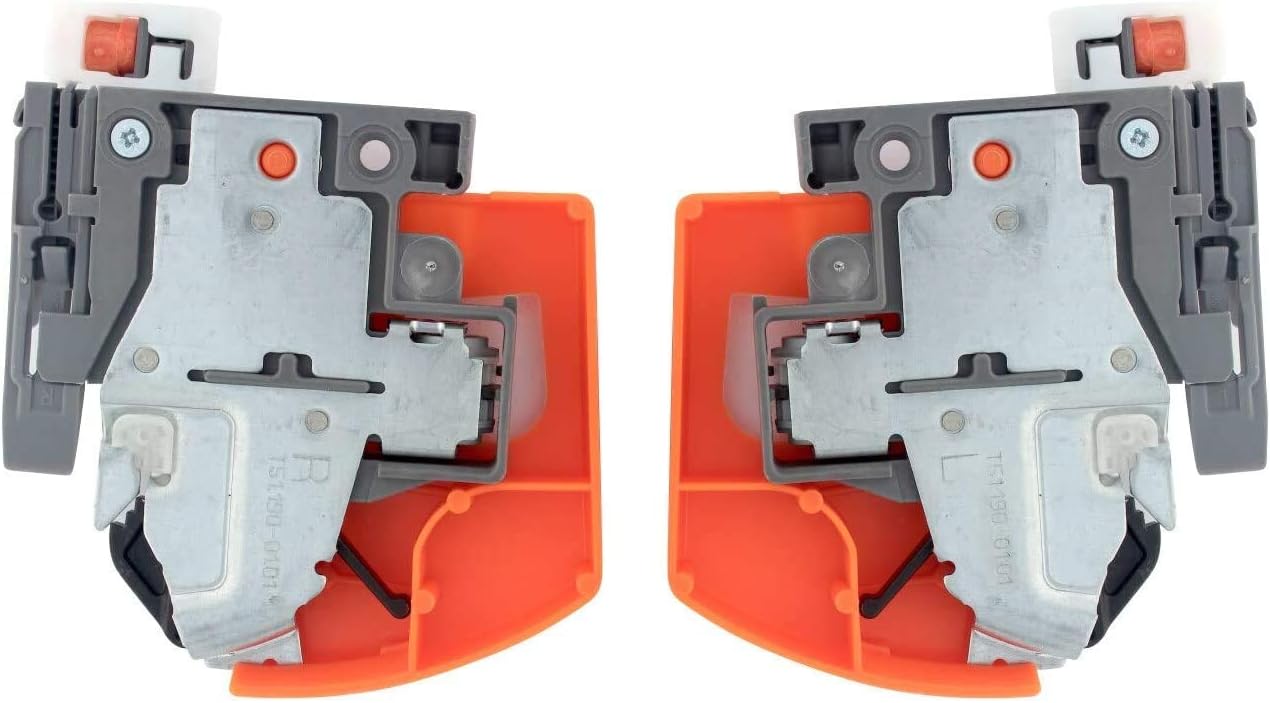
Figure 2: Rear view of Blum T51.1901.PS locking devices, showing the steel base and mounting points.
4.2 Attaching to the Drawer Box
- Position the locking device onto the underside of the drawer box, aligning it with the pre-drilled holes or marking the appropriate screw locations. Ensure the orange release levers face the front of the drawer.
- Secure the locking devices to the drawer box using appropriate screws (not included). Refer to your drawer slide instructions for specific screw types and lengths.

Figure 3: Illustration of how the locking device attaches to the underside of a drawer box, with arrows indicating the direction of insertion into the drawer slide.
4.3 Engaging with Drawer Slides
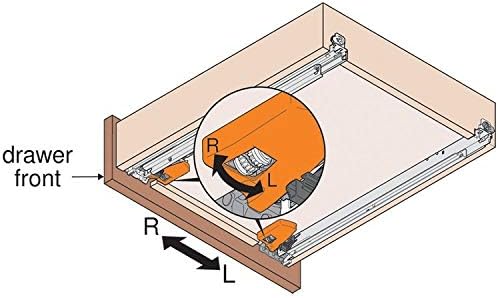
Figure 4: Diagram illustrating a drawer box with both left (L) and right (R) locking devices installed and engaged with the corresponding drawer slides. The arrows indicate the left-right adjustment capability.
- Extend the drawer slides (B563/B569 Series TANDEM plus) fully from the cabinet.
- Carefully align the locking devices on the drawer box with the corresponding slots on the drawer slides.
- Push the drawer box firmly into the slides until the locking devices click into place. Ensure both sides are securely engaged.
5. Operation: Depth Adjustment
The T51.1901.PS allows for precise depth adjustment of the drawer front to achieve perfect alignment with your cabinet. This adjustment is typically performed after the drawer is installed.
5.1 Adjusting Drawer Depth
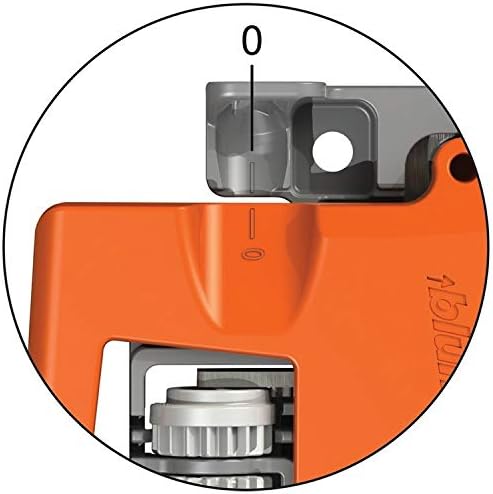
Figure 5: Close-up view of the depth adjustment mechanism on the Blum T51.1901.PS locking device. The '0' mark indicates the neutral position.
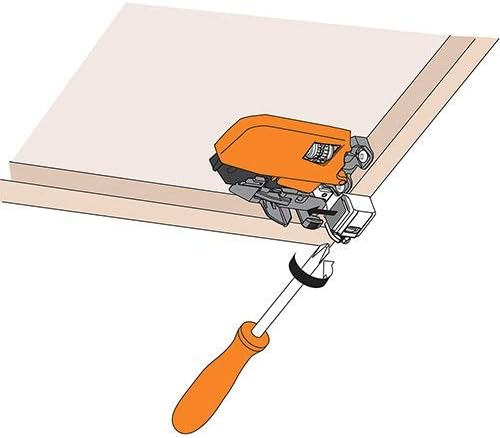
Figure 6: Illustration of a screwdriver being used to turn the adjustment screw on the locking device, allowing for fine-tuning of the drawer front depth.
- Locate the adjustment screw on the front of each locking device (visible when the drawer is open).
- Using a screwdriver, turn the adjustment screw clockwise to move the drawer front inwards (towards the cabinet) or counter-clockwise to move it outwards (away from the cabinet).
- Make small, incremental adjustments on both the left and right devices until the drawer front is perfectly flush and aligned with the surrounding cabinet fronts.
6. Maintenance
The Blum T51.1901.PS locking devices are designed for durability and require minimal maintenance.
- Cleaning: Wipe the devices with a soft, dry cloth to remove dust or debris. Avoid using abrasive cleaners or solvents, as these may damage the synthetic components.
- Inspection: Periodically check the locking devices and their screws for any signs of loosening or wear. Tighten screws if necessary.
- Lubrication: No lubrication is required for these locking devices.
7. Troubleshooting
If you encounter issues with your Blum T51.1901.PS locking devices, consider the following common solutions:
- Drawer front not flush: Use the depth adjustment screws as described in Section 5 to fine-tune the position. Ensure both left and right devices are adjusted evenly.
- Drawer not engaging slides: Ensure the locking devices are correctly aligned with the drawer slides and pushed in firmly until they click. Check for any obstructions.
- Drawer feels loose: Verify that all mounting screws for the locking devices are tight. Also, check the installation of the drawer slides themselves.
- Difficulty adjusting: Ensure the adjustment screw is not stripped. If it is, the device may need replacement.
8. Specifications
| Attribute | Detail |
|---|---|
| Model Number | T51.1901.PS |
| Brand | Blum |
| Compatibility | Blum B563/B569 Series TANDEM plus slides ONLY |
| Mounting Type | Side Mount |
| Material | Steel base with synthetic, spring-loaded release levers |
| Finish | Steel |
| Item Weight | 7.6 ounces (approximate, for the set) |
| Product Dimensions | 3.63"L x 3"W x 1"Th (approximate, per device) |
| Included Components | Two (2) Left, Two (2) Right T51.1901.PS Locking Devices |
9. Warranty Information
For specific warranty details regarding your Blum T51.1901.PS Depth Adjustable Locking Devices, please refer to the official Blum website or contact your authorized Blum dealer. Warranty terms typically cover manufacturing defects under normal use conditions.
10. Support
If you require further assistance or have questions not covered in this manual, please contact Blum customer support or consult with a qualified cabinet installer. You can typically find contact information on the official Blum website (www.blum.com).


