
Brookstone B-HHP-650J
Brookstone Max 2 Cordless Percussion Massager
Model: B-HHP-650J | Brand: Brookstone
Introduction
The Brookstone Max 2 Cordless Percussion Massager is designed to provide targeted relief and relaxation for various muscle groups. Its lightweight and ergonomic design ensures portability and ease of use, allowing for a customizable massage experience anytime, anywhere.
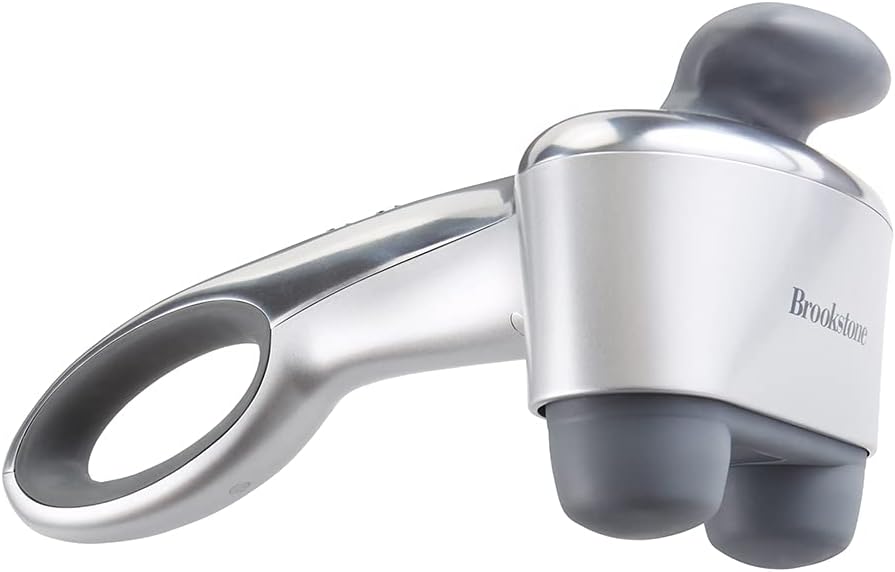
Image: The Brookstone Max 2 Cordless Percussion Massager, showcasing its sleek silver design and dual massage nodes.
Key Features:
- Targeted Relief: Pinpoint problematic areas such as neck, shoulders, back, and legs. Powerful dual pulsating massage heads knead deep to soothe and relax overworked muscles.
- Lightweight and Ergonomic Design: Aluminum construction makes this percussion massager lightweight and very portable. Its ergonomic rubber handle allows easy handling and gripping.
- Customizable Massage: Choose between 3 massage programs and 5 speed settings, ranging from a gentle relaxing massage to a more vigorous, deep tissue massage.
- Rechargeable Battery: Conveniently recharge the battery for up to 3 hours of relief. Use at home, the office, or while traveling, for relaxation anytime, anywhere.
Important Safety Information
Please read all instructions carefully before using this massager. Failure to do so may result in injury or damage to the device.
For detailed safety warnings and precautions, refer to the complete instruction booklet provided with your product. This device is intended for household use only and should not be used for medical purposes.
What's Included
Upon opening the package, ensure all components are present and in good condition:
- Brookstone Max 2 Cordless Percussion Massager
- Charging Adapter
- Instruction Booklet with Warranty Information
Setup and Charging
Before first use, fully charge your Brookstone Max 2 Cordless Percussion Massager. A full charge provides up to 3 hours of continuous use.
- Locate the charging port on the massager's handle.
- Connect the provided charging adapter to the massager.
- Plug the adapter into a standard electrical outlet.
- The indicator lights on the massager will illuminate to show charging progress. Once all lights are solid, the massager is fully charged.
- Disconnect the charger before use.

Image: The cordless design allows for flexible use in various environments, such as a gym.
Operating Instructions
The Brookstone Max 2 offers customizable massage programs and speed settings to suit your preferences.
Controls Overview:

Image: The control panel features buttons for selecting massage programs and adjusting speed, along with indicator lights.
- On/Off Button: Press to power the device on or off.
- Speed Control Button: Cycle through 5 intensity levels. Indicator lights show the current speed.
- Program Button: Select from 3 distinct massage programs:
- Pulsing: Provides a rhythmic, intermittent massage.
- Energizing: A more vigorous and continuous massage.
- Soothing: A gentle and steady massage for relaxation.
- Heat Button: Activate or deactivate the soothing heat function.
Using the Massager:
- Ensure the massager is fully charged or connected to power.
- Press the On/Off button to turn on the device. It will start on a default setting.
- Use the Program button to select your desired massage mode (Pulsing, Energizing, or Soothing).
- Adjust the massage intensity using the Speed Control button. There are 5 speed levels to choose from.
- For added comfort, press the Heat button to activate the soothing heat function.
- Apply the dual massage nodes to the desired muscle area. The ergonomic handle allows for easy reach to areas like the back, neck, shoulders, and legs.

Image: The massager's speed indicator lights, allowing users to easily see and adjust the intensity from 1 to 5.

Image: The massager being used on a man's shoulder, illustrating the soothing heat feature with red heat rings.

Image: The ergonomic handle provides a comfortable and secure grip, making it easy to maneuver the massager.

Image: Visual representation of the massager's versatility for full-body relaxation, targeting the neck, shoulders, back, and legs.
Care and Maintenance
Proper care will ensure the longevity of your massager:
- Always unplug the massager from the power outlet before cleaning.
- Wipe the surface of the massager with a soft, damp cloth. Do not use abrasive cleaners or harsh chemicals.
- Do not immerse the massager in water or any other liquid.
- Store the massager in a cool, dry place, away from direct sunlight and extreme temperatures.
- Avoid twisting or bending the power cord excessively.
Troubleshooting
If you experience issues with your massager, try the following steps:
- Device not turning on: Ensure the battery is fully charged. Connect the massager to the charging adapter and a power outlet. Check if the power outlet is functional.
- Weak massage intensity: Verify that the massager is set to a higher speed level. Ensure the massage nodes are making proper contact with the skin.
- Heat function not working: Confirm that the heat button has been pressed and the indicator light is on. Allow a few minutes for the heat to build up.
- Unusual noises: Discontinue use immediately and contact customer support if you hear any abnormal sounds.
If the problem persists after attempting these steps, please refer to the Warranty & Support section for further assistance.
Product Specifications
| Product Dimensions | 14.57 x 7.28 x 5.89 inches |
| Item Weight | 5.22 Pounds |
| Item Model Number | B-HHP-650J |
| Batteries | 1 Lithium Ion batteries required (included) |
| Power Source | Battery Powered |
| Material | Aluminum, Rubber |
| Manufacturer | HoMedics |
| ASIN | B092RHZBM9 |

Image: A diagram illustrating the compact dimensions of the massager for easy storage and handling.
Warranty and Support
The Brookstone Max 2 Cordless Percussion Massager comes with a 2-year Limited Warranty. For warranty claims or technical support, please contact the manufacturer, HoMedics, or refer to the contact information provided in your instruction booklet.
You can also find the official User Manual (PDF) for this product here for more detailed information.
Related documentsB-HHP-650J


Ask a question about this manual
Ask about setup, troubleshooting, compatibility, parts, safety, or missing instructions. Manuals+ will review the question and use this page’s manual context to help answer it.