
Other D28
D28 Smart Watch User Manual
Model: D28 | Brand: Other
1. Introduction
The D28 Smart Watch is a versatile wearable device designed to help you monitor your health and daily activities, stay connected, and manage various functions directly from your wrist. This manual provides essential information for setting up, operating, maintaining, and troubleshooting your smart watch.

Figure 1.1: Front view of the D28 Smart Watch, showcasing its square display and black silicone strap.
2. Setup
2.1 Charging the Device
Before first use, fully charge your D28 Smart Watch. The charging time is approximately 2-3 hours.
- Connect the charging cable to the charging port on the watch.
- Plug the other end of the cable into a standard USB power adapter (not included) or a computer's USB port.
- The watch display will indicate charging status.
2.2 App Download and Pairing
To unlock the full functionality of your D28 Smart Watch, you must pair it with your smartphone using the dedicated application.
- Scan the digital code provided with your bracelet to download the official application to your smartphone. The application is compatible with Android 4.4 / iOS 8.4 and above.
- Ensure Bluetooth is enabled on your smartphone.
- Open the downloaded application and follow the on-screen instructions to search for and connect to your D28 Smart Watch.
- Confirm the pairing request on both your watch and smartphone.
3. Operating Instructions
3.1 Basic Navigation
The D28 Smart Watch features a responsive touch screen for easy navigation. Swipe left, right, up, or down to access different menus and functions. Tap to select an option.
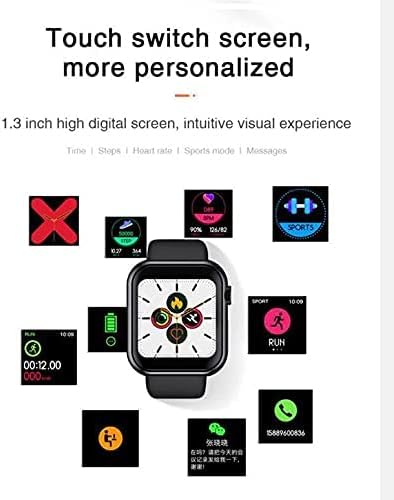
Figure 3.1: The D28 Smart Watch display showing different personalized screens and data points, including time, steps, heart rate, and sports mode.
3.2 Activity Tracking
The watch continuously monitors your daily activity and health metrics.
- Steps, Calories, Distance: View your daily step count, calories burned, and distance covered directly on the watch or in the connected app.
- Heart Rate & Blood Pressure: The watch is equipped with sensors for heart rate and blood pressure detection. Access these functions from the main menu to take a measurement.
- Multi-Sport Mode: The watch supports various sports modes including Climbing, Walking, Basketball, Running, Table Tennis, Cycling, Swimming, Badminton, and Football. Select the appropriate mode before starting your activity for accurate tracking.
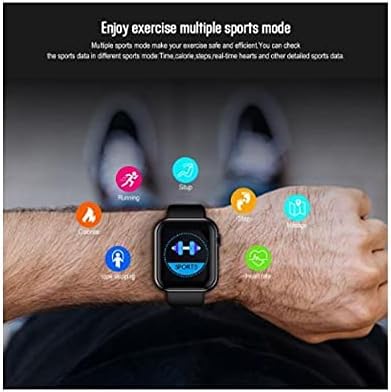
Figure 3.2: A user wearing the D28 Smart Watch, with icons representing various sports modes and health metrics like heart rate, steps, and calories.
3.3 Sleep Monitoring
The watch automatically monitors your sleep patterns, including sleep time and distinctions between night and day sleep. Review your sleep data in the companion application for insights into your sleep quality.
3.4 Notifications and Reminders
Once paired with your smartphone, the D28 Smart Watch can display various notifications and reminders:
- Date Reminder
- SMS Reminder
- WeChat Reminder
- Facebook Notifications
- Alarm Reminders
- Medicine / Meeting / Drinking Water Reminders
3.5 Remote Camera Control
Control your smartphone's camera remotely using your D28 Smart Watch.

Figure 3.3: The D28 Smart Watch displaying a camera icon, indicating its ability to remotely control a paired smartphone's camera function by shaking the watch band.
- Connect the phone through Bluetooth.
- Long press on the watch to enter the photo function.
- Control the photograph on your phone by shaking the watch band to take a photo.
3.6 Finding Your Phone or Watch
The watch includes a feature to help you locate your paired smartphone, and vice versa, the app can help you find your watch.

Figure 3.4: The D28 Smart Watch display showing a 'MORE' option, typically leading to additional settings or features.
4. Maintenance
4.1 Water Resistance
The D28 Smart Watch has an IP67 water rating. This means it is resistant to splashes and brief immersion. It is suitable for hand washing but should not be immersed into deep water and is not suitable for swimming.
4.2 Cleaning
To maintain the watch's appearance and functionality:
- Wipe the watch and strap regularly with a soft, dry, lint-free cloth.
- If necessary, dampen the cloth slightly with water. Avoid using harsh chemicals, cleaning solvents, or strong detergents.
- Ensure the charging contacts are clean and dry before charging.
4.3 Battery Care
- Avoid exposing the watch to extreme temperatures (very hot or very cold), as this can affect battery life.
- Do not allow the battery to fully discharge frequently, as this can reduce its overall lifespan.
5. Troubleshooting
If you encounter issues with your D28 Smart Watch, refer to the following common problems and solutions:
| Problem | Possible Cause | Solution |
|---|---|---|
| Watch does not power on | Low battery; Device frozen | Charge the watch for at least 30 minutes; Perform a hard reset (refer to app for specific instructions). |
| Cannot pair with smartphone | Bluetooth off; App not running; Watch not in pairing mode | Ensure Bluetooth is on for both devices; Restart the app and watch; Check app for pairing instructions. |
| Inaccurate health data (HR, steps) | Improper fit; Sensor obstruction | Ensure watch is snug but comfortable on wrist; Clean the sensor on the back of the watch. |
| Notifications not received | App permissions; Bluetooth disconnected | Check app notification settings and phone permissions; Reconnect Bluetooth. |
| Touch screen unresponsive | Software glitch; Screen dirty | Restart the watch; Clean the screen with a soft cloth. |
6. Specifications
| Feature | Detail |
|---|---|
| Model Number | D28 |
| Brand | Other |
| Operating System Compatibility | Android 4.4 / iOS 8.4 and above |
| Display Type | Color IPS Screen |
| Screen Size | 1.3 inches (33 Millimeters) |
| Resolution | 240 x 240 |
| Connectivity | Bluetooth 4.0 |
| Water Resistance Rating | IP67 (Hand wash only, not for deep water immersion or swimming) |
| Charging Time | Approximately 2-3 hours |
| Band Material | Silicone |
| Color | Black |
| Item Weight | 450 g |
| Package Dimensions | 8 x 7.8 x 4 cm |
7. Warranty and Support
Information regarding product warranty and customer support was not available in the provided product data. Please refer to the product packaging, the seller's website, or contact the retailer directly for details on warranty coverage and support options for your D28 Smart Watch.
Related documentsD28


Ask a question about this manual
Ask about setup, troubleshooting, compatibility, parts, safety, or missing instructions. Manuals+ will review the question and use this page’s manual context to help answer it.