
1. Introduction
This manual provides essential information for the safe and effective operation, maintenance, and troubleshooting of your Crown CT11023 Multi-function Plunge Router. Please read this manual thoroughly before using the tool to ensure proper handling and to prevent injury or damage.
1.1 Safety Information
Always observe general power tool safety guidelines. Failure to follow these instructions may result in electric shock, fire, and/or serious injury.
- Work Area Safety: Keep the work area clean and well-lit. Cluttered or dark areas invite accidents.
- Electrical Safety: Do not expose power tools to rain or wet conditions. Avoid body contact with earthed or grounded surfaces.
- Personal Safety: Always wear eye protection, hearing protection, and a dust mask. Dress properly; avoid loose clothing or jewelry.
- Tool Use and Care: Do not force the power tool. Use the correct power tool for your application. Disconnect the plug from the power source before making any adjustments, changing accessories, or storing power tools.
1.2 Intended Use
The Crown CT11023 Multi-function Plunge Router is designed for routing wood, plastic, and similar materials. It is suitable for creating decorative edges, grooves, dados, and other woodworking joints. This tool is intended for domestic and light professional use.
2. Product Overview
Familiarize yourself with the components of your Crown CT11023 Plunge Router before operation.
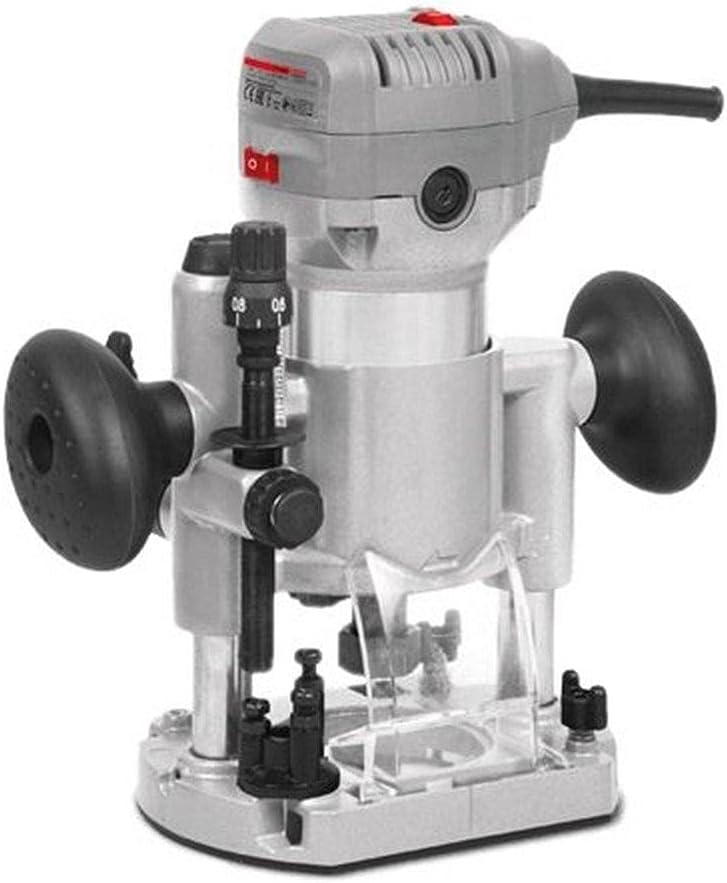
Figure 2.1: Overall view of the Crown CT11023 Multi-function Plunge Router. This image displays the main body, handles, depth adjustment mechanism, and power switch.
2.1 Main Components
- Motor Housing: Contains the electric motor.
- Handles: Ergonomic grips for control during operation.
- Power Switch: On/Off control for the motor.
- Depth Adjustment Knob: Used to precisely set the routing depth.
- Plunge Lock Lever: Secures the router at a desired depth.
- Collet Nut: Secures the router bit in place.
- Base Plate: Provides a stable surface for guiding the router over the workpiece.
- Dust Extraction Port: For connecting a dust collection system (if applicable).

Figure 2.2: Side view of the Crown CT11023 Router, illustrating a fixed base attachment. This configuration is often used for edge routing or when a compact form factor is preferred.

Figure 2.3: Another side view of the Crown CT11023 Router, showing a different base configuration, potentially for trimming or specialized routing tasks. Note the black grip for enhanced control.
3. Setup
3.1 Bit Installation
- Ensure the router is unplugged from the power source.
- Press and hold the spindle lock button (if present) to prevent the spindle from rotating.
- Loosen the collet nut using the provided wrench.
- Insert the router bit into the collet, ensuring at least 3/4 of the shank is seated. Do not bottom out the bit.
- Tighten the collet nut firmly with the wrench. Do not overtighten.
- Release the spindle lock.
3.2 Depth Adjustment
- Ensure the router is unplugged.
- Place the router on a flat surface with the desired bit installed.
- Release the plunge lock lever.
- Lower the router until the bit touches the workpiece surface.
- Engage the plunge lock lever to hold the router at this zero depth.
- Adjust the depth adjustment knob or scale to the desired routing depth.
- Release the plunge lock lever before starting the router.
4. Operating
4.1 Powering On/Off
- To Turn On: Ensure the router bit is clear of the workpiece. Press the power switch to the "ON" position. Allow the motor to reach full speed before contacting the workpiece.
- To Turn Off: Release the power switch or press it to the "OFF" position. Wait for the bit to stop completely before setting the tool down.
4.2 Routing Techniques
- Direction of Feed: Always feed the router against the rotation of the bit. This provides better control and prevents the router from "climbing" over the workpiece.
- Shallow Cuts: For deeper cuts, make multiple shallow passes instead of one deep pass. This reduces strain on the motor and bit, and improves cut quality.
- Workpiece Securement: Always clamp your workpiece securely to a stable surface.
- Practice: Practice on scrap material before routing your final workpiece.
5. Maintenance
Regular maintenance ensures the longevity and safe operation of your router.
5.1 Cleaning
- Always unplug the tool before cleaning.
- Use a soft brush or compressed air to remove dust and debris from the ventilation openings and around the collet area.
- Wipe the exterior with a damp cloth. Do not use harsh chemicals or solvents.
- Keep the base plate clean to ensure smooth gliding over the workpiece.
5.2 Storage
- Store the router in a dry, secure location, out of reach of children.
- Ensure the power cord is neatly coiled and not kinked.
- Remove any router bits from the collet before storage.
6. Troubleshooting
This section addresses common issues you might encounter with your router.
| Problem | Possible Cause | Solution |
|---|---|---|
| Router does not start. | No power supply; faulty switch; motor issue. | Check power connection. Ensure switch is "ON". If problem persists, consult qualified service personnel. |
| Poor cut quality (e.g., burning, rough edges). | Dull bit; incorrect feed rate; wrong bit for material; excessive depth of cut. | Replace or sharpen bit. Adjust feed rate. Use appropriate bit. Make multiple shallow passes. |
| Excessive vibration. | Loose bit; bent bit; damaged bearings. | Ensure bit is securely tightened. Replace bent bit. If bearings are suspected, seek professional service. |
7. Specifications
Technical data for the Crown CT11023 Multi-function Plunge Router.
| Feature | Detail |
|---|---|
| Model Number | CT11023 |
| Brand | Crown |
| Power Source | Corded Electric |
| Power Input | 710 W |
| Collet Size | 6 mm |
| Item Weight | 209 g (0.21 kg) |
| Product Dimensions | 10 x 20 x 37 cm |
| Color | Grey-Black |
8. Warranty and Support
For warranty information, please refer to the warranty card included with your product or contact your local Crown dealer. Keep your purchase receipt as proof of purchase.
For technical support or service inquiries, please contact Crown customer service or an authorized service center. Contact details can typically be found on the manufacturer's official website or on the product packaging.
