
1. Introduction
This manual provides detailed instructions for the installation, operation, and maintenance of your AWESAFE 9-inch Touch Screen Car Radio Stereo. This unit is specifically designed for Jeep Grand Cherokee WK2 models from 2014 to 2017. Please read this manual thoroughly before installation and use to ensure proper function and safety.
2. Safety Information
- Professional Installation Recommended: Due to the complexity of vehicle electronics, professional installation is highly recommended to prevent damage to the unit or your vehicle.
- Power Disconnection: Always disconnect the vehicle's battery before beginning any installation or wiring work.
- Wiring: Ensure all wiring connections are secure and properly insulated to prevent short circuits. Refer to the wiring diagram provided with the product.
- Operation While Driving: Do not operate the unit in a manner that distracts you from driving. Always prioritize road safety.
- Temperature: Avoid exposing the unit to extreme temperatures or direct sunlight for prolonged periods.
3. Package Contents
Verify that all items listed below are included in your package:

This image displays the various components included with your AWESAFE car radio stereo, such as cables, modules, and tools.
- Main Head Unit (9-inch Touch Screen)
- Power Cable
- RCA Cable
- USB Cable 1
- USB Cable 2
- CAN Bus Decoder
- External Speaker (if applicable)
- Microphone
- GPS Module
- Screwdriver
- Reversing Line (for rear camera connection)
- Crowbar (for trim removal)
- Antenna Adapter Cable
Note: A separate power harness (ASIN: B097241R1Q) may be required and is sold separately. Please ensure you have the correct harness for your vehicle model year.
4. Setup and Installation
This section outlines the general steps for installing the AWESAFE car radio stereo. Specific vehicle disassembly instructions are not provided here and should be referenced from your vehicle's service manual or a professional installer.
4.1 Compatibility
This unit is designed for Jeep Grand Cherokee WK2 models manufactured between 2014 and 2017.
4.2 Pre-Installation
- Disconnect Battery: Before starting, disconnect the negative terminal of your vehicle's battery to prevent electrical shorts.
- Remove Old Unit: Carefully remove the existing factory radio and trim panels using appropriate tools, such as the provided crowbar.

This image illustrates the visual difference in the dashboard console before and after the AWESAFE car radio stereo is installed.
4.3 Wiring Connections
Connect the provided cables to the corresponding ports on the AWESAFE head unit and your vehicle's wiring harness. Ensure all connections are firm and correct.

This image displays the rear of the head unit, highlighting the various input and output ports for connecting power, speakers, USB devices, and other accessories.
- Power Cable: Connect the main power harness. Ensure the CAN Bus decoder is correctly integrated if your vehicle requires it for steering wheel controls or other functions.
- USB Cables: Connect the USB extension cables for external USB devices.
- GPS Antenna: Connect the GPS module and mount the antenna in a location with a clear view of the sky (e.g., on the dashboard).
- Microphone: Connect the external microphone for hands-free calling and voice commands. Mount it in a suitable location for clear audio pickup.
- RCA Cables: Connect RCA cables for external amplifiers, subwoofers, or auxiliary video inputs/outputs.
- Reversing Line: If installing a rear camera, connect its video input to the designated reversing line input on the head unit.
- Antenna Adapter: Connect the vehicle's radio antenna to the head unit using the provided adapter.
4.4 Mounting the Unit
Once all connections are made, carefully slide the AWESAFE head unit into the dashboard opening. Secure it using the vehicle's mounting brackets and screws. Reinstall all trim panels.
This image shows the AWESAFE car radio stereo seamlessly integrated into the dashboard of a Jeep Grand Cherokee.
4.5 Post-Installation
Reconnect the vehicle's battery. Turn on the ignition and power on the head unit. Perform initial setup steps on the screen, such as language selection, time zone, and network configuration.
5. Operating Instructions
The AWESAFE car radio stereo runs on an Android 10.0 operating system, offering a wide range of features and applications.
5.1 Android 10.0 System

This icon signifies the Android 10.0 operating system, which powers the head unit's interface and applications.
The unit features a user-friendly interface similar to an Android tablet. Navigate through menus by touching the screen. Access various applications from the home screen or app drawer.
5.2 Bluetooth Functionality
This image illustrates the Bluetooth interface, showing options for dialing phone numbers and playing music wirelessly from a connected device.
- Pairing: Go to the Bluetooth settings on the head unit and enable Bluetooth. On your mobile device, search for available devices and select the AWESAFE unit to pair.
- Hands-Free Calling: Once paired, you can make and receive calls directly from the head unit's screen using the external microphone.
- Audio Streaming: Stream music and other audio from your paired mobile device to the car stereo speakers.
5.3 GPS Navigation

This image displays the GPS navigation interface, showing a map with highlighted routes and destination markers.
The unit comes with pre-installed navigation software. Ensure the GPS antenna is properly connected and positioned for optimal signal reception. Access the navigation application from the main menu to input destinations and receive turn-by-turn directions.
5.4 WiFi Applications
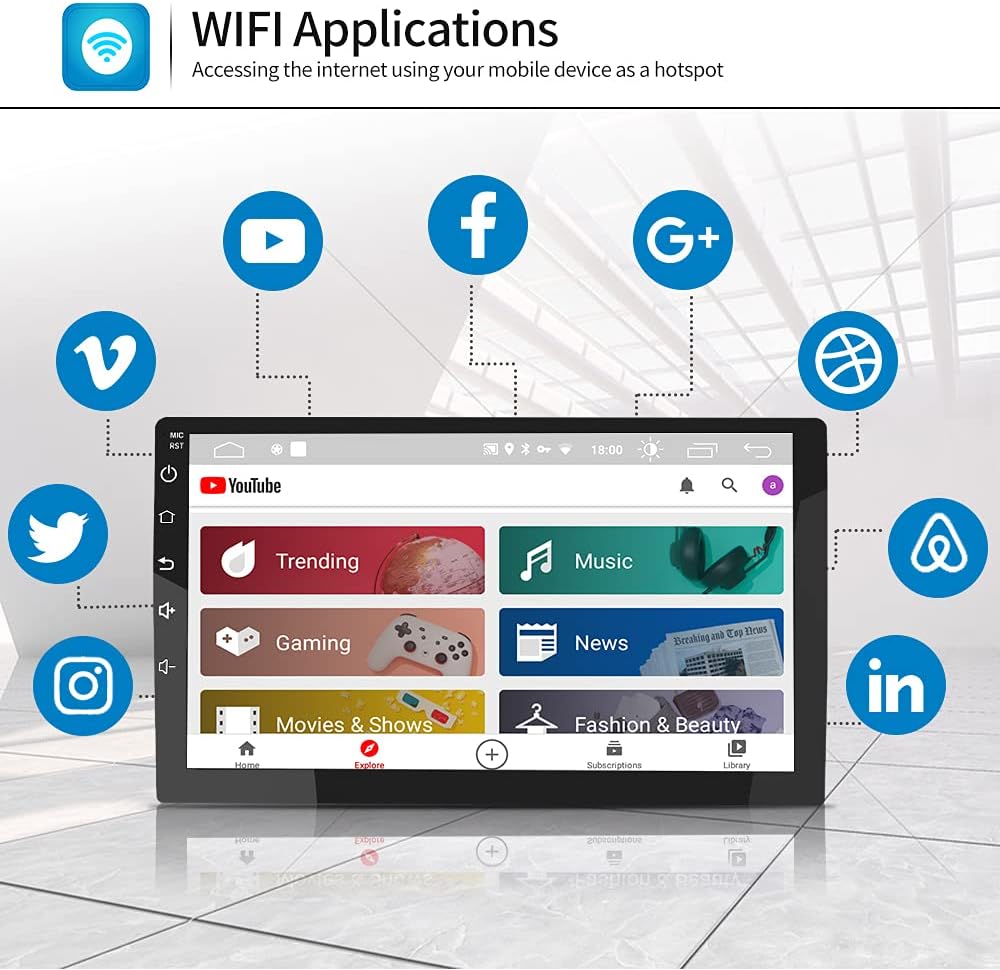
This image shows the head unit's screen with various internet applications, such as YouTube, Facebook, and Instagram, accessible via Wi-Fi.
Connect the head unit to the internet by tethering to your mobile device's hotspot or connecting to an available Wi-Fi network. This allows access to online applications, streaming services, and web browsing.
5.5 Screen Mirroring Function

This icon represents the screen mirroring feature, allowing content from a smartphone to be displayed on the car radio screen.
The screen mirroring feature allows you to display your smartphone's screen content directly onto the head unit's display. This is useful for viewing apps, videos, or navigation from your phone on a larger screen.
5.6 Steering Wheel Control

This image shows a steering wheel with integrated control buttons, indicating compatibility with the head unit for safe operation.
If your vehicle has steering wheel controls and the CAN Bus decoder is correctly installed, you can configure the head unit to respond to these controls for functions like volume adjustment, track skipping, and call management.
5.7 Split Screen Function

This image demonstrates the split-screen feature, allowing two applications, such as a video player and a navigation map, to be viewed simultaneously.
The split-screen feature allows you to run two applications simultaneously on the display, such as navigation on one side and music playback on the other.
5.8 Rear Camera Support

This graphic illustrates the rear camera functionality, providing a visual aid for parking and reversing maneuvers.
The unit supports connection to an aftermarket rear-view camera. When the vehicle is shifted into reverse, the display will automatically switch to the camera feed, assisting with parking and maneuvering.
5.9 Built-in DSP (Digital Sound Processor)

This image shows the Digital Sound Processor (DSP) interface, allowing users to customize audio settings such as equalizer, balance, and bass.
The integrated DSP allows for advanced audio customization, including equalizer settings, balance, fader, and subwoofer control, to optimize your in-car audio experience.
5.10 RCA Output

This image demonstrates the RCA output feature, allowing video content from the head unit to be displayed on external screens, such as headrest monitors.
The RCA output ports allow you to connect external monitors, such as headrest displays, to mirror the video content playing on the main unit.
6. Maintenance
- Screen Cleaning: Use a soft, lint-free cloth to clean the touch screen. For stubborn smudges, lightly dampen the cloth with water or a screen-safe cleaner. Avoid abrasive materials or harsh chemicals.
- Software Updates: Periodically check for software updates from the manufacturer's website or through the unit's settings menu to ensure optimal performance and access to new features.
- General Care: Keep the unit free from dust and debris. Avoid spilling liquids on the unit.
7. Troubleshooting
If you encounter issues with your AWESAFE car radio stereo, refer to the following common problems and solutions:
| Problem | Possible Cause | Solution |
|---|---|---|
| Unit does not power on. | Incorrect wiring, blown fuse, loose connection. | Check all power connections, including the main power harness and ground wire. Verify the vehicle's fuse for the radio is intact. Ensure the separate power harness (if applicable) is correctly installed. |
| No sound from speakers. | Speaker wires disconnected, incorrect audio settings, amplifier issue. | Check speaker wire connections. Verify audio settings (volume, mute, fader/balance). If using an external amplifier, ensure it is powered and connected correctly. |
| GPS signal is weak or unavailable. | GPS antenna improperly installed or obstructed. | Ensure the GPS antenna is mounted in a location with a clear view of the sky, free from obstructions. Check the antenna connection to the head unit. |
| Bluetooth device cannot pair. | Bluetooth not enabled, device too far, incorrect pairing procedure. | Ensure Bluetooth is enabled on both the head unit and your mobile device. Place devices close to each other. Follow the correct pairing steps as outlined in section 5.2. Try restarting both devices. |
| Steering wheel controls do not work. | CAN Bus decoder not connected or configured, incorrect wiring. | Verify the CAN Bus decoder is correctly installed and connected. Check the wiring for steering wheel control inputs. Access the head unit's settings to configure or map the steering wheel buttons. |
| Unit does not fit correctly in the dashboard. | Incorrect model year, improper trim removal. | Double-check that your Jeep Grand Cherokee is a 2014-2017 WK2 model. Ensure all factory mounting points and trim pieces are correctly aligned and removed/installed. Consult a professional installer if fitment issues persist. |
8. Specifications
| Feature | Detail |
|---|---|
| Operating System | Android 10.0 |
| Screen Size | 9 Inches |
| Display Resolution | 1024x600 |
| Memory (RAM) | 2GB |
| Storage (ROM) | 32GB |
| Connectivity | Bluetooth, Wi-Fi |
| Navigation | Built-in GPS (North America maps) |
| Audio Output Mode | Stereo |
| Human Interface Input | Microphone, Touchscreen |
| Compatible Devices | Smartphone |
| Product Dimensions | 13.78 x 12.6 x 10.63 inches |
| Item Weight | 4.09 pounds |
9. Warranty and Support
For warranty information and technical support, please refer to the documentation included with your product or visit the official AWESAFE website. Keep your purchase receipt as proof of purchase for warranty claims.
If you require further assistance or have questions not covered in this manual, please contact AWESAFE customer support through their official channels.


