
CENMING FAN-HD
CENMING FAN-HD Ceiling Fan Remote Control User Manual
Model: FAN-HD
Product Overview
The CENMING FAN-HD remote control is designed as a replacement for specific Hampton Bay and Hunter ceiling fan remote models. It provides 3-speed fan control (HI/MED/LO/OFF) and light dimming functionality. This remote does not include a reverse button and is not compatible with ceiling fans that have an Up/Down light feature.

Image: Front view of the CENMING FAN-HD remote control, showing the "LIGHT / DIMMER", "LO", "MED", "HI", and "FAN OFF" buttons. Two screws are visible next to it, indicating included accessories.
Compatibility
This remote is a replacement for specific models and is not universal. To ensure compatibility, verify that your original remote matches the appearance of this remote and has one of the following FCC ID/Model numbers on its back:
- UC7078T
- CHQ7078T
- CHQ8BT7078T
- FAN-HD
- L3H2010FANHD
- L3H2014FANHD
The remote operates at a frequency of 303.9MHz. If your original remote differs in appearance or model number, it is recommended to purchase a complete kit that includes a receiver.

Image: Diagram illustrating how to check the FCC ID/Model number on the back of an original remote for compatibility with the CENMING FAN-HD remote. Lists compatible FCC IDs and shows images of various compatible remote styles.
Package Contents
Upon opening the package, please ensure all the following items are present:
- 1 x Remote Control (FAN-HD v5)
- 1 x Wall Mount Holder
- 2 x Screws
- 1 x User Manual
Please note: A 9V battery is required for operation and is not included in the package.

Image: An exploded view showing the remote control, wall mount holder, two screws, user manual, and the product packaging box.
Setup and Installation
Setting the DIP Codes
The most crucial step for proper function is to match the DIP switch settings of your new remote to those of your original remote or receiver. These switches are typically located inside the battery compartment.
- Locate the DIP switches: Open the battery cover of your old remote (or the receiver unit if you are replacing a lost remote). The DIP switches are small toggles, usually numbered, hidden behind the battery slot.
- Note the pattern: Observe the ON/OFF or UP/DOWN position of each switch.
- Match the new remote: Open the battery cover of your new CENMING FAN-HD remote. Carefully slide the switches in the new remote to exactly match the pattern observed on your original remote or receiver.
- Insert Battery: Insert a 9V battery (not included) into the new remote, ensuring correct polarity.
- Test Functionality: Test the remote to ensure it controls your ceiling fan and light as expected.

Image: Close-up view of the battery compartment of the remote control, showing the red DIP switches and instructions for setting them. An arrow indicates the location of the switches.
Wall Mount Holder Installation
The included wall mount holder allows for convenient storage of your remote.
- Choose a location: Select a suitable location on a wall, away from direct sunlight or heat sources.
- Mark screw points: Place the wall mount holder against the wall and mark the positions for the two screws.
- Install screws: Use the provided screws to secure the wall mount holder to the wall. Ensure it is firmly attached.
- Place remote: Slide the remote control into the installed wall mount holder.
Operating Instructions
The FAN-HD remote control features five primary buttons for fan and light operation:
- LIGHT / DIMMER:
- Press once to turn the light ON or OFF.
- Press and hold to dim or brighten incandescent lights and some dimmable LED lights. Note that most LED lights and all CFL lights are not dimmable and will only respond to ON/OFF commands.
- HI: Sets the fan speed to High.
- MED: Sets the fan speed to Medium.
- LO: Sets the fan speed to Low.
- FAN OFF: Turns the ceiling fan OFF.
This remote does not have a reverse function or controls for separate up/down lights.

Image: A living room scene with a ceiling fan, showing an overlay of the CENMING FAN-HD remote control and icons indicating 3-speed fan control and light dimming features.
Maintenance
- Battery Replacement: When the remote's range decreases or it becomes unresponsive, replace the 9V battery. Ensure correct polarity.
- Cleaning: Wipe the remote with a soft, dry cloth. Do not use abrasive cleaners or immerse the remote in water.
- Storage: Store the remote in a cool, dry place when not in use for extended periods. Remove the battery if storing for several months to prevent leakage.
Troubleshooting
| Problem | Possible Cause | Solution |
|---|---|---|
| Remote does not control fan/light. | Incorrect DIP switch settings. | Verify the DIP switches in the new remote match the original remote/receiver exactly. |
| Remote does not control fan/light. | Dead or low battery. | Replace the 9V battery. |
| Remote does not control fan/light. | Remote is not compatible. | Ensure your original remote's FCC ID/Model number is listed as compatible. If not, this remote will not work. |
| Light does not dim. | Non-dimmable light bulbs. | Only incandescent and some dimmable LED bulbs will dim. CFL and most LED bulbs are not dimmable. |
| Limited range. | Low battery or interference. | Replace battery. Ensure no major obstructions or strong radio interference sources are nearby. |
Specifications
| Model Number | FAN-HD |
| Brand | CENMING |
| Product Dimensions | 5.79 x 2.24 x 1.38 inches |
| Item Weight | 3.2 ounces |
| Power Source | 1 x 9V Battery (not included) |
| Special Feature | 3-Speed Control, Light Dimming |
| Color | White |
| Max Number of Supported Devices | 1 |
| Compatible Devices | 110V 3-Speed AC Ceiling Fan (with compatible receiver) |
| Frequency | 303.9MHz |
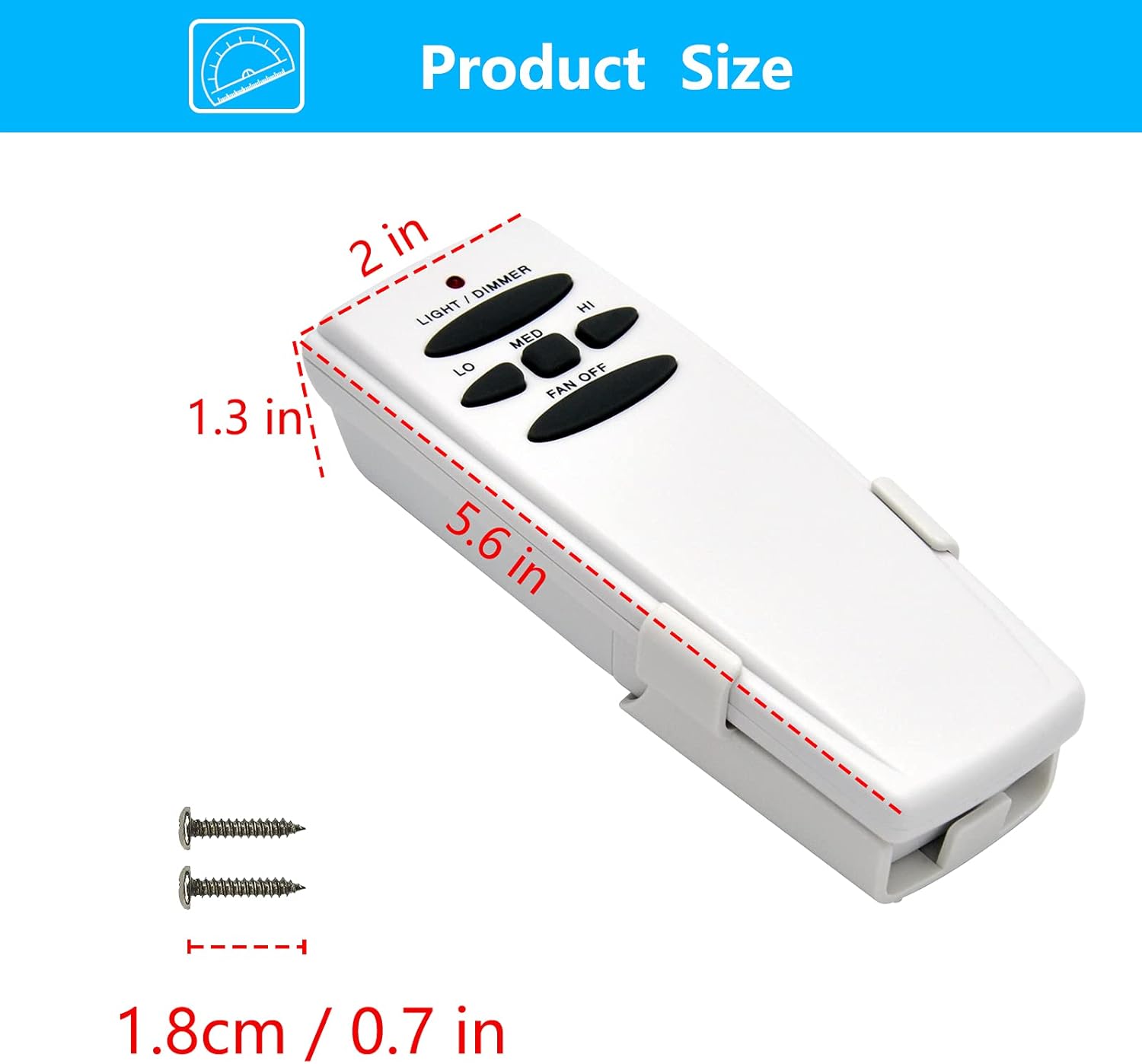
Image: Diagram showing the dimensions of the CENMING FAN-HD remote control (5.6 inches length, 2 inches width, 1.3 inches thickness).
Warranty and Support
CENMING is committed to product quality and customer satisfaction. For any issues or inquiries regarding your FAN-HD remote control, please contact CENMING customer support. While specific warranty details are not provided in this manual, please refer to your purchase documentation or the seller's website for warranty information.
For further assistance, you may visit the official CENMING store on Amazon: CENMING Store
Related documentsFAN-HD


Ask a question about this manual
Ask about setup, troubleshooting, compatibility, parts, safety, or missing instructions. Manuals+ will review the question and use this page’s manual context to help answer it.