
Plantronics 213928-101
Plantronics Poly Blackwire 3310 USB-A Wired Headset
Model: 213928-101
Introduction
The Plantronics Poly Blackwire 3310 is a mono USB-A wired headset designed for professional communication. It offers plug-and-play connectivity and is certified for use with Microsoft Teams and Skype for Business. Featuring a noise-cancelling microphone and comfortable design, it ensures clear audio and all-day wearability.
What's in the Box
- Poly Blackwire 3310 USB-A Headset

Figure 1: The Plantronics Poly Blackwire 3310 headset, showing the single earcup, microphone boom, and the inline control unit with USB-A connector.
Setup
- Connect to Computer: Insert the USB-A connector of the headset's inline control unit into an available USB-A port on your computer (Windows or Mac OS).
- Automatic Driver Installation: Your computer should automatically detect and install the necessary drivers. This may take a few moments.
- Adjust Headset Fit:
- Adjust the headband for a comfortable fit. The headband is adjustable to accommodate various head sizes.
- Position the earcup over one ear.
- Rotate the microphone boom 180 degrees to position it on either the left or right side, depending on your preference.
- Bend the flexible microphone boom to bring the microphone approximately two finger-widths from the corner of your mouth.
- Verify Audio Settings: After connecting, ensure the headset is selected as the default audio input and output device in your computer's sound settings or communication application (e.g., Microsoft Teams, Skype for Business).

Figure 2: The headset connected via its USB-A cable to a laptop, demonstrating a typical setup.
Operating Instructions
Inline Control Unit Functions:
The inline control unit provides easy access to essential call management features.
- Volume Up (+): Press to increase listening volume.
- Volume Down (-): Press to decrease listening volume.
- Mute Microphone: Press the mute button (microphone icon with a slash) to mute or unmute your microphone.
- Call Answer/End: Press the call button (phone icon) to answer an incoming call or end an active call.
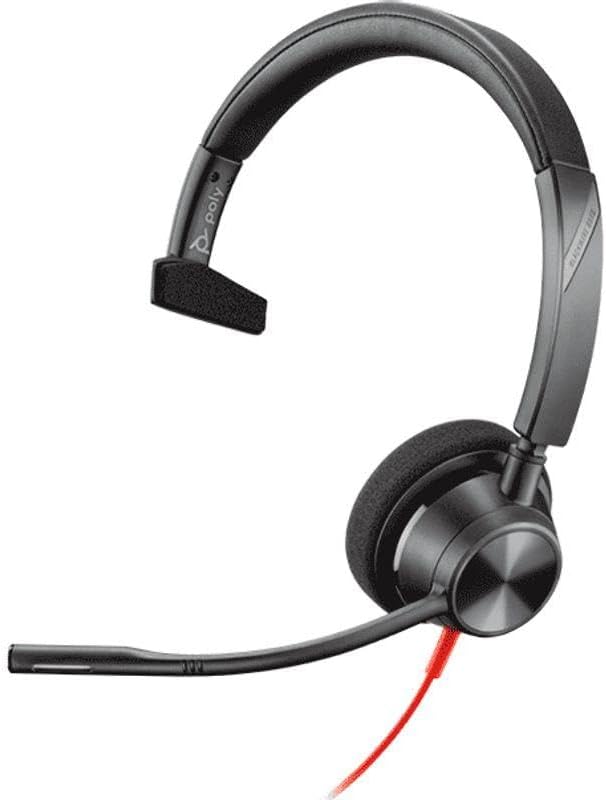
Figure 3: The headset with its microphone boom extended, illustrating its adjustable nature for optimal voice capture.

Figure 4: A close-up view of the headset's earcup and the pivot point for the microphone, highlighting the durable design.
Maintenance
- Cleaning: Use a soft, dry cloth to clean the headset. Do not use liquid cleaners or aerosols.
- Storage: Store the headset in a cool, dry place when not in use. Avoid extreme temperatures.
- Cable Care: Avoid sharp bends or kinks in the cable to prevent damage.
Troubleshooting
| Problem | Solution |
|---|---|
| No audio from headset. |
|
| Microphone not working. |
|
| Headset is uncomfortable. |
|
Specifications
- Model Name: Blackwire 3310
- Item Model Number: 213928-101
- Brand: Plantronics
- Connectivity Technology: Wired (USB-A)
- Headphones Jack: 3.5 mm (via detachable inline control unit)
- Compatible Devices: Computers (Windows, Mac OS)
- Ear Placement: Over Ear
- Form Factor: Over Ear
- Noise Control: Sound Isolation
- Microphone: Noise-cancelling, 180° rotatable boom
- Material: Plastic
- Item Weight: 7.2 ounces
- Product Dimensions: 7.3 x 8.3 x 2.3 inches
- Country of Origin: China
Warranty and Support
For warranty information and technical support, please refer to the official Plantronics (Poly) website or contact their customer service directly. Keep your purchase receipt for warranty claims.
Online Support: Visit www.poly.com/us/en/support for drivers, manuals, and troubleshooting guides.
Related documents213928-101


Ask a question about this manual
Ask about setup, troubleshooting, compatibility, parts, safety, or missing instructions. Manuals+ will review the question and use this page’s manual context to help answer it.