
Eureka NEU181A
Eureka PowerSpeed NEU181A Upright Vacuum Cleaner User Manual
Model: NEU181A | Brand: Eureka
Introduction
The Eureka PowerSpeed NEU181A is a lightweight and powerful upright vacuum cleaner designed for efficient cleaning of carpets and hard floors. Its versatile features and included accessories make it suitable for various household cleaning tasks, including pet hair removal.

Figure 1: The Eureka PowerSpeed NEU181A, demonstrating its lightweight and portable design (approximately 10 lbs).
Important Safety Information
WARNING:
- Always unplug the vacuum cleaner from the electrical outlet before performing any maintenance or cleaning.
- Do not use the vacuum cleaner on wet surfaces or to pick up liquids.
- Keep hair, loose clothing, fingers, and all parts of body away from openings and moving parts.
- When using the vacuum cleaner, the floor brush may become clogged by hairs and dirt. It is recommended to clean the roller brush and the belt every 2 weeks to prevent malfunction, overheating, or belt breakage.
- Use only as described in this manual. Use only manufacturer's recommended attachments.
What's in the Box
Your Eureka PowerSpeed NEU181A package includes the following components:
-

Vacuum Cleaner Main Unit
-

Accessories (Dusting Brush, Pet Tool, Crevice Tool, Upholstery Tool)
Figure 2: Components included with your Eureka PowerSpeed NEU181A.
Assembly
Assembling your Eureka PowerSpeed NEU181A is quick and straightforward:
- Insert the handle into the main vacuum body until it clicks securely into place.
- Connect the hose to the designated port on the vacuum cleaner. Ensure it is firmly attached to prevent loss of suction.
- Store the included accessories (crevice tool, dusting brush, pet tool) on the onboard storage clips for easy access.

Figure 3: Visual guide for simple assembly of the vacuum cleaner.
Operating Instructions
Powering On/Off
To turn the vacuum cleaner on or off, press the power button located on the main unit.
Height Adjustment
The Eureka PowerSpeed NEU181A features 5 height adjustment settings to optimize cleaning performance on different floor types. To adjust the height, ensure the handle is NOT in the upright locked position. Release the handle as if you are ready to vacuum, then turn the height adjustment knob located on the cleaner head to select the appropriate setting:
- Lowest settings: For bare floors and low-pile carpets.
- Higher settings: For medium-pile to high-pile carpets.

Figure 4: The vacuum effectively cleaning a carpet, suitable for various pile heights with proper adjustment.
Using Attachments
The vacuum comes with several tools for specialized cleaning:
- Crevice Tool: Ideal for cleaning tight spaces, corners, and along edges.
- Dusting Brush: Use for dusting furniture, blinds, lampshades, and other delicate surfaces.
- Upholstery Tool: Designed for cleaning upholstery, curtains, and car interiors.
- Pet Tool: Specifically designed to effectively pick up pet hair from various surfaces.
To use an attachment, detach the hose from the main unit and connect the desired tool to the end of the hose.
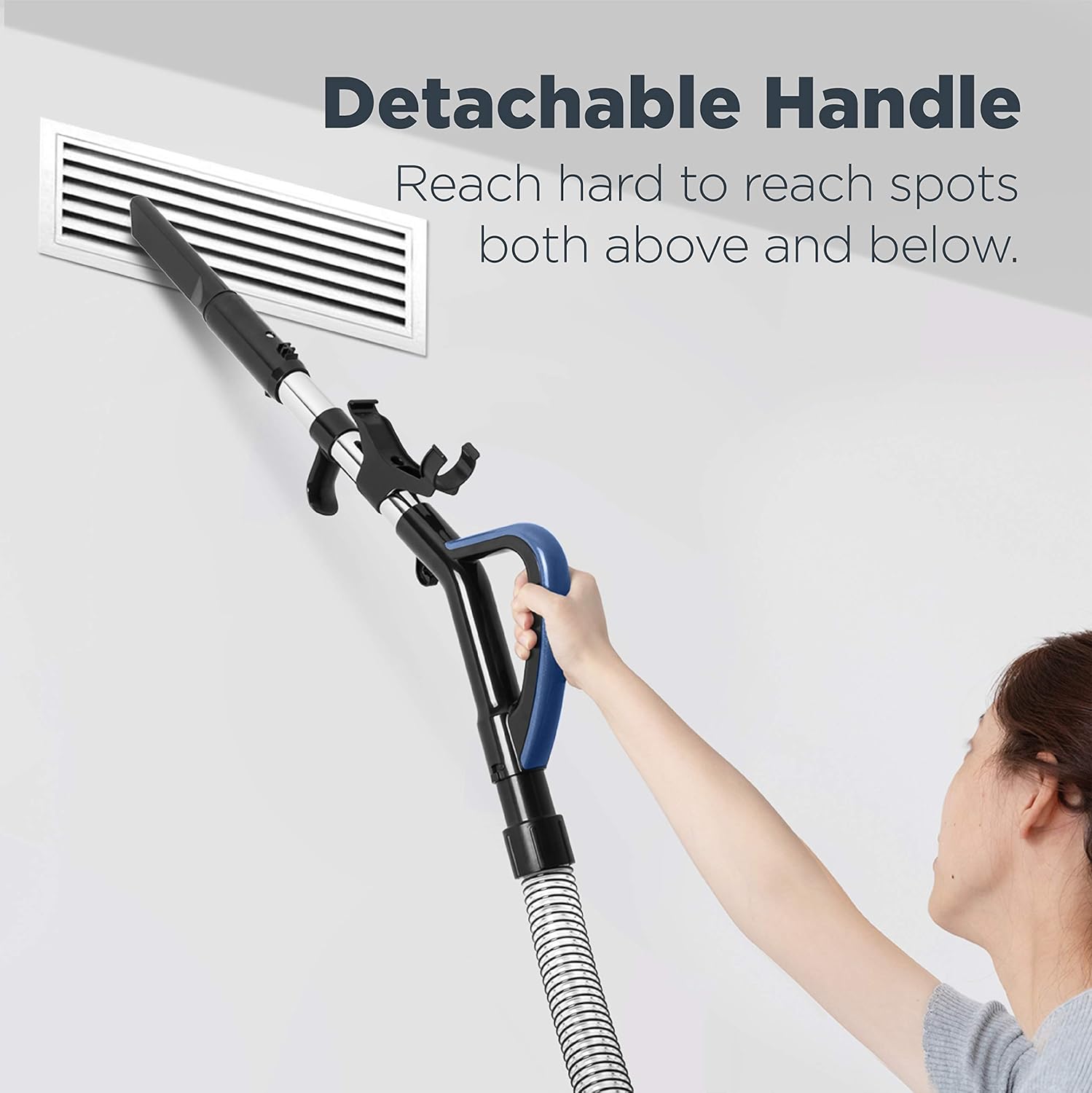
Figure 5: The detachable handle allows for extended reach, useful for cleaning high or low areas.

Figure 6: The included pet tool is highly effective for removing pet hair from various surfaces.
Maintenance
Regular maintenance ensures optimal performance and extends the life of your vacuum cleaner.
Emptying the Dust Cup
The extra-large 2.6L dust cup should be emptied regularly, especially when the debris reaches the "Max Fill" line. To empty:
- Press the release button on the top handle to detach the dust cup from the main unit.
- Position the dust cup over a trash bin.
- Press the bottom release button to open the dust cup and empty its contents.
- Close the bottom flap securely and reattach the dust cup to the vacuum.

Figure 7: Easy-empty dust cup design for convenient disposal of collected debris.
Cleaning the Filter
The washable foam filter helps maintain suction power and should be cleaned periodically. For best results, clean the filter every 2 weeks or as needed:
- Remove the dust cup.
- Carefully remove the foam filter from the dust cup assembly.
- Rinse the filter under cool running water until the water runs clear.
- Allow the filter to air dry completely for at least 24 hours before reinserting it into the vacuum. Do not use a dryer or other heating methods.
- Reassemble the filter and dust cup, then reattach to the vacuum.

Figure 8: The washable filter ensures zero maintenance cost and prolonged vacuum life.
Cleaning the Brush Roll
Inspect the brush roll regularly for tangled hair, strings, or debris. To clean:
- Unplug the vacuum cleaner.
- Turn the vacuum over to access the brush roll.
- Use scissors to carefully cut away any tangled hair or debris from the brush roll.
- Ensure the brush roll spins freely before resuming operation.
Regular cleaning of the brush roll prevents clogs and maintains optimal cleaning performance.
Troubleshooting
| Problem | Possible Cause | Solution |
|---|---|---|
| Vacuum does not turn on. | Not plugged in; Power outlet not working. | Ensure power cord is securely plugged into a working outlet. |
| Loss of suction. | Dust cup full; Filter clogged; Hose or brush roll clogged. | Empty dust cup; Clean or replace filter; Clear any blockages from hose or brush roll. |
| Vacuum not picking up debris. | Height adjustment incorrect; Brush roll not spinning. | Adjust height setting for floor type; Check brush roll for obstructions and clean. |
| Unusual noise. | Obstruction in fan or brush roll; Worn belt. | Inspect for and remove obstructions; Contact customer service if belt is worn. |
Specifications
| Feature | Detail |
|---|---|
| Brand | Eureka |
| Model Name | PowerSpeed Lightweight Upright Vacuum Cleaner for Carpet and Hard Floor |
| Model Number | NEU181A |
| Color | Blue |
| Form Factor | Upright |
| Special Features | Portable, Lightweight, Bagless, Washable Filter |
| Filter Type | Foam |
| Included Components | Dusting Brush, Pet Tool, Crevice Tool |
| Capacity | 2.6 Liters (Dust Cup) |
| Wattage | 960 watts |
| Amperage | 8 Amps |
| Hose Length | 2.1 Feet |
| Recommended Uses | Carpet, Hard Floor, Upholstery |
| Product Dimensions | 13.4"L x 14"W x 44.5"H |
| Item Weight | 10 pounds |
| Noise Level | 88 dB |
| Country of Origin | Vietnam |
Warranty and Support
Your Eureka PowerSpeed NEU181A vacuum cleaner comes with a 2-year limited warranty.
For any questions, technical assistance, or warranty claims, please contact Eureka customer service:
- Phone: 1-800-282-2886
- Online Support: Visit the official Eureka website for FAQs and support resources.
Related Documents - NEU181A
 |
Eureka NEU180 Series Upright & NER300 Series Robotic Vacuum Cleaner Owner's Guide Comprehensive owner's guide for Eureka NEU180 series upright and NER300 series robotic vacuum cleaners, covering assembly, operation, maintenance, troubleshooting, and warranty information. |
 |
EUREKA NEU182A PowerSpeed Bagless Upright Vacuum Cleaner User Manual User guide and operational details for the EUREKA NEU182A PowerSpeed Bagless Upright Vacuum Cleaner, covering features, maintenance, and troubleshooting. |
 |
Eureka NEU180 Series Upright Vacuum Cleaner Owner's Guide Comprehensive owner's guide for Eureka NEU180, NEU181, NEU181A, NEU182A, NEU182B, NEU188, NEU188A upright vacuum cleaners, covering assembly, operation, maintenance, troubleshooting, and warranty information. |
 |
Eureka NEU180 and NEC180 Series Vacuum Cleaner Owner's Guide Comprehensive owner's guide for Eureka NEU180 series upright vacuum cleaners (including models NEU180, NEU181, NEU181A, NEU182A, NEU182B, NEU185, NEU188, NEU188A) and NEC180 series cordless stick and handheld vacuum cleaners. This manual provides important instructions for assembly, operation, maintenance, troubleshooting, and warranty information to prolong the life and ensure optimal performance of your Eureka vacuum. |
 |
Eureka PowerSpeed Upright & RapidClean Pro Cordless Stick Vacuum Cleaners: Owner's Guide & User Manuals Comprehensive owner's guide and user manual for Eureka NEU180 series PowerSpeed Bagless Upright Vacuum Cleaners (including models NEU180, NEU181, NEU182B, NEU188) and NEC180 series RapidClean Pro Cordless Stick and Handheld Vacuum Cleaners. Includes important safeguards, assembly instructions, parts identification, usage guidelines, maintenance procedures for dust cups, filters, and brushrolls, troubleshooting tips, warranty information, and replacement parts. |
 |
Eureka AS1000-AS1009 Series Owner's Guide: Maintenance, Use, and Troubleshooting Comprehensive owner's guide for the Eureka AS1000-AS1009 Series upright vacuum cleaner. Learn about setup, maintenance, accessories, troubleshooting, and warranty information. |
Ask a question about this manual
Ask about setup, troubleshooting, compatibility, parts, safety, or missing instructions. Manuals+ will review the question and use this page’s manual context to help answer it.