
1. Introduction
Thank you for choosing the North Bayou P5 Full-Motion TV Wall Mount. This manual provides detailed instructions for safe installation, operation, and maintenance of your new TV mount. The P5 mount is designed for 32-55 inch LCD/LED televisions, offering a robust dual-arm design and full-motion capabilities including tilt, swivel, extension, and folding for optimal viewing angles. It supports VESA mounting patterns from 200x200mm up to 400x400mm and has a maximum load capacity of 36.4 kg.
2. Safety Information
WARNING: Failure to read and follow these instructions may result in serious personal injury, property damage, or voiding your warranty. If you do not understand these instructions or have doubts about the safety of the installation, please contact a qualified installer.
- Do not install this product on walls that are not structurally sound or that exceed the specified weight capacity.
- Ensure the mounting surface can safely support the combined weight of the mount and the television.
- Always use the provided hardware. If any parts are missing or defective, contact customer support.
- Do not overtighten screws, as this may cause damage.
- Keep children and pets away during installation.
- This product is intended for indoor use only.
3. Package Contents
Please verify that all components are present and undamaged before beginning installation. If any parts are missing or damaged, do not proceed with installation and contact customer service.
- Wall Plate Assembly
- TV Bracket Arms (2x)
- Mounting Hardware Kit (various screws, washers, spacers for TV and wall)
- Wall Anchors (for concrete/brick walls)
- Level
- Wrench
4. Setup and Installation
Carefully follow these steps for a secure installation. Professional installation is recommended for optimal safety.
4.1 Pre-Installation Checks
- TV Compatibility: Ensure your TV size is between 32 and 55 inches and its weight does not exceed 36.4 kg.
- VESA Pattern: Check your TV's VESA mounting pattern. This mount supports 200x200mm to 400x400mm.
- Wall Type: Identify your wall type (wood stud, concrete, brick). Different wall types require specific mounting hardware.

4.2 Mounting the Wall Plate
- Determine the desired height for your TV. Mark the drilling locations on the wall using the wall plate as a template.
- Drill pilot holes at the marked locations. Use appropriate drill bits for your wall type.
- Secure the wall plate to the wall using the provided lag bolts and washers. Ensure it is level using a spirit level.
4.3 Attaching TV Brackets to the TV
- Carefully place your TV face down on a soft, clean surface.
- Attach the TV bracket arms to the back of your TV using the appropriate screws, washers, and spacers from the hardware kit. Ensure the brackets are centered and securely fastened.
4.4 Mounting the TV to the Wall Plate
- With assistance, carefully lift the TV with the attached brackets and hook them onto the wall plate.
- Secure the TV to the wall plate using the locking screws or mechanisms provided.

5. Operating Instructions
The North Bayou P5 mount offers full-motion adjustability to achieve your ideal viewing experience.
5.1 Adjusting Tilt
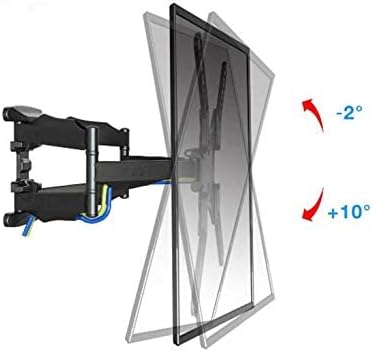
To adjust the vertical tilt angle of your TV, loosen the tilt adjustment knobs or bolts on the TV brackets, adjust the TV to the desired angle, and then securely tighten the knobs/bolts.
5.2 Adjusting Swivel
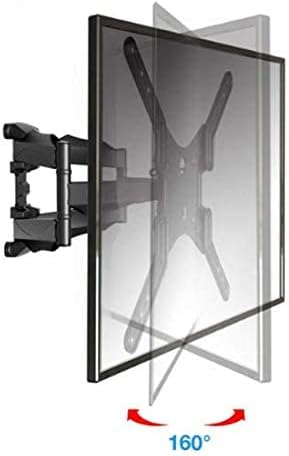
To swivel the TV horizontally, gently push or pull the TV to the left or right. The dual-arm design allows for a wide range of swivel motion.
5.3 Extending and Retracting
To extend or retract the TV from the wall, simply pull the TV gently outwards or push it inwards. The articulated arms will move smoothly.
5.4 Cable Management
Utilize the integrated cable management system on the mount arms to route and conceal your TV cables for a neat and organized appearance.
6. Maintenance
- Cleaning: Wipe the mount with a soft, dry cloth. Avoid abrasive cleaners or solvents.
- Periodic Checks: Periodically check all screws and connections to ensure they remain tight and secure. Retighten if necessary.
- Lubrication: The moving parts are designed for smooth operation and generally do not require lubrication. If movement becomes stiff, consult customer support.
7. Troubleshooting
7.1 TV Not Level
- Check if the wall plate was installed level. If not, minor adjustments might be possible with the TV brackets, or the wall plate may need re-installation.
- Ensure the TV brackets are evenly attached to the TV.
7.2 Mount Feels Loose or Unstable
- Immediately remove the TV from the mount.
- Check all wall mounting bolts and TV bracket screws for tightness.
- Verify that the wall structure is sound and the correct anchors were used. If unsure, consult a professional.
7.3 Difficulty Adjusting TV Position
- Ensure no cables are snagged or obstructing movement.
- Check for any overtightened bolts on the articulating arms that might restrict movement.
8. Specifications
| Feature | Specification |
|---|---|
| Brand | North Bayou |
| Model | P5 |
| Mount Type | Wall Mount |
| Movement Type | Full-Motion (Tilt, Swivel, Extend, Fold) |
| Material | Metal |
| Compatible TV Sizes | 32 - 55 inches |
| Load Capacity | 36.4 kg (80 lbs) |
| VESA Compatibility | 200x200mm to 400x400mm |
| Tilt Angle | -2° to +10° |
| Swivel Angle | Up to 160° (depending on TV size) |
| Color | Black |
| Item Weight | 4.248 kg (4248 grams) |
9. Warranty and Support
This product comes with a standard manufacturer's warranty. For specific warranty details, please refer to the warranty card included in your package or contact North Bayou customer support. If you have any questions regarding installation, operation, or troubleshooting, please reach out to our support team through the contact information provided with your purchase.


