
1. Introduction
Welcome to your Remax 560BT Wireless Headphones. This manual will guide you through the features and functions of your new headphones, ensuring optimal performance and user experience. Please read these instructions carefully before using the product.
2. Package Contents
Please check the package for the following items:
- Remax 560BT Wireless Headphones
- USB Charging Cable
- 3.5mm Audio Cable
- User Manual
3. Product Overview
Familiarize yourself with the components of your Remax 560BT headphones.
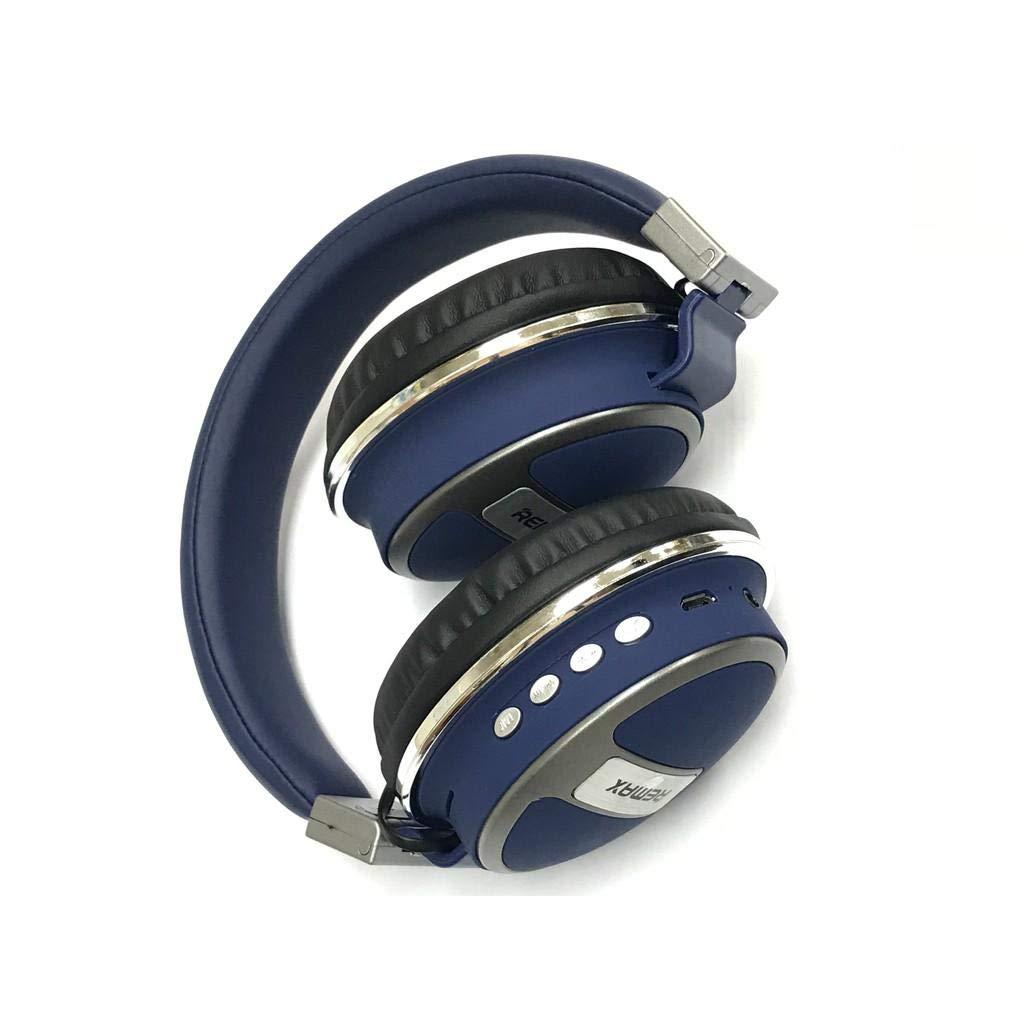
Image: Remax 560BT Wireless Headphones, showing the over-ear design, earcups, and headband.
4. Setup
4.1 Charging the Headphones
Before first use, ensure your headphones are fully charged.
- Connect the USB charging cable to the charging port on the headphones.
- Connect the other end of the USB cable to a compatible USB power source (e.g., computer USB port, wall adapter).
- The LED indicator will illuminate (e.g., red) during charging and turn off or change color (e.g., blue) when fully charged.
4.2 Bluetooth Pairing
To connect your headphones to a Bluetooth-enabled device:
- Ensure the headphones are turned off.
- Press and hold the Power button until the LED indicator flashes rapidly (often alternating blue and red), indicating pairing mode.
- On your device (smartphone, tablet, computer), enable Bluetooth and search for available devices.
- Select "Remax 560BT" from the list of found devices.
- Once connected, the LED indicator will typically turn solid blue.
- If prompted for a password, enter "0000".
5. Operating Instructions
5.1 Power On/Off
- To power on: Press and hold the Power button until the LED indicator lights up.
- To power off: Press and hold the Power button until the LED indicator turns off.
5.2 Music Playback
- Play/Pause: Press the Multi-function button once.
- Next Track: Press and hold the Volume Up button.
- Previous Track: Press and hold the Volume Down button.
5.3 Volume Control
- Volume Up: Press the Volume Up button briefly.
- Volume Down: Press the Volume Down button briefly.
5.4 Call Management (with Microphone)
- Answer/End Call: Press the Multi-function button once.
- Reject Call: Press and hold the Multi-function button for 2 seconds.
- Redial Last Number: Double-press the Multi-function button.
5.5 Wired Connection (3.5mm Audio Jack)
To use the headphones with a wired connection:
- Connect the provided 3.5mm audio cable to the headphone's audio jack.
- Connect the other end of the cable to your audio source's 3.5mm port.
- The headphones can be used passively without power in this mode.
6. Maintenance
To ensure the longevity and optimal performance of your headphones, follow these maintenance guidelines:
- Clean the headphones with a soft, dry cloth. Do not use abrasive cleaners or solvents.
- Avoid exposing the headphones to extreme temperatures, humidity, or direct sunlight.
- Store the headphones in a cool, dry place when not in use.
- Do not attempt to disassemble or modify the headphones, as this will void the warranty.
7. Troubleshooting
7.1 Headphones will not power on.
Ensure the headphones are fully charged. Connect to a power source and try again.
7.2 Cannot pair with device.
- Ensure Bluetooth is enabled on your device.
- Make sure the headphones are in pairing mode (flashing LED).
- Move the headphones closer to your device.
- Clear the Bluetooth pairing list on your device and try pairing again.
7.3 No sound or low volume.
- Check the volume levels on both the headphones and your connected device.
- Ensure the headphones are properly connected via Bluetooth or the 3.5mm audio cable.
- If using a wired connection, ensure the cable is fully inserted.
7.4 Microphone not working.
- Ensure the headphones are connected via Bluetooth, as the microphone typically functions only in wireless mode.
- Check microphone settings on your connected device.
8. Specifications
| Feature | Description |
|---|---|
| Brand | Remax |
| Model Number | 560BT |
| Connectivity | Wireless (Bluetooth), Wired (3.5mm Jack) |
| Microphone | Yes |
| Noise Cancellation | No (Passive Noise Isolation) |
| Control Method | Touch |
| Compatible Devices | Multi-device |
| Material | Rubber |
| Age Range Description | Adult |
| Item Dimensions | 18.96 x 14.67 x 6.73 cm |
| Item Weight | 262.72 grams |
| ASIN | B091C1QMJC |
9. Warranty and Support
For warranty information and technical support, please refer to the documentation included with your purchase or visit the official Remax website. Keep your proof of purchase for any warranty claims.


