
1. Introduction
This manual provides detailed instructions for the safe installation, operation, and maintenance of your North Bayou Ceiling TV Mount, Model B091BSL3TR. This mount is designed to securely hold flat panel LCD TVs ranging from 32 to 57 inches, with an adjustable height feature and a maximum load capacity of 68 kg. Please read this manual thoroughly before installation and keep it for future reference.
2. Safety Information
WARNING: Failure to read and follow all instructions can result in personal injury, property damage, or voiding your warranty. If you have any questions, please contact customer support.
- Ensure the ceiling structure can safely support the combined weight of the mount and your TV.
- Do not exceed the maximum weight capacity of 68 kg (150 lbs).
- This mount is designed for LCD TVs between 32 and 57 inches.
- Use only the provided mounting hardware. If any parts are missing or damaged, contact customer service.
- Installation should be performed by qualified personnel.
- Always have at least two people assist with TV lifting and mounting.
- Avoid installing near heat sources, direct sunlight, or areas with high humidity.
3. Package Contents
Please verify that all components are present and undamaged before beginning installation. If any parts are missing or defective, do not proceed with installation and contact customer support.
- Ceiling Mount Assembly
- TV Mounting Brackets
- Hardware Kit (screws, washers, spacers, anchors)
- Instruction Manual (this document)
4. Setup and Installation
Before installation, ensure you have the necessary tools (e.g., drill, stud finder, level, screwdriver) and understand all steps. It is highly recommended to have a second person assist during the installation process.
4.1 Pre-Installation Checks
- Verify TV Compatibility: Check your TV's VESA mounting pattern and weight. This mount supports VESA patterns up to 600x400mm and TVs weighing up to 68 kg.
- Locate Ceiling Joists: Use a stud finder to locate the center of the ceiling joists where the mount will be installed. Mark the drilling locations.
- Check Ceiling Material: Ensure your ceiling material (wood stud, concrete) is suitable for mounting and use appropriate anchors if necessary.
4.2 Mounting the Ceiling Plate
- Position the ceiling plate against the ceiling at your desired location.
- Mark the pilot hole locations through the plate's mounting holes.
- Drill pilot holes into the ceiling joists using an appropriate drill bit size.
- Secure the ceiling plate to the ceiling using the provided lag bolts and washers. Ensure it is firmly attached and level.
4.3 Attaching TV Brackets
- Attach the TV mounting brackets to the back of your TV using the appropriate screws, washers, and spacers from the hardware kit. Ensure the brackets are centered and securely fastened.
4.4 Hanging the TV
- With assistance, carefully lift the TV and hook the TV mounting brackets onto the ceiling mount arm.
- Secure the TV to the mount using the safety screws or locking mechanisms provided.
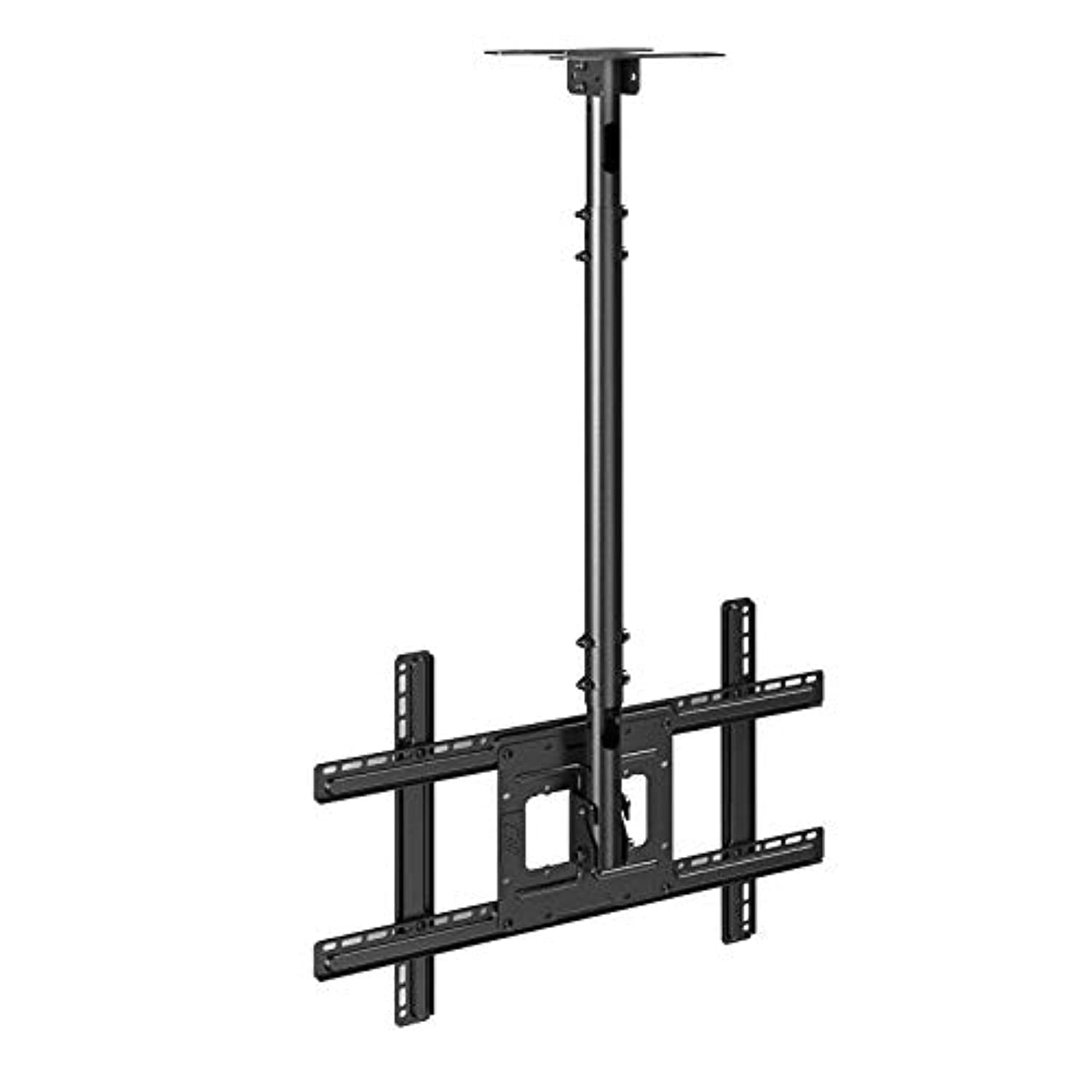
Figure 1: Example of the North Bayou Ceiling TV Mount installed. This image shows the mount's structure and how a TV is attached, demonstrating its ceiling-mounted design.
5. Operating and Adjustments
This ceiling mount offers adjustable features to optimize your viewing experience.
- Height Adjustment: The mount features an adjustable pole to set the TV at your preferred viewing height. Loosen the locking mechanism on the pole, adjust to the desired height, and then securely tighten the mechanism.
- Tilt Adjustment: Some models allow for tilting the TV screen up or down. Loosen the tilt adjustment knobs on the TV brackets, set the desired angle, and re-tighten firmly.
- Swivel Adjustment: The mount may allow for horizontal swivel. Gently rotate the TV to the desired viewing angle. Ensure all connections are secure after adjustment.
6. Maintenance
Regular maintenance ensures the longevity and safe operation of your TV mount.
- Periodic Checks: Every few months, check all screws and bolts to ensure they are tight and secure. Re-tighten if necessary.
- Cleaning: Wipe the mount with a soft, dry cloth. Do not use abrasive cleaners or solvents, as they may damage the finish.
- Inspect for Damage: Periodically inspect the mount for any signs of wear, corrosion, or damage. If any issues are found, contact customer support and do not use the mount until it is repaired or replaced.
7. Troubleshooting
If you encounter issues with your TV mount, refer to the following common problems and solutions.
| Problem | Possible Cause | Solution |
|---|---|---|
| TV is not level. | Mounting plate or TV brackets are not level. | Adjust the leveling screws on the TV brackets or re-install the ceiling plate ensuring it is level. |
| Mount feels unstable. | Loose bolts or improper installation. | Check all mounting bolts and screws for tightness. Ensure the mount is secured to ceiling joists. Re-read safety instructions. |
| Difficulty adjusting height/tilt. | Locking mechanisms are too tight or components are stiff. | Loosen locking mechanisms before attempting adjustment. Apply a small amount of silicone lubricant to moving parts if stiff. |
8. Specifications
| Feature | Detail |
|---|---|
| Brand | North Bayou |
| Model | B091BSL3TR |
| Mounting Type | Ceiling |
| Compatible TV Sizes | 32 - 57 inches |
| Max Load Capacity | 68 kg (150 lbs) |
| Adjustable Height | Yes |
| Movement Type | Adjustable (Height, Tilt, Swivel) |
| Materials | Metal |
| Color | Black |
| Package Dimensions | 46.3 x 22.15 x 5.6 cm |
| Package Weight | 3.95 kg |
9. Warranty and Support
For warranty information, please refer to the documentation provided at the time of purchase or contact your retailer. For technical support, missing parts, or any questions regarding the installation or operation of your North Bayou Ceiling TV Mount, please contact North Bayou customer service through their official website or the contact information provided with your product.
Note: Extended protection plans may be available from third-party providers, but these are separate from the manufacturer's standard warranty.


