
Alpicool T60
Alpicool T60 Portable Refrigerator User Manual
Model: T60 | Brand: Alpicool
Introduction
Thank you for choosing the Alpicool T60 Portable Refrigerator. This manual provides essential information for the safe and efficient operation, maintenance, and troubleshooting of your new appliance. Please read this manual thoroughly before use and retain it for future reference.

Figure 1: Alpicool T60 Portable Refrigerator with its accompanying smartphone application interface.
Safety Information
To ensure safe operation and prevent damage, please observe the following safety precautions:
- Do not operate the appliance if it is visibly damaged.
- Ensure the power supply voltage matches the appliance's requirements (12V/24V DC, 100-240V AC).
- Do not immerse the refrigerator in water or expose it to heavy rain.
- Keep ventilation openings clear of obstructions.
- Do not use electrical devices inside the refrigerator unless they are recommended by the manufacturer.
- Avoid touching internal cooling surfaces with bare hands when the unit is operating at very low temperatures, as this can cause frostbite.
- Always disconnect the power supply before cleaning or performing maintenance.
Product Components and Features
The Alpicool T60 is designed for versatility and ease of use. Key components and features include:

Figure 2: Detailed view of the Alpicool T60's main components, including the removable internal basket, LCD control panel, foldable handle, wheels, compressor, drain plug, and interior LED lighting.
- Removable Internal Basket: Facilitates organized storage and easy access to contents.
- LCD Control Panel: Intuitive interface for temperature settings and monitoring.
- Foldable Handle & Wheels: Designed for easy portability and transport, even on uneven terrain.
- High-Efficiency Compressor: Ensures rapid cooling and stable temperature maintenance.
- Drain Plug: Simplifies cleaning and water removal.
- Interior LED Lighting: Provides visibility inside the unit.
- Dual Temperature Control: The detachable sensor divider allows for single or dual temperature zones (refrigerator/freezer).
- Fast Cooling: Capable of cooling from 25°C to 0°C in approximately 15 minutes.

Figure 3: Cooling performance graph demonstrating the rapid temperature reduction capabilities of the Alpicool T60.

Figure 4: The Alpicool T60 can function as both a refrigerator and a freezer, suitable for a wide range of items from frozen goods to beverages and sensitive products.
Setup
Before first use, please follow these setup instructions:
- Unpacking: Carefully remove the refrigerator from its packaging. Inspect for any shipping damage.
- Placement: Place the unit on a flat, stable surface. Ensure adequate ventilation around the unit, especially around the fan vents.
- Power Connection:
- For vehicle use (12V/24V DC): Connect the DC power cord to the vehicle's cigarette lighter socket.
- For home/AC use (100-240V AC): Use the provided AC power cord with adapter and plug it into a standard wall outlet.
- Initial Cooling: For optimal performance, it is recommended to pre-cool the unit for at least 30 minutes before loading items.
- Battery Protection Setting: The unit features a 3-level battery protection system to prevent your vehicle battery from draining.

Figure 5: Battery protection settings. The factory default is High (H). Adjust this setting via the control panel based on your power source. Use 'H' for car power, 'L' for portable battery.
The voltage values are theoretical and may vary slightly. The factory setting is High (H). Set to 'H' when connected to car power and 'L' when connected to a portable battery or other backup battery.
Operating Instructions
Operating your Alpicool T60 is straightforward:
- Power On/Off: Press the power button on the LCD control panel to turn the unit on or off.
- Temperature Setting: Use the '+' and '-' buttons on the control panel to adjust the desired temperature. The display will show the current and target temperatures.
- Dual Zone Operation: If using the detachable sensor divider, you can set different temperatures for each compartment. Refer to the control panel interface for specific zone selection.
- Mode Selection (if applicable): Some models may have ECO (energy-saving) or MAX (fast cooling) modes. Select the appropriate mode based on your needs.
- USB Charging Port: The integrated USB port can be used to charge small electronic devices.
Maintenance
Regular maintenance ensures the longevity and efficiency of your Alpicool T60:
- Cleaning:
- Disconnect the power supply before cleaning.
- Clean the interior and exterior surfaces with a damp cloth and mild detergent. Avoid abrasive cleaners.
- Use the drain plug to easily remove any accumulated water from inside the unit.
- Ensure the unit is completely dry before reconnecting power or storing.
- Ventilation: Periodically check and clean the ventilation openings to ensure proper airflow and prevent overheating.
- Storage: When not in use for extended periods, store the refrigerator in a dry, well-ventilated area with the lid slightly ajar to prevent odors and mold.

Figure 6: The drain plug feature simplifies the cleaning process by allowing easy removal of water.
Troubleshooting
If you encounter issues with your Alpicool T60, refer to the following common troubleshooting steps:
| Problem | Possible Cause | Solution |
|---|---|---|
| Unit does not turn on. | No power supply; faulty cable; low battery voltage (vehicle). | Check power connection; try a different power source/cable; adjust battery protection setting to 'L' or charge vehicle battery. |
| Unit is not cooling sufficiently. | Blocked ventilation; excessive ambient temperature; lid not closed properly; too many items loaded. | Clear vents; move to a cooler environment; ensure lid is sealed; reduce load. |
| Unusual noise from the unit. | Unit not level; fan obstruction; normal compressor operation. | Ensure unit is on a flat surface; check for obstructions around the fan; some compressor noise is normal during cooling cycles. |
| Display shows an error code. | Internal fault. | Disconnect power for 5 minutes, then reconnect. If error persists, contact customer support. |
If the problem persists after attempting these solutions, please contact Alpicool customer support.
Specifications
Detailed technical specifications for the Alpicool T60 Portable Refrigerator:
| Specification | Value |
|---|---|
| Brand | Alpicool |
| Model Number | T60 |
| Capacity | 60 Liters |
| Product Dimensions (L x W x H) | 72.3 x 36 x 54.8 cm (28.5 x 14.2 x 21.5 inches) |
| Item Weight | 17 Kilograms |
| Voltage | 12 Volts / 24 Volts DC, 100-240 Volts AC |
| Rated Power Input | 60 Watts |
| Noise Level | 45 dB |
| Temperature Range | -20°C to 20°C (-4°F to 68°F) |
| Material | Foam (insulation) |
| Included Components | Sensor divider, storage baskets, 2.5M DC Power Cord, AC Power Cord with Adapter, User Manual |

Figure 7: Capacity and dimensions of the Alpicool T60, illustrating its spacious interior.
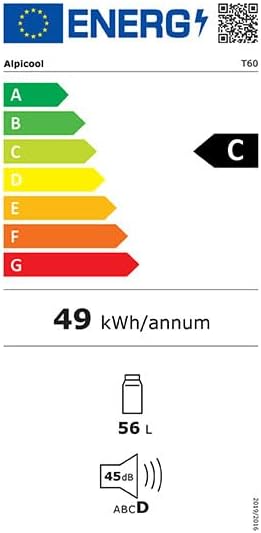
Figure 8: Energy efficiency label for the Alpicool T60, indicating its energy consumption and noise level.
Warranty and Support
Alpicool provides a one-year warranty for the T60 Portable Refrigerator. This warranty covers manufacturing defects and malfunctions under normal use.
For technical support, warranty claims, or any inquiries regarding your product, please contact Alpicool customer service. Provide your model number (T60) and purchase details when contacting support to expedite assistance.
Seller: Alpicool Portable Fridge Freezer
Related documentsT60


Ask a question about this manual
Ask about setup, troubleshooting, compatibility, parts, safety, or missing instructions. Manuals+ will review the question and use this page’s manual context to help answer it.