
1. Product Overview
The SKYSHL SS322T-2G1 is a high-performance Single Mode Optical Time Domain Reflectometer (OTDR) designed for comprehensive fiber optic network testing. It integrates multiple essential functions including OTDR, Optical Power Meter (OPM), Optical Light Source (OLS), Visual Fault Locator (VFL), Event Map, and APP Module connectivity. With 1310nm and 1550nm wavelengths and a dynamic range of 49dB, it is capable of testing distances up to 280km (174 miles). The device features a 7-inch touch screen for intuitive operation and supports various connector types, making it a versatile tool for fiber optic professionals.

Figure 1: Front view of the SKYSHL SS322T-2G1 OTDR Fiber Tester, showcasing its 7-inch touch screen interface.
2. Safety Information
Please read all safety instructions carefully before operating the device. Failure to follow these instructions may result in injury or damage to the device.
- Laser Safety: This device uses lasers. Do not look directly into the optical output ports when the device is active. Laser radiation can cause severe eye damage.
- Power Source: Use only the specified power adapter and battery. Incorrect power sources can damage the device or cause fire.
- Handling: Handle the device with care. Avoid dropping or subjecting it to strong impacts.
- Environment: Do not expose the device to extreme temperatures, humidity, or corrosive environments.
- Maintenance: Refer to the maintenance section for cleaning and care. Do not attempt to disassemble or repair the device yourself.
3. Package Contents
Verify that all items are present in the package:
- 1x OTDR Set (main unit)
- 2x Fiber Optic Patch Cords (1*SM FC/UPC-FC/UPC + 1*SM FC/UPC-FC/APC)
- Various Connectors (FC-SC, FC-ST, FC-FC, FC-LC)
- USB Cable
- Power Adapter
- User Manual
- Cleaning Swabs
- Carrying Bag

Figure 2: Included accessories and the main unit of the SKYSHL SS322T-2G1 OTDR Fiber Tester.
4. Key Features
- Dual Wavelengths & High Dynamic Range: 1310nm+1550nm with 49dB+49dB dynamic range, supporting test distances up to 280km.
- Multi-Function Integration: Combines OTDR, Optical Power Meter (OPM), Optical Light Source (OLS), and Visual Fault Locator (VFL) in one handheld device.
- Short Dead Zones: Event Dead Zone (EDZ) of 0.5m (typical for SM) and Attenuation Dead Zone (ADZ) of 3.0m (typical for SM) for precise fault detection.
- Intelligent Operation: Features automatic testing, scheduled testing, and event mapping for simplified use.
- Smart APP & PC Software: Supports connectivity to Android phones/tablets and Windows PCs for real-time data viewing, sharing, analysis, and saving.
- Broad Connector Compatibility: Includes adapters for SC/UPC, ST/UPC, FC/UPC, LC/UPC, SC/APC, ST/APC, FC/APC, and LC/APC.
- Data Management: Allows saving test traces to SD card and USB flash disk, supports EI&SOR format, one-click screenshot, and one-click PDF generation.
5. Device Layout and Interfaces
Familiarize yourself with the physical components and connection ports of the SS322T-2G1.

Figure 3: Top view of the device showing the VFL, OTDR, and OPM ports, along with USB and Ethernet ports.
- Optical Ports: Dedicated ports for OTDR, VFL, and OPM functions. Ensure correct fiber connection to the appropriate port.
- USB Ports: Type A and Type B USB ports for connecting USB disks, external devices, or connecting to a computer.
- Micro SD Slot: For expanding storage capacity.
- Ethernet Port: For network connectivity and functions like PING test.
- Power Button: Located on the front panel for turning the device on/off.
- Navigation Buttons: Arrow keys and OK button for menu navigation and selection.
- 7-inch Touch Screen: Primary interface for all operations and data display.
6. Setup
6.1 Initial Power On
- Press and hold the power button until the device powers on.
- The device will display the boot screen and then the main menu.
6.2 Language and Time Settings
To configure language and time:
- From the main menu, tap on the System icon.
- Navigate to General Settings.
- Select Language and choose 'English'.
- Adjust the Time settings as needed.
6.3 Network Settings (Optional)
To connect to a Wi-Fi network for APP module functionality:
- From the System menu, tap on Network Settings.
- Enable Wi-Fi and scan for available networks.
- Select your desired network and enter the password to connect.
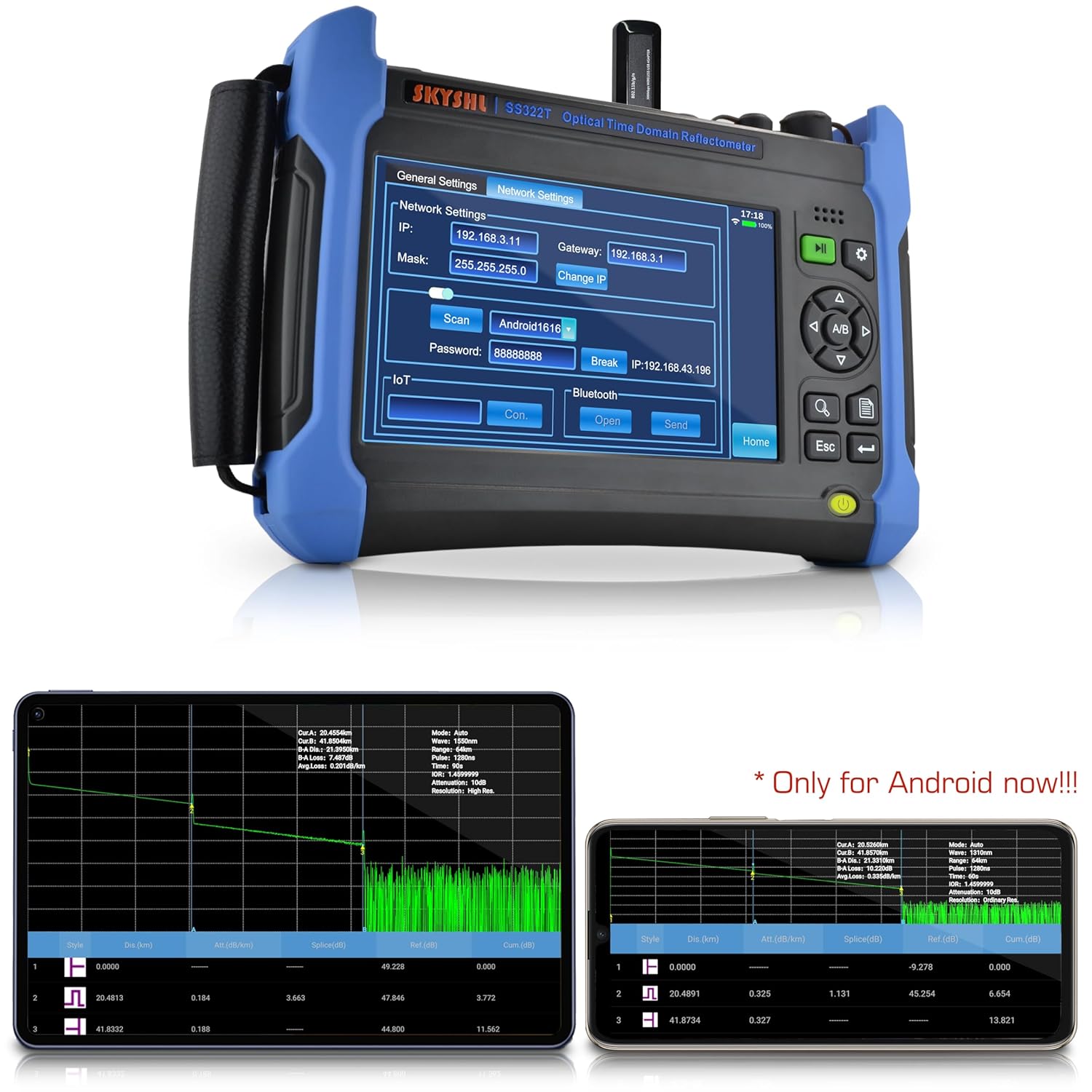
Figure 4: The network settings interface on the SS322T-2G1, showing options for IP, Mask, Gateway, and Wi-Fi connection.
Video 1: Demonstrates how to connect the SKYSHL SS322T OTDR to a Wi-Fi network, enabling remote access and data transfer capabilities.
7. Operating Instructions
7.1 OTDR Testing
The OTDR function is used to characterize optical fibers. Ensure the fiber under test is clean and properly connected.
- From the main menu, tap on the OTDR icon.
- Connect the fiber to the OTDR port. Ensure the connector type matches (UPC/APC). Use appropriate adapters if necessary.
- Tap Setup to configure test parameters.
- Select the desired Wavelength (1310nm or 1550nm).
- Choose the Mode (Auto-Test for automatic parameter selection or Manual for custom settings).
- Adjust Avg. Time (averaging time), Range, and Pulse Width if in Manual mode.
- Tap Test or Average to start the measurement.
- The OTDR trace will be displayed on the screen, showing events like splices, connectors, and fiber ends.

Figure 5: Example of 1310nm and 1550nm graphics analysis on the OTDR screen, detailing events and their characteristics.
Video 2: A real-time introduction to the SKYSHL SS322T OTDR, demonstrating its immediate response and display during fiber testing.
Video 3: An introduction to the fiber test capabilities of the SKYSHL SS322T OTDR, showing how to perform and interpret fiber optic measurements.
7.2 Optical Power Meter (OPM)
The OPM measures the optical power of a fiber optic signal.
- From the main menu, tap on the OPM icon.
- Connect the fiber to the OPM port.
- Select the desired wavelength (850nm to 1650nm).
- The screen will display the measured optical power in dBm or mW.
7.3 Optical Light Source (OLS)
The OLS provides a stable light source for various fiber optic tests.
- From the main menu, tap on the OLS icon.
- Connect the fiber to the OLS port.
- Select the desired wavelength (1310nm or 1550nm).
- Choose the output mode (CW, 270Hz, 1kHz, 2kHz).
- Tap Start to activate the light source.
7.4 Visual Fault Locator (VFL)
The VFL emits a visible red laser to quickly locate breaks, bends, and faulty connectors in fiber optic cables.
- From the main menu, tap on the VFL icon.
- Connect the fiber to the VFL port.
- Tap Start to activate the VFL.
- Observe the fiber for any visible red light leakage, indicating a fault.
7.5 Event Map
The Event Map function provides a simplified, graphical representation of the fiber link, making it easier to identify and locate events without detailed trace analysis.
- After performing an OTDR test, tap on the Event Map icon (if available in your UI version) or navigate to the analysis section.
- The map will display icons representing different events (e.g., splices, connectors, fiber ends) and their distances.

Figure 6: Diagram illustrating various OTDR test event types such as splicing points, adapters, fractures, and fiber ends, as displayed on the test curve.
7.6 Data Management
The SS322T-2G1 allows for efficient management of test data.
- Saving Files: After a test, tap Save to store the trace data. You can choose to save to internal memory, SD card, or a connected USB disk.
- Loading Files: Tap File to browse and load previously saved test files.
- Transferring Files: Use the USB Type A port to connect a USB flash drive for easy transfer of files between the device and external storage.
- PDF Report Generation: The device supports one-click PDF report generation for professional documentation of test results.
Video 4: Demonstrates how to copy test files between the internal memory, SD card, and a USB disk on the SKYSHL SS322T OTDR.
Video 5: Shows the process of directly creating PDF test reports from the SKYSHL SS322T OTDR, simplifying documentation.
7.7 APP Module Connectivity
The Smart APP module allows for enhanced functionality and remote interaction with the device.
- Ensure the device is connected to Wi-Fi (refer to Section 6.3).
- Install the SKYSHL APP on your Android device (currently Android only) or Windows PC.
- Follow the APP's instructions to connect to the SS322T-2G1.
- You can now view, share, analyze, and save test data in real-time from your connected device.
8. Maintenance
Proper maintenance ensures the longevity and accuracy of your SS322T-2G1 OTDR.
- Cleaning Optical Ports: Regularly clean the optical ports and fiber connectors using the provided cleaning swabs and appropriate fiber optic cleaning solutions. Dust and debris can significantly affect measurement accuracy.
- Screen Cleaning: Use a soft, lint-free cloth to clean the touch screen. Avoid abrasive materials or harsh chemicals.
- Battery Care: Charge the device regularly. For long-term storage, ensure the battery is partially charged (around 50%) and store in a cool, dry place. Avoid fully discharging the battery for extended periods.
- Software Updates: Check the manufacturer's website periodically for software updates to ensure optimal performance and access to new features.
- Storage: When not in use, store the device in its carrying bag to protect it from dust, moisture, and physical damage.
9. Troubleshooting
This section addresses common issues you might encounter with your SS322T-2G1 OTDR.
| Problem | Possible Cause | Solution |
|---|---|---|
| No power/Device won't turn on | Low battery; Faulty power adapter; Device malfunction | Charge the battery; Use a different power adapter; Contact technical support |
| Inaccurate OTDR readings | Dirty optical connectors; Incorrect test parameters; Damaged fiber/patch cord | Clean connectors thoroughly; Verify and adjust test parameters; Inspect fiber/patch cord for damage |
| VFL light not visible | VFL not activated; Fiber too long/attenuated; Severe fiber break | Ensure VFL is 'ON'; VFL is for short-distance visual fault location; Check for complete fiber break |
| Cannot connect to Wi-Fi/APP | Incorrect password; Out of range; Network issue; APP not installed/updated | Verify Wi-Fi password; Move closer to access point; Check network status; Install/update APP |
| Touch screen unresponsive | Temporary software glitch; Screen damage | Restart the device; Contact technical support if issue persists |
10. Technical Specifications
| Feature | Specification |
|---|---|
| Model Number | SS322T-2G1 |
| Wavelengths | 1310nm / 1550nm |
| Dynamic Range | 49dB / 49dB |
| Event Dead Zone (EDZ) | 0.5m (typical for SM) |
| Attenuation Dead Zone (ADZ) | 3.0m (typical for SM) |
| Max Test Distance | 280km / 174 miles |
| Screen Size | 7 Inches |
| Operating System | Android / Windows (for APP/Software) |
| Power Source | Battery-powered + AC/DC (11.1V 6800mAh Lithium Battery included) |
| Product Dimensions | 9.83 x 7.08 x 2.16 inches |
| Item Weight | 7.87 pounds |
| Compatible Connectors | SC/UPC, ST/UPC, FC/UPC, LC/UPC, SC/APC, ST/APC, FC/APC, LC/APC |
11. Warranty and Support
SKYSHL provides a 3-year free replacement warranty for the SS322T-2G1 OTDR Fiber Tester, along with lifetime maintenance. For any technical assistance, troubleshooting, or warranty claims, please contact SKYSHL customer support. A professional technical support team is available 24 hours a day to assist you.
For further information, please visit the official SKYSHL website or refer to the contact details provided in your product packaging.