
Introduction
This manual provides essential information for the safe and effective use of your Pioneer DJ VM-80 8-inch Active Monitor Speaker. Please read this manual thoroughly before use to ensure proper setup, operation, and maintenance. Keep this manual for future reference.

Front view of the Pioneer DJ VM-80 8-inch Active Monitor Speaker, showcasing its sleek black design and speaker components.
Safety Information
Always follow basic safety precautions when using this product to reduce the risk of fire, electric shock, and injury to persons. This includes, but is not limited to:
- Do not expose this apparatus to rain or moisture.
- Do not block any ventilation openings. Install in accordance with the manufacturer’s instructions.
- Do not install near any heat sources such as radiators, heat registers, stoves, or other apparatus (including amplifiers) that produce heat.
- Protect the power cord from being walked on or pinched, particularly at plugs, convenience receptacles, and the point where they exit from the apparatus.
- Only use attachments/accessories specified by the manufacturer.
- Refer all servicing to qualified service personnel. Servicing is required when the apparatus has been damaged in any way.
Package Contents
Verify that all items listed below are included in your package:
- Pioneer DJ VM-80 Active Monitor Speaker (x1)
- Power Cord (x1)
- Operating Instructions (this manual)
- Safety Precautions
Product Overview
The Pioneer DJ VM-80 is an 8-inch active monitor speaker designed for accurate audio reproduction in various environments, from DJ booths to home studios. It features a Class D amplifier, 96 kHz sampling DSP, and a 4-mm rigid aluminum front baffle to reduce unwanted vibrations.
Key Features
- Clear, Fast-Attacking Bass: Achieved through an Aramid fiber woofer cone and a Vortex Bass Accelerator for distortion-free airflow.
- Constant Directivity Horn: Ensures a natural sound and smooth frequency crossover.
- DSP Control: Offers 16 EQ configurations to adjust the sound to suit your room or application.
- Robust Construction: 4-mm rigid aluminum front baffle minimizes resonance.
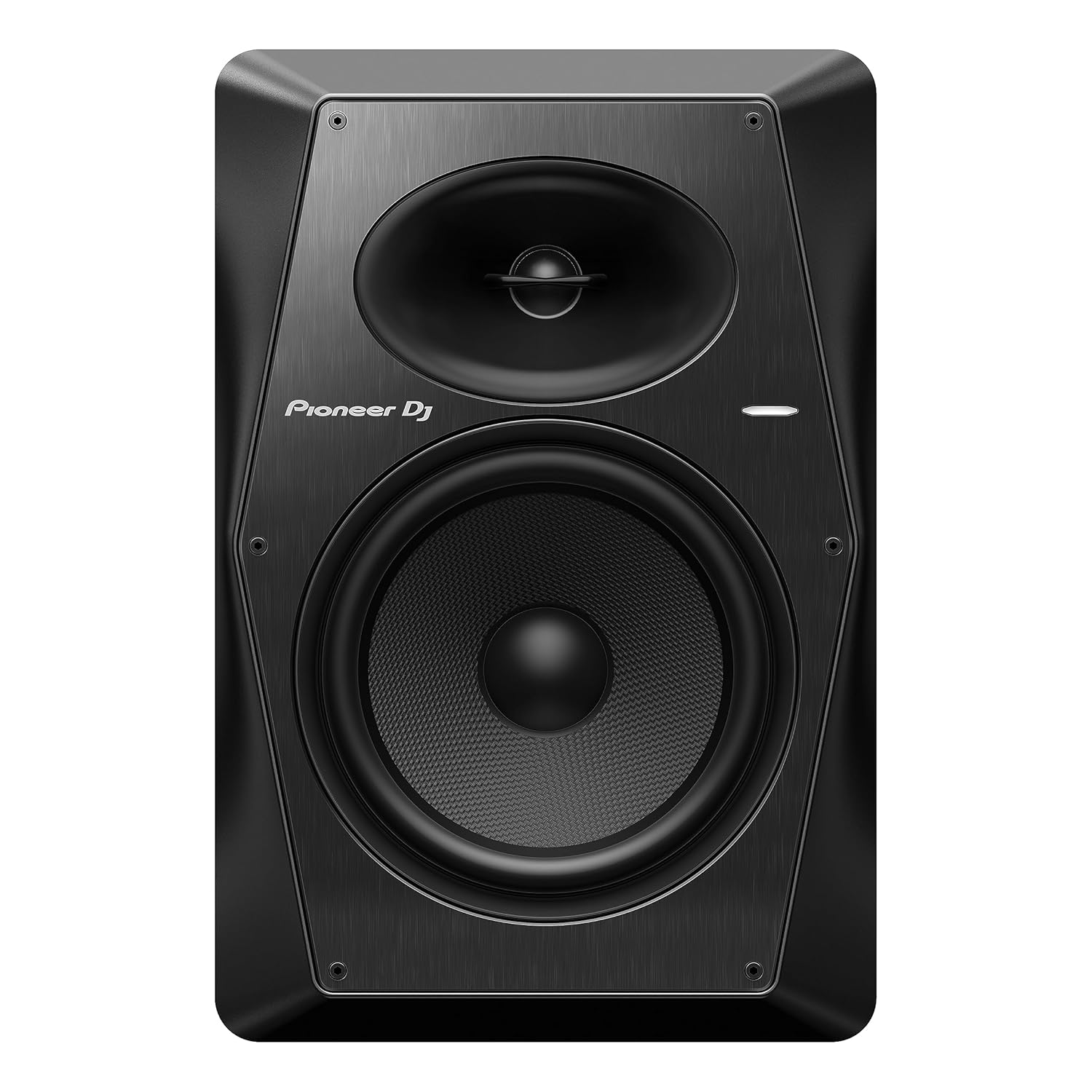
The front of the VM-80 speaker, highlighting the woofer and tweeter.

Side profile of the VM-80 speaker, showing its robust enclosure.
Rear panel of the VM-80, featuring input connectors (XLR/TRS, RCA), volume control, auto standby switch, and DSP control knobs for LOW and HIGH EQ.
Setup
Proper setup is crucial for optimal performance of your VM-80 monitor speakers.
Placement
- Place the speakers on a stable, flat surface at ear level.
- Position the speakers to form an equilateral triangle with your listening position.
- Avoid placing speakers directly against walls or in corners, as this can overemphasize bass frequencies. If necessary, use the DSP controls to compensate.

A typical studio setup showing two VM-80 speakers flanking a DJ mixer and turntables.
Connections
The VM-80 offers balanced XLR/TRS and unbalanced RCA input options.
- Ensure the speaker's power switch is OFF before making any connections.
- Connect your audio source (e.g., DJ mixer, audio interface) to the speaker using appropriate cables. For balanced connections, use XLR or 1/4-inch TRS cables. For unbalanced connections, use RCA cables.
- Connect the power cord to the AC IN socket on the rear panel and then to a power outlet.

Detail of the VM-80 rear panel, showing the XLR/TRS and RCA input jacks, along with the volume and DSP controls.
Operating
Power On/Off
- Before turning on the speaker, ensure the volume knob is set to minimum.
- Flip the power switch on the rear panel to the ON position. The LED indicator on the front will illuminate.
- Gradually increase the volume to your desired listening level.
- To power off, reduce the volume to minimum and then flip the power switch to OFF.
DSP Control (EQ Adjustment)
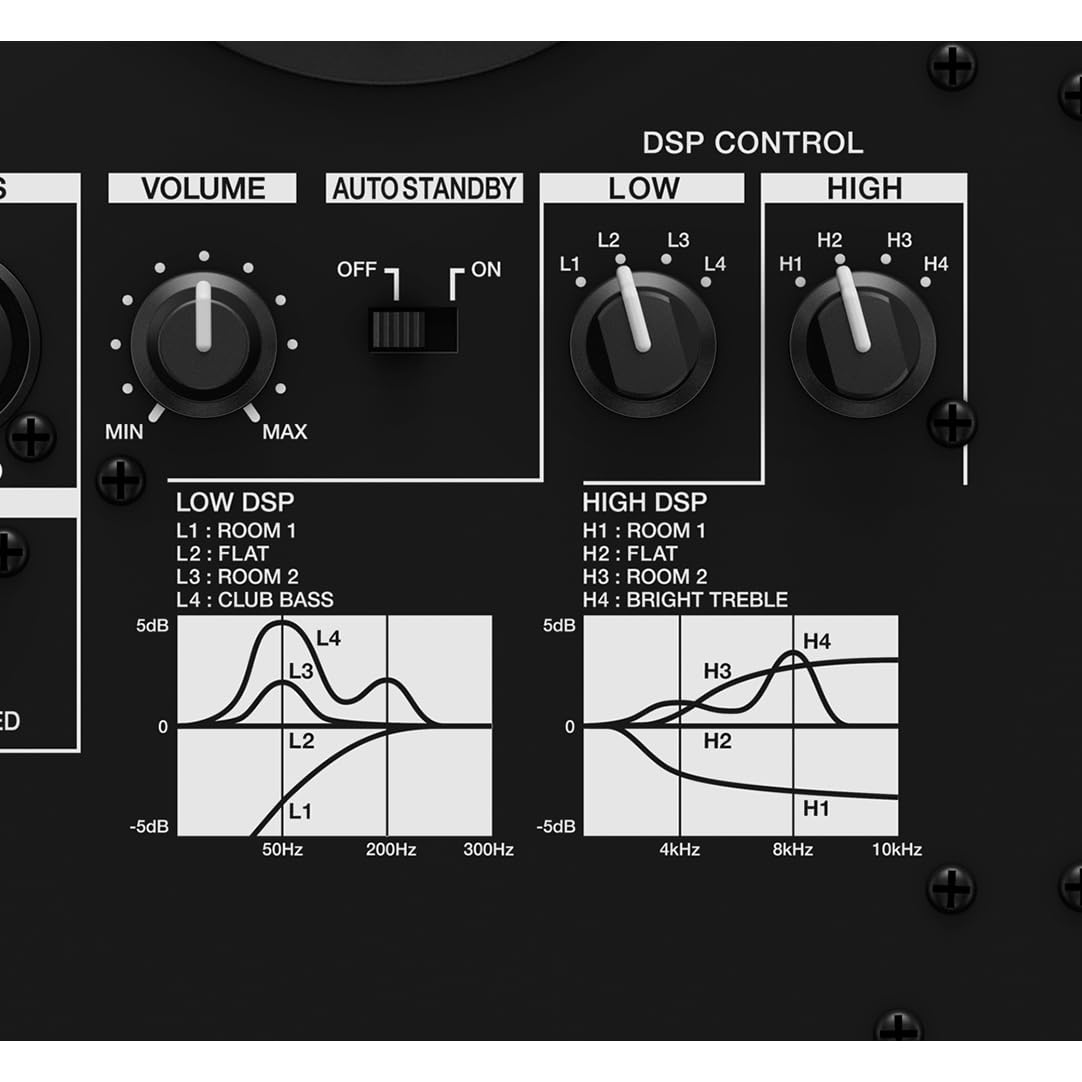
The VM-80 features DSP controls for both LOW and HIGH frequencies, offering 16 different configurations to optimize sound for your room or application.

Detailed view of the DSP control section, showing the LOW and HIGH EQ knobs and their corresponding frequency response curves for different settings like Room 1, Flat, Room 2, Club Bass, and Bright Treble.
- LOW DSP: Adjusts the bass response. Options include L1: Room 1, L2: Flat, L3: Room 2, L4: Club Bass.
- HIGH DSP: Adjusts the treble response. Options include H1: Room 1, H2: Flat, H3: Room 2, H4: Bright Treble.
- Experiment with these settings to find the optimal sound profile for your listening environment and audio content.
Auto Standby Function
The VM-80 includes an auto standby feature to conserve energy. If no audio input is detected for a certain period, the speaker will automatically enter standby mode. The LED indicator will change color or turn off. It will automatically resume normal operation when an audio signal is detected.
Official video showcasing the Pioneer DJ VM Series active monitor speakers, highlighting features like clear bass, DSP control, and room adjustment capabilities.
Maintenance
Regular maintenance ensures the longevity and optimal performance of your VM-80 speakers.
- Cleaning: Use a soft, dry cloth to wipe the exterior of the speaker. Do not use abrasive cleaners, waxes, or solvents.
- Dust: Regularly dust the speaker grilles and ventilation openings to prevent accumulation that could affect performance.
- Storage: If storing the speakers for an extended period, disconnect them from power, clean them, and store them in a cool, dry place away from direct sunlight and extreme temperatures.
Troubleshooting
If you encounter issues with your VM-80 speakers, refer to the following common problems and solutions:
| Problem | Possible Cause | Solution |
|---|---|---|
| No sound | Power not connected; Volume too low; Input cable loose/faulty; Auto standby active. | Check power connection; Increase volume; Reconnect/replace input cable; Send an audio signal to wake from standby. |
| Distorted sound | Volume too high (input or speaker); Faulty cable; Incorrect DSP settings. | Reduce volume on source and speaker; Replace cable; Adjust DSP settings. |
| Humming/Buzzing noise | Ground loop; Interference from other electronics; Faulty cable. | Ensure proper grounding; Move speakers away from other electronics; Replace cable. |
| Speaker not turning on | No power; Power switch off. | Check power outlet and cord; Ensure power switch is ON. |
If the problem persists after trying these solutions, please contact Pioneer DJ customer support.
Specifications
| Feature | Detail |
|---|---|
| Model Number | VM-80 |
| Product Dimensions | 12.8 x 10.51 x 15.75 inches |
| Weight | 21.41 Pounds |
| Speaker Maximum Output Power | 120 Watts |
| Frequency Response | 36 KHz (Note: This value seems unusually high for a frequency response range. Typically, it would be a range like 40 Hz - 20 kHz. Please refer to official product documentation for precise specifications.) |
| Connectivity Technology | XLR, TRS, RCA |
| Audio Output Mode | Stereo |
| Amplifier Type | Class D |
| DSP Sampling Rate | 96 kHz |
Warranty Information
Pioneer DJ products are covered by a limited warranty. The specific terms and duration of the warranty may vary by region and product. Please refer to the warranty card included with your product or visit the official Pioneer DJ website for detailed warranty information and registration procedures.
Support
For technical assistance, product inquiries, or service requests, please contact Pioneer DJ customer support through the following channels:
- Website: Visit the official Pioneer DJ support website for FAQs, driver downloads, and contact forms.
- Phone: Refer to your regional Pioneer DJ website for local support telephone numbers.
When contacting support, please have your product model number (VM-80) and serial number ready.


