
1. Introduction
Thank you for choosing the SNJ Model 1095 52-inch Black Modern Ceiling Fan. This manual provides essential information for the safe installation, operation, and maintenance of your new ceiling fan. Please read these instructions thoroughly before beginning installation and retain them for future reference.

This image displays the SNJ 52-inch black modern ceiling fan with LED light in various home environments, including a living room, dining room, and bedroom, showcasing its versatile design.
2. Safety Information
To reduce the risk of electric shock, fire, or personal injury, always follow these basic safety precautions:
- Read all instructions before installing the fan.
- Ensure the installation site is structurally sound and can support the fan's weight (approximately 35 lbs).
- All wiring must be in accordance with national and local electrical codes. If you are unfamiliar with wiring, consult a qualified electrician.
- Turn off power at the circuit breaker or fuse box before beginning installation or performing any maintenance.
- Do not insert any objects into the path of the blades while the fan is operating.
- Do not install the ceiling fan in a moisture or high humidity location. It could be unsafe.
- Ensure the fan blades are installed at least 7 feet (2.1 meters) from the floor and 18 inches (0.45 meters) from any wall or obstruction.
3. Package Contents
Carefully unpack your fan and inspect the contents. You should have the following items:
- Ceiling Fan Motor Assembly
- Fan Blades (4)
- LED Light Kit
- Remote Control
- Wall Cradle for Remote
- AAA Batteries (for remote)
- Mounting Bracket
- Hardware Pack (screws, wire nuts, washers)
- Instruction Manual

LED Light Board

Lampshade

Fan Blade

DC Motor

Remote
4. Specifications
| Feature | Specification |
|---|---|
| Model Number | 1095 |
| Dimensions (L x W x H) | 52"L x 52"W x 12.3"H |
| Brand | SNJ |
| Color | Modern Black |
| Power Source | AC |
| Voltage | 120V |
| Hertz | 60Hz |
| Motor Wattage | 65W |
| Light Source | Integrated LED |
| Light Kit Wattage | 18W |
| Brightness | 1100-1200 Lumens |
| Light Color Temperatures | 3000K (Warm), 4000K (Neutral), 6500K (Cool) |
| Airflow | 5000 CFM |
| Control Method | Remote Control |
| Number of Blades | 4 (Reversible) |
| Indoor/Outdoor Usage | Indoor (Dry Rated) |
| Mounting Type | Semi Flush Mount (Flat or Angled) |
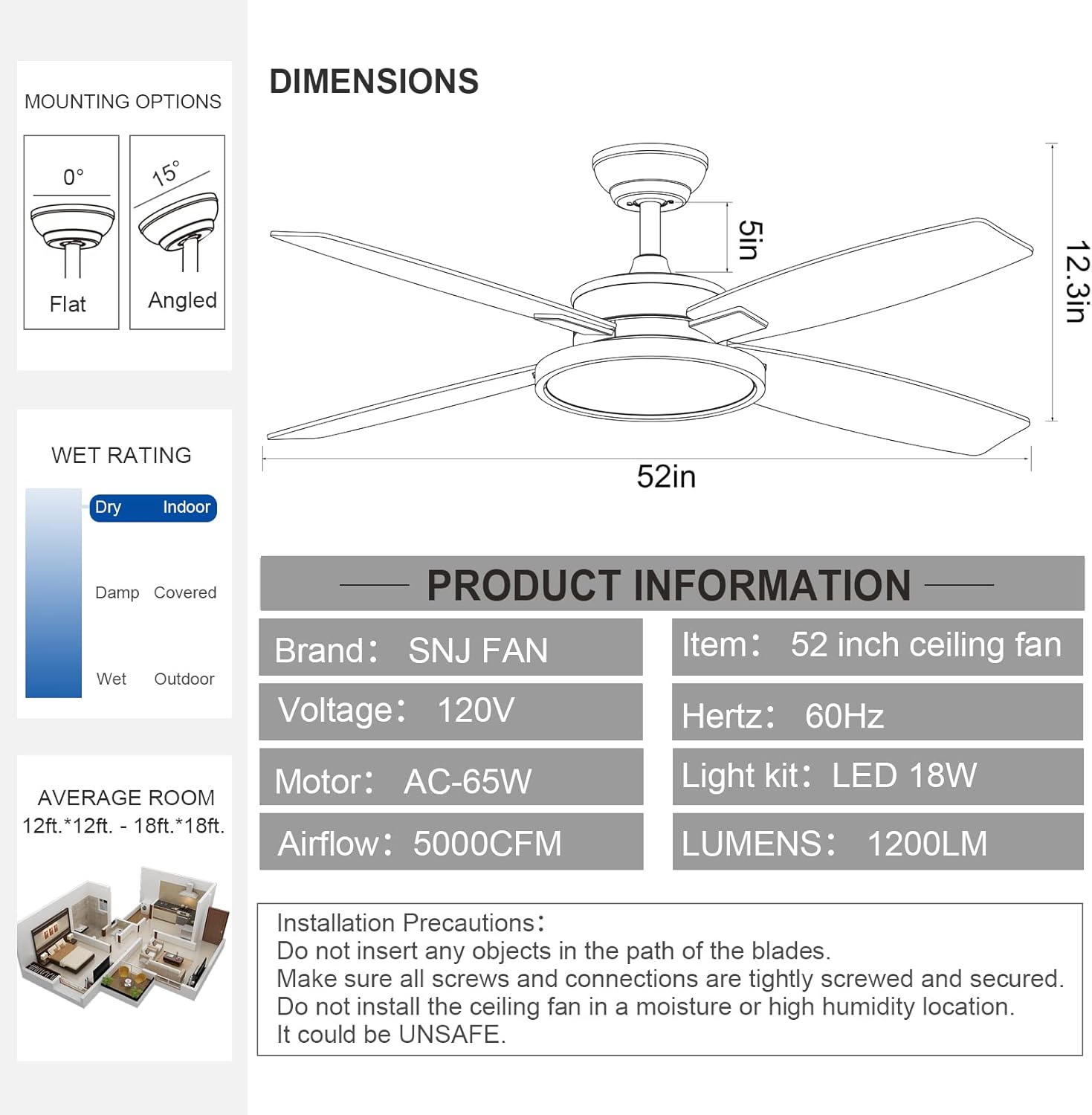
This image provides key product information including dimensions, mounting options, wet rating, and electrical specifications. It also lists important installation precautions.
5. Setup (Installation)
Professional installation is recommended. Ensure power is OFF at the circuit breaker before proceeding.
- Prepare the Mounting Location: Securely attach the mounting bracket to a ceiling joist or an outlet box rated for fan support.
- Assemble the Fan: Attach the fan blades to the motor housing. Ensure all screws are tightly fastened.
- Wire the Fan: Connect the fan's electrical wires to the household wiring according to the provided wiring diagram. Ensure all connections are secure with wire nuts.
- Attach the Fan to the Mounting Bracket: Carefully lift the fan assembly and secure it to the mounting bracket.
- Install the Light Kit: Connect the LED light kit wires and attach the light kit to the fan housing.
- Restore Power: Once installation is complete, restore power at the circuit breaker.
Installation Precautions:
- Do not insert any objects in the path of the blades.
- Make sure all screws and connections are tightly screwed and secured.
- Do not install the ceiling fan in a moisture or high humidity location. It could be unsafe.
6. Operating Instructions
Your SNJ ceiling fan is operated using the included remote control.
Remote Control Functions:

The remote control for the SNJ ceiling fan, showing buttons for fan speed (LOW, MED, HI), fan off (STOP), LED light control (ON/OFF, color temperature switch for 6500K cool, 3000K warm, 4000K neutral light), and fan timer (1/2/4/8H). It also notes memory function for light and wind speed, and includes a wall cradle and AAA batteries.
- Fan Speed (LOW/MED/HI): Press the corresponding button to select low, medium, or high fan speed.
- Fan Off (STOP): Press this button to turn off the fan.
- LED Light Control (ON/OFF/Color Temperature Switch): Press the light button to turn the LED light on or off. Repeatedly pressing the light button will cycle through the three color temperatures: 6500K (Cool Light), 3000K (Warm Light), and 4000K (Neutral Light).
- Fan Timer (1/2/4/8H): Press to set the fan to automatically turn off after 1, 2, 4, or 8 hours.
- Memory Function: The fan remembers the last light color temperature and fan speed setting if it stays on for 10 seconds before being turned off. When turned on again, it will resume the last setting.
Reversible Function (Summer/Winter Mode):
The fan features a reversible motor for year-round comfort. The switch for this function is located on the fan motor housing. Ensure the fan is off before changing the direction.
- Summer Mode (Forward): Blades rotate counter-clockwise, pushing air downwards to create a cooling effect.
- Winter Mode (Reverse): Blades rotate clockwise, drawing air upwards to circulate warm air evenly throughout the room.

This diagram explains the reversible function of the fan blades. In summer, the blades rotate clockwise to create a cooling downdraft. In winter, they reverse to circulate warm air upwards, aiding in balanced indoor heating.
Operational Videos:
This video demonstrates the overall operation of the SNJ 52-inch black ceiling fan, including its fan and light functions controlled by the remote.
A short video showcasing the three color temperature options (cool, warm, neutral) of the SNJ 52-inch black ceiling fan's LED light.
This video illustrates the three adjustable fan speeds (low, medium, high) of the SNJ 52-inch black ceiling fan.
A brief video demonstrating the timer function of the SNJ 52-inch black ceiling fan, allowing users to set it for 1, 2, 4, or 8 hours.
7. Maintenance
Regular maintenance helps ensure the longevity and optimal performance of your ceiling fan.
- Cleaning: Periodically wipe the fan blades and motor housing with a soft, damp cloth. Do not use abrasive cleaners or solvents.
- Tighten Fasteners: Check all screws and fasteners annually to ensure they are secure. Loose connections can cause noise or wobble.
- Light Kit: The LED light is designed for long life. If replacement is needed, contact customer support for compatible parts.
Always turn off power at the circuit breaker before cleaning or performing any maintenance.
8. Troubleshooting
If you experience issues with your fan, refer to the following common problems and solutions:
| Problem | Possible Cause | Solution |
|---|---|---|
| Fan does not start | No power to the fan; Loose wire connections; Remote control battery low or not paired. | Check circuit breaker/fuse; Verify all wire connections are secure; Replace remote batteries or re-pair remote. |
| Fan is noisy | Loose fan blades or mounting hardware; Motor hum (normal for some motors); Blades unbalanced. | Tighten all blade and mounting screws; Ensure fan is securely mounted; Check for balanced blades. |
| Light does not work | Loose wire connection to light kit; LED light failure; Remote control issue. | Check light kit wiring; Contact customer support for LED replacement; Check remote batteries. |
| Fan wobbles | Loose blades or mounting hardware; Unbalanced blades; Improper installation. | Ensure all screws are tight; Use a balancing kit if necessary; Re-check installation steps. |
| Remote not responding | Low or dead batteries; Remote not paired; Obstruction between remote and receiver. | Replace AAA batteries; Follow pairing instructions (if applicable); Ensure clear line of sight. |
9. Warranty and Support
Your SNJ Model 1095 Ceiling Fan comes with a 2-year warranty from the date of purchase. This warranty covers defects in materials and workmanship under normal use.
For warranty claims, missing parts, product damage, or any other inquiries, please contact SNJ customer service. Our professional after-sales support team is available for 24-hour customer service to provide a satisfactory solution.
Contact Information: Please refer to your purchase documentation or the SNJ official website for the most current customer service contact details.

SNJ offers professional after-sales support and a 2-year warranty for this product.


