
LIGE BW1290
LIGE Smart Watch Instruction Manual
Model: BW1290
1. Setup
1.1. Unboxing and Initial Inspection
Upon opening the package, verify that all components are present and in good condition. The package should contain the LIGE Smart Watch, a magnetic charging cable, and a strap adjustment tool. A warranty card and user manual are also included.

Image: LIGE Smart Watch and its included accessories.
Video: Unboxing the LIGE Smart Watch and reviewing its contents.
1.2. Charging the Smart Watch
Connect the magnetic charging cable to the charging points on the back of the watch. Plug the USB end into a compatible power source. The watch display will indicate charging status. Ensure the watch is fully charged before first use.
1.3. App Download and Pairing
To unlock the full functionality of your LIGE Smart Watch, download the 'Da Fit' application on your smartphone. The app is compatible with iOS 8.0 or Android OS 4.4 and above, and Bluetooth 4.0 or above.
- Long press the side button of the watch for 3-5 seconds to turn it on.
- Open the QR code on the watch's setting page.
- Scan the QR code using your phone to download the 'Da Fit' APP.
- Turn on your phone's Bluetooth and location services.
- Ensure the smart watch is not currently bound to other phones.
- Open the 'Da Fit' APP on your phone, set up your personal information.
- Navigate to the "Device" interface within the app and click "Bind Device".
- On the watch's main dial interface, swipe right to view the Bluetooth MAC address.
- Select the searched device name and corresponding MAC address in the app, then click 'Pair'. The bracelet is successfully connected once paired.
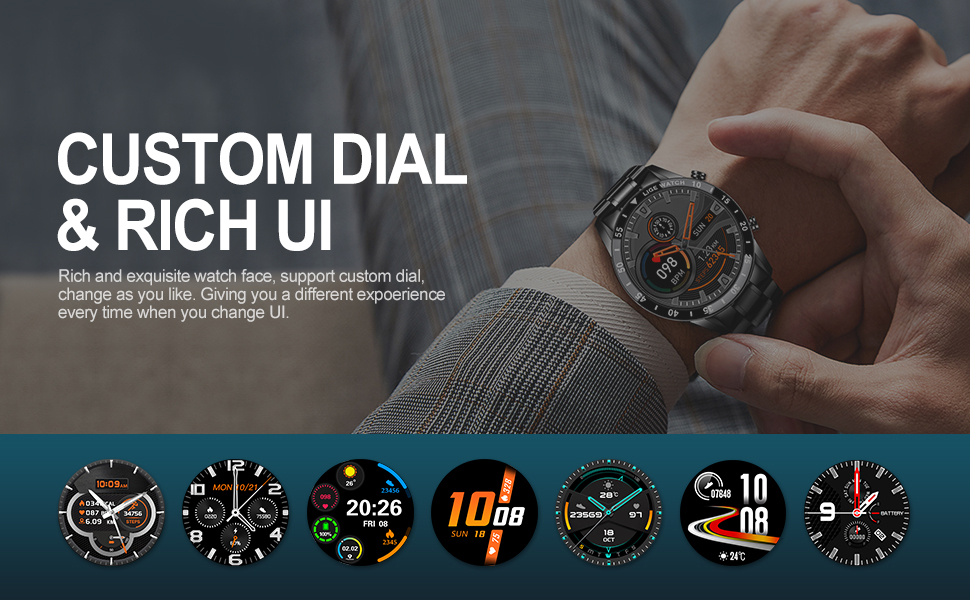
Image: The 'Da Fit' app interface for customizing watch dials.
1.4. Adjusting the Strap Size
The LIGE Smart Watch comes with a metal strap and a dedicated adjustment tool. Use this tool to remove or add links to achieve a comfortable fit on your wrist.
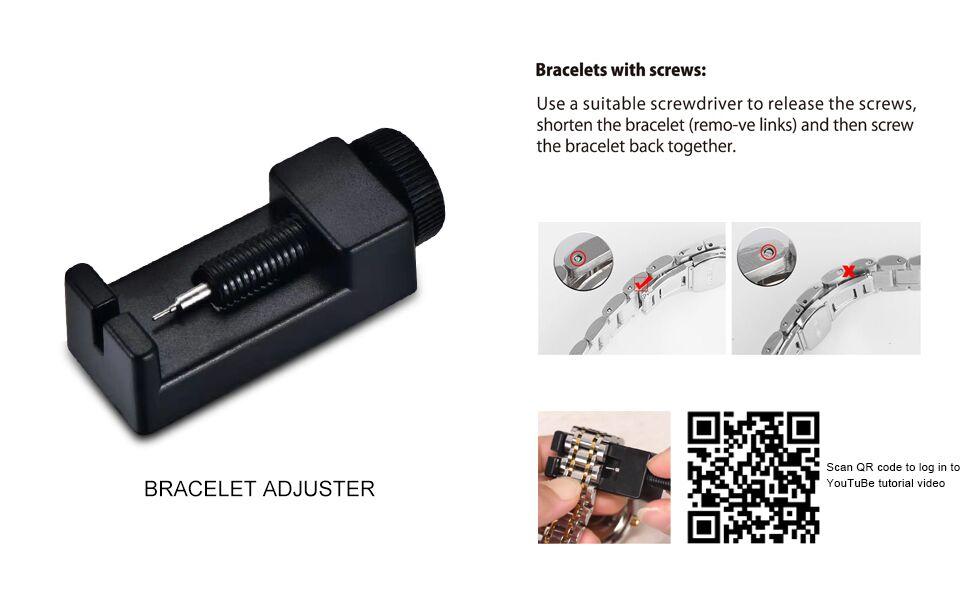
Image: Instructions for adjusting the watch strap using the provided tool.
2. Operating the Smart Watch
2.1. Basic Navigation
The LIGE Smart Watch features a 1.3-inch full touch screen. Swipe left/right or up/down to navigate through different menus and functions. Use the side buttons for power on/off and quick access to certain features.
2.2. Bluetooth Calls and Notifications
Once paired with your phone, the watch allows you to make and receive calls directly. It also vibrates to alert you of incoming calls, SMS texts, and SNS messages from platforms like Facebook, WeChat, WhatsApp, Skype, Line, Instagram, and Twitter.

Image: The smart watch displaying an incoming call, allowing direct answering or hanging up.
2.3. Health Monitoring
The watch provides 24-hour health monitoring capabilities:
- Heart Rate Monitor: Continuously tracks your heart rate.
- Blood Pressure Monitor: Provides periodic blood pressure readings.
- Sleep Monitor: Automatically measures your sleep patterns, including awake, light, and deep sleep data.
Note: The measurement data from the smart watch's health functions are for reference only and should not be used as medical data.

Image: Health monitoring features, including heart rate and blood pressure tracking.
2.4. Activity Tracking
Track your daily activities and exercise performance:
- Sport Modes: Built-in 10 sport modes including walking, running, cycling, rock climbing, swimming, diving, table tennis, badminton, football, and basketball.
- Daily Tracking: All-day tracking of steps, distance, and calories burned.
- Stopwatch: Use the stopwatch function to time your workouts.

Image: Overview of daily sports tracking features and supported activities.
2.5. Additional Features
The LIGE Smart Watch includes several convenient features:
- Alarm Clock: Set alarms directly from your watch.
- Sedentary Reminder: Receive alerts to encourage movement after periods of inactivity.
- Music Control: Control music playback on your phone (play, pause, next, previous).
- Remote Camera Control: Remotely trigger your phone's camera for photos.
- Weather Forecast: Synchronize with your phone to display real-time weather conditions.

Image: A compilation of additional smart features available on the watch.
3. Maintenance
3.1. Extending Battery Life
To maximize your watch's battery life:
- Reduce screen brightness and frequency of screen activation. Disable the
Related documentsBW1290


Ask a question about this manual
Ask about setup, troubleshooting, compatibility, parts, safety, or missing instructions. Manuals+ will review the question and use this page’s manual context to help answer it.