
Introduction
This manual provides detailed instructions for the installation, operation, maintenance, and troubleshooting of your RAINPOINT Digital Water Hose Timer (Model B08ZSRRFVV). Please read this manual carefully before using the product to ensure proper function and longevity.
Safety Information
- Do not immerse the timer in water. While it is IP54 waterproof, it is not designed for submersion.
- Use only 3 AAA 1.5V Alkaline batteries. Do not mix old and new batteries or different battery types.
- Ensure all connections are tight to prevent leaks.
- Do not use with water pressure exceeding 8.0 bar (120 PSI) or below 0.5 bar (10 PSI).
- Protect the timer from freezing temperatures to prevent damage. Remove batteries and store indoors during winter.
Product Overview
The RAINPOINT Digital Water Hose Timer is designed for automated irrigation of gardens, lawns, and plants. It features a single outlet, IP54 waterproof rating, and an easy-to-program interface.
Key Features:
- One-Key Control: Simple programming with a single button.
- IP54 Waterproof: Suitable for outdoor use, resistant to dust and water splashes.
- Durable Construction: Made from high-quality electronic components and industrial-grade ABS materials.
- Universal Connections: 3/4" inlet and 3/4" outlet for compatibility with standard North American hoses.
- Flexible Programming: Supports watering frequency (12/24/48 hours) and duration (2/5/10/15 minutes), with delay options.
- Self-Cleaning Valve: Designed to prevent liquid leakage and reduce maintenance.

Image: Overview of the RAINPOINT Sprinkler Timer highlighting its reliable valve, easy programming, precise timing, and quick installation.
Setup
1. Battery Installation
- Locate the battery compartment on the back of the timer.
- Twist and remove the battery cover.
- Insert three (3) new AAA 1.5V Alkaline batteries, ensuring correct polarity (+/-).
- Replace the battery cover, ensuring it is securely sealed to maintain the IP54 waterproof rating.
2. Connecting the Timer
- Connect the timer's inlet (top connection) to your outdoor faucet. Hand-tighten only. Do not overtighten.
- Connect your garden hose to the timer's outlet (bottom connection). Hand-tighten only.
- Ensure the faucet is turned on fully after installation.

Image: The RAINPOINT Sprinkler Timer installed on an outdoor faucet with a garden hose attached.
Operating Instructions
The RAINPOINT Digital Water Hose Timer features a simple dial and button interface for programming.
Programming Watering Schedules:
- Set Watering Duration: Rotate the outer dial to select the desired watering duration. Options typically include 2, 5, 10, 15 minutes, and more, up to 55 minutes.
- Set Watering Frequency: Rotate the inner dial to select how often watering occurs. Options include every 12, 24, 48 hours, or every 1 to 7 days.
- The timer will automatically begin the programmed schedule after settings are selected.
Manual Watering:
- To initiate manual watering, press and hold the button on the timer.
- The water will flow until the button is pressed again or a preset manual duration expires (if applicable). Refer to the specific model's manual for detailed manual watering duration settings.

Image: Close-up of the RAINPOINT Sprinkler Timer's dial, illustrating how to set watering duration and frequency.
Maintenance
Battery Replacement:
When the battery indicator shows low power, replace all three AAA batteries promptly to ensure continuous operation. Follow the battery installation steps in the Setup section.
Cleaning the Filter:
The timer includes a mesh filter at the inlet to prevent debris from entering. Periodically check and clean this filter to maintain optimal water flow. Unscrew the timer from the faucet, remove the filter, rinse it under running water, and reinsert it before reattaching the timer.
Winterization:
Before the first frost, disconnect the timer from the faucet and hose. Remove the batteries. Store the timer indoors in a dry, protected area to prevent damage from freezing temperatures.
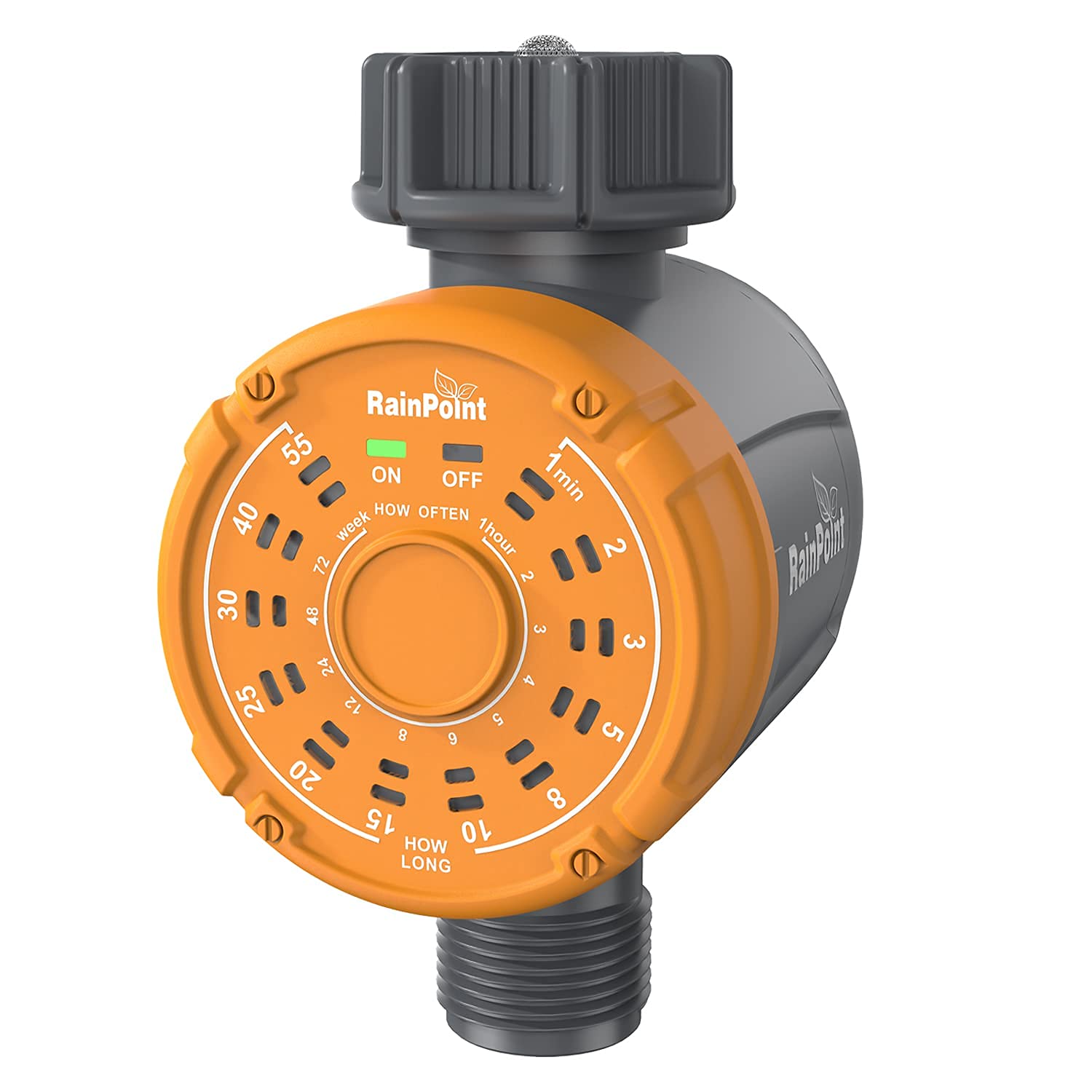
Image: An exploded diagram illustrating the intelligent valve design of the RAINPOINT Sprinkler Timer, showing the mesh filter, auto-shutoff valve, and self-cleaning components.
Troubleshooting
| Problem | Possible Cause | Solution |
|---|---|---|
| No water flow. |
|
|
| Timer not turning on/off. |
|
|
| Water leakage from connections. |
|
|
Specifications
- Model: B08ZSRRFVV
- Material: Acrylonitrile Butadiene Styrene (ABS)
- Waterproof Rating: IP54
- Inlet Size: 3/4 inch
- Outlet Size: 3/4 inch
- Power Source: 3 x AAA 1.5V Alkaline Batteries (not included)
- Working Water Pressure: 0.5 bar to 8.0 bar (10-120 PSI)
- Flow Rate: 5 L/min to 35 L/min
- Irrigation Frequency: Every 1/2/3/4...7 days, or 12/24/48 hours
- Irrigation Duration: 1/2/3/5...55 minutes
- Item Weight: 218 Grams
- UPC: 768563801860
Warranty and Support
RAINPOINT is committed to providing quality products and satisfactory customer service. If you encounter any issues with your Digital Water Hose Timer, please contact RAINPOINT customer service for assistance. Our professional support team is available to help with product inquiries and troubleshooting.
For support, please refer to the contact information provided on the official RAINPOINT website or product packaging.


