
1. Introduction
Thank you for choosing the Hoco PH37 Folding Laptop Stand. This manual provides essential information for the proper setup, operation, and maintenance of your new laptop stand. Please read this manual thoroughly before using the product to ensure optimal performance and longevity.
2. Product Overview
The Hoco PH37 is an excellent aluminum alloy folding laptop stand designed to elevate your laptop for improved ergonomics and heat dissipation. Its foldable design makes it highly portable, while its adjustable nature allows for multiple viewing angles and heights.
Key Features:
- Premium Aluminum Alloy Construction: Ensures durability and a sleek, modern aesthetic.
- Foldable Design: Compact and easy to carry, ideal for travel or storage.
- Multi-Angle Adjustment: Allows you to set your laptop at various ergonomic heights and angles.
- Silicone Protection: Non-slip silicone pads on contact surfaces protect your laptop from scratches and ensure stability.
- Enhanced Heat Dissipation: Open design promotes airflow around your laptop, preventing overheating.
- Wide Compatibility: Suitable for a variety of laptops, including Apple MacBook, Samsung, HP, Dell, and Lenovo models.
Product Components:
- Main Stand Frame (Aluminum Alloy)
- Adjustable Support Arms
- Silicone Anti-Slip Pads (on top and bottom surfaces)
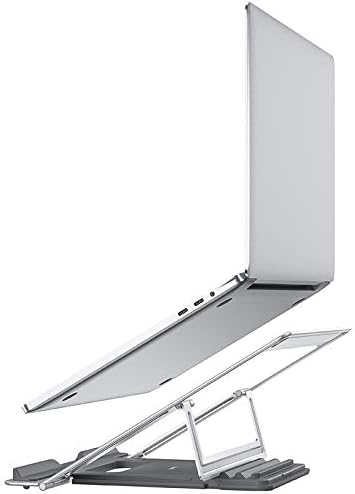


3. Setup Instructions
- Unfold the Stand: Gently pull the two main sections of the stand apart until they fully extend and lock into place. The adjustable support arms will also unfold.
- Adjust Height/Angle: The stand features multiple adjustment points. Carefully lift or lower the support arms to achieve your desired viewing height and angle. Ensure both arms are adjusted to the same level for stability.
- Place Your Laptop: Carefully place your laptop onto the silicone-padded surface of the stand. Ensure it is centered and stable on the stand. The silicone pads will prevent slipping and protect your device.
Note: Always ensure the stand is placed on a stable, flat surface before placing your laptop on it.
4. Operating Instructions
Once set up, the Hoco PH37 stand provides a stable and elevated platform for your laptop. You can easily adjust its height and angle as needed:
- Height Adjustment: To change the height, gently lift your laptop off the stand, then adjust the support arms to a new position. Re-place your laptop once the adjustment is complete.
- Angle Adjustment: The stand's design allows for various tilt angles. Adjust the support arms to achieve the most comfortable screen angle for your posture.
The open design of the stand facilitates better airflow around your laptop, which helps in dissipating heat and maintaining optimal operating temperatures, especially during prolonged use.
5. Maintenance
To ensure the longevity and proper functioning of your Hoco PH37 laptop stand, follow these simple maintenance guidelines:
- Cleaning: Wipe the stand with a soft, damp cloth. For stubborn marks, a mild soap solution can be used, followed by drying with a clean, dry cloth. Avoid abrasive cleaners or solvents.
- Storage: When not in use, fold the stand into its compact form and store it in a dry, clean place away from direct sunlight or extreme temperatures.
- Inspection: Periodically check the joints and silicone pads for any signs of wear or damage.
6. Troubleshooting
If you encounter any issues with your Hoco PH37 laptop stand, please refer to the following common solutions:
| Problem | Possible Cause | Solution |
|---|---|---|
| Stand feels unstable. | Not fully unfolded or placed on an uneven surface. | Ensure the stand is fully extended and locked. Place it on a flat, stable desk or table. |
| Laptop slides on the stand. | Silicone pads are dirty or worn. | Clean the silicone pads with a damp cloth. If pads are severely worn, contact customer support. |
| Difficulty adjusting height/angle. | Joints are stiff. | Apply gentle, even pressure when adjusting. Avoid forcing the mechanism. |
If the problem persists, please contact Hoco customer support for further assistance.
7. Specifications
| Feature | Detail |
|---|---|
| Brand | HOCO |
| Model Number | PH37 |
| Material | Metal (Aluminum Alloy) |
| Color | Silver |
| Form Factor | Foldable |
| Compatible Devices | Multi-laptop compatibility (Apple MacBook, Samsung, HP, Dell, Lenovo) |
| Mounting Type | Tabletop |
| Special Features | Adjustable, Heat Dissipation, Silicone Protection |
| Recommended Uses | Desk |
| Package Dimensions | 28 x 22.6 x 3.5 cm |
| Package Weight | 720 g |
8. Warranty and Support
HOCO products are manufactured to high-quality standards. For information regarding warranty coverage, please refer to the warranty card included with your product or visit the official HOCO website. If you require technical support or have any questions not covered in this manual, please contact HOCO customer service through their official channels.
For the latest support information and contact details, please visit: www.hoco.com