
Introduction
Thank you for choosing the Hoco PH36 Metal Multifunctional Folding Stand. This user manual provides detailed instructions on how to set up, operate, and maintain your new device stand. Please read this manual carefully before use to ensure optimal performance and longevity of the product.
Product Features
- Durable Construction: Crafted from high-quality zinc alloy for enhanced durability and stability.
- Elegant Finish: Features an electroplated surface for a sleek, silver appearance and corrosion resistance.
- Compact and Portable: Designed to be foldable, reducing its size to 70 x 42 x 4 mm for easy transport and storage.
- Stable Support: Provides stable absorption to securely hold your device.
- Universal Compatibility: Suitable for mobile phones and devices up to 7 inches, including popular models from Apple, Samsung, Huawei, Xiaomi, and Oppo.
- Multifunctional Design: Can be used in various orientations for viewing, video calls, or typing.
Setup and Installation
- Unfold the Stand: Gently unfold the stand from its compact, folded position. The hinges are designed for smooth movement.
- Adjust the Angle: Position the stand to your desired viewing angle. The adjustable design allows for both vertical and horizontal device placement.
- Place Your Device: Carefully place your mobile phone or device onto the stand. Ensure it is seated securely on the support arms.

Image: The Hoco PH36 stand in a partially unfolded state, illustrating its adjustable hinge for various viewing angles.
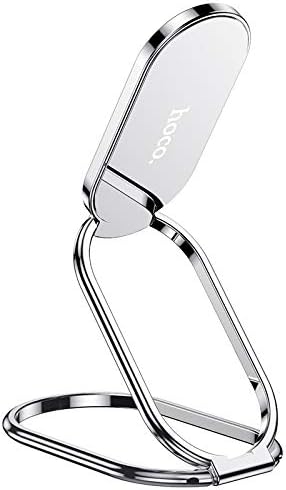
Image: The Hoco PH36 stand in its compact, folded configuration, ready for portability.
Operating Instructions
The Hoco PH36 stand is designed for simple and intuitive operation:
- Viewing Modes: Adjust the stand to hold your device in portrait mode for video calls or browsing, or in landscape mode for watching videos and movies.
- Stability: Ensure the stand is placed on a flat, stable surface to prevent accidental tipping.
- Device Compatibility: The stand is suitable for devices up to 7 inches. Avoid placing excessively heavy or large devices on the stand to maintain stability.

Image: Two Hoco PH36 stands demonstrating usage with smartphones in both landscape and portrait orientations on a table.
Maintenance
- Cleaning: Wipe the stand with a soft, dry cloth to remove dust and fingerprints. Do not use abrasive cleaners or solvents.
- Storage: When not in use, fold the stand to its compact size and store it in a dry place away from extreme temperatures.
- Avoid Impact: While durable, avoid dropping the stand or subjecting it to strong impacts, which could damage the hinges or surface finish.
Troubleshooting
- Stand feels unstable: Ensure the stand is fully unfolded and placed on a flat, level surface. Check that your device is centered on the support arms.
- Device slipping: Verify that your device's size is within the recommended 7-inch limit. The stand is designed for general use and may not be suitable for devices with unusually slick surfaces or heavy cases.
- Hinges are stiff: The hinges are designed to be firm to maintain the chosen angle. If they become excessively stiff, apply a small amount of silicone-based lubricant (not oil-based) to the hinge points.
Specifications
| Brand | Hoco |
| Model Number | PH36 |
| Material | Zinc Alloy, Metal |
| Surface Technology | Electroplating |
| Folded Dimensions | 70 x 42 x 4 mm |
| Weight | 44 grams |
| Color | Silver |
| Form Factor | Foldable |
| Compatibility | Mobile phones up to 7 inches (Universal) |
| Number of Items | 1 |
Warranty and Support
This Hoco PH36 Metal Multifunctional Folding Stand comes with a standard manufacturer's warranty. For specific warranty details, please refer to the product packaging or contact your retailer. For technical support or any inquiries regarding your product, please visit the official Hoco website or contact their customer service department.

Image: The Hoco PH36 product packaging, which may contain additional warranty and support information.