1. Product Overview
The Roland FP-30X is an 88-key digital piano designed to provide an authentic piano experience with modern features. It combines rich sound with space efficiency, making it suitable for various environments.
- SuperNATURAL Piano Sound Engine: Delivers rich expression, from soft pianissimo to powerful fortissimo.
- PHA-4 Standard Keyboard: Provides an authentic acoustic-style piano touch.
- Powerful 22-Watt Speaker System: Built-in speakers offer room-filling sound.
- Bluetooth MIDI Connectivity: Connects with apps like Zenbeats, GarageBand, and the Roland Piano App for recording, practice tracking, and tone selection.
- Comprehensive Bundle: Includes the Roland KSC-70 Stand, Roland KPD-70 Three Pedal Unit, bench, instructional DVD, online piano lessons, and an Austin Bazaar polishing cloth.
2. Setup and Assembly
2.1 What's in the Box
Your Roland FP-30X bundle includes the following components:
- Roland FP-30X Digital Piano Unit
- Roland KSC-70 Furniture Stand
- Roland KPD-70 Three Pedal Unit
- Bench
- Instructional DVD
- Online Piano Lessons Access (registration required)
- Austin Bazaar Polishing Cloth
- AC Adapter and Power Cord
- Music Rest
2.2 Assembly Instructions
Follow these general steps to assemble your Roland FP-30X Digital Piano. Refer to the included instructional DVD for detailed visual guidance.
- Unpack Components: Carefully remove all items from the packaging and ensure all parts listed in 'What's in the Box' are present.
- Assemble the KSC-70 Stand: Follow the stand's specific instructions to connect the side panels and crossbars. Ensure all screws are tightened securely.
- Attach the KPD-70 Pedal Unit: Secure the three-pedal unit to the designated area on the stand.
- Place the Piano Unit: Carefully lift the FP-30X piano unit and place it onto the assembled KSC-70 stand, aligning it with the mounting brackets. Secure the piano to the stand using the provided screws.
- Connect Cables: Plug the power cord into the piano and a power outlet. Connect the pedal unit cable to the appropriate port on the piano.
- Assemble the Bench: Attach the legs to the bench seat according to the instructions.
- Attach Music Rest: Insert the music rest into the slot on top of the piano.
Note: Some customer reviews indicate that stand assembly instructions may be minimal. Online video tutorials can provide additional assistance if needed.
3. Operating Instructions
3.1 Power On/Off and Volume
Locate the power button on the piano's control panel. Press and hold to turn the unit on or off. Adjust the master volume using the dedicated knob or slider.
3.2 Sound Selection and Customization
The FP-30X features Roland's SuperNATURAL Piano sound engine. You can select various piano tones and other instrument sounds directly from the control panel. Advanced customization of piano tones (e.g., lid position, resonance, tuning) can be performed via the Roland Piano App connected via Bluetooth.
3.3 Bluetooth Connectivity
The piano supports Bluetooth MIDI for wireless connection to smartphones or tablets. This allows you to use the Roland Piano App for enhanced control, practice features, and access to other music apps like Zenbeats and GarageBand for creative recording.
3.4 Pedal Unit Usage
The KPD-70 Three Pedal Unit provides sustain, soft, and sostenuto pedal functions, replicating the expressive control of an acoustic grand piano.
4. Media Integration
4.1 Product Images
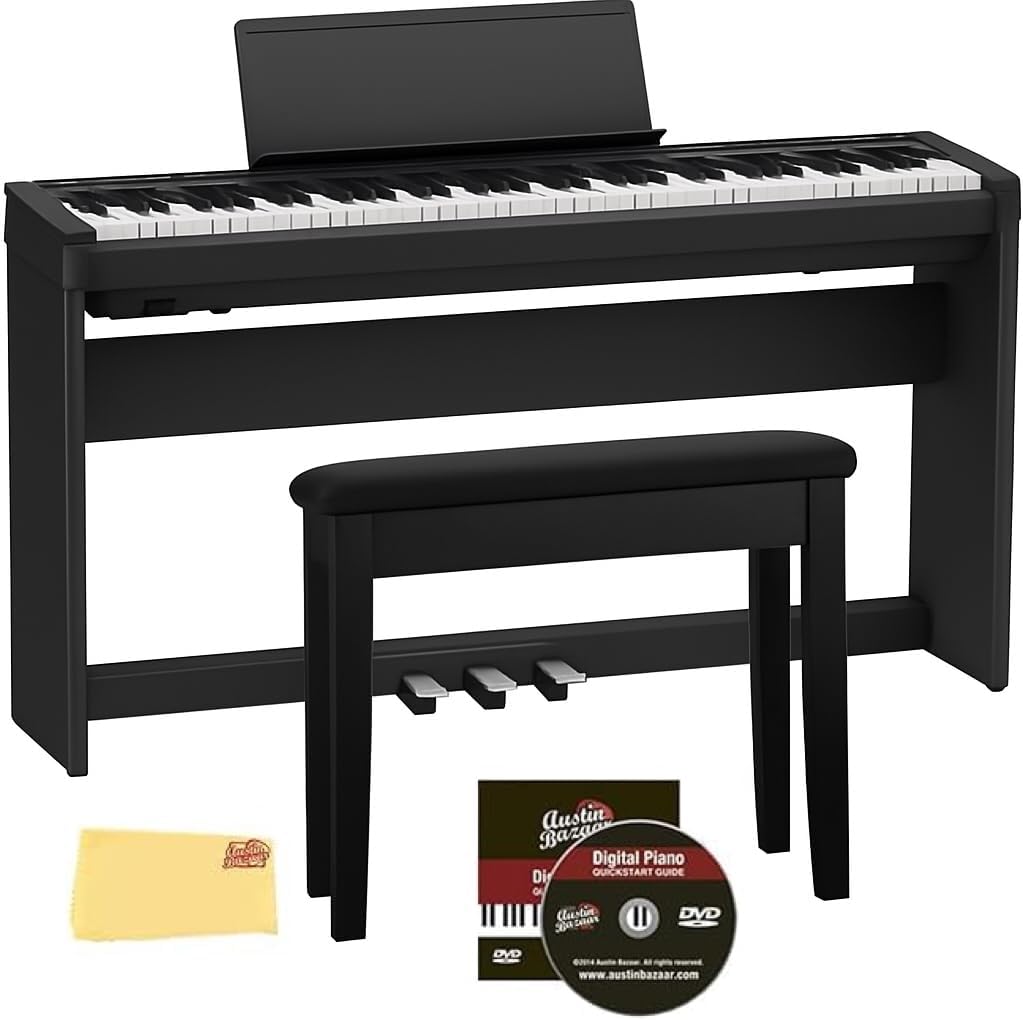
Figure 1: The Roland FP-30X Digital Piano in black, shown with the KSC-70 furniture stand, KPD-70 three-pedal unit, and matching bench. Also visible are the instructional DVD and polishing cloth included in the bundle.

Figure 2: An illustration detailing the accessories included in the bundle: Roland KSC-70 Stand, Roland KPD-70 Three Pedal Unit, Bench, Instructional DVD, and Austin Bazaar Polishing Cloth.

Figure 3: Diagram showing the product dimensions of the Roland FP-30X Digital Piano with its furniture stand. Dimensions are approximately 51.1 inches (width), 36.4 inches (height), and 12.7 inches (depth).

Figure 4: Overview of the Roland FP-30X's performance features, including 6 piano tones, 7 electric piano tones, 22 other tones, 8 rhythm types, 102 dB volume level, and 20-250 tempo range.

Figure 5: Detailed view of the Roland FP-30X's rear connectors, including USB COMPUTER port (Type B), USB MEMORY port (Type A), DC In jack, Accessory pedal Damper, and Optional pedals.

Figure 6: The included piano bench, featuring a padded seat and sturdy construction. The bench also has a storage compartment under the seat.
4.2 Official Product Videos
Video 1: This video provides an overview of the Roland FP-30X Digital Piano, highlighting its built-in powerful amplifier and various features. It showcases the instrument's sound quality and design.
5. Specifications
| Model Name | FP-30X |
| Number of Keys | 88 |
| Keyboard Type | PHA-4 Standard Keyboard |
| Sound Engine | SuperNATURAL Piano |
| Speaker Output | 22 Watts (11W x 2) |
| Connectivity | Bluetooth, Auxiliary |
| Headphones Jack | 3.5mm Jack |
| Product Dimensions | 11.2"D x 51.2"W x 6"H |
| Item Weight | 32.7 Pounds |
| Power Source | Battery Powered (AC Adapter included) |
| Supported Software | Roland Cloud, Cubase, Logic Pro |
6. Maintenance
Proper maintenance ensures the longevity and optimal performance of your digital piano.
- Cleaning: Use the provided polishing cloth to gently wipe the piano's surface and keys. Avoid abrasive cleaners or solvents.
- Storage: Store the piano in a stable environment, away from direct sunlight, extreme temperatures, and high humidity.
- Dust Cover: Use a dust cover when the piano is not in use to protect it from dust and debris.
7. Troubleshooting
If you encounter any issues with your Roland FP-30X, refer to the following common troubleshooting tips:
- No Sound: Check if the power is on, volume is up, and headphones are not plugged in (unless intended). Ensure all cables are securely connected.
- Bluetooth Connectivity Issues: Ensure Bluetooth is enabled on both the piano and your device. Try restarting both devices and re-pairing.
- Keys Not Responding: Power cycle the piano. If the issue persists, contact customer support.
8. Warranty and Support
For warranty information, detailed support, and to access your free online piano lessons, please register your Roland FP-30X Digital Piano on the official Roland website. Customer support is also available through Austin Bazaar, the seller.


