
1. Introduction and Overview
The Redragon K630 Dragonborn is a compact 60% wired RGB mechanical gaming keyboard designed for efficiency and performance. Featuring 61 keys with tactile blue switches, it offers a responsive typing experience. The keyboard includes vibrant RGB backlighting with multiple preset modes and supports professional software for extensive customization. Its ultra-compact design frees up desk space, making it ideal for FPS gamers.

Figure 1: Redragon K630 Dragonborn 60% Wired RGB Gaming Keyboard.
2. Package Contents
Ensure all items are present in the package:
- Redragon K630 60% RGB Keyboard
- Detachable USB-C Cable
- Keycap Puller
- Switch Puller
- Switch Backup Box (containing spare switches)
- User Manual

Figure 2: Included Keycap Puller and Switch Puller for maintenance and customization.
3. Setup
- Connect the Keyboard: Plug the detachable USB-C cable into the keyboard's USB-C port and the other end into an available USB port on your computer.
- Driver Installation: The keyboard is plug-and-play for basic functionality. For advanced customization and macro programming, download the official Redragon K630 software from the Redragon website.
- Adjust Keyboard Angle: Utilize the adjustable feet on the underside of the keyboard to set your preferred typing angle (3° or 8°).

Figure 3: The detachable USB-C cable ensures a stable wired connection and portability.

Figure 4: The keyboard features adjustable feet for ergonomic comfort, offering 3-degree and 8-degree tilt options.
4. Operating Instructions
4.1. Basic Key Functions
The K630 Dragonborn features a 60% layout, meaning some keys are accessed via function (Fn) key combinations. Refer to the keyboard's keycaps for secondary functions indicated by symbols or text below the primary character.
4.2. RGB Backlighting
The keyboard offers up to 11 preset backlighting modes. You can cycle through these modes directly on the keyboard. Brightness and flowing speed are also adjustable without software.

Figure 5: The K630 Dragonborn features vibrant RGB backlighting with multiple customizable effects.
4.3. Pro Software Customization
For advanced users, the dedicated software allows you to design your own lighting modes and effects, create macros with different keybindings, and set up shortcuts for enhanced efficiency in work and gaming. Refer to the detailed description on the Redragon website for software download and usage instructions.
Figure 6: The Redragon K630 software provides extensive options for customizing RGB lighting and programming macros.
5. Customization
5.1. Hot-Swappable Switches
The K630 Dragonborn features hot-swappable blue switches, allowing you to easily replace them with other compatible Redragon switches without soldering. This enables personalized tactile feedback and sound profiles.
Figure 7: The hot-swappable design allows for easy replacement of mechanical switches without soldering.
5.2. Switch Types
The K630 is compatible with 3-pin or 5-pin mechanical switches, offering flexibility for users to experiment with different switch types (e.g., Clicky, Tactile, Linear) to match their preference.
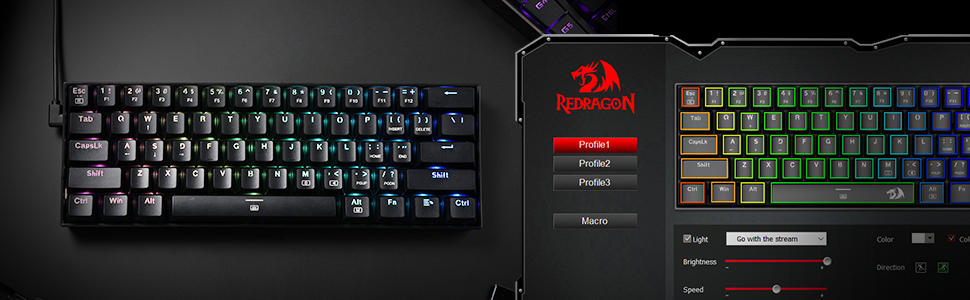
Figure 8: Understanding the characteristics of different mechanical switch types for personalized keyboard feel.
6. Maintenance
To ensure the longevity and optimal performance of your Redragon K630 keyboard, regular cleaning is recommended. Use the provided keycap puller to carefully remove keycaps for thorough cleaning of dust and debris. Switches can also be removed for deeper cleaning or replacement.
7. Troubleshooting
- Keyboard not responding: Ensure the USB-C cable is securely connected to both the keyboard and the computer. Try a different USB port.
- RGB lights not working: Check the keyboard's onboard controls for lighting modes and brightness. If using software, ensure it's running and settings are applied.
- Keys not registering: If specific keys are not working, try removing and re-inserting the switch using the switch puller. If the issue persists, replace the switch with a spare.
- Software issues: Ensure you have the latest version of the Redragon K630 software installed. Restart your computer and the software.
8. Specifications
| Feature | Detail |
|---|---|
| Product Dimensions | 11.48 x 4 x 1.42 inches |
| Item Weight | 1.26 pounds |
| Manufacturer | Redragon |
| Item Model Number | K630 |
| Connectivity Technology | Wired (USB-C) |
| Keyboard Description | 60% Compact Wired Gaming Keyboard |
| Key Switches | Tactile Blue Switch (Hot-Swappable) |
| Backlighting | RGB (11+ preset modes, customizable via software) |
| Material | Metal + ABS Plastic |
| Compatible Devices | PC |
9. Product Videos
9.1. Redragon K630 Dragonborn Gaming Keyboard Overview
Video 1: A seller-provided overview of the Redragon K630 Dragonborn keyboard, highlighting its features and design.
9.2. Redragon K630 Typing Sound Test
Video 2: A sound test demonstrating the tactile and audible feedback of the Redragon K630's mechanical switches.
10. Warranty and Support
This product is sold by Redragon Shop and fulfilled by Amazon. For specific warranty details, please refer to the product listing on Amazon or contact Redragon customer support directly. Amazon's standard return policy allows for returns or replacements within 30 days of purchase. Extended protection plans (3-Year and 4-Year) are available for purchase separately.
For technical assistance or further inquiries, please visit the official Redragon website or contact their customer service.


