
OnePlus LE2115
OnePlus 9 Winter Mist 5G Unlocked Android Smartphone User Manual
Brand: OnePlus | Model: LE2115
1. Product Overview
The OnePlus 9 Winter Mist is a 5G unlocked Android smartphone featuring 8GB RAM, 128GB storage, a 120Hz Fluid Display, and a Hasselblad Triple Camera system. It supports 65W Ultra Fast Charge and 15W Wireless Charge, and comes with Alexa Built-in.

Figure 1.1: Front view of the OnePlus 9 Winter Mist smartphone.
2. What's in the Box
- OnePlus 9 Smartphone
- Warp Type-C Cable
- Power Adapter
- SIM Ejector Tool
- Quick Start Guide
- Safety Information and Warranty Card
3. Key Features
- Hasselblad Camera for Mobile: Triple Camera system (48MP main, 50MP Ultra-Wide, 2MP monochrome lens) co-developed by Hasselblad for exceptional photography.
- Qualcomm Snapdragon 888: Delivers fast and smooth performance across all applications.
- Warp Charge 65T: Provides a day's power in just 15 minutes of wired charging. Supports Qi wireless charging.
- 120 Hz Fluid Display: 6.55-inch Full HD display with a 120 Hz refresh rate for effortless scrolling and entertainment.
- 5G Capable: Experience faster upload and download speeds with lower latency (compatible with T-Mobile 5G).
- Alexa Support: Built-in Alexa for voice commands, calls, news, and weather.
- Designed by OnePlus: Blends creativity and premium materials into a unibody design.
4. Initial Setup
4.1. Insert SIM Card
Locate the SIM card tray on the side of your OnePlus 9. Use the provided SIM ejector tool to open the tray. Insert your Nano-SIM card(s) into the tray with the gold contacts facing down. Ensure the tray is fully reinserted into the device.
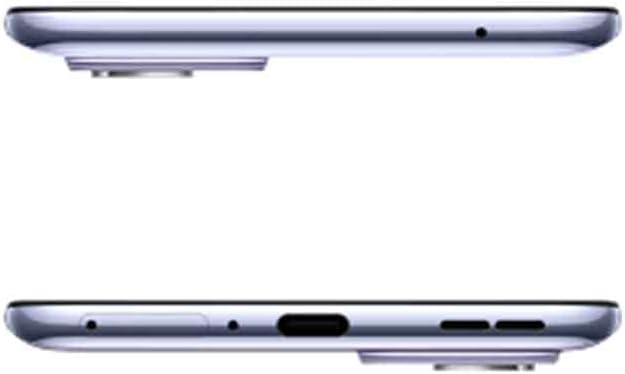
Figure 4.1: Top and bottom view of the OnePlus 9, indicating port and tray locations.
4.2. Power On and Initial Configuration
Press and hold the Power button (located on the right side) until the OnePlus logo appears. Follow the on-screen prompts to select your language, connect to Wi-Fi, sign in with your Google account, and transfer data from an old device if desired. Complete the setup wizard to begin using your phone.

Figure 4.2: Side view of the OnePlus 9, highlighting physical buttons.
5. Operating Your OnePlus 9
5.1. Display and Navigation
The OnePlus 9 features a 120Hz Fluid Display for smooth visuals and responsive touch. Navigate the interface using gestures or traditional navigation buttons. The Hyper Touch Display enables faster responses for swipes and taps, enhancing gaming and general use.
5.2. Camera Operation
Launch the Camera app from your home screen or lock screen. The Hasselblad Triple Camera system offers various modes including Photo, Video, Portrait, and Nightscape. Utilize the Ultra-Clear Ultra-Wide lens for expansive shots and the Natural Color Calibration with Hasselblad for true-to-life colors.

Figure 5.1: Rear view of the OnePlus 9, showcasing the Hasselblad camera system.
5.3. Charging
Connect the Warp Type-C Cable to the phone's USB-C port and the Power Adapter to a wall outlet for Warp Charge 65T. For wireless charging, place the phone on a Qi-compatible wireless charger. The Smart 120Hz with LTPO technology helps optimize power consumption for extended battery life.
5.4. Using Alexa Built-in
To use Alexa, ensure the Alexa app is downloaded and set up on your device. Simply say "Alexa" to activate the voice assistant and issue commands for music playback, calls, news updates, and more.
6. Maintenance and Care
- Cleaning: Use a soft, lint-free cloth to clean the screen and body. Avoid harsh chemicals.
- Software Updates: Regularly check for and install system updates to ensure optimal performance and security.
- Battery Care: Avoid extreme temperatures. For optimal battery longevity, try to keep the charge between 20% and 80% when possible.
- Storage Management: Periodically clear unnecessary files and apps to maintain sufficient storage space and device speed.
7. Troubleshooting
7.1. Text Messages or Phone Call Issues
If your device is not receiving text messages or experiencing errors when making phone calls, you may need to contact your carrier's technical support. Request them to add the CDMALess feature to your account. This is a common solution for certain network configurations.
7.2. General Performance Issues
- Restart Device: A simple restart can often resolve minor software glitches.
- Clear Cache: Clear the cache of problematic apps or the system cache partition.
- Factory Reset: As a last resort, if issues persist, consider performing a factory reset. Note: This will erase all data on your device. Back up important information before proceeding.
8. Specifications
| Feature | Detail |
|---|---|
| Product Dimensions | 6.31 x 2.92 x 0.34 inches |
| Item Weight | 7 ounces |
| ASIN | B08Y727NMK |
| Item model number | LE2115 |
| Batteries | 1 Lithium Polymer batteries required. (included) |
| OS | OxygenOS |
| RAM | 8 GB |
| Connectivity technologies | Bluetooth, Infrared, NFC, USB, Wi-Fi |
| GPS | True |
| Special features | 120Hz display, 48MP+50MP+2MP high resolution camera, Fingerprint Sensor, Warp Charge 65W, Wireless Charging |
| Display technology | AMOLED |
| Other display features | Wireless |
| Human Interface Input | Microphone, Touchscreen |
| Scanner Resolution | 2400 x 1080 |
| Other camera features | Front, 16MP, Rear, Triple Camera, 48+50+2 MP |
| Audio Jack | No headphone jack |
| Form Factor | Slate |
| Color | Winter Mist |
| Battery Power Rating | 4500 |
| Phone Talk Time | 3.63 days |
| Whats in the box | Oneplus 9, Warp Type-C Cable, Power Adapter, Ejector tool, Quick Start Guide, Safety Information and Warranty Card |
| Manufacturer | ONEPLUS |
| Date First Available | March 23, 2021 |
| Memory Storage Capacity | 128 GB |
| Standing screen display size | 6.55 Inches |
| Ram Memory Installed Size | 8 GB |
| Battery Capacity | 4500 Milliamp Hours |
| Weight | 6.95 Ounces |
| Charging Time | 0.3 Hours |
| Brand | OnePlus |
| Operating System | OxygenOS |
| CPU Model | A-Series Eight-Core A10-5800K |
| CPU Speed | 3.4 GHz |
| Screen Size | 6.55 Inches |
| Resolution | 2400 x 1080 |
| Refresh Rate | 120 Hz |
| Model Name | OnePlus 9 |
9. Warranty and Support
The OnePlus 9 comes with a manufacturer's warranty. Please refer to the "Safety Information and Warranty Card" included in your product box for specific terms and conditions. For further support, technical assistance, or to view the full warranty policy, please visit the official OnePlus support website or contact their customer service.
Official OnePlus Store: OnePlus Store on Amazon
Related documentsLE2115


Ask a question about this manual
Ask about setup, troubleshooting, compatibility, parts, safety, or missing instructions. Manuals+ will review the question and use this page’s manual context to help answer it.