
Renogy RBT100LFP12SH-G1-US
Renogy Smart Lithium-Iron Phosphate Battery User Manual
Model: RBT100LFP12SH-G1-US
1. Introduction
This user manual provides essential information for the safe and efficient operation of your Renogy Smart Lithium-Iron Phosphate Battery. Please read this manual thoroughly before installation and use. Keep this manual for future reference.
The Renogy Smart Lithium Iron Phosphate Battery is designed for deep cycle applications, offering enhanced flexibility for battery connections with its auto-balancing feature. It incorporates an advanced Battery Management System (BMS) and high-quality battery cells, along with a self-heating function, to ensure a long cycle life and superior discharge performance. This lightweight, auto-balanced, and ultra-safe lithium-ion battery is an ideal plug-and-play solution for various applications including RVs, solar systems, marine vessels, and off-grid setups.

Image 1.1: Renogy Smart Lithium-Iron Phosphate Battery. This image shows the top and front view of the black rectangular battery with positive and negative terminals clearly visible. The Renogy logo and "SMART LITHIUM IRON PHOSPHATE" text are printed on the front, along with caution and information symbols.
2. Safety Information
Always observe the following safety precautions to prevent personal injury or damage to the battery and connected equipment.
- Fire Hazard: Ensure that your charger is lithium iron phosphate compatible before use.
- DO NOT:
- Disassemble, crush, puncture, or incinerate the battery.
- Short circuit the external contacts.
- Expose the battery to temperatures above 132°F (50°C).
- Connect batteries in series.
- Wear appropriate personal protective equipment (PPE) including eye protection, gloves, and protective clothing when handling batteries.
- Ensure proper ventilation during charging and discharging to prevent heat buildup.
- Keep the battery away from flammable materials and sources of ignition.
- In case of fire, use a Class D fire extinguisher. Water or foam extinguishers may not be effective and could worsen the situation.
- Do not attempt to repair a damaged battery. Contact Renogy customer support for assistance.
3. Product Features
The Renogy Smart Lithium-Iron Phosphate Battery is equipped with several advanced features for optimal performance and safety:
- Self-Heating Function: Automatically activates when the battery's core temperature drops below 41°F (5°C), allowing charging in cold environments. This function is powered by the charger/controller, not the battery itself.
- Premium BMS Circuit: An advanced Battery Management System provides over 20 protections, supporting peak currents of 150A and up to 1C charging and 1.3C discharging during emergencies. Features 50% more heat dissipation area for enhanced safety.
- Ultimate Quality Pouch Cells: Next-level pouch cells pass severe high temperature and puncture tests, preventing fire or explosion. UL1642 certified, offering over 4,000 cycles (80% DOD) and a lifespan exceeding ten years.
- Activation Switch: Includes an activation switch cable for safely turning multiple parallel-connected batteries on or off during installation and use.
- Auto-balancing Function: Allows easy parallel connection of up to 8 batteries, improving average charging efficiency.
- Enhanced Monitoring: Connect a battery monitor directly via CAT cable without an additional coulometer. Use the BT-2 Bluetooth module and DC HOME app for real-time monitoring of multiple battery states.

Image 3.1: Battery Self-Heating Function. This diagram illustrates the internal heating elements of the battery. It shows that self-heating starts below 41°F (5°C) and stops above 50°F (10°C), ensuring optimal performance in cold conditions.

Image 3.2: Renogy Battery Unique Features. This image compares Renogy batteries with other batteries, highlighting Renogy's advantages: over 20 protections, 4000+ lifecycles (80% DOD), high-quality pouch cells, free activation switch cable, and various certifications (UL1642, UL1973, MSDS, UN38.3, FCC, CE, UKCA, PSE, MIC).

Image 3.3: Grade-A Pouch Cells and Lifetime. This image emphasizes the quality of the battery's internal pouch cells, stating over 6000 lifecycles (battery cell) and a 10-year lifetime. It also notes 10% higher energy density, lighter overall weight, more dependability, and no sudden fire hazards.
4. Specifications
| Attribute | Value |
|---|---|
| Brand | Renogy |
| Model | 12V 100Ah Smart with Self-Heating |
| Product Dimensions | 6.8"D x 7.4"W x 11.4"H |
| Item Weight | 26 pounds |
| Number Of Cells | 4 |
| Terminal Type | Marine Terminal |
| Manufacturer Part Number | RBT100LFP12SH-G1-US |
| UPC | 810009716396 |
| Battery Type | Lithium Iron Phosphate (LiFePO4) |
| Cycle Life | 4000+ cycles (80% DOD) |
| Self-Heating Activation | Below 41°F (5°C) |
| Peak Current (BMS) | 150A |
| Charging Rate | Up to 1C |
| Discharging Rate (Emergency) | Up to 1.3C |

Image 4.1: Battery Dimensions and Weight. This image provides a visual representation of the battery's dimensions (11.4 inches length, 7.4 inches width, 6.8 inches height) and its weight (26 lbs), emphasizing its lightweight and powerful design.
5. Setup and Installation
Before installation, ensure you have all necessary components and tools. Always prioritize safety by wearing appropriate protective gear.
5.1 Unpacking
Carefully remove the battery from its packaging. Inspect the battery for any signs of damage during transit. If any damage is observed, contact Renogy customer support immediately.
What's in the Box:
- Renogy Smart Lithium-Iron Phosphate Battery
5.2 Connection Guidelines
The Renogy Smart Lithium-Iron Phosphate Battery is designed for parallel connections only. Do NOT connect batteries in series.
- Ensure all batteries to be connected in parallel are of the same voltage and capacity.
- Use appropriate gauge cables for connections to minimize voltage drop and ensure safe current flow.
- Connect the positive terminals of all batteries together and the negative terminals of all batteries together.
- Utilize the activation switch cable to safely turn on or off multiple batteries in parallel during installation. This ensures safety and simplifies the connection process.

Image 5.1: Safety Installation and Less Self-Discharge. This image shows a hand connecting a blue activation switch cable to the battery, illustrating how to turn on/off multiple batteries in parallel with one press for safe installation and reduced self-discharge.
5.3 Charger Compatibility
Ensure your charger is compatible with Lithium Iron Phosphate (LiFePO4) batteries. Using an incompatible charger can damage the battery and pose safety risks.
6. Operating the Battery
Once installed, the Renogy Smart Lithium-Iron Phosphate Battery is ready for operation. Its intelligent features simplify management.
6.1 Charging and Discharging
- The battery supports a charging current of up to 1C and can deliver up to 1.3C discharging during emergencies.
- The integrated BMS manages charging and discharging parameters to protect the battery from overcharge, over-discharge, over-current, and short circuits.
- The self-heating function will automatically activate when the battery temperature is below 41°F (5°C) to allow for safe charging in cold conditions. This function draws power from the charger/controller, not the battery itself.

Image 6.1: Maximum Charging and Discharging Speed. This image illustrates the battery's performance capabilities, showing a charging current of 50A (boostable to 100A Max during emergency) and a discharge current of 100A (boostable to 130A Max during emergency).
6.2 Monitoring Battery Status
You can monitor the battery's status through various methods:
- Direct Monitor Screen: Connect a compatible battery monitor directly to the battery via a CAT cable. This allows for real-time display of battery voltage, current, state of charge, and other parameters.
- Bluetooth Module & DC HOME App: For advanced monitoring, use the optional BT-2 Bluetooth module (sold separately) and the Renogy DC HOME app. This allows you to monitor multiple battery states in real-time from your smartphone or tablet.
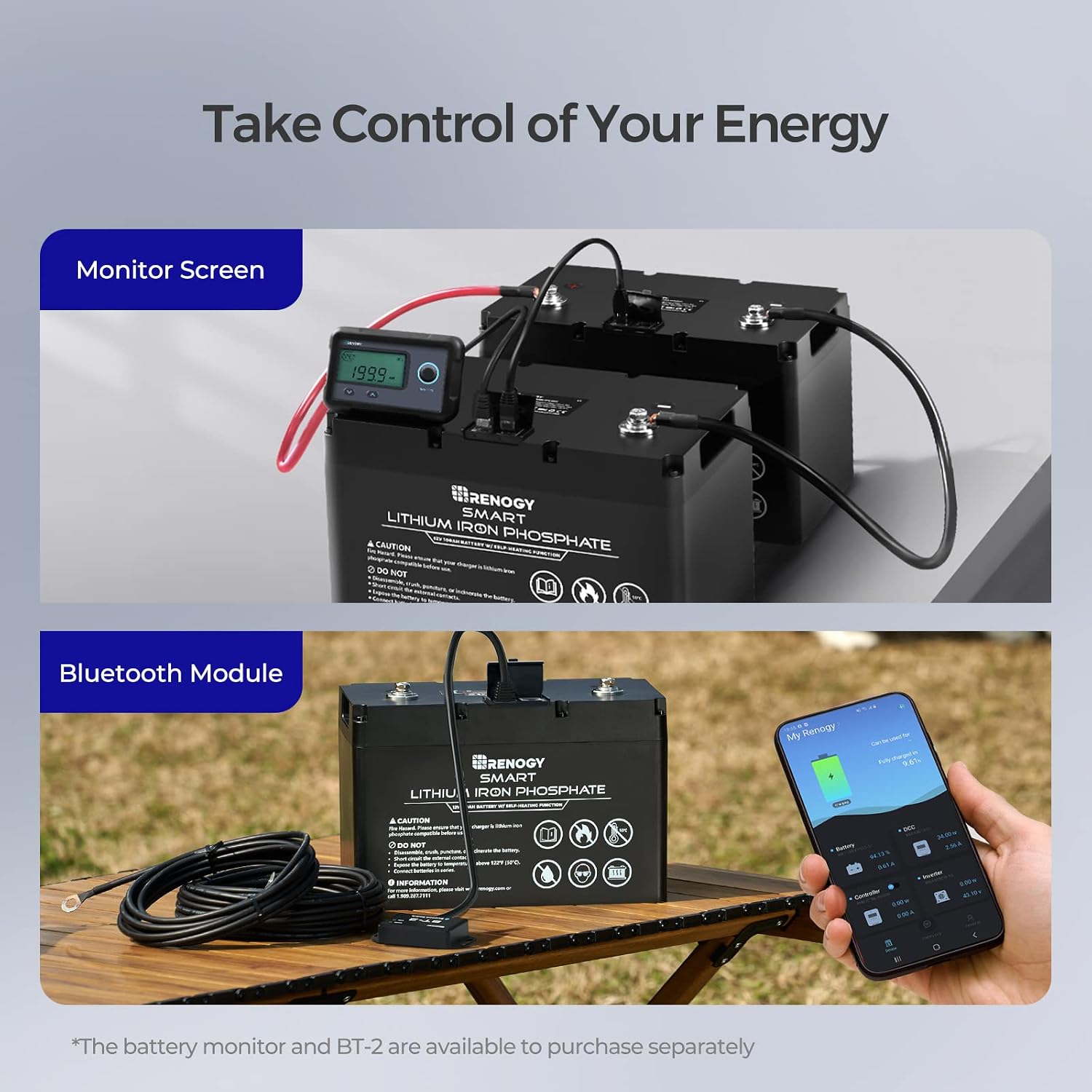
Image 6.2: Battery Monitoring Options. This image displays two methods for monitoring the battery: a physical monitor screen connected via cable and a smartphone app (DC HOME) connected via a Bluetooth module (BT-2). Both the monitor and BT-2 are available for purchase separately.
7. Maintenance
The Renogy Smart Lithium-Iron Phosphate Battery requires minimal maintenance due to its robust design and integrated BMS. However, regular checks can help ensure longevity and optimal performance.
- Regular Inspection: Periodically inspect the battery terminals and cables for any signs of corrosion, damage, or loose connections. Clean terminals if necessary.
- Temperature Management: While the battery has a self-heating function, avoid prolonged exposure to extreme temperatures outside its operating range.
- Storage: If storing the battery for an extended period, ensure it is charged to approximately 50% State of Charge (SOC) and stored in a cool, dry place. Disconnect it from all loads and charging sources.
- Cleaning: Use a dry cloth to clean the battery casing. Do not use solvents or abrasive cleaners.
8. Troubleshooting
This section addresses common issues you might encounter with your Renogy Smart Lithium-Iron Phosphate Battery. For more complex problems, contact Renogy customer support.
| Problem | Possible Cause | Solution |
|---|---|---|
| Battery not charging |
|
|
| Battery not discharging / No power output |
|
|
| Self-heating not working in cold temperatures |
|
|
| Inaccurate monitoring readings |
|
|
9. Warranty and Support
Renogy provides a warranty for its products to ensure customer satisfaction and product reliability.
9.1 Warranty Information
The Renogy Smart Lithium-Iron Phosphate Battery comes with a 5-year warranty. This warranty covers defects in materials and workmanship under normal use and service conditions. Please retain your proof of purchase for warranty claims.
The warranty does not cover damage resulting from:
- Improper installation or wiring.
- Misuse, abuse, or neglect.
- Unauthorized disassembly or modification.
- Exposure to extreme temperatures or environmental conditions beyond specified limits.
- Short circuits or reverse polarity connections.
9.2 Customer Support
For technical assistance, troubleshooting, or warranty claims, please contact Renogy customer support:
- Website: Visit the official Renogy website for FAQs, support resources, and contact information. www.renogy.com
- Phone: Refer to the product packaging or Renogy website for the latest customer service phone numbers.
- User Manual (PDF): A comprehensive PDF user manual is available for download. Download PDF Manual
Related documentsRBT100LFP12SH-G1-US


Ask a question about this manual
Ask about setup, troubleshooting, compatibility, parts, safety, or missing instructions. Manuals+ will review the question and use this page’s manual context to help answer it.