
GLOBE 50239
GLOBE Electric Wi-Fi Smart Ambient Night Light User Manual
Model: 50239 | Brand: GLOBE
Introduction
This manual provides detailed instructions for the installation, operation, and maintenance of your GLOBE Electric Wi-Fi Smart Ambient Night Light. Please read this manual thoroughly before using the product to ensure proper function and safety. This smart night light offers convenient features such as motion detection, multicolor changing RGB, tunable white light, and voice activation, all controllable via the GLOBE SUITE App.
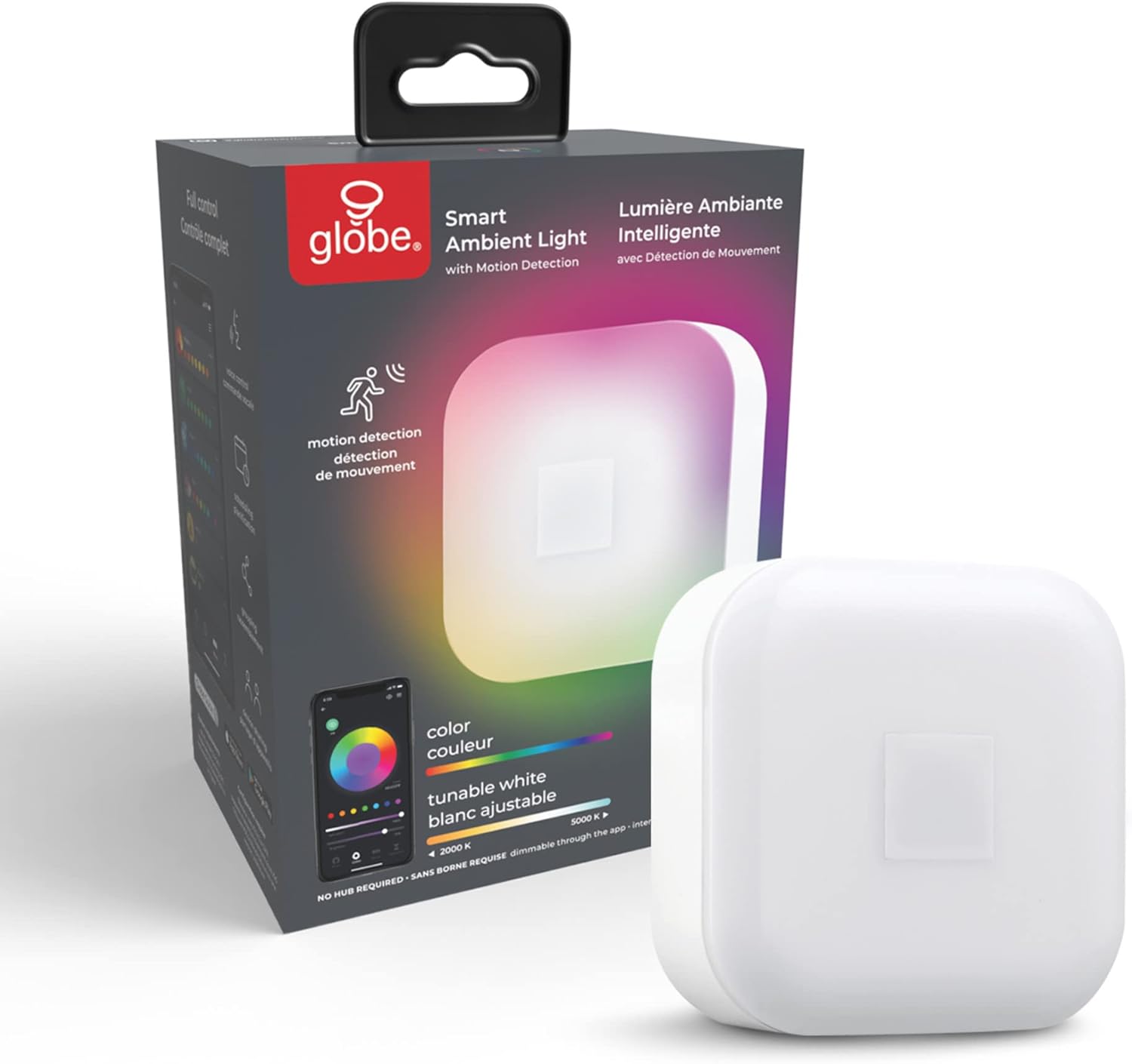
Figure 1: GLOBE Electric Wi-Fi Smart Ambient Night Light and its packaging.
Safety Information
Please observe the following safety precautions to prevent injury or damage to the product:
- Ensure the power outlet is easily accessible and not overloaded.
- Do not disassemble, modify, or attempt to repair the device yourself. This will void the warranty.
- Keep the device away from water, moisture, and extreme temperatures.
- This product is designed for indoor use only.
- Unplug the device from the power outlet before cleaning.
Package Contents
Verify that all items are present in the package:
- 1 x GLOBE Electric Wi-Fi Smart Ambient Night Light
- 1 x Instruction Sheet
Product Features
The GLOBE Electric Wi-Fi Smart Ambient Night Light is designed to enhance your home with smart lighting capabilities:
- No Hub Required: Connects directly to your Wi-Fi network (2.4 GHz).
- Voice Control: Compatible with Google Assistant, Amazon Alexa, and Siri for hands-free operation.
- Scheduling: Create custom schedules for automatic daily routines, including bedtime, wake-up, and vacation modes.
- Grouping: Control multiple smart devices simultaneously by grouping them within the GLOBE SUITE App.
- Device Sharing: Share control of your smart device with family and friends through the app.
- Motion Detection: Built-in motion sensor activates the light when movement is detected.
- Multicolor Changing RGB: Choose from a wide spectrum of colors to set the perfect ambiance.
- Tunable White: Adjust white light from warm (2000K) to cool (5000K) temperatures.
Setup Guide
Follow these steps to set up your smart night light:
- Download the GLOBE SUITE App: Search for "GLOBE SUITE" in your mobile device's app store (iOS or Android) and download the application.

Figure 2: GLOBE SUITE App Logo for easy identification.
- Create an Account: Open the GLOBE SUITE App and follow the on-screen prompts to create a new user account or log in if you already have one.
- Plug In the Night Light: Insert the smart night light into a standard wall outlet. The light should begin to blink, indicating it is in pairing mode. If it does not blink, refer to the troubleshooting section.
- Connect to Wi-Fi: In the GLOBE SUITE App, tap the "+" icon to add a new device. Select "Lighting" and then "Smart Ambient Night Light." Follow the app's instructions to connect the device to your 2.4 GHz Wi-Fi network. Note: The device requires an initial connection to a 2.4 GHz network; it can operate on 5 GHz after the initial setup.

Figure 3: Easy setup process using the Globe Suite app.
- Sync Device: Once connected, the app will confirm the successful pairing. You can now rename your device for easier identification.

Figure 4: Control your smart device from anywhere using the app.
Operating Instructions
App Control (GLOBE SUITE App)
The GLOBE SUITE App provides full control over your night light's features:
- On/Off: Toggle the light on or off directly from the app's main device screen.
- Color and Brightness Adjustment:
Navigate to the "Color" tab within the app to select from millions of RGB colors. Use the brightness slider to adjust the intensity of the light.

Figure 5: Adjust color and brightness from anywhere using the app.
- Tunable White Adjustment:
Switch to the "White" tab to adjust the white light temperature from warm (2000K) to cool (5000K), suitable for various moods and activities.

Figure 6: Tunable white light options from 2000K (Relax) to 5000K (Focus).
- Scheduling and Routines:
Access the "Routines" or "Schedule" section to set up automated actions. You can create schedules for the light to turn on/off at specific times, or activate "Vacation Mode" to simulate occupancy.

Figure 7: Create custom routines to automate your device's behavior.
- Grouping Devices:
If you have multiple GLOBE smart devices, use the grouping feature to control them simultaneously, synchronizing lighting across a room or area.
- Device Sharing:
Share control of your night light with other users by inviting them through the app's device sharing settings.
Voice Control
Integrate your night light with popular voice assistants for convenient hands-free control:
- Amazon Alexa: Enable the GLOBE SUITE skill in the Alexa app and link your account.
- Google Assistant: Link your GLOBE SUITE account through the Google Home app.
- Siri: Use Siri Shortcuts to create custom voice commands for your night light.
Example Voice Commands:
- "Alexa, turn on the night light."
- "Hey Google, set night light to blue."
- "Siri, dim the night light to 50%."

Figure 8: Control your smart device with your voice using compatible assistants.
Motion Detection
The built-in motion sensor automatically turns the night light on when motion is detected in its range. This feature is ideal for hallways, bathrooms, or nurseries, providing light only when needed.

Figure 9: The night light activates with motion detection.
Maintenance
To ensure the longevity and optimal performance of your night light:
- Cleaning: Unplug the device before cleaning. Use a soft, dry cloth to wipe the surface. Do not use abrasive cleaners or solvents.
- Storage: If storing the device for an extended period, unplug it and keep it in a cool, dry place away from direct sunlight.
Troubleshooting
If you encounter issues with your GLOBE Electric Wi-Fi Smart Ambient Night Light, refer to the following common problems and solutions:
| Problem | Possible Cause | Solution |
|---|---|---|
| Device not connecting to Wi-Fi. | Incorrect Wi-Fi band (not 2.4 GHz), weak signal, incorrect password. |
|
| Motion sensor not working or activating randomly. | Obstruction, incorrect placement, environmental factors, sensitivity settings. |
|
| Light not turning on. | No power, device unplugged, app setting. |
|
| Voice control not responding. | Incorrect voice assistant setup, network issue, incorrect commands. |
|
Specifications
| Attribute | Detail |
|---|---|
| Model Number | 50239 |
| Brand | GLOBE |
| Product Dimensions | 1.96"D x 3.03"W x 3.03"H |
| Item Weight | 1.92 ounces |
| Power Source | Plug-In |
| Voltage | 120 Volts |
| Wattage | 25 watts (Max) |
| Light Source Type | LED |
| Color Temperature | 2000K - 5000K (Tunable White) |
| Connectivity Technology | Wi-Fi (2.4 GHz for initial setup) |
| Control Method | App, Voice |
| Special Features | Adjustable Color Temperature, Color Changing, Motion Sensor, Plug In, Voice Activated |
| Material | Plastic |
| Indoor/Outdoor Usage | Indoor |
Warranty Information
This GLOBE Electric Wi-Fi Smart Ambient Night Light is covered by a 2-year manufacturer's limited warranty. This warranty covers defects in materials and workmanship under normal use. It does not cover damage resulting from misuse, accidents, unauthorized modifications, or improper installation.
Please retain your proof of purchase for warranty claims.
Customer Support
For further assistance, technical support, or warranty inquiries, please contact GLOBE customer service. Refer to the contact information provided on the product packaging or the official GLOBE website.
You can also visit the GLOBE Store on Amazon for more product information and resources.
Related documents50239


Ask a question about this manual
Ask about setup, troubleshooting, compatibility, parts, safety, or missing instructions. Manuals+ will review the question and use this page’s manual context to help answer it.