
Introduction
This manual provides detailed instructions for the Monoprice Blackbird 4K 5x1 HDMI 2.0 Switch, Model 42270. This device allows you to connect up to five HDMI video source devices to a single HDMI display. It supports 4K@60Hz video resolution with YCbCr 4:4:4 color space, 18Gbps video bandwidth, and all HDMI 3D video modes. The switch complies with HDMI 2.0 and HDCP 2.2 standards, supporting advanced video technologies such as HDR, HDR10, Dolby Vision, and Hybrid Log-Gamma (HLG). Control options include a top panel button and an included IR remote control.
Package Contents
Please ensure all items listed below are present in your package:
- 1x Monoprice Blackbird 4K 5x1 HDMI 2.0 Switch (Model 42270)
- 1x IR Remote Control
- 1x USB Power Cable
- 1x IR Receiver Cable
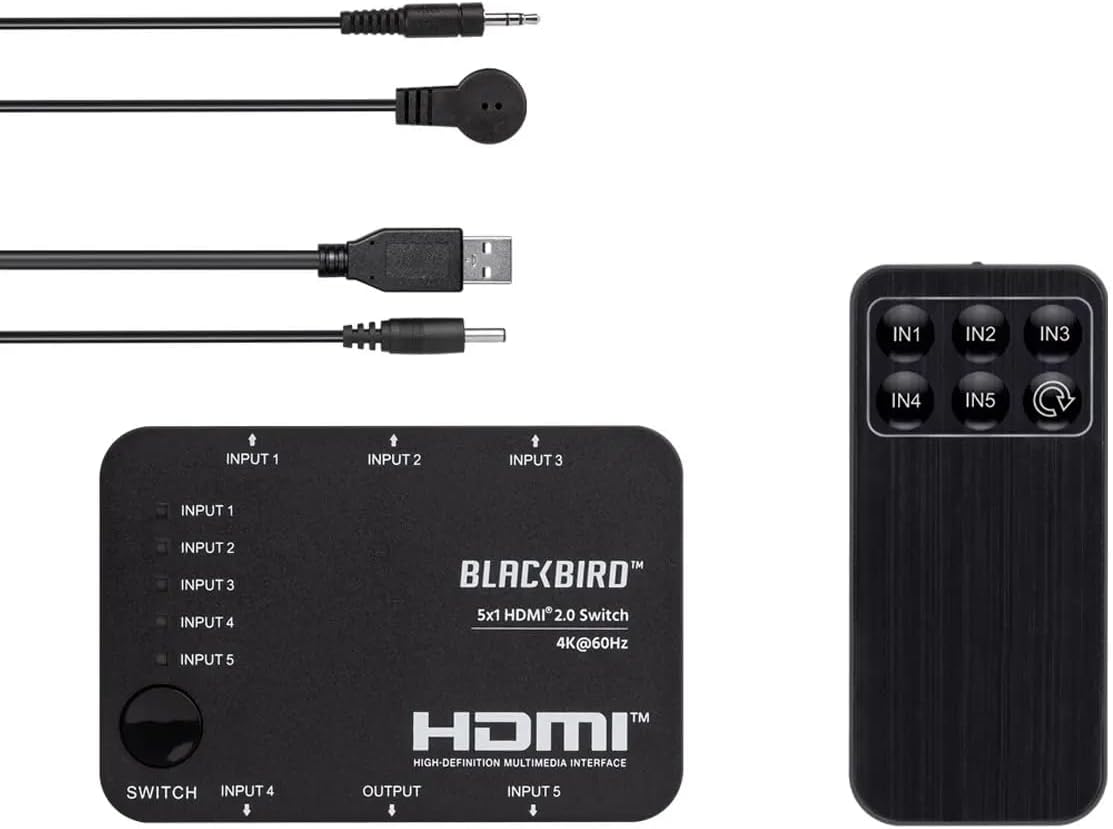
Image: The Monoprice Blackbird 4K 5x1 HDMI 2.0 Switch, its IR remote control, USB power cable, and IR receiver cable.
Product Features
The Monoprice Blackbird 4K 5x1 HDMI 2.0 Switch offers the following key features:
- Supports video resolutions up to 4K@60Hz YCbCr 4:4:4.
- Compatible with all HDMI 3D video modes.
- Features 5 HDMI video inputs and 1 HDMI video output.
- Supports up to 18Gbps video bandwidth.
- Complies with HDMI 2.0, HDCP 2.2/1.x, and DVI 1.0 specifications.
- Supports High Dynamic Range (HDR), HDR10, Dolby Vision, and Hybrid Log-Gamma (HLG).
- USB powered with low power consumption.
- Includes an IR remote control for convenient switching.
Setup Instructions
Follow these steps to set up your HDMI switch:
- Connect HDMI Source Devices: Connect up to five HDMI source devices (e.g., Blu-ray player, game console, streaming box) to the HDMI INPUT 1-5 ports on the switch.
- Connect HDMI Display: Connect your HDMI display (e.g., TV, monitor, projector) to the HDMI OUTPUT port on the switch.
- Connect IR Receiver (Optional): If you plan to use the IR remote control, connect the IR Receiver Cable to the "IR" port on the switch. Position the IR receiver in a location where it has a clear line of sight to your remote control.
- Connect Power: Connect the USB Power Cable to the "DC 5V" port on the switch and then to a USB power source (e.g., a USB wall adapter, a USB port on your TV, or a computer). The switch is USB powered.
- Power On Devices: Power on your HDMI source devices and your HDMI display. The switch will power on automatically when connected to a power source.

Image: Rear view of the switch, highlighting the HDMI input ports (Input 4, Input 5), HDMI output port, DC 5V power input, and IR receiver port.

Image: Front view of the switch, showing HDMI input ports (Input 1, Input 2, Input 3) and the manual switch button with corresponding LED indicators.
Operating Instructions
You can switch between HDMI input sources using two methods:
Manual Switching
- Press the "SWITCH" button located on the top panel of the device to cycle through the HDMI input sources (Input 1, Input 2, Input 3, Input 4, Input 5).
- The corresponding LED indicator for the active input will illuminate.
Remote Control Switching
- Ensure the IR Receiver Cable is connected and positioned correctly.
- Point the IR Remote Control towards the IR receiver.
- Press the desired input button (IN1, IN2, IN3, IN4, or IN5) on the remote control to directly select an HDMI source.
- Alternatively, press the cycle button (often labeled with a circular arrow) on the remote to cycle through inputs sequentially.

Image: Top view of the switch, showing the manual "SWITCH" button and LED indicators for each input (Input 1-5).
Image: The IR remote control with buttons for direct input selection (IN1-IN5) and a cycle button.
Maintenance
To ensure the longevity and optimal performance of your HDMI switch, follow these maintenance guidelines:
- Cleaning: Use a soft, dry cloth to clean the exterior of the device. Do not use liquid cleaners or aerosol sprays, as they may damage the unit.
- Ventilation: Ensure the switch is placed in a well-ventilated area to prevent overheating. Do not block any ventilation openings.
- Storage: When not in use for extended periods, store the switch in a cool, dry place away from direct sunlight and extreme temperatures.
- Cable Management: Avoid bending or kinking HDMI and power cables excessively, as this can lead to damage and signal loss.
Troubleshooting
If you encounter issues with your Monoprice Blackbird 4K 5x1 HDMI 2.0 Switch, refer to the following common problems and solutions:
- No Video/Audio Output:
- Ensure all HDMI cables are securely connected to both the source devices, the switch, and the display.
- Verify that the correct input source is selected on the switch (check the LED indicators).
- Confirm that the switch is receiving power via the USB power cable.
- Try connecting the HDMI source directly to the display to rule out issues with the source device or display.
- Test with different HDMI cables, especially if using long cables or cables not rated for 4K@60Hz.
- Remote Control Not Responding:
- Ensure the IR Receiver Cable is properly connected to the switch's "IR" port.
- Verify that the IR receiver has a clear line of sight to the remote control and is not obstructed.
- Check if the remote control's battery needs replacement.
- Intermittent Signal or Flickering:
- Ensure all HDMI cables are high-quality and rated for the resolution and bandwidth you are using (e.g., High-Speed HDMI with Ethernet for 4K@60Hz).
- Reduce cable lengths if possible.
- Check for electromagnetic interference from other electronic devices.
- Ensure the power supply is stable.
Specifications
Detailed technical specifications for the Monoprice Blackbird 4K 5x1 HDMI 2.0 Switch:
| Model Number | 42270 |
| Brand | Monoprice |
| Connector Type | HDMI, DVI (via adapter) |
| Number of Ports | 5 Inputs, 1 Output |
| Video Resolution Support | Up to 4K@60Hz YCbCr 4:4:4 |
| Video Bandwidth | 18Gbps |
| HDMI Compliance | HDMI 2.0 |
| HDCP Compliance | HDCP 2.2/1.x |
| HDR Support | HDR, HDR10, Dolby Vision, Hybrid Log-Gamma (HLG) |
| Power Supply | USB Powered (DC 5V) |
| Control Methods | Manual button, IR Remote Control |
| Item Weight | 0.4 Pounds |
| UPC | 889028165706 |
Warranty Information
This Monoprice Blackbird 4K 5x1 HDMI 2.0 Switch is covered by a 1-year warranty from the date of purchase. This warranty covers defects in materials and workmanship under normal use. For warranty claims or further details, please contact Monoprice customer support.
Customer Support
For technical assistance, troubleshooting, or general inquiries regarding your Monoprice Blackbird 4K 5x1 HDMI 2.0 Switch, please visit the official Monoprice website or contact their customer support team. You can typically find contact information, FAQs, and additional resources on their support pages.
Monoprice Official Website: www.monoprice.com


