
1. Introduction
This manual provides instructions for the Sharp Digital Alarm Clock, Model SPC547AJAMZ. This device features an easy-to-read LED display, a high-speed USB charging port, and essential alarm functions. Please read this manual thoroughly before use to ensure proper operation and to maximize the product's lifespan.

Figure 1: Sharp Digital Alarm Clock (Model SPC547AJAMZ) front view.
2. Product Features
The Sharp Digital Alarm Clock offers the following key features:
- Easy-to-Read Display: Large, clear green LED digits for visibility from a distance.
- High-Speed USB Charging Port: A 2 AMP USB port for rapid charging of compatible devices such as smartphones and tablets.
- Adjustable Alarm Volume: Select between high and low alarm volume settings.
- Simple Operation: Intuitive button controls for setting time and alarm.
- Battery Backup: Maintains time and alarm settings during power outages (requires 2 AAA batteries, not included). The display will be blank during battery backup mode, but the internal clock will continue to run, and the alarm will sound at the set time.

Figure 2: Alarm clock with a smartphone connected to the USB charging port.
3. Package Contents
Verify that all items are present in the package:
- Sharp Digital Alarm Clock (Model SPC547AJAMZ)
- AC Power Adapter
- User Manual (this document)
Note: 2 AAA batteries for backup are not included and must be purchased separately.
4. Safety Information
Please observe the following safety precautions:
- Do not expose the unit to water or excessive moisture.
- Avoid placing the unit near heat sources or in direct sunlight.
- Use only the provided AC power adapter.
- Do not attempt to disassemble or modify the unit.
- Keep out of reach of children.
- Ensure proper ventilation around the unit.
5. Setup
5.1 Power Connection
- Plug the AC power adapter into the DC IN jack located on the back of the alarm clock.
- Plug the other end of the AC power adapter into a standard wall outlet (120V AC, 60Hz).
- The display will illuminate, and the clock will be ready for time setting.
5.2 Battery Backup Installation
To ensure time and alarm settings are retained during a power outage:
- Locate the battery compartment on the bottom of the unit.
- Open the battery compartment cover.
- Insert two (2) new AAA batteries, observing the correct polarity (+ and -) as indicated inside the compartment.
- Close the battery compartment cover securely.
Note: Batteries are for backup only. The clock display will not be lit during a power outage when operating on battery backup, but the internal clock will continue to run, and the alarm will sound at the set time.
6. Operating Instructions
Familiarize yourself with the control buttons located on the top of the unit:
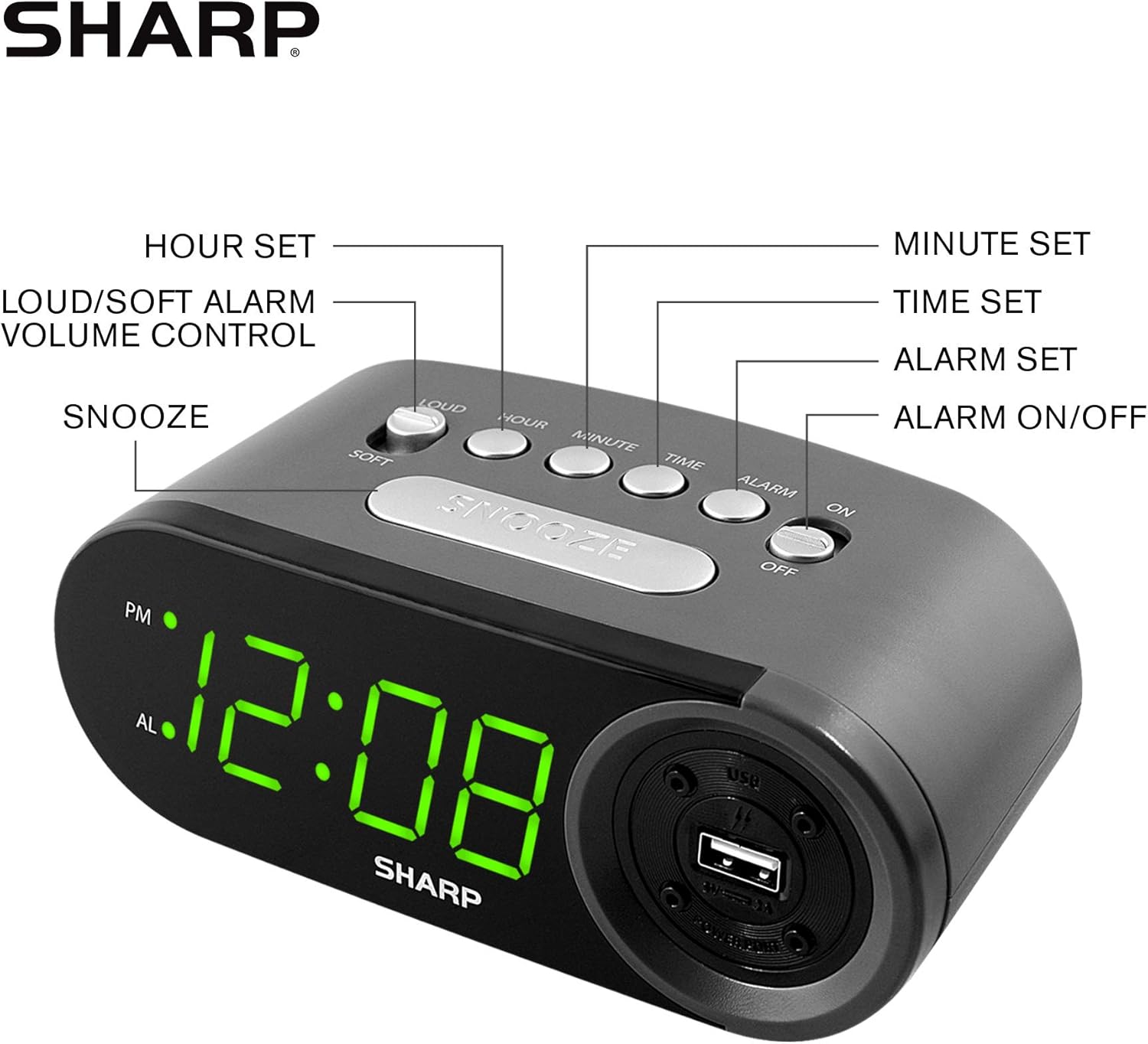
Figure 3: Top panel controls and their functions.
6.1 Setting the Current Time
- Press and hold the TIME button until the display begins to flash.
- Press the HOUR button repeatedly to set the hour. Observe the PM indicator for afternoon hours.
- Press the MINUTE button repeatedly to set the minutes.
- Once the desired time is set, press the TIME button again to confirm and exit time setting mode.
6.2 Setting the Alarm Time
- Press and hold the ALARM button until the alarm time display begins to flash. The "AL" indicator will also flash.
- Press the HOUR button repeatedly to set the alarm hour. Observe the PM indicator.
- Press the MINUTE button repeatedly to set the alarm minutes.
- Once the desired alarm time is set, press the ALARM button again to confirm and exit alarm setting mode.
6.3 Activating/Deactivating the Alarm
- To turn the alarm ON, slide the ALARM ON/OFF switch to the "ON" position. The "AL" indicator will appear on the display.
- To turn the alarm OFF, slide the ALARM ON/OFF switch to the "OFF" position. The "AL" indicator will disappear.
6.4 Snooze Function
When the alarm sounds, press the large SNOOZE button. The alarm will temporarily stop and sound again after approximately 9 minutes.
6.5 Stopping the Alarm
To stop the alarm completely after it sounds (without using snooze), slide the ALARM ON/OFF switch to the "OFF" position. The alarm will reset for the next day if the switch is moved back to "ON".
6.6 Adjusting Alarm Volume
Press the LOUD/SOFT button to toggle between high and low alarm volume settings.
6.7 Using the USB Charging Port
The 2 AMP USB charging port is located on the right side of the unit.
- Connect your device's USB charging cable (not included) to the USB port on the alarm clock.
- Connect the other end of the cable to your smartphone, tablet, or other compatible USB-powered device.
- Ensure the alarm clock is connected to AC power for the USB port to function.
Note: Charging speed may vary depending on your device and cable.
7. Maintenance
To keep your alarm clock in optimal condition:
- Cleaning: Wipe the unit with a soft, dry cloth. Do not use abrasive cleaners or solvents.
- Battery Replacement: Replace AAA backup batteries annually or when the battery low indicator (if present) appears, to ensure reliable backup functionality.
- Storage: If storing the unit for an extended period, remove the backup batteries to prevent leakage.
8. Troubleshooting
| Problem | Possible Cause | Solution |
|---|---|---|
| Clock display is blank. | No AC power; power outage; unit unplugged. | Ensure AC adapter is securely plugged into the unit and a working wall outlet. Check for power outages. |
| Alarm does not sound. | Alarm is not activated; alarm time is incorrect; volume is too low. | Slide ALARM ON/OFF switch to "ON". Verify alarm time is set correctly. Adjust alarm volume using the LOUD/SOFT button. |
| USB charging port not working. | Clock not connected to AC power; device not compatible; faulty cable. | Ensure the clock is plugged into AC power. Try a different USB cable or device to confirm compatibility. |
| Time/Alarm settings lost after power outage. | Backup batteries are dead or not installed. | Install two fresh AAA batteries in the battery compartment, ensuring correct polarity. |
9. Specifications
- Brand: Sharp
- Model: SPC547AJAMZ
- Display Type: Digital LED (Green)
- Power Source: Corded Electric (AC 120V, 60Hz)
- Battery Backup: 2 x AAA batteries (not included)
- USB Charging Port: 2 AMP (5V)
- Product Dimensions: Approximately 6.2" W x 2.3" H x 3.25" D
- Item Weight: Approximately 9.6 ounces
- Material: Plastic
- UPC: 049353006000

Figure 4: Product dimensions.
10. Warranty & Support
10.1 Warranty Information
This Sharp product is covered by a limited manufacturer's warranty. For specific warranty terms and conditions, please refer to the warranty card included with your purchase or visit the official Sharp website. Keep your purchase receipt as proof of purchase.
10.2 Customer Support
If you have any questions, require assistance, or need to report an issue with your Sharp Digital Alarm Clock, please contact Sharp customer support. Contact details can typically be found on the official Sharp website or on the product packaging.
For more information, visit the Sharp Store on Amazon.


