
EPEVER XTRA3210N
EPEVER MPPT Solar Charge Controller XTRA3210N User Manual
Model: XTRA3210N | Brand: EPEVER
1. Product Overview
The EPEVER MPPT Solar Charge Controller XTRA3210N is an advanced Maximum Power Point Tracking (MPPT) controller designed for off-grid solar systems. It efficiently manages power flow from solar panels to batteries, ensuring optimal charging and protection. This controller supports various battery types, including Sealed, Gel (AGM), Flooded, and Lithium, and features an intuitive LED and LCD display with five keys for easy parameter adjustment.

Figure 1: Front view of the EPEVER MPPT Solar Charge Controller XTRA3210N.
2. Key Features
- Advanced MPPT Algorithm and Adaptive Charging: Features enhanced tracking and response speeds, reducing losses and minimizing downtime. It improves efficiency across various power segments. The adaptive charging includes stages like bulk, boost, equalize, and float, optimizing battery health, lifespan, and overall performance.
- Versatile Battery Compatibility: Supports Lead-acid (Sealed, Gel, Flooded) and Lithium (LiFePO4, Li(NiCoMn)O2) battery types. It ensures correct voltage and current delivery and responds to Battery Management System (BMS) requirements to mitigate risks associated with BMS disconnection, such as potential equipment damage. The controller employs constant voltage output and limited current features for smooth system operation.
- Output Overcurrent Protection: Offers advanced overcurrent protection, quickly detecting and responding to excessive current to prevent solar system damage. It adjusts output in milliseconds to avoid overload and ensure continuous operation.
- Communication Options: View and modify working parameters via MT50 remote meter, APP (WiFi / BLE adapter), or PC software via RS485 interface. The built-in Bluetooth interface (XTRA-N G3 BLE models) offers wireless communication for remote monitoring and parameter adjustment via a smartphone application. The RS485 connection delivers a reliable, hard-wired communication path.
- Enhanced Control: Users can enable/disable the COM port via the LCD screen to conserve energy, reducing energy consumption by cutting the power used for communication operations.
- Ultra-quiet & Low Power Design: Designed for efficiency with low power consumption (≤30mA/12V, ≤16mA/24V, ≤13mA/48V). Disabling communication features further reduces consumption (typically <8mA/12V, <6mA/24V, <5mA/48V), boosting standby time by over 70% and ensuring system reliability when power is limited. Crafted for ultra-quiet operation, it's ideal for environments where noise is a concern, seamlessly fitting into indoor settings.
- Real-time Energy Statistics: Provides real-time energy data for effective system management.
- Common Negative Grounding: Designed for wide application in communication base stations, household systems, street lighting, field monitoring, and RV solar systems.

Figure 2: Diagram highlighting the main features of the XTRA3210N controller.
3. What's in the Box
The package includes:
- EPEVER MPPT Solar Charge Controller XTRA3210N
- User Manual
Please check all components upon receipt. If any items are missing or damaged, contact your vendor immediately.
4. Product Diagram
Familiarize yourself with the components and connection points of the solar charge controller.

Figure 3: Front view with labeled components (Mounting Hole, Display Unit, Terminal Protection Cover).

Figure 4: Bottom view with labeled connection terminals (RS485 port, Grounding terminal, RTS port, Load terminals, Battery terminals, PV terminals).
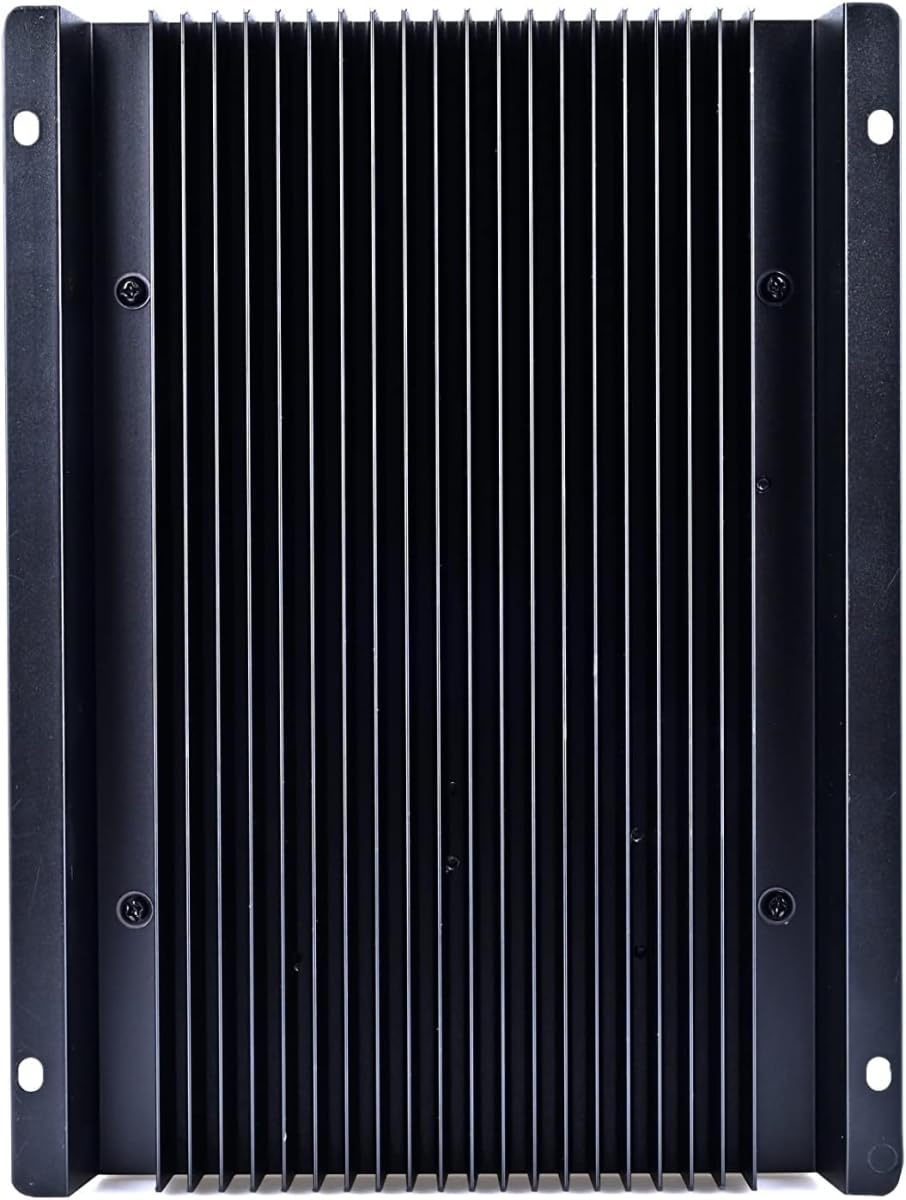
Figure 5: Back view showing the heatsink for heat dissipation.
5. Setup and Installation
5.1 Safety Precautions
- Ensure all power sources are disconnected before installation.
- Use appropriate tools and wear protective gear.
- Follow local electrical codes and regulations.
- Mount the controller in a well-ventilated area, away from direct sunlight and moisture.
5.2 Wiring Diagram
Connect the components in the following order: battery, solar panels, and then load. Disconnect in the reverse order.
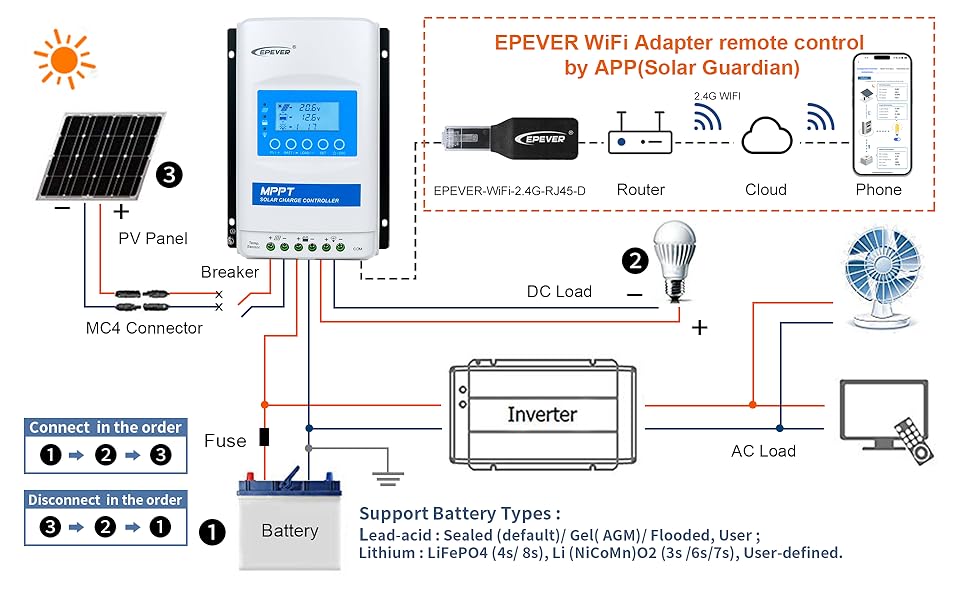
Figure 6: Standard wiring diagram for the solar charge controller.
5.3 Communication with PC
This video tutorial demonstrates how to communicate with your EPEVER solar charge controller via a PC, including connecting the necessary cables and installing drivers. This allows for real-time data monitoring and parameter configuration.
Video 1: Communicating with the EPEVER Solar Charge Controller via PC.
6. Operation
6.1 Display and Buttons
The controller features an LCD display and five buttons for navigation and setting adjustments. The display shows various parameters such as PV input voltage, battery voltage, load current, and temperature.
Figure 7: Front panel showing LCD display and control buttons.
6.2 Battery Type Selection
The controller supports multiple battery types. To select or customize battery parameters, navigate through the menu using the control buttons. Refer to the detailed instructions in the full manual for specific settings for Sealed, Gel, Flooded, and Lithium batteries.

Figure 8: LCD interface for browsing data and battery type selection.
6.3 Load Control Modes
The XTRA N model features four load control modes: Manual, Light ON/OFF, and Light ON Plus. These modes allow for flexible management of connected DC loads based on user preference or environmental conditions. Consult the full manual for detailed configuration of each mode.
7. Specifications
| Specification | Value |
|---|---|
| Product Dimensions | 9.06 x 6.5 x 2.48 inches |
| Item Weight | 3.39 pounds |
| Manufacturer | HUIZHOU EPEVER TECHNOLOGY CO., LTD. |
| Item model number | XTRA3210N |
| Brand | EPEVER |
| Voltage | 12V/24V Auto (Max PV 100V) |
| Display Type | LCD |
| Max PV Input Power (12V battery) | 390W |
| Max PV Input Power (24V battery) | 780W |
| Tracking Efficiency | Up to 99.5% |
| Conversion Efficiency | Peak 98% |
8. Accessories
EPEVER offers a range of accessories to enhance the functionality and monitoring capabilities of your solar charge controller.
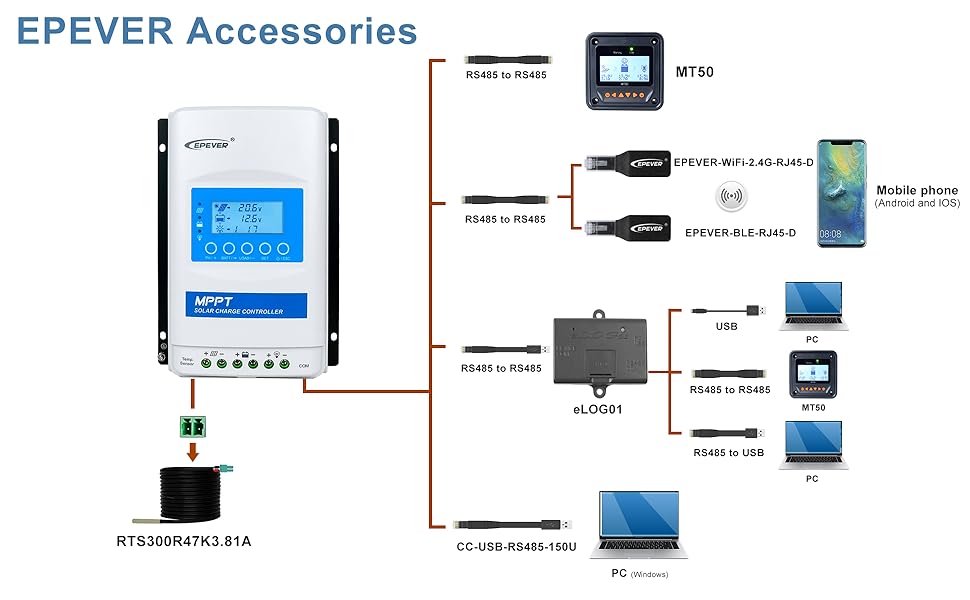
Figure 9: EPEVER accessories for enhanced control and monitoring.
- Remote Meter 52 (MT50): For remote monitoring and real-time parameter configuration of the controller. This is a plug-and-play device, eliminating the need for complex communication parameter setups.
- RTS300R47K3.81A Temperature Sensor Cable: Collects the real temperature of the battery, enabling the controller to perform accurate control and protection of charging and discharging based on temperature.
- CC-USB-RS485-150U PC Communication Cable: Allows the controller to be monitored and configured through PC monitoring software.
- EPEVER-BLE-RJ45-D Bluetooth Adapter: Compatible with mobile apps for wireless monitoring and parameter configuration of the controller via Bluetooth signal.
- EPEVER-WiFi-2.4G-RJ45-D WiFi Adapter: Compatible with mobile apps or cloud platforms for wireless monitoring and parameter configuration of the controller via WiFi signal.
- eLOG01 Logger: A data logger for recording system performance.
- Serial Device Server: Compatible with mobile apps or cloud platforms via TCP network communication. LAN monitoring can be achieved using PC configuration tools and PC software.
- 4G Wireless Data Transmission Terminal: Compatible with mobile apps or cloud platforms via a GSM or GPRS SIM card for remote wireless monitoring and parameter configuration.
9. Troubleshooting
If you encounter issues with your EPEVER MPPT Solar Charge Controller, please refer to the comprehensive troubleshooting section in the full product manual. Common issues and their solutions include:
- Controller not powering on: Check battery connections and ensure sufficient battery voltage (typically 12V or 24V).
- No solar charging: Verify PV panel connections, ensure adequate sunlight, and check for shading or damage to panels.
- Incorrect battery voltage readings: Confirm proper wiring and ensure the battery type setting matches your battery.
- Load not working: Check load connections, ensure the load is within the controller's rated capacity, and verify load control settings.
For persistent problems, contact EPEVER's authorized vendor for technical support.
10. Warranty and Support
The EPEVER MPPT Solar Charge Controller XTRA3210N comes with a standard manufacturer's warranty. For detailed warranty terms, conditions, and duration, please refer to the warranty card included with your product or visit the official EPEVER website.
For technical assistance, product inquiries, or warranty claims, please contact Goland Century, an officially authorized EPEVER vendor. Their contact information can typically be found on your purchase receipt or the product packaging.
Related documentsXTRA3210N


Ask a question about this manual
Ask about setup, troubleshooting, compatibility, parts, safety, or missing instructions. Manuals+ will review the question and use this page’s manual context to help answer it.