
EMOS E06016
EMOS E06016 Wireless Wind Sensor
Instruction Manual
1. Introduction
This manual provides detailed instructions for the installation, operation, maintenance, and troubleshooting of the EMOS E06016 Wireless Wind Sensor. Please read this manual thoroughly before using the product to ensure proper function and longevity.
1.1 Product Description
The EMOS E06016 is an additional wireless wind sensor designed to expand the capabilities of the EMOS E6016 Professional Weather Station. It accurately measures wind direction, wind speed, temperature, and humidity. The sensor communicates wirelessly with the main weather station, eliminating the need for extensive cabling.
2. Product Overview
2.1 Key Features
- Measures wind direction, wind speed, temperature, and humidity.
- Wireless communication with a range of up to 100 meters.
- Operates on a frequency of 433 MHz.
- Designed as an additional sensor for the EMOS E6016 Professional Weather Station.
- Compact and lightweight design.
2.2 Package Contents
- 1 x EMOS E06016 Wireless Wind Sensor
- Mounting accessories (screws, brackets)
- Instruction Manual
2.3 Component Identification
Familiarize yourself with the components of the EMOS E06016 sensor:

Figure 1: EMOS E06016 Wireless Wind Sensor. This image shows the complete assembly of the wind sensor, including the anemometer cups for wind speed, the wind vane for wind direction, and the radiation shields for temperature and humidity sensing.
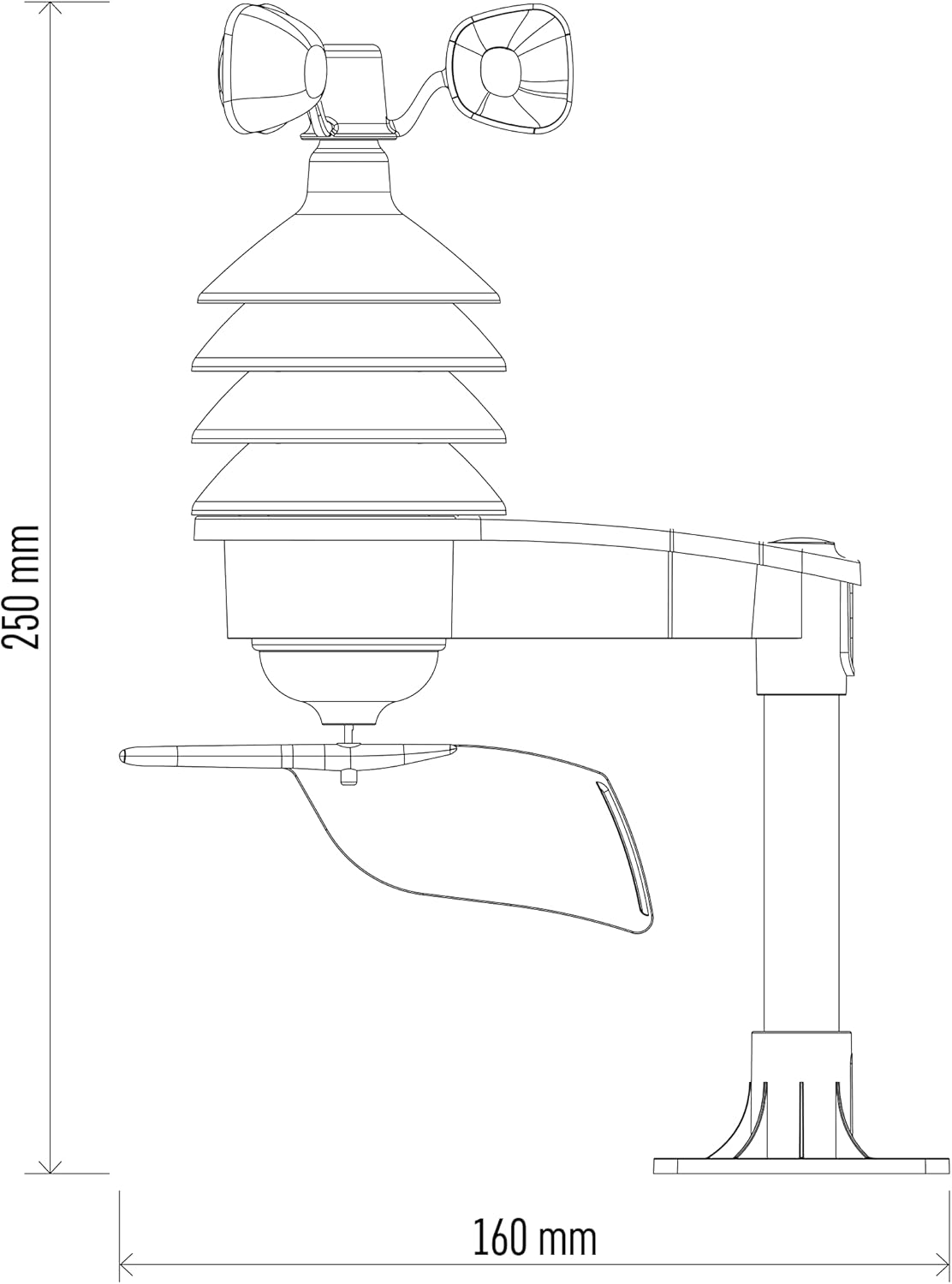
Figure 2: EMOS E06016 Wireless Wind Sensor with Dimensions. This image provides a side view of the sensor with key measurements, indicating a height of 250 mm and a width of 160 mm.
- Anemometer Cups: Measure wind speed.
- Wind Vane: Determines wind direction.
- Radiation Shields: Protect temperature and humidity sensors from direct sunlight and precipitation.
- Mounting Arm: Provides a stable base for installation.
- Battery Compartment: Located on the main body of the sensor.
3. Setup
3.1 Battery Installation
- Locate the battery compartment on the sensor unit.
- Open the battery compartment cover.
- Insert 4 x AA batteries (not included) into the compartment, ensuring correct polarity (+/-).
- Close the battery compartment cover securely to ensure water resistance.
3.2 Mounting the Sensor
For accurate readings, the sensor should be mounted in an open area, free from obstructions like buildings or trees, which could interfere with wind flow. The ideal height is typically 2-10 meters above ground level.
- Select a suitable mounting location.
- Attach the mounting bracket to a stable surface (e.g., pole, wall) using the provided screws.
- Securely attach the sensor unit to the mounting bracket.
- Ensure the wind vane is oriented correctly, typically pointing North, for accurate wind direction readings. Some models may have a compass on the unit for alignment.
3.3 Pairing with Weather Station
Refer to your EMOS E6016 Professional Weather Station manual for specific instructions on how to pair additional sensors. Generally, this involves activating a pairing mode on the main station and then powering on the sensor.
4. Operating Instructions
4.1 Data Transmission
Once paired, the EMOS E06016 sensor will automatically transmit wind speed, wind direction, temperature, and humidity data to your EMOS E6016 Professional Weather Station at regular intervals. The data refresh rate is determined by the weather station.
4.2 Understanding Readings
- Wind Speed: Displayed in meters per second (m/s) or other units configured on your weather station.
- Wind Direction: Indicated by cardinal directions (N, S, E, W) or degrees (0-360°) on the weather station display.
- Temperature: Measured in degrees Celsius (°C).
- Humidity: Expressed as a percentage (%).
5. Maintenance
5.1 Cleaning
Periodically inspect the sensor for dirt, dust, or debris that may accumulate on the anemometer cups, wind vane, or radiation shields. Gently clean with a soft, damp cloth. Do not use abrasive cleaners or solvents.
5.2 Battery Replacement
When the weather station indicates a low battery for the sensor, or if the sensor stops transmitting data, replace the batteries. Follow the steps in Section 3.1 for battery installation. Always replace all batteries at the same time with new ones of the same type.
6. Troubleshooting
6.1 Common Issues and Solutions
- No Data Transmission:
- Check sensor batteries and replace if necessary.
- Ensure the sensor is within the 100m wireless range of the weather station.
- Verify that the sensor is properly paired with the weather station. Re-pair if needed.
- Check for strong interference sources (e.g., large metal objects, other wireless devices) between the sensor and the weather station.
- Inaccurate Wind Readings:
- Ensure the sensor is mounted in an open area, free from obstructions.
- Check for physical obstructions (e.g., leaves, spiderwebs) on the anemometer cups or wind vane and clean if necessary.
- Verify the wind vane is correctly oriented (e.g., North).
- Inaccurate Temperature/Humidity Readings:
- Ensure the radiation shields are clean and unobstructed.
- Verify the sensor is not exposed to direct sunlight or heat sources that could skew readings.
7. Technical Specifications
| Specification | Value |
|---|---|
| Model Number | E06016 |
| Measures | Wind direction, Wind speed, Temperature, Humidity |
| Wireless Frequency | 433 MHz |
| Wireless Range | Up to 100 meters (open area) |
| Power Source | 4 x AA batteries (not included) |
| Dimensions (L x W x H) | 19.2 x 12.7 x 1.7 cm (Product); 275 x 135 x 310 mm (Overall) |
| Weight | 800 g |
| Material | Plastic |
| Color | White |
8. Warranty and Support
EMOS products are manufactured with high-quality standards. For information regarding warranty terms and conditions, please refer to the warranty card included with your product or visit the official EMOS website. For technical support or service inquiries, please contact EMOS customer service through their official channels.
EMOS Official Website: www.emos.eu
Related documentsE06016


Ask a question about this manual
Ask about setup, troubleshooting, compatibility, parts, safety, or missing instructions. Manuals+ will review the question and use this page’s manual context to help answer it.