
1. Overview
The Hoco E33 Wireless Earbud with Microphone offers a convenient and high-quality audio experience. Designed for comfort and portability, this single earbud features Bluetooth V4.2 connectivity, providing stable audio for music and calls. Its ergonomic ear hook design ensures a secure fit for various activities.
Enjoy up to 4 hours of talk or music playback time, with an impressive 100 hours of standby time. The earbud is equipped with an 80 mAh battery that fully charges in approximately 2 hours. It supports both Chinese and English voice prompts for ease of use.
2. Package Contents
- Hoco E33 Wireless Earbud
- USB Charging Cable
- User Manual
3. Product Diagram
Familiarize yourself with the components of your Hoco E33 earbud.
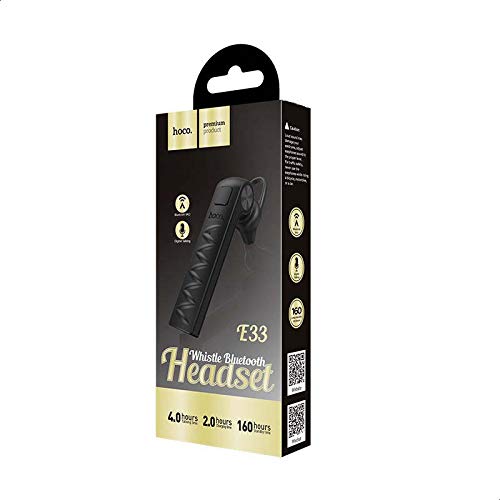

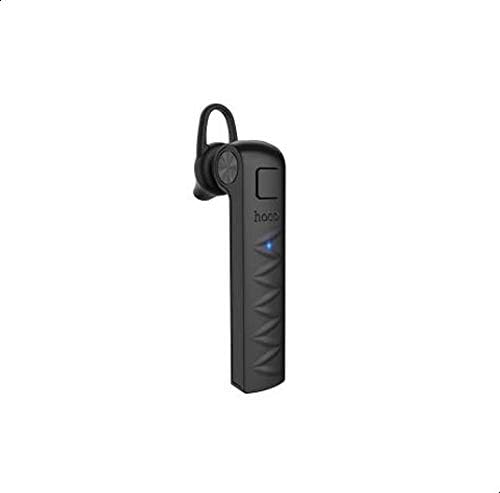
4. Setup
4.1 Charging the Earbud
- Connect the Micro-USB end of the charging cable to the earbud's charging port.
- Connect the USB-A end of the charging cable to a compatible USB power source (e.g., computer USB port, wall adapter).
- The indicator light will typically glow red during charging.
- Once fully charged (approximately 2 hours), the indicator light will turn blue or turn off.
- Disconnect the charging cable.
4.2 Pairing with a Device
- Ensure the earbud is fully charged.
- Press and hold the multi-function button on the earbud until the indicator light flashes red and blue alternately, indicating it is in pairing mode.
- On your mobile device, enable Bluetooth and search for available devices.
- Select "Hoco E33" from the list of found devices.
- Once paired, the earbud's indicator light will flash blue periodically, and you may hear a voice prompt confirming the connection.
- If prompted for a password, enter "0000".
5. Operating Instructions
5.1 Power On/Off
- Power On: Press and hold the multi-function button for approximately 3 seconds until the blue indicator light flashes and you hear a power-on prompt.
- Power Off: Press and hold the multi-function button for approximately 5 seconds until the red indicator light flashes and you hear a power-off prompt.
5.2 Music Playback
- Play/Pause: Short press the multi-function button once.
- Next Track: Double-press the multi-function button.
- Previous Track: Triple-press the multi-function button.
5.3 Call Management
- Answer/End Call: Short press the multi-function button once.
- Reject Call: Press and hold the multi-function button for approximately 2 seconds.
- Redial Last Number: Double-press the multi-function button when not on a call.
5.4 Voice Assistant
- Activate Voice Assistant: Press and hold the multi-function button for approximately 2 seconds (when not on a call) to activate your device's voice assistant (e.g., Siri, Google Assistant).
6. Specifications
| Feature | Description |
|---|---|
| Brand | Hoco |
| Model | E33 |
| Color | Black |
| Wireless Connectivity | Bluetooth V4.2 |
| Talk Time | Up to 4 hours |
| Music Playback Time | Up to 4 hours |
| Standby Time | Up to 100 hours |
| Battery Capacity | 80 mAh |
| Charging Time | Approximately 2 hours |
| Dimensions | 62 x 15 x 25 mm |
| Weight | 6g |
| Control Method | Touch (Multi-function button) |
| Special Features | Single ear design, Ear hook, Supports Chinese and English voice prompts, Active Noise Cancellation |
| Materials | Metal, Rubber |
| Compatible Devices | Mobile phones |
7. Maintenance
- Cleaning: Use a soft, dry cloth to clean the earbud. Avoid using harsh chemicals or abrasive materials.
- Storage: Store the earbud in a cool, dry place away from direct sunlight and extreme temperatures.
- Water Exposure: This earbud is not waterproof. Avoid exposure to water or excessive moisture.
- Battery Care: To prolong battery life, avoid fully discharging the earbud frequently. Charge it regularly, even if not in use for extended periods.
8. Troubleshooting
- Cannot Power On:
Ensure the earbud is fully charged. Connect it to a power source and try again after a few minutes.
- Cannot Pair with Device:
Make sure the earbud is in pairing mode (red and blue indicator lights flashing alternately). Ensure Bluetooth is enabled on your device and it is within range (typically 10 meters). Try turning Bluetooth off and on again on your device, or restarting both the earbud and your device.
- No Sound or Poor Sound Quality:
Check the volume levels on both the earbud and your connected device. Ensure the earbud is properly paired. Move closer to your device to avoid interference. Try disconnecting and re-pairing the earbud.
- Earbud Not Charging:
Verify that the charging cable is securely connected to both the earbud and the power source. Try using a different USB port or charging cable. Ensure the power source is functional.
9. Warranty and Support
For warranty information and customer support, please refer to the documentation provided at the time of purchase or contact your retailer. Keep your proof of purchase for any warranty claims.