
Hoco ES32 Plus
Hoco ES32 Plus Series TWS Wireless Bluetooth Headset User Manual
Model: ES32 Plus | Brand: Hoco
Introduction
Thank you for choosing the Hoco ES32 Plus Series TWS Wireless Bluetooth Headset. This manual provides detailed instructions on how to set up, operate, and maintain your new headset. Please read this manual carefully before use to ensure optimal performance and longevity of your device.
Package Contents
- Hoco ES32 Plus TWS Wireless Bluetooth Headset (Left and Right Earbuds)
- Charging Case
- Charging Cable
- Silicone Case
- Hook
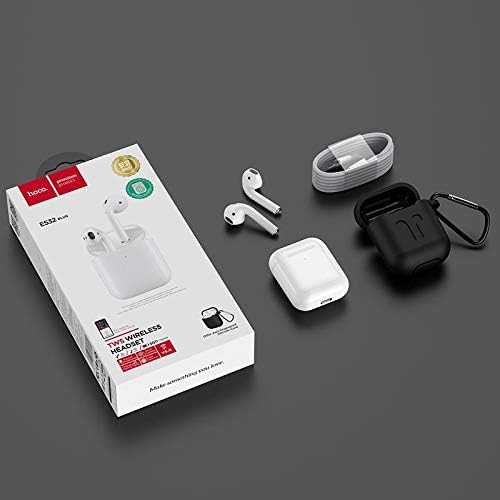
Image: Contents of the Hoco ES32 Plus package, including the earbuds, charging case, charging cable, silicone case, and hook.
Product Overview and Features
The Hoco ES32 Plus headset is designed for a seamless wireless audio experience. Key features include:
- Bluetooth V5.0: Ensures stable and efficient wireless connectivity.
- Airoha AB1536U Chip: Provides reliable performance.
- Battery Capacity: 350mAh for the charging case, 30mAh for each earbud.
- Long Battery Life: Approximately 3 hours of talk/music time, 200 hours standby time.
- Compact Design: Earbuds and case are lightweight and portable.
- Pop-Up Window Support: For Apple mobile phones, enabling quick pairing and battery display.
- Master-Slave Switching: Allows independent use of either earbud.
- In-Ear Detection: Automatically pauses/plays audio when earbuds are removed/inserted.
- Wireless Charging Support: Convenient charging without cables.
- Touch Operation: Intuitive controls for music and calls.

Image: A detailed view of the Hoco ES32 Plus wireless earbuds, highlighting their design.
Setup Guide
1. Initial Charging
Before first use, fully charge the charging case and earbuds. Place the earbuds into the charging case. Connect the charging cable to the case and a USB power source, or place the case on a compatible wireless charger.

Image: The Hoco ES32 Plus charging case being charged wirelessly on a charging pad.
2. Pairing with Your Device
- Ensure the earbuds are in the charging case and the case has sufficient charge.
- Open the charging case lid. The earbuds will automatically enter pairing mode.
- On your mobile device (e.g., iPhone, Samsung, Huawei, Oppo), go to Bluetooth settings and turn Bluetooth on.
- Search for available devices. You should see "HOCO ES32 Plus" or similar in the list.
- Select "HOCO ES32 Plus" to connect. For Apple devices, a pop-up window may appear for quick pairing.
- Once connected, the earbuds are ready for use.

Image: Visual guide demonstrating the pairing process for the Hoco ES32 Plus headset with an iPhone, including the pop-up window for connection and battery status.
Operating Instructions
Touch Controls
The Hoco ES32 Plus earbuds feature intuitive touch controls on the outer surface of each earbud.
- Play/Pause: Single tap on either earbud.
- Next Track: Double tap the right earbud.
- Previous Track: Double tap the left earbud.
- Answer/End Call: Single tap on either earbud during an incoming call.
- Reject Call: Press and hold either earbud for 2 seconds during an incoming call.
- Activate Voice Assistant (Siri/Google Assistant): Triple tap either earbud.
In-Ear Detection
The earbuds are equipped with in-ear detection. Music will automatically pause when you remove an earbud and resume when you put it back in.
Maintenance
- Cleaning: Use a soft, dry, lint-free cloth to clean the earbuds and charging case. Do not use harsh chemicals or abrasive materials.
- Storage: When not in use, store the earbuds in their charging case to protect them and keep them charged.
- Battery Care: To prolong battery life, avoid fully discharging the battery frequently. Charge the device regularly, even if not in constant use.
- Water Resistance: The earbuds are not waterproof. Avoid exposure to water, sweat, or high humidity.
Troubleshooting
| Problem | Possible Solution |
|---|---|
| Earbuds not pairing/connecting |
|
| No sound from one earbud |
|
| Charging case not charging |
|
| Poor sound quality |
|
Specifications
| Feature | Detail |
|---|---|
| Bluetooth Version | V5.0 |
| Chipset | Airoha AB1536U |
| Charging Case Battery Capacity | 350mAh |
| Earbud Battery Capacity (Single) | 30mAh |
| Talk/Music Time | Approx. 3 hours |
| Standby Time | 200 hours |
| Dimensions (Case) | 53.8 x 44.3 x 21.4 mm |
| Weight (Total) | 47g |
| Connectivity | Wireless |
| Color | White |
| Model Number | ES32 Plus |
| Compatible Devices | Mobile Phones |
| Special Features | Dual ear, Pop-up window support (Apple), Master-slave switching, In-ear detection, Wireless charging support |
Warranty and Support
For warranty information and technical support, please refer to the official Hoco website or contact your local retailer where the product was purchased. Keep your proof of purchase for any warranty claims.
For further assistance, you may visit the Hoco brand page on Amazon.eg.
Ask a question about this manual
Ask about setup, troubleshooting, compatibility, parts, safety, or missing instructions. Manuals+ will review the question and use this page’s manual context to help answer it.